
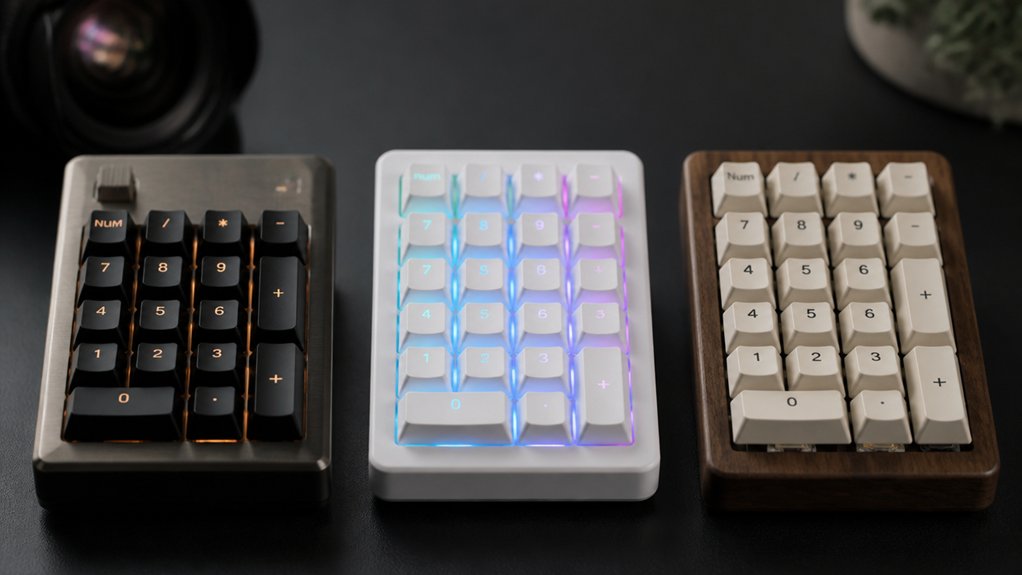
You’re looking to add a matching DIY number pad, and the 2026 market offers three standout kits that each bring something different to the table. The Wireless Mechanical Numpad Kit blends tri‑mode connectivity with a sleek metal knob, Icstation’s 17‑Key Kit delivers a solid clicky feel and robust PBT caps, while KBDcraft’s 01Adam Kit offers a screw‑free, LEGO‑compatible case and versatile USB‑C support. Each option has its own strengths, so the choice hinges on which features matter most to you.
| Wireless Mechanical Numpad Kit with RGB Hot‑Swappable Metal Knob White | 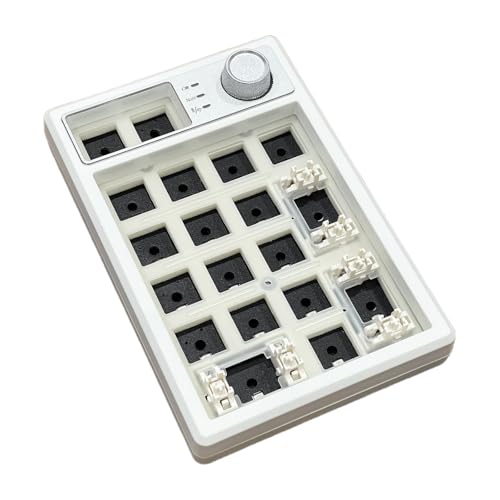 | Feature-Packed Pro | Connectivity: Tri‑mode (2.4 GHz, Bluetooth 5.0, USB‑C) | Switch Compatibility: Hot‑swappable 3‑pin & 5‑pin mechanical switches | Key Count: 19 keys | CHECK ON AMAZON | Read Our Analysis |
| Icstation 17-Key USB Mechanical Numeric Keypad Kit |  | Windows‑Only Classic | Connectivity: USB‑A wired only | Switch Compatibility: Hot‑swappable 3‑pin & 5‑pin mechanical switches | Key Count: 17 keys | CHECK ON AMAZON | Read Our Analysis |
| KBDcraft 01Adam 20% Numpad Keyboard Kit – White |  | Lego‑Friendly DIY | Connectivity: USB‑C wired only | Switch Compatibility: Hot‑swappable 3‑pin & 5‑pin MX‑type linear switches | Key Count: 17 keys | CHECK ON AMAZON | Read Our Analysis |
More Details on Our Top Picks
Wireless Mechanical Numpad Kit with RGB Hot‑Swappable Metal Knob White
If you crave a feature‑packed pro numpad, the Wireless Mechanical Numpad Kit delivers tri‑mode connectivity, hot‑swap switches, and a metal volume knob—all in a sleek white ABS shell. You’ll switch between Bluetooth, 2.4 GHz, and USB‑C with FN+1‑5, pairing up to three Bluetooth devices and a wireless or wired host simultaneously. The gasket‑mounted design, EVA foam, and IXPE pads give soft tactile feedback, while the hot‑swap base accepts 3‑pin or 5‑pin switches. Eighteen programmable keys, full NKRO, and RGB backlighting (18 modes) let you customize shortcuts, macros, and lighting. A 1500 mAh battery lasts 30‑60 days, with auto‑sleep and hibernation to conserve power.
- Connectivity:Tri‑mode (2.4 GHz, Bluetooth 5.0, USB‑C)
- Switch Compatibility:Hot‑swappable 3‑pin & 5‑pin mechanical switches
- Key Count:19 keys
- Backlighting:True RGB with up to 18 modes
- Programmability:18 programmable keys + memory function
- Material:ABS + metal enclosure
- Additional Feature:Gasket‑mounted EVA foam
- Additional Feature:1500 mAh rechargeable battery
- Additional Feature:30‑day unconditional refund
Icstation 17-Key USB Mechanical Numeric Keypad Kit
The Icstation 17‑Key USB Mechanical Numeric Keypad Kit is the perfect Windows‑only classic for anyone who needs a tactile, hot‑swappable numpad on a laptop or desktop. You’ll love its Cherry MX Blue switches, giving crisp, clicky feedback and full‑size QWERTY layout. All 17 keys are hot‑swappable, so you can swap 3‑pin or 5‑pin switches without soldering. Plug the dual USB‑A cable in, enable the numeric keypad via Win + Ctrl + O, and toggle NumLock for arrow mode. The kit includes a beginner‑friendly soldering practice board, illustrated instructions, PBT caps, and a sturdy plastic case, all for Windows 10+ users.
- Connectivity:USB‑A wired only
- Switch Compatibility:Hot‑swappable 3‑pin & 5‑pin mechanical switches
- Key Count:17 keys
- Backlighting:None (no backlight)
- Programmability:Fixed function (NumLock/arrow mode) only
- Material:Plastic enclosure
- Additional Feature:Cherry MX Blue switches
- Additional Feature:STEM soldering practice kit
- Additional Feature:Dual USB‑A power cable
KBDcraft 01Adam 20% Numpad Keyboard Kit – White
Looking for a compact, LEGO‑friendly DIY numpad that snaps into your existing setup? The KBDcraft 01Adam 20% kit delivers a 17‑key, brick‑built case that mates with any Lego collection. You’ll assemble 97 ABS pieces into a screw‑free gasket mount that weighs just 0.46 lb, then slide in a hot‑swappable PCB supporting 3‑pin or 5‑pin MX linear switches—no soldering required. PBT keycaps give a premium feel, while USB‑C wiring powers the pad and drives customizable RGB backlighting. Programmable via QMK or VIAL on Windows or Mac, it slots beside your main Adam keyboard for seamless numeric input.
- Connectivity:USB‑C wired only
- Switch Compatibility:Hot‑swappable 3‑pin & 5‑pin MX‑type linear switches
- Key Count:17 keys
- Backlighting:RGB lighting, customizable
- Programmability:Programmable via QMK/VIAL
- Material:ABS plastic bricks (Lego‑compatible)
- Additional Feature:LEGO‑compatible brick case
- Additional Feature:Screw‑free gasket design
- Additional Feature:QMK/VIAL firmware support
Factors to Consider When Choosing Numpad Kits for Adding a Matching DIY Number Pad
You’ll want to check the kit’s connectivity and compatibility with your existing setup, make sure the switches are the type you prefer and support hot‑swap, and evaluate the build quality and materials for durability. Consider whether the firmware lets you program keys and whether the lighting options match your aesthetic. These factors together determine how seamlessly the numpad integrates into your DIY workflow.
Connectivity Options and Compatibility
If you want a numpad that fits seamlessly into your workflow, start by checking its connectivity options and compatibility. First, decide if you need wired reliability, wireless freedom, or both. A kit offering USB‑C or USB‑A lets you plug straight into a laptop, while Bluetooth or 2.4 GHz dongles give you a tidy desk. Verify that the kit supports your OS—Windows, macOS, Linux, iOS, or Android—to avoid driver hassles. Look for multi‑device pairing if you switch between a PC and a tablet; a simple key combo should toggle connections. Make sure plug‑and‑play operation or minimal setup steps, and confirm any required receivers are included. These checks keep your DIY number pad functional and hassle‑free.
Switch Type and Hot‑Swapability
After confirming that your numpad connects the way you need, the next factor to examine is the switch type and whether the kit supports hot‑swapability. Hot‑swap boards let you pop switches in and out without soldering, so you can experiment with linear, tactile, or clicky options until you nail the feel and sound you want. Look for kits that accept both 3‑pin and 5‑pin switches; this widens your choice pool and avoids compatibility headaches. Make certain the PCB’s socket layout matches the switch stems, and that the contacts are robust enough for repeated swaps. A hot‑swap‑compatible numpad lets you upgrade or replace switches on the fly, keeping maintenance simple and your typing experience fresh.
Build Quality and Materials
While evaluating a numpad kit, focus on the enclosure material—ABS plastic offers lightweight durability, whereas metal frames provide a premium, sturdier feel. Choose a case that balances weight and resilience for your desk setup. Gasket‑mounted designs add foam or padding between the PCB and housing, delivering softer keystrokes and dampening acoustic noise. Hot‑swappable PCBs let you replace switches without soldering, extending the kit’s lifespan and simplifying upgrades. Opt for PBT keycaps; they resist shine, wear, and retain a satisfying texture longer than ABS alternatives. Compact, modular constructions—often screw‑free—enhance portability and make disassembly painless for customizations. Together, these material choices and design features guarantee a robust, comfortable, and long‑lasting DIY numpad.
Programmability and Software Support
Because a numpad’s true value lies in how it adapts to your workflow, you should prioritize kits that offer robust programmability and solid software support. Look for dedicated drivers or firmware that let you remap every key, assign macros, and store those settings in onboard memory so they survive power loss. Open‑source options like QMK or VIAL give you deep control and community‑driven updates, letting you tweak scan rates, debounce, and even layer behavior. Verify that the software runs on Windows, macOS, and Linux, and that it provides a clear UI for creating profiles. Finally, guarantee the kit’s documentation explains how to flash firmware and back up configurations, so you can keep your custom layout intact across devices.
Lighting and Aesthetic Customization
When you pick a numpad kit, the lighting and aesthetic options can make the difference between a functional add‑on and a seamless extension of your existing setup. First, decide if you want full‑spectrum RGB with multiple modes or a single‑color backlight that matches your current palette. Look for kits that let you program effects, tweak brightness, and hook into your favorite lighting software for dynamic control. Choose keycaps and case materials that echo your main keyboard’s texture and color, creating a cohesive visual theme. Check whether the lighting can sync with other peripherals, so the whole rig pulses in harmony. Finally, prioritize easy access to controls—dedicated knobs or function‑key shortcuts let you adjust the glow on the fly without breaking your workflow.
Power Management and Battery Life
Your numpad’s glow won’t matter if it runs out of juice mid‑session, so power management should be a top priority. First, decide wired you want a wired or wireless kit; wireless models demand battery oversight, while wired ones pull power straight from the USB or host. Check the battery capacity and the manufacturer’s estimated runtime—some last days, others months—so you know how often you’ll need to recharge or replace cells. Look for energy‑saving features like automatic backlight shutdown, hibernation modes, or sleep timers that cut draw during idle periods. A built‑in level indicator or a simple software readout helps you avoid surprise shutdowns. If you favor rechargeables, make certain the kit supports USB‑C charging for convenience and reduced waste.
Frequently Asked Questions
How to Program Custom Macros on Each Key?
You program custom macros by installing the kit’s firmware, opening its configuration software, assigning each key a macro script, saving the layout, and flashing the firmware back to the numpad.
Are the Kits Compatible With Macos and Linux?
Yes, the kits work on macOS and Linux; you’ll need to install the appropriate drivers, flash the firmware, and map the keys using open‑source tools like QMK or Karabiner.
Can I Replace the Keycaps With PBT Sets?
Yes, you can swap the keycaps for PBT sets; just make sure the stems match the kit’s switches, and verify the keycap profile fits your layout. Most kits support standard MX‑compatible PBT caps.
Do These Kits Support Bluetooth Connectivity?
You’ll find most kits include Bluetooth modules, so you can pair them wirelessly. Just verify the specific model’s specs, as a few rely on wired USB connections instead.
What Warranty Coverage Do the Manufacturers Provide?
You’ll get a one‑year limited warranty covering defects, plus optional extended plans from most brands; some offer two‑year coverage, and a few include accidental‑damage protection if you purchase their premium bundles.



