
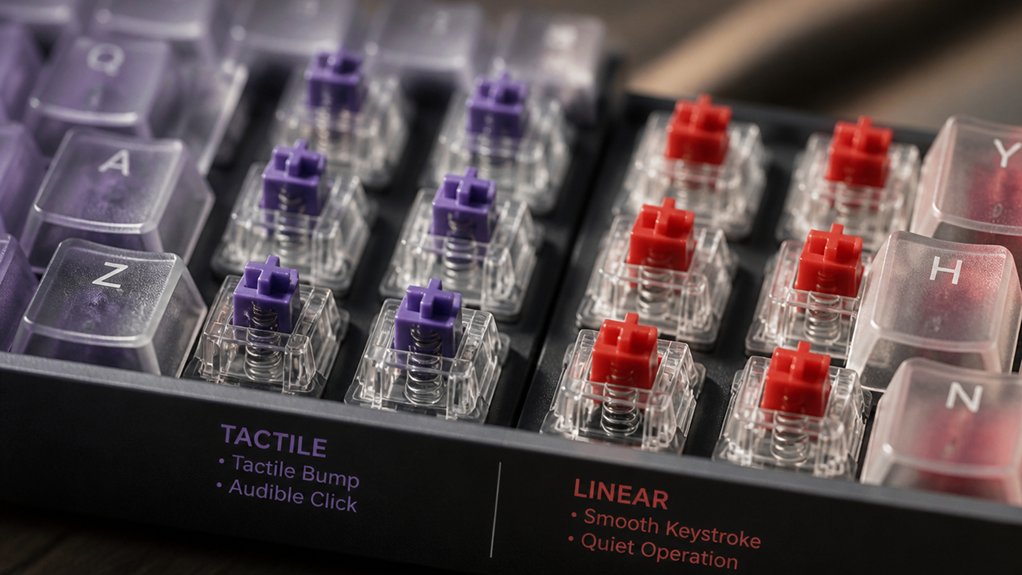
You hear each keystroke’s character because the switch’s housing, stem, spring, and tactile bump dictate how vibrations travel and resonate. Nylon housings mute and deepen tone, while polycarbonate brightens it; UHMWPE stems soften bottom‑out impacts, and heavier springs amplify the “clack.” Linear switches give a smooth, quiet thock, tactile adds a modest bump, and clicky produces sharp clicks. Changing keycaps, adding foam, or modding stabilizers further dampens or accentuates those sounds, so the next sections will show you exactly how to tune them.
How Switch Architecture Shapes Mechanical Keyboard Sound
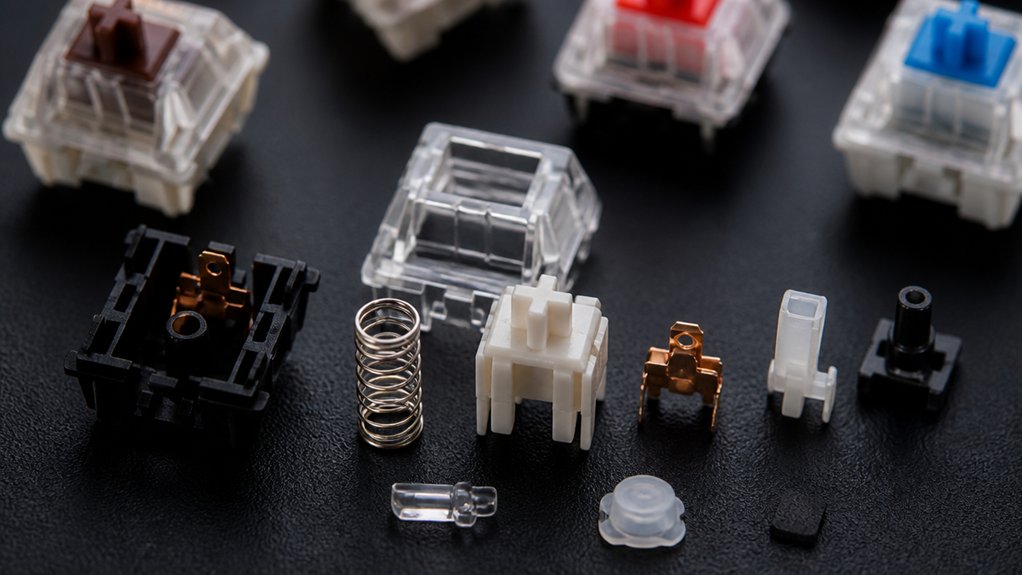
When you pick a mechanical keyboard, the switch’s architecture dictates every click you hear. The switch housing—whether sturdy Nylon (PA66) or bright Polycarbonate—sets the base tone, delivering deeper muted sounds or higher clearer pitches.
Stem materials like POM or UHMWPE fine‑tune the acoustic qualities; UHMWPE yields softer, smoother strokes, while denser stems sharpen the tone. Internal dampening elements such as rubber or silicone pads in a silent mechanical keyboard cushion impacts, slashing bottom‑out noise and rebound.
Switch construction details—clear gaps, tolerances, and spring weight—shape how tactile switches feel and sound, either curbing rattling or amplifying it. By balancing these factors, you control the keyboard’s overall sonic profile without sacrificing performance.
Noise Characteristics of Linear, Tactile, and Clicky Switches
You’ll notice that linear switches give you a smooth, muted keystroke with barely any sound.
Tactile switches add a subtle bump that creates a modest click‑like thump without the sharp click of clicky types. Both profiles are shaped by spring weight and housing, so even small material changes can shift the acoustic signature.
Linear Switch Sound Profile
Although linear switches lack a tactile bump or click, they still produce a distinct sound profile: a muted, “thock” tone that’s softer than the sharper clicks of other types. You’ll notice that linear switches enable quiet typing because the keystroke sound profile stays smooth from actuation to bottom‑out.
The housing and stem materials dampen vibrations, yielding a muted sound that feels like a soft thock rather than a clack. Bottom‑out noise is reduced, especially when you add dampening mods or thicker keycaps, so each keystroke blends into a low‑key rhythm.
This combination of smooth keystroke motion and dampened acoustics keeps overall typing noise to a minimum while preserving a satisfying tactile feel.
Tactile Switch Acoustic Signature
Linear switches stay quiet, but tactile switches add a modest bump that creates a more noticeable “thunk” without the sharp click of clicky types. You’ll notice the acoustic signature of a tactile switch sits between the muted smoothness of linear and the loud chatter of clicky.
The bump produces a tactile click that adds a subtle “thunk” to each key travel, giving you clear feedback while keeping typing noise moderate. Materials in the switch housing shape the tonal character; nylon (PA66) deepens the sound, while polycarbonate makes it brighter.
As you type, the balanced typing sounds let you hear each press without overwhelming your environment, offering a satisfying compromise between silence and audible feedback.
How Different Switch Housings Change Your Keyboard’s Tone
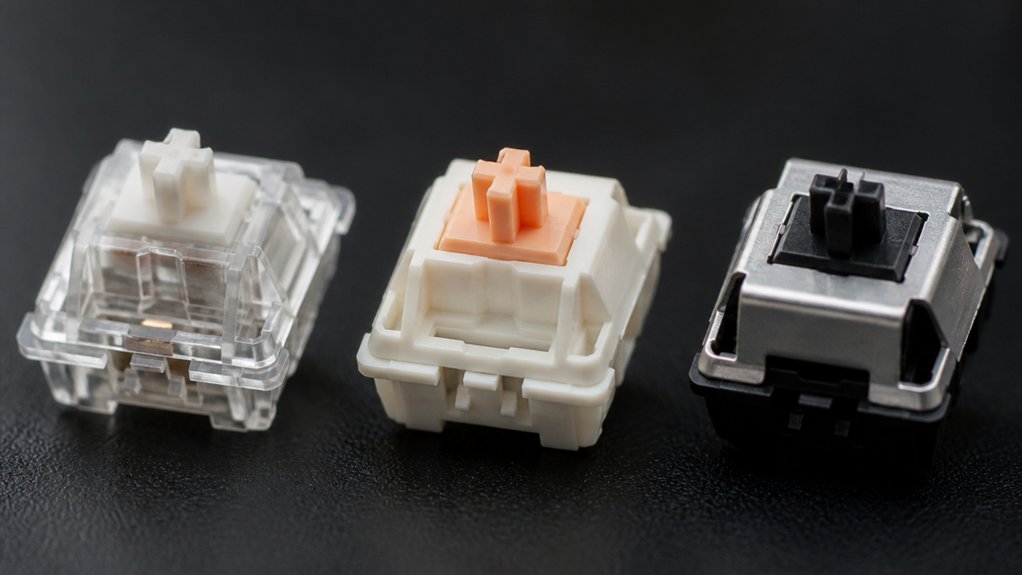
When you swap a switch’s housing, the material instantly reshapes its acoustic fingerprint. You’ll notice that keyboard noise shifts as the housing changes the mechanical typing sound and overall sound profile.
Polycarbonate housings amplify higher‑frequency clicks, making each press brighter and more pronounced. Nylon housings, on the other hand, deepen muted tones and reduce vibrations, yielding a warmer, less harsh feel. Softer UHMWPE housings soften the keystroke further, while denser materials produce clackier, sharper noises.
The housing material controls how vibrations resonate and dissipate inside the switch, so choosing the right switch housings lets you tailor your keyboard’s tone to match your acoustic preferences.
Stem and Spring Choices That Influence Bottom‑Out Noise
Swapping the housing reshapes the tone, but the next factor that shapes your typing sound is the stem‑and‑spring pairing.
A longer, smoother stem pole lets the key travel more evenly, softening the bottom‑out noise. Heavier spring weight raises the force needed to bottom out, which amplifies the impact and makes the typing noise louder and more pronounced. Conversely, lighter springs lower the spring weight impact, yielding a quieter pop and gentler tactile feedback.
Softer stem materials such as UHMWPE reduce scratchiness on the rails, delivering a smoother, less harsh bottom‑out sound. By mixing lighter springs with UHMWPE stems, you can curb harshness, keep tactile feedback satisfying, and keep overall typing noise to a minimum.
Keycap Material and Profile Impact on Mechanical Keyboard Sound
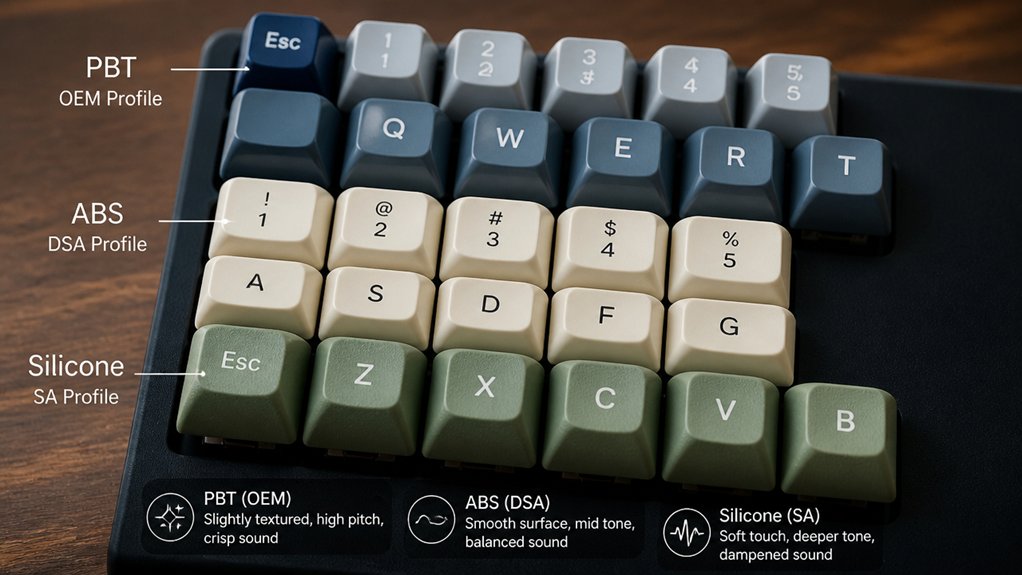
You’ll notice that ABS caps give a brighter, sharper clack while PBT caps mute the high end and add a deeper thock.
Choosing a taller profile like SA pushes the tone lower, whereas low‑profile Cherry caps keep it brighter. Thicker caps also dampen resonance, enriching the acoustic character of each keystroke.
ABS vs PBT
Although ABS keycaps tend to emit a brighter, sharper “clack,” PBT caps usually give a deeper, thockier tone. The difference stems from keycap material and how it handles vibrations and resonance.
ABS keycaps are lighter and smoother, so they transmit more acoustic energy, raising sound levels and creating a sharper click. Thicker PBT keycaps are denser, absorbing vibrations and damping resonance, which yields a richer, lower‑frequency thock that stays consistent over time.
- ABS keycaps produce higher‑pitched, sharper clacks
- PBT keycaps give deeper, thockier tones
- Thicker PBT keycaps dampen vibrations and resonance
- Keycap material directly influences typing noise and acoustic profile
- PBT retains sound characteristics longer, while ABS may shine and change tone with wear
Profile Height Effects
When you raise a keycap’s profile—especially to a tall SA shape—the extra height lengthens the resonant cavity, letting the sound waves vibrate longer and produce a deeper, richer thock.
Taller keycap profiles push the switch’s travel farther from the board, so the acoustic chamber expands and the sound resonance shifts toward lower frequencies. If you pair a tall profile with thicker keycaps, the added mass further damps high‑frequency chatter, making the typing tones feel more rounded.
PBT keycaps, being denser, absorb impact energy and reinforce that thockier character, while ABS keycaps stay lighter and let sharper, clackier tones escape.
The keycap profile shape also tweaks internal reflections, subtly shaping the overall a signature.
Thickness Influences Tone
Raising the profile already showed how height stretches the resonant cavity; now the thickness of the keycap decides how much of that vibration is absorbed. Thicker keycaps dampen high‑frequency chatter, giving you a deeper, richer tone, while thinner caps let more vibration escape, producing sharper sound.
PBT keycaps, especially when thick, feel denser and mute typing noise, whereas ABS keycaps stay light, bright, and clacky. The profile you choose—SA, Cherry, or others—interacts with thickness, shaping the final acoustic character.
- Thickness: thicker caps absorb vibration, thinner caps transmit it.
- Material: PBT yields a thocky, low‑frequency tone; ABS yields a crisp, high‑frequency click.
- Profile: tall profiles (SA) lower tone; low profiles (Cherry) raise it.
- Density: denser caps soften sound, lighter caps accentuate it.
- Result: adjust thickness and profile to tune typing noise toward muted thocks or crisp clicks.
Plate and Case Materials: Metal, Plastic, and Foam Dampening
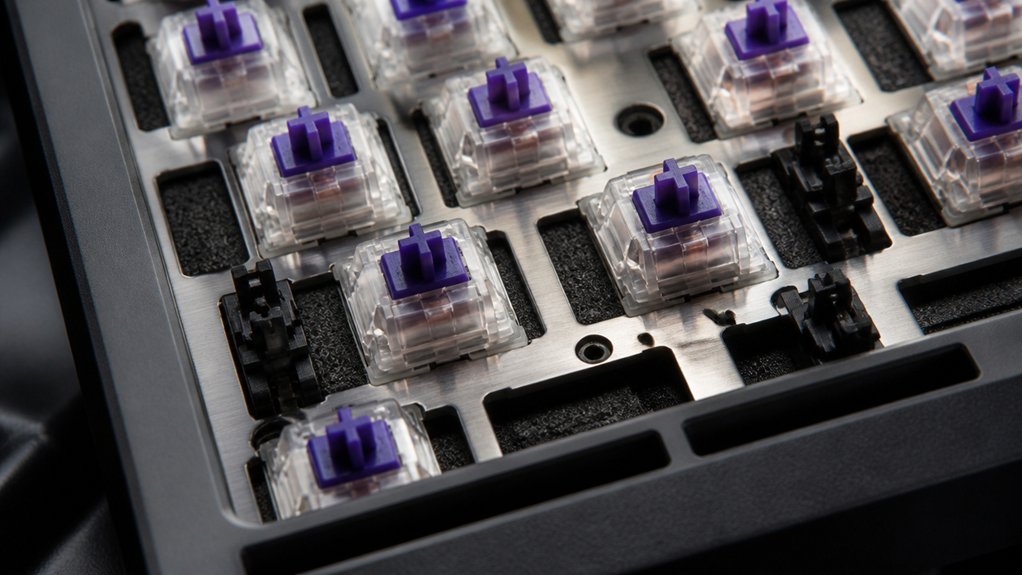
If you pair a metal plate with a metal case, the hard surfaces bounce vibrations back into the switch, creating a brighter, louder keystroke. A stiffer plate and PCB combo, especially aluminum cases, amplifies case resonance and makes each tap ring.
Switching to plastic cases softens the sound because the material absorbs vibrations and reduces harsh reflections. Adding foam inside the keyboard—whether as a single sheet or multiple foam layers—further dampens echo, muting hollow tones and smoothing the overall keyboard feel.
The mounting style matters too; a plate that sits loosely on the PCB lets foam fill gaps, while a tight fit transfers more energy to the case. Combining plastic cases with internal foam yields the quietest, most balanced typing experience.
Add Foam and Felt for Extra Dampening
Layer foam or felt inside the case—or between the plate and PCB—to soak up vibrations and mute hollow resonance, cutting typing noise dramatically. You’ll notice the difference instantly: the sound becomes smoother, the clack less sharp, and the overall feel more refined.
Choosing the right material matters; EVA, PE, and PORON foams each offer distinct density levels, while felt pads cushion stabilizers and switches without sacrificing travel.
- Place a thin foam sheet against the inner walls of the keyboard case.
- Slip a strip of felt under each stabilizer to absorb impact.
- Add a layer of foam between the plate and PCB for extra dampening.
- Use denser foam for louder mechanical keyboards, lighter foam for quieter typing.
- Combine foam and felt for up to 20 dB reduction in sound.
Taming Stabilizers: Simple Mods to Stop Rattle
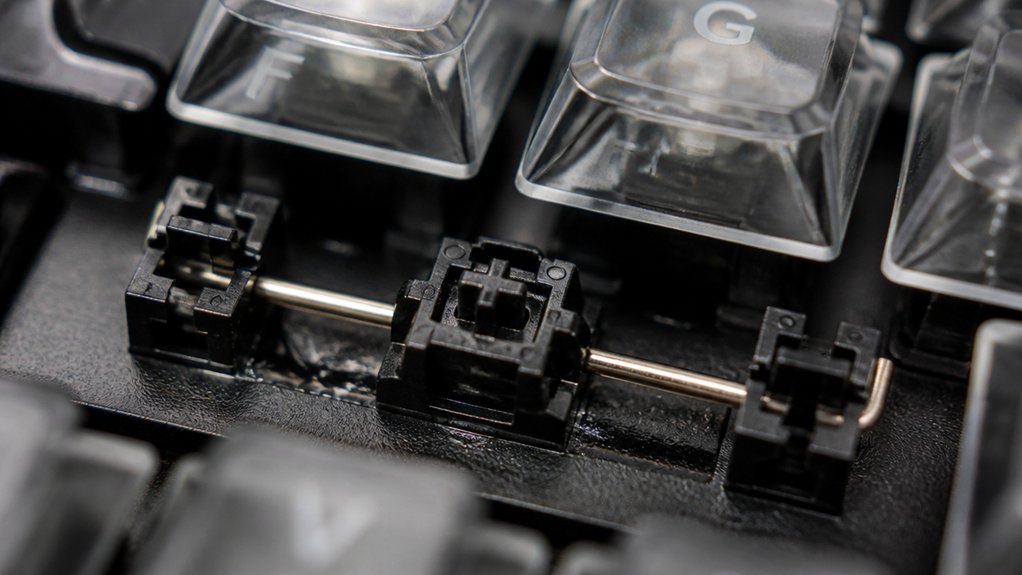
When stabilizers on the spacebar, enter, or shift keys are dry, misaligned, or lack lubrication, they produce a sharp rattle that ruins an otherwise quiet typing experience.
First, pull the stabilizer wires and housings out of the PCB and clean any debris. Then, apply a thin layer of dielectric grease or a high‑quality lubricant to the wires and housing interiors; this cuts friction and silences metallic clacks.
Next, try the band‑aid mod: place a small piece of tape on the PCB contact points beneath each stabilizer to soften the bottom‑out noise.
Finally, carefully clip the plastic feet of the stabilizer, trimming excess material to eliminate loose contact. Aligning stabilizer wires after each tweak keeps the system tight and keeps rattling noises at bay.
Fix Rattling, Ping, and Bottom‑Out Noise
You can quiet rattles by adding foam under the stabilizers, which absorbs the wobble of larger keys.
Switching to a plate made of a dampening material or inserting thin foam sheets between the plate and PCB cuts down the metallic ping.
Finally, fitting soft O‑rings on the keycaps cushions the bottom‑out, giving you a smoother, quieter keystroke.
Stabilizer Foam Mod
A simple strip of foam tucked inside each stabilizer housing can silence the annoying rattles, metallic ping, and harsh bottom‑out thuds that plague larger keys. The stabilizer foam mod reduces noise by absorbing vibrations from the metal wire and the keyboard case, softening impact and delivering smoother key feedback.
When you add foam to the spacebar or enter, the bottom‑out noise drops dramatically, making your typing quieter and more pleasant.
- Cut foam to fit each stabilizer housing snugly.
- Insert strips before lubricating the stabilizer.
- Make sure foam contacts the wire and plastic housing.
- Test key travel; adjust if tactile feel changes.
- Combine with band‑aid mods for maximum reduction.
Plate Material Damping
Foam inside stabilizers tames rattles, but the plate beneath still plays a big role in overall noise. When you pick plate materials, you decide the keyboard’s acoustic brightness. Aluminum plates boost ping noises and case resonance, while polycarbonate plates dampen vibrations for a softer feel.
Rigid mounting plates transmit every bottom‑out impact straight into the case, amplifying metallic clangs. Adding damping materials—thin foam sheets, silicone films, or lubricated layers—between the plate and PCB absorbs those vibrations, slashing rattling and ping.
If you use a tray‑mounted case, expect higher case resonance and louder bottom‑out sounds; a gasket‑mounted design isolates the plate better. Choose a plate with inherent damping or retrofit it with damping materials to keep your typing quiet and consistent.
Pick Switches, Caps, and Dampers for Your Desired Sound
When you prioritize a quieter typing experience, start by choosing linear switches, which deliver smooth keystrokes with minimal noise compared to tactile or clicky options. Pair them with thick PBT keycaps to deepen the tone and absorb vibrations, then add O‑rings or internal foam to mute bottom‑out thuds.
Silent switches further cut typing noise, while switch housing materials like Nylon (PA66) provide a richer, muffled sound versus the sharper bite of polycarbonate. By mixing these elements, you shape a keyboard that feels and sounds exactly how you want.
- Use linear switches for baseline quietness
- Select PBT keycaps over ABS for deeper tones
- Install O‑rings to cushion bottom‑out impacts
- Choose silent switches for minimal typing noise
- Opt for Nylon housing or add damping materials for richer acoustics
Frequently Asked Questions
Is 60% or 75% Keyboard Better?
You’ll find a 60% keyboard better if you value portability and a tiny desk footprint, but choose a 75% if you need dedicated navigation keys and function rows for productivity.
Why Do Gamers Hate Membrane Keyboards?
You hate membrane keyboards because their mushy domes delay actuation, reduce tactile feedback, and limit customization—making rapid combos, precise timing, and simultaneous key presses feel sluggish and unreliable.
What Is Thocky?
You’ll find thocky is that deep, muted “thock” sound keyboards keyboards make when PBT caps absorb vibrations and softer switch housings or stems dampen the impact, giving a low‑pitched, satisfying acoustic feel.
Which Is Quieter, a Red or Yellow Switch?
You’ll find yellow switches quieter than red ones; their lighter spring and softer stem reduce bottom‑out noise, especially when lubricated and paired with thicker caps, giving a noticeably softer typing sound.
In Summary
Now you know why every switch component—from housing to stem, spring, and even keycap material—shapes your keyboard’s sound. By choosing the right switch type, adding foam or felt, and taming stabilizers, you can dial in the exact tone you want, whether it’s a quiet thock or a crisp click. Tinker with these mods, and you’ll turn any noisy board into a satisfying, personalized typing experience.



