
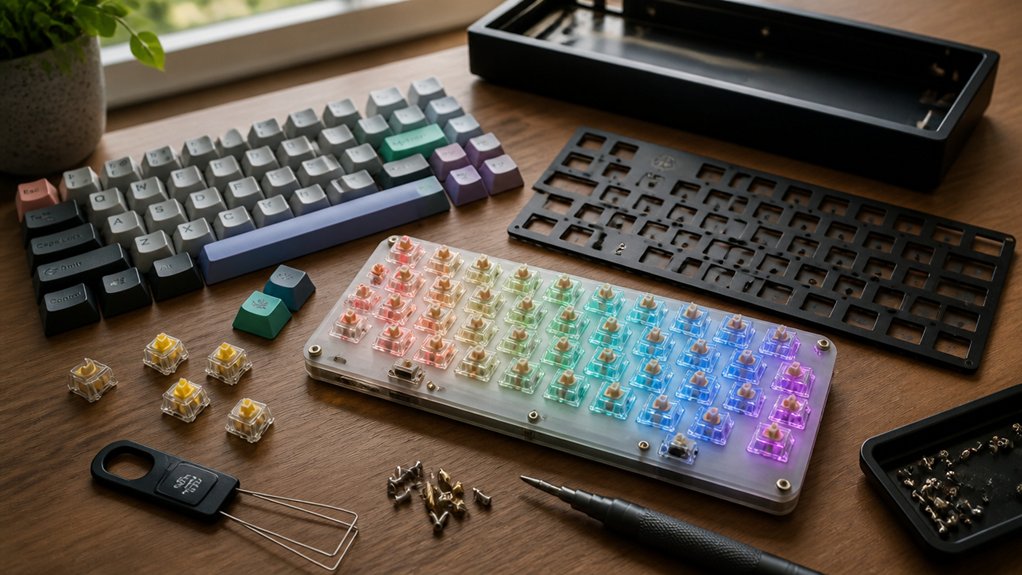
Compact mechanical keyboard build kits give you everything needed to create a personalized, space-saving keyboard with layouts like 60%, 65%, or 75%. You’ll get components like the case, PCB, plate, and stabilizers, usually without switches or keycaps, letting you customize your typing experience. Many kits offer hot-swappable switches, so you can change keys without soldering. These kits save desk space while keeping essential functions. If you want to know how to choose and build one, keep exploring.
What Are Compact Mechanical Keyboard Build Kits?

What makes compact mechanical keyboard build kits so appealing? You get a sleek, space-saving compact mechanical keyboard that typically comes in 60%, 65%, or 75% layouts. These Keyboard Kits skip the number pad and sometimes function keys, making your desk less cluttered.
Most kits feature hot-swappable sockets, so you can easily swap out switches without soldering. A barebones keyboard often includes an aluminum alloy top plate paired with durable ABS plastic, improving both feel and acoustics.
Customizable RGB lighting and support for standard ANSI layouts mean you can personalize your setup and use a wide range of aftermarket keycaps.
Prices vary widely—from around $70 for basic barebones models to over $200 for premium or copper editions—letting you pick something that suits your budget and preferences perfectly.
Why Choose Compact Mechanical Keyboards Over Full-Size?
You’ll value how compact mechanical keyboards save valuable desk space and free up room for your mouse. Their lighter designs make them easy to carry between work, gaming, or travel setups.
Choosing a smaller layout means you get enhanced portability without sacrificing essential functionality.
Space Efficiency Benefits
Although full-size keyboards offer a complete set of keys, opting for a compact mechanical keyboard build kit, like a 65% or 75% layout, lets you save significant desk space without losing essential functions. With fewer keys than a traditional keyboard, these layouts remove the numeric keypad while keeping critical keys such as function rows and arrow clusters. This design creates more room for mouse movement, improving your workflow and comfort.
For example, the Neo65 Core Plus mechanical keyboard perfectly balances functionality and space efficiency. By reducing hand travel distance, compact keyboards help decrease fatigue during long typing or gaming sessions.
Choosing a compact mechanical keyboard build kit boosts desk aesthetics and declutters your workspace, providing a practical and stylish solution without compromising usability.
Enhanced Portability Options
Because they omit the number pad and often the function keys, compact mechanical keyboards like 60% or 75% layouts fit easily into backpacks and laptop bags, making them perfect for anyone who moves frequently between workspaces or attends LAN gaming events.
You’ll find it beneficial how a modular mechanical keyboard’s smaller footprint reduces weight and cable clutter, enhancing portability without compromising essential functions. Many custom keyboard kits offer hot-swappable switches and fully customizable layouts, so you can tailor features and shortcuts to your needs.
Despite their size, these keyboards maintain usability through layer programming, giving you a powerful typing experience on the go. Choosing compact kits means you get a highly portable, versatile setup that’s ideal for mobility and efficiency, unlike bulky full-size models.
What’s Inside a Compact Keyboard Build Kit?

Curious about what comes in a compact keyboard build kit? Typically, you’ll find a keyboard case, PCB (printed circuit board), plate, stabilizers, and sometimes mounting hardware. These kits are designed to support mechanical switches—either hot-swappable or soldered—so you can customize the typing experience by choosing your preferred switches and keycaps separately.
Most kits don’t include switches and keycaps, letting you select those based on your preferred feel and style. Compact keyboard build kits often feature USB-C connectivity and come in ANSI or ISO layouts. Some even offer RGB lighting for per-key customization.
Whether you’re a beginner or an enthusiast, kits vary from easy hot-swap assemblies to full soldering builds, giving you flexibility when creating your perfect mechanical keyboard.
Compact Layouts Explained: 60%, 65%, and 75
How do compact keyboard layouts like 60%, 65%, and 75% differ, and which one fits your needs best?
A 60% keyboard cuts out function keys, navigation keys, and the number pad, making it perfect if you want a minimalist setup that saves space.
The 65% adds dedicated arrow keys and a few navigational buttons, ideal if you need more functionality without clutter.
The 65% layout offers arrow keys and some navigation buttons, perfect for extra function without added bulk.
The 75% layout keeps a full function row and most navigation keys, offering near-TKL features while still being compact.
When you put together a compact mechanical keyboard build kit for PC gaming or work, make sure you choose the layout that balances desk space with the keys you use most. This way, you’ll get a custom feel without compromising essential functions.
How Hot-Swappable Switches Simplify Your Build

With hot-swappable switches, you can easily swap out switches without any soldering, making your build process faster and more flexible.
You’re free to mix different switch types to tailor your typing or gaming experience exactly how you want it. Plus, if a switch goes bad or you want a change, maintenance is simple and tool-free.
Plug-And-Play Convenience
Why spend time soldering switches when you can swap them out effortlessly? Hot-swappable kits make building your keyboard fast and risk-free. You just plug in your preferred switches—no soldering needed. This means less chance of damage and more freedom to customize. Even the RGB lighting stays intact while you swap switches, letting you enjoy vibrant colors without hassle. If you want to try different switches, just pop one out and try another. It’s perfect for experimenting and quickly tweaking your setup.
| Benefit | Emotion |
|---|---|
| No soldering required | Relief & Ease |
| Quick switch swapping | Freedom & Fun |
| Safe for beginners | Confidence & Joy |
Switch Variety Flexibility
Beyond simply making switch changes hassle-free, hot-swappable sockets give you the freedom to tailor your keyboard’s feel and sound exactly how you like. With these sockets, you can quickly install or replace 2-pin mechanical switches without soldering, letting you experiment with various types—linear, tactile, or clicky—to match your typing preferences.
Kits like the Sanpyl DIY Mechanical Keyboard Kit offer compatibility with a wide range of switches, boosting your build’s versatility. This plug-and-play flexibility means you can customize individual keys or the entire layout easily.
Whether you want a softer press or a louder click, hot-swappable kits let you adjust your keyboard on the fly, simplifying the building process and saving you time, no matter your experience level.
Easy Maintenance Benefits
Although mechanical keyboards can be complex, hot-swappable switches make maintenance straightforward by letting you remove and replace switches without any soldering. This plug-and-play feature lets you quickly swap switches to customize your typing experience or fix faulty keys with ease. You don’t need technical skills, which lowers the barrier for beginners to maintain and upgrade their keyboards independently. Plus, many hot-swap kits come with customizable RGB lighting, enhancing both functionality and aesthetics without complicating upkeep.
| Benefit | Description |
|---|---|
| No soldering required | Remove/replace switches easily |
| Switch compatibility | Supports various 2-pin mechanical types |
| Quick customization | Tailor typing feel instantly |
| Beginner-friendly | Simplifies maintenance and upgrades |
Comparing Prebuilt vs. DIY Compact Keyboard Kits

When choosing between prebuilt and DIY compact keyboard kits, you’ll find that prebuilt models like the Qwertykeys Neo75 Prebuilt offer convenience with immediate use, hot-swappable switches, and RGB lighting, but limit customization options. Prebuilts come fully assembled and tested, making them ideal if you want to avoid the hassle of building and prefer a ready-to-go setup.
On the other hand, DIY kits like the Neo75 Keyboard Kit start at a lower base price but require assembly and buying switches and keycaps separately. They give you the freedom to select layouts, materials like aluminum or copper plates, and components to suit your typing feel perfectly.
While DIY demands more time and skill, it rewards you with a uniquely personalized compact keyboard tailored exactly to your preferences.
Choosing Switches and Keycaps for Compact Mechanical Keyboards
When picking switches for your compact keyboard, you’ll want to take into account options like linear, tactile, or clicky to match your typing style.
Keycap materials also play a big role, with choices ranging from durable PBT to translucent sets that highlight RGB lighting. Understanding these basics helps guarantee your build feels just right and looks great.
Switch Types Overview
How do you choose the right switches and keycaps for your compact mechanical keyboard build? Start by understanding switch types: linear, tactile, and clicky.
Compact kits often support hot-swappable 2-pin switches, letting you easily test options like Gateron Red (linear), Brown (tactile), or Blue (clicky) without soldering. Brands like Gateron and Kailh are popular; Kailh’s Box-Brown and Box-Red provide extra durability and unique feel.
For keycaps, look for those compatible with standard ANSI layouts and universal bottom rows—this lets you pick from aftermarket sets like CannonCaps or Drop’s DCX doubleshot ABS. Consider sound, typing feel, and whether you want RGB lighting to shine through translucent caps. Modularity means you can mix switch types and create customized keycap patterns for both function and style.
Keycap Material Options
Choosing the right switches sets the foundation, but selecting suitable keycap materials shapes your typing experience and keyboard’s look. In compact builds, keycaps usually come in PBT or ABS, each with distinct benefits.
Here’s what you should consider:
- PBT keycaps resist shine and last longer, keeping your keyboard looking fresh.
- ABS keycaps, like the DCX ABS doubleshot line, provide vibrant colors and excellent RGB diffusion but may wear faster over time.
- Keycap profiles and legends must fit your layout, especially compact ANSI bottom rows for easy aftermarket swaps.
- Your choice affects typing sound and feel—combine keycap material with switch type for the right balance of tactility and noise.
Picking the right keycaps complements your switches to enhance both performance and style.
RGB Lighting and Customization in Compact Kits
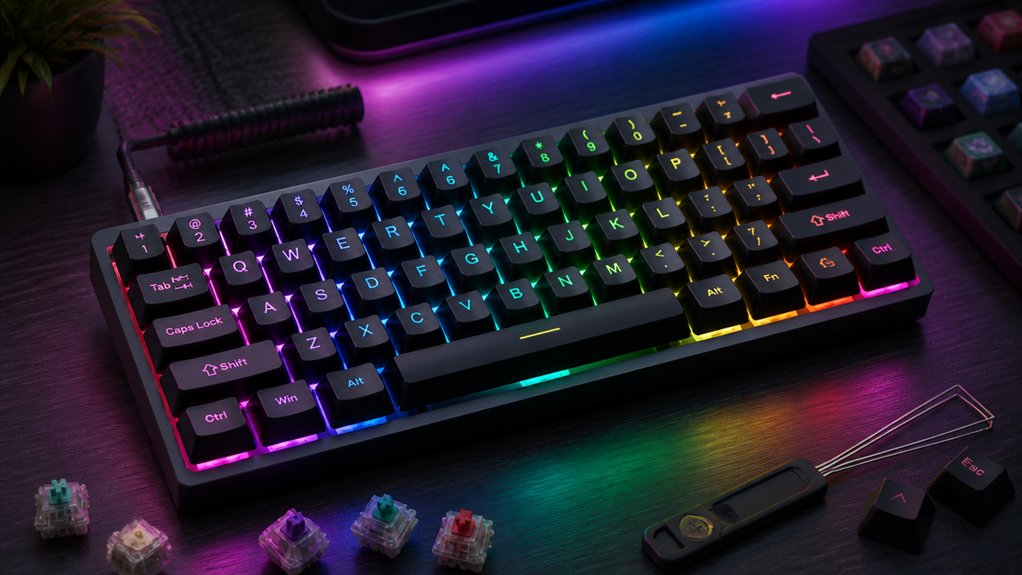
Although compact mechanical keyboard build kits prioritize space-saving design, they don’t skimp on vibrant RGB lighting and customization options. You’ll find kits offering 16.8 million color options per key, letting you personalize effects extensively. Many, like the Sanpyl TKL and Luminkey series, include hot-swappable sockets, so you can easily swap switches without soldering—enhancing customization alongside lighting.
Their RGB systems support multiple modes and per-key customization, giving you both style and functional feedback. Advanced materials like aluminum and ABS plastic improve light diffusion and add pleasing acoustic qualities, elevating your experience. Software support usually features macro programming and lighting sync, allowing you to fine-tune effects to perfectly match your setup and preferences. This level of control makes compact kits feel anything but limited.
Compact Mechanical Keyboard Kits for Beginners
When you’re new to building mechanical keyboards, compact kits like the Neo75 and Luminkey65 make the process straightforward by offering layouts around 65% to 75% that keep essential keys without overwhelming you.
These kits strike a balance between functionality and ease of use, perfect if you want quality without complexity.
Here’s why beginner-friendly compact kits stand out:
- Many come prebuilt or feature hot-swappable switches, so you can avoid soldering.
- They use ANSI standard layouts with universal bottom rows, ensuring compatibility with a variety of keycaps.
- Affordable price points, typically ranging from $73 to $139, invite experimentation without breaking the bank.
- Customizable RGB lighting and plug-and-play design enhance personalization without added difficulty.
This makes them ideal for starting your compact keyboard journey.
Assembly Tips for Your Compact Keyboard Build
Starting your compact keyboard build means paying close attention to compatibility and assembly techniques to avoid common pitfalls. Make sure your hot-swappable switches and keycaps match your compact layout—whether it’s 60%, 65%, or 75%—to guarantee everything fits smoothly.
When inserting switches, align their pins straight to prevent bent prongs that cause connectivity problems. Use a keycap puller to safely install or remove keycaps without damaging stems or caps.
After assembling switches and keycaps, test every key with tools like keyboardtester.com to catch any issues early. If your kit has a modular design with snap-in or latch systems, like the Neo80 or Cycle series, take advantage of these features to simplify both assembly and future modifications.
Where to Find the Best Compact Keyboard Kits
Wondering where to find the best compact keyboard kits? You’ve got several solid options depending on your budget and skill level. Check out these places:
- Neo Keyboard Kits – The Neo60 and Neo65 Cu kits offer $200+ premium 60% and 65% layouts with customization options like plating and case finishes.
- Luminkey – Perfect for beginners, with affordable, hot-swappable kits like the Magger60 HE at $159 and the Luminkey65 starting around $139.
- Sanpyl DIY Kit – An 87-key TKL layout featuring hot-swappable switches and RGB customization for versatile compact builds.
- KBDfans and Qwertykeys – Both provide accessible prebuilt or barebone compact kits starting under $100, suitable for all budgets.
These sources balance price, quality, and features, making it easier for you to pick the ideal compact keyboard kit.
Final Thoughts: Building Your Ideal Compact Mechanical Keyboard
Although building a compact mechanical keyboard may seem intimidating at first, it lets you tailor every detail—from layout to switches and keycaps—to fit your typing style and workspace perfectly.
By choosing popular kits like the Qwertykeys Neo75 or Luminkey65, you gain hot-swappable switches and customizable RGB lighting, giving you flexibility and personalization. If you’re new, entry-level kits from Luminkey or Keychron offer mostly pre-built options that simplify assembly without sacrificing customization.
Selecting a tenkeyless (TKL) or 75% layout balances functionality with desk space savings, preserving essential keys while keeping your setup compact. Opt for kits with modularity and hot-swap sockets to make future upgrades or repairs easy.
This way, your keyboard evolves with your needs, ensuring long-term satisfaction and versatility.
Frequently Asked Questions
What Is a Compact Keyboard?
A compact keyboard is a smaller mechanical keyboard that saves desk space by removing the number pad and some keys. You’ll get essential keys and often arrows, making it portable and ergonomic for efficient typing.
What Is a Mechanical Keyboard Kit?
A mechanical keyboard kit gives you the keyboard’s core parts—case, PCB, plate—without switches or keycaps. You can customize and build it your way, choosing switches and keycaps to fit your typing style and preferences.
What Is a 96% Keyboard Missing?
A 96% keyboard is missing a separate, dedicated numpad. You still get nearly all keys, including function and navigation clusters, but the number pad’s integrated to save space, giving you full functionality in a compact layout.
Is 84 Keys 75%?
An 84-key layout isn’t strictly 75%, but it’s close. You’ll find 75% keyboards usually pack function and navigation keys tightly, sometimes with a few more keys than 84, depending on the bottom row configuration.
In Summary
Building your ideal compact mechanical keyboard is easier than you might think, especially with a build kit. You get everything you need in one place, plus the flexibility to customize layouts like 60%, 65%, or 75%. Hot-swappable switches make experimentation simple, and beginner-friendly kits help you assemble confidently. Whether you want to save desk space or just love the sleek look, compact kits offer a fun, personalized typing experience worth exploring. Jump in and start building today!



