
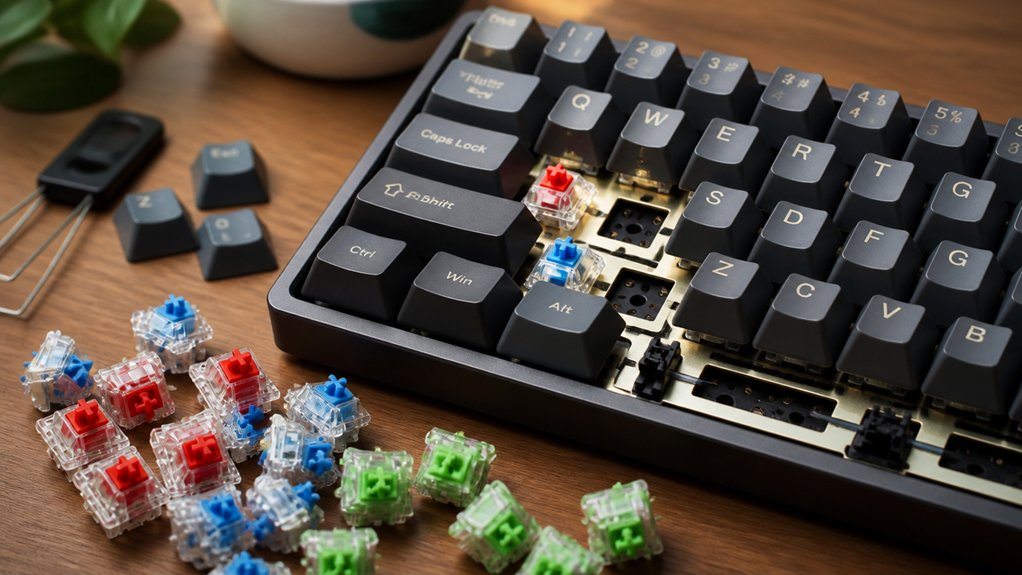
You’ll want hot-swappable keyboard kits because they let you change switches quickly without soldering or special tools, saving time and avoiding damage. They support both 3-pin and 5-pin MX-style switches, making customization easy and flexible. Whether you prefer linear, tactile, or clicky switches, you can personalize your typing feel effortlessly. These kits also simplify repairs and upgrades, extending your keyboard’s lifespan. Keep exploring to uncover features and tips that match your typing style perfectly.
What Makes a Keyboard Hot-Swappable
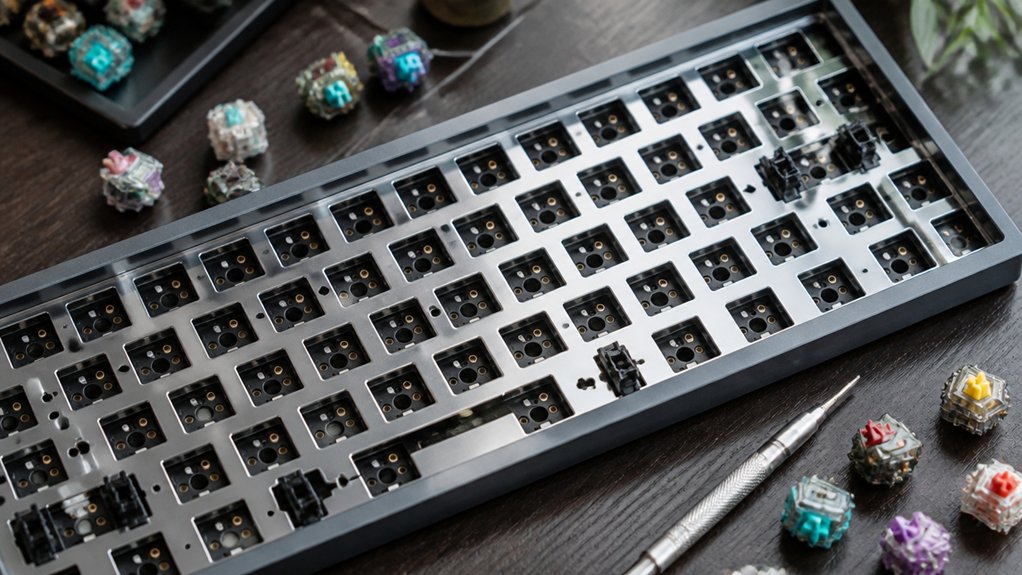
What exactly makes a keyboard hot-swappable? A hot-swap keyboard has a PCB equipped with special sockets that let you remove and install mechanical switches without soldering. These hot-swap sockets usually support both 3-pin and 5-pin MX-style mechanical switches, so you get wide compatibility with different switch types.
Instead of needing a soldering iron, all you need is a simple switch puller tool to swap out switches. This design saves you time and limits damage risk when changing switches.
Hot-swap keyboards make it easy for anyone to personalize their typing experience by trying out various switch brands and types without any technical skills. If you want flexibility with minimal hassle, hot-swap keyboards offer a straightforward way to customize your setup.
Why Hot-Swappable Kits Make Customization Easy
With hot-swappable kits, you can replace switches quickly without any soldering or tools, making customization hassle-free.
This lets you experiment with different switch types anytime, tailoring your keyboard to exactly how you like to type. You get the freedom to adjust your typing experience on the fly, without any technical barriers.
Simplified Switch Replacement
Because hot-swappable keyboard kits come equipped with PCBs featuring special sockets, you can replace switches quickly and without soldering. This hot-swap keyboard feature lets you swap out switches using just a switch puller, so you can experiment with linear, tactile, or clicky switches without hassle.
The keyboard features support both 3-pin and 5-pin MX-style switches, giving you access to a vast range of options that suit your personal typing preference. You won’t need expensive tools or technical skills, and you avoid risks like heat damage or voided warranties tied to soldering.
Simplified switch replacement also makes repairs and upgrades easy, extending your keyboard’s lifespan. Ultimately, hot-swap keyboard kits put customization and convenience right at your fingertips.
Flexible Typing Experience
Though many mechanical keyboards offer a fixed typing feel, hot-swappable kits give you the freedom to change switches anytime without soldering. This flexibility lets you easily experiment with different switch types to find your ideal tactile, linear, or clicky response.
You can also swap keycaps and stabilizers to fine-tune ergonomics and acoustics, creating a truly personalized setup.
With a hot-swap keyboard, you’ll enjoy:
- Quick customization by swapping switches without tools beyond a puller
- Compatibility with both 3-pin and 5-pin MX-style switches
- Simplified repairs by replacing individual switches without downtime
This flexible typing experience guarantees you can always optimize noise, actuation force, and feedback, making your keyboard perfectly suited to your preferences.
Key Benefits of Hot-Swappable Keyboards for Beginners
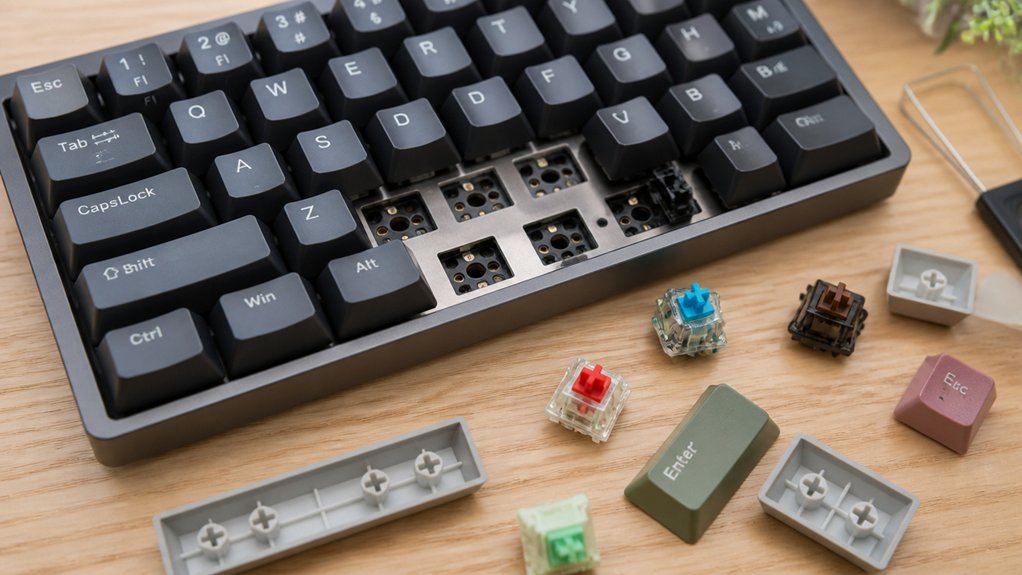
You’ll find that hot-swappable keyboards make it easy to replace switches whenever you want, so customizing your typing feel is simple.
You can try different switch types without any soldering, giving you full control over your keyboard’s performance. Plus, if a switch fails, you can quickly fix it yourself, keeping maintenance hassle-free and beginner-friendly.
Easy Switch Replacement
When you want to customize or repair your keyboard, hot-swappable kits make replacing switches a breeze. With a hotswap keyboard, you don’t need soldering skills or special tools—just a switch puller to pop out old switches and snap in new ones. This ease of use encourages you to try different switch styles without hassle, perfect for beginners.
Here’s why switch replacement is so simple:
- Supports both 3-pin and 5-pin MX-style switches for broad compatibility
- Hot-swap sockets reduce damage risk and make swaps safe
- Quick, tool-free process extends your keyboard’s lifespan
This straightforward replacement method means you can maintain and upgrade your keyboard exactly how you want, anytime.
Customizable Typing Experience
How can you tailor your keyboard to fit your unique typing style? With a hot-swappable keyboard, you can easily experiment with switches without soldering, trying different linear, tactile, or clicky options to find what suits you best.
You’re not limited to one type—mix and match switches on a single keyboard for ideal ergonomics and feedback on different keys. Many hot-swappable kits also support 3-pin and 5-pin MX-style switches, making your options even wider.
Plus, beginner-friendly designs often include QMK or VIA software support, so you can remap keys and create macros, further personalizing your setup. This flexibility lets you craft a typing experience tailored specifically to you, enhancing comfort, efficiency, and enjoyment every time you type.
Beginner-Friendly Maintenance
Because hot-swappable keyboards let you change switches without soldering, maintaining and customizing your keyboard becomes straightforward—even if you’re new to the hobby. Hot-swap keyboards support both 3-pin and 5-pin mechanical switches, giving you plenty of options to experiment with your typing feel and sound.
You don’t need special tools—just a switch puller—to easily replace or upgrade your switches.
With hot-swap keyboards, you can:
- Quickly fix noisy or faulty mechanical switches without hassle
- Extend your keyboard’s lifespan by swapping out worn components
- Explore different switch types to find your perfect match
This beginner-friendly maintenance makes hot-swap keyboards a practical choice for anyone starting out or looking for hassle-free customization.
Hot-Swappable vs Soldered Keyboards: Pros and Cons
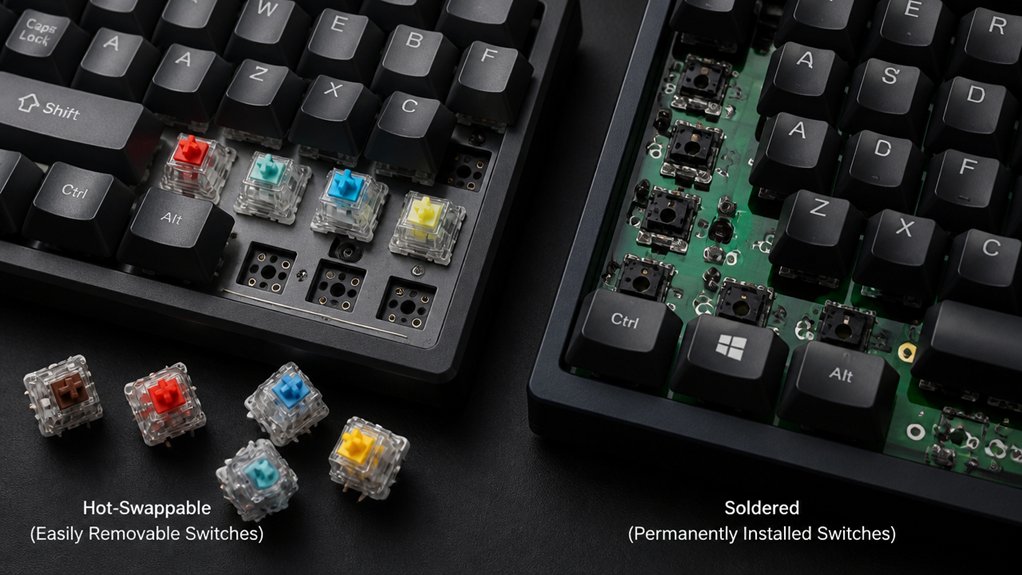
Why choose a hot-swappable keyboard over a soldered one? Hot-swap keyboards let you easily switch out or customize switches without any soldering, making maintenance quick and beginner-friendly. In contrast, soldered boards demand soldering skills and carry risks during switch replacement but offer more secure switch stability and layout flexibility.
| Feature | Hot-Swappable Keyboards | Soldered Boards |
|---|---|---|
| Switch Replacement | Tool-free, quick | Requires soldering, time-consuming |
| Switch Stability | Slight wobble possible | Very stable |
| Layout Flexibility | Limited but easy experimentation | Broader customization |
Choosing hot-swap keyboards suits those valuing convenience and swap versatility, while soldered boards fit users needing durability and complex layouts.
Hot-Swappable Keyboard Layout Options Explained
You’ll find hot-swappable keyboard kits in layouts from full-size to compact designs, each catering to different needs.
Deciding between traditional layouts with a full navigation cluster or custom setups affects your workflow and desk space. Understanding these options helps you pick the right balance of functionality and portability.
Full-Size Versus Compact
How do you decide between a full-size and a compact hot-swappable keyboard? Full-size hot-swappable keyboards usually include 104-108 keys with a dedicated numeric keypad and navigation cluster, perfect if you often enter numbers or rely on traditional layouts.
Compact hot-swap keyboards, like 75% or 60% layouts, save desk space and boost portability but may remove or remap keys like the numpad and navigation keys. Your choice hinges on balancing key availability with workspace and usage needs.
- Full-size hot-swappable keyboards offer standard keys for easy navigation
- Compact hot-swap keyboards are more portable and space-saving
- Hot-swap keyboards let you customize regularly used keys effortlessly
Consider your workflow and desk setup to pick what fits best.
Traditional Versus Custom Layouts
Although traditional mechanical keyboards mostly stick to fixed layouts like full-size or tenkeyless (TKL), hot-swappable kits let you explore a wide range of layouts—including 65%, 60%, and ergonomic split designs—without needing to solder. Hot-swappable keyboards give you the freedom to experiment with custom layouts that better suit your workflow and desk space.
Unlike traditional boards with fixed key placements, custom layouts enable varied key arrangements such as split backspace or layered functions. Plus, with programmable firmware like QMK or VIA, you can easily remap keys to your liking.
These features make hot-swappable keyboards ideal if you want a personalized typing experience, whether you prefer compact designs or ergonomic setups—options traditional fixed-layout keyboards generally don’t offer.
Navigational Cluster Importance
When your workflow depends on quick access to keys like Del, Home, End, PgUp, and PgDn, the navigational cluster becomes indispensable. Hot-swap keyboards that preserve this cluster let you maintain productivity by avoiding complex function layers or key combos common in compact layouts.
Many full-size keyboard kits like the MonsGeek M5 and Keychron V6/Q6 keep the traditional 108-key layout, ensuring these keys are in their usual spots.
Here’s why the navigational cluster matters in hot-swappable keyboard options:
- Enables fast directional and editing commands without extra layers
- Supports traditional workflows for users who rely on these keys daily
- Avoids cramped or modified layouts that reduce ease of use
Choosing a keyboard kit with a full nav cluster means smoother, more efficient typing and editing.
What Makes a Hot-Swappable Keyboard Well-Built
To guarantee your hot-swappable keyboard feels solid and performs well, you need a kit built with high-quality components. Key features include a durable PCB with dependable hot-swap sockets compatible with 3-pin and 5-pin MX-style switches, plus sturdy cases made from CNC-machined aluminum or similarly robust materials. Good kits support QMK/VIA for customization, letting you reprogram layouts and lighting easily. Including stabilizers with silicone dampeners reduces noise and wobble, while compatibility with standard keycaps guarantees easy upgrades.
| Feature | Benefit | Detail |
|---|---|---|
| Hot-swap sockets | Easy switch replacement | Supports 3-pin & 5-pin MX |
| Durable materials | Long-lasting, solid build | CNC aluminum & secure mounts |
| Stabilizers | Stable, quiet keys | Silicone dampeners included |
| Firmware support | Advanced customization | QMK/VIA compatible |
Switch Compatibility and Choices for Hot-Swappable Boards

How do you decide which switches best suit your hot-swappable keyboard? Hot-swap keyboards let you install and replace switches without soldering, supporting both 3-pin and 5-pin MX-style switches.
Choosing switches for your hot-swap keyboard is easy—install or replace without soldering using 3-pin or 5-pin MX-style switches.
Most hotswap PCBs handle 3-pin switches natively, so if you want to use 5-pin switches, you may need to clip the extra pins. This action is often irreversible, so check your keyboard’s compatibility before buying switches.
When choosing switches without hassle, consider:
- The switch type: linear, tactile, or clicky
- Your keyboard’s hot-swap socket compatibility (3-pin or 5-pin)
- How easily you want to swap or upgrade switches
How Hot-Swappable Keyboards Simplify Maintenance and Repairs
Choosing the right switches for your hot-swappable keyboard not only impacts your typing experience but also makes maintenance much easier. Thanks to hot-swap PCBs, you can quickly remove and replace mechanical switches without soldering or special tools—just use a simple switch puller.
If a switch wears out or malfunctions, you don’t need to replace the entire keyboard; swapping out the faulty switch extends your device’s lifespan and saves money. Plus, hot-swap boards support both 3-pin and 5-pin MX-style mechanical switches, giving you broad compatibility for repairs and upgrades.
This modular design also speeds up troubleshooting, letting you customize and maintain your keyboard with ease. Overall, hot-swappable keyboards simplify upkeep, making repairs more accessible for everyone.
Ergonomic Features to Look For in Hot-Swappable Keyboards

Though hot-swap capability simplifies customization, ergonomic features play a crucial role in your keyboard’s comfort and usability.
Hot-swap ease meets essential ergonomic design for ultimate comfort and enhanced keyboard usability.
To reduce typing fatigue and improve comfort, look for features like gasket mount or silicone dampeners, which provide a softer typing feel. Adjustable typing angles help you find the best wrist position, reducing strain during long sessions. A sturdy case made from CNC-machined aluminum stabilizes your keyboard and lowers vibration.
Consider these ergonomic features when choosing your hot-swappable keyboard:
- Gasket mount or silicone dampeners for softer, quieter typing
- Multiple tilt options to customize your typing angle
- Solid cases with foam layers to minimize sound and vibration
These elements guarantee your keyboard supports your typing health and comfort efficiently.
How to Customize Your Typing Experience With Hot-Swappable Switches
When you want to tailor your keyboard to fit your unique typing style, hot-swappable switches let you easily experiment without any soldering. Hot-swappable keyboards use sockets compatible with both 3-pin and 5-pin MX-style switches, so you can quickly swap between linear, tactile, or clicky switches.
This flexibility allows you to mix switch types—maybe tactile switches for typing and linear ones for gaming—to optimize your experience. You also get to try budget options like Akko Jelly linear switches or premium tactile varieties without commitment.
Plus, hot-swappable keyboards simplify repairs; if a switch fails, you can replace it yourself, saving money. Pair your switches with compatible keycaps and mods like foam inserts or O-rings to enhance sound and feel, creating a truly personalized typing experience.
Budget-Friendly Hot-Swappable Keyboards vs Premium Models
Exploring switch options is just one part of customizing your keyboard—selecting the right hot-swappable kit plays an equally important role. When choosing between budget-friendly and premium mechanical keyboards, your decision impacts build quality, typing feel, and long-term value.
Choosing the right hot-swappable kit is key to customizing your keyboard’s performance and feel.
- Budget hot-swappable keyboards (like Keychron K10) cost $60-$150, offering solid layouts but simpler materials and 3-pin switch support.
- Premium models (such as Freebird TKL) exceed $200, featuring CNC-machined aluminum, advanced dampening, and compatibility with both 3-pin and 5-pin switches.
Premium kits let you customize switches, keycaps, and cases for a tailored typing experience, while budget options come mostly pre-assembled.
Your choice depends on how much you value durability and personalization in your mechanical keyboards.
Tips for Choosing the Right Hot-Swappable Keyboard Kit for You
Because your workflow and preferences shape the best keyboard choice, you’ll want to focus on factors like layout, switch compatibility, and build quality. If you rely on a numpad or navigation keys, prioritize full-size layouts or kits like Zoom98 that suit your needs.
Make sure the PCB uses hot-swappable sockets compatible with both 3-pin and 5-pin MX-style switches, giving you flexibility to try different switches without soldering. Check if the kit offers programmable features and supports software like QMK or VIA so you can customize macros and key mappings.
Finally, consider build materials like CNC-machined aluminum and gasket mounts, which improve durability and typing feel. Balancing these guarantees you pick a kit that fits both your workflow and budget.
Frequently Asked Questions
What Is the Benefit of Hot-Swappable Keyboard?
You get the freedom to change switches anytime without soldering, making upgrades and repairs quick and easy. This means you can customize your typing feel effortlessly and keep your keyboard working longer without hassle.
What Are the Downsides of Hot-Swap?
You’ll face less switch stability, possible wobbling, and limited 5-pin switch support. Hot-swap kits can cost more upfront, wear out sooner, restrict layout options, and occasionally cause connection issues needing switch reseating for reliability.
What Keyboard Is Best for Cerebral Palsy?
You’ll want a full-size, traditional layout keyboard with soft, low-force switches like Akko’s Jelly, hot-swappable for easy customization, ergonomic features for comfort, and removable keycaps to adjust spacing and texture to your specific needs.
Do Gamers Prefer Membrane or Mechanical?
You’ll find most gamers prefer mechanical keyboards because they offer better tactile feedback, faster response, and improved precision. These features enhance performance and durability, making mechanical switches a popular choice for competitive and casual gaming alike.
In Summary
Choosing a hot-swappable keyboard kit lets you easily tailor your typing experience without any soldering hassle. Whether you’re new to mechanical keyboards or a customization pro, these kits offer flexibility, convenience, and ergonomic options to suit your needs. You can switch switches, try different layouts, and upgrade components without extra tools or costs. So, if you want a versatile, beginner-friendly, and budget-conscious option, hot-swappable keyboards are definitely worth considering.



