
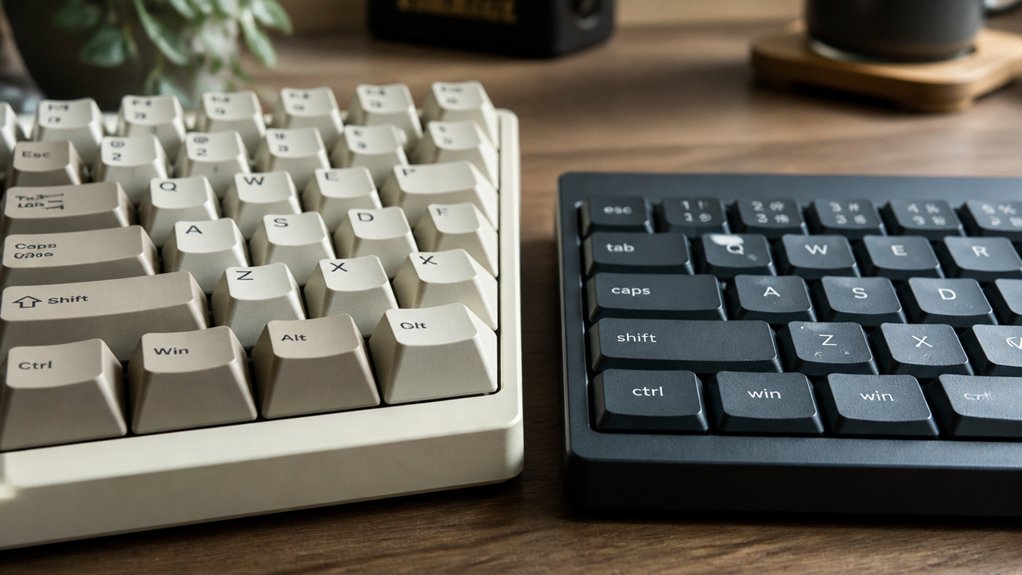
You’ll choose high-profile keycaps if you want enhanced typing precision and comfort, as their sculpted, contoured shapes guide your fingers naturally and reduce strain during long sessions. Compact keycaps, on the other hand, speed up typing by lowering finger travel and minimizing fatigue with their low height and uniform design. Both types impact typing sound and feel differently, so understanding their unique benefits will help you pick the perfect match for your style and keyboard setup.
How To Choose The Right Keycap Profile For You
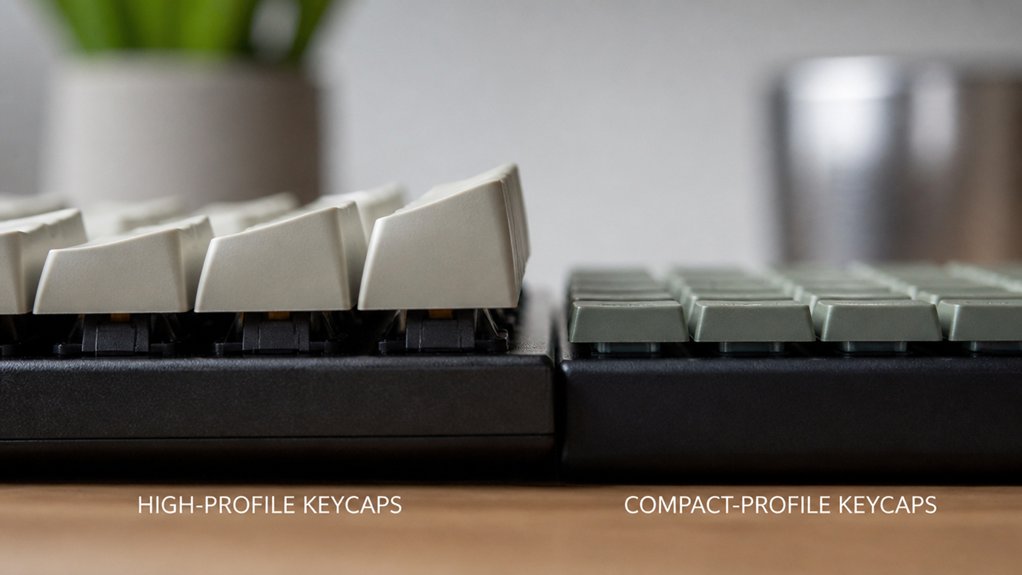
How do you pick the keycap profile that suits your typing style and comfort? First, consider your hand size and typing habits.
If you want an ergonomic typing experience, a sculpted profile like OEM or Cherry guides your fingers with row-specific shapes, enhancing accuracy. For larger hands or those preferring more pronounced key differentiation, high-profile keycaps such as SA offer a vintage feel but may need wrist support over long sessions.
Alternatively, if you seek to reduce finger travel and fatigue—especially with smaller hands—low-profile or uniform keycap profiles like XDA provide a flatter, consistent surface that speeds up typing.
Ultimately, your ideal keycap profile balances comfort, speed, and feel, so match it to how you type and the keyboard layout you use.
Sculpted Vs Uniform Keycap Profiles: What’s The Difference?
Why choose between sculpted and uniform keycap profiles? Sculpted keycaps vary in keycap height and shape across rows, guiding your fingers naturally and boosting typing accuracy. Profiles like OEM and Cherry have contoured rows with angled or cylindrical tops, so your fingers find keys comfortably and reach distant ones with less effort.
On the other hand, a uniform profile maintains the same height and shape on every row, giving you a flat, consistent surface. This makes it easier to reshuffle keycaps or customize layouts without worrying about matching profiles. Uniform profiles like DSA and XDA often feature spherical or flat tops, appealing if you prioritize portability and quick finger gliding.
Choosing between sculpted and uniform profiles hinges on whether you want ergonomic guidance or versatile keycap height consistency.
How Keycap Height Affects Typing Comfort And Finger Travel
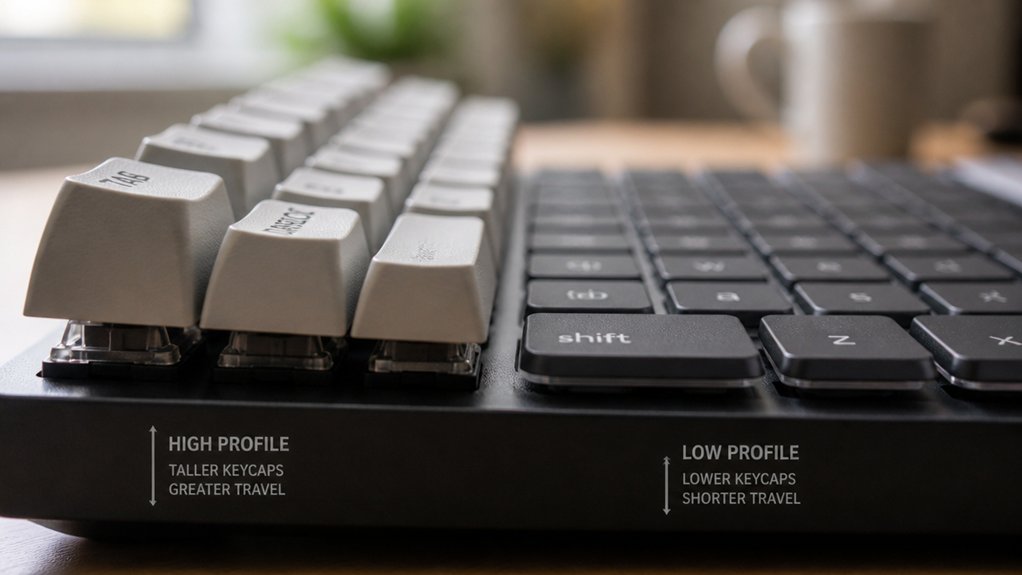
Choosing between sculpted and uniform keycap profiles sets the stage for understanding how keycap height influences typing comfort and finger travel. Keycap height affects how far your fingers must move to press keys, directly impacting typing comfort.
Taller keycaps like SA provide a higher surface, which can improve wrist posture but increase finger travel distance, potentially requiring extra wrist support. On the other hand, compact or low-profile keycaps reduce finger extension and finger travel, allowing for faster keypresses and less fatigue during long sessions.
Sculpted profiles with varying heights optimize finger reach and enhance comfort, while uniform low-profile keycaps keep each key at the same height, promoting quick shifts. Balancing keycap height helps you achieve the right mix of comfort and efficient finger travel.
Why High-Profile Keycaps Improve Precision And Comfort
You’ll notice high-profile keycaps guide your fingers more accurately thanks to their sculpted, contoured shape. This design helps you hit the right keys with less effort, reducing mistakes during fast typing or gaming.
Plus, the ergonomic alignment eases finger strain, letting you type comfortably for longer periods.
Enhanced Finger Placement
When you use high-profile keycaps like SA, you gain sculpted, contoured rows that naturally guide your fingertips, making finger placement more precise. These sculpted rows feature varying heights and angled tops that help your fingers flex ergonomically, reducing strain and boosting accuracy.
The distinct finger travel distances between rows let you feel your way across keys without needing to look. High-profile keycaps also come with larger surface areas and spherical or concave tops, increasing tactile feedback and preventing finger slips.
This enhanced finger placement not only improves typing precision but also elevates comfort, especially during extended use. Whether you’re gaming or typing professionally, high-profile keycaps provide the physical cues you need to type confidently and accurately every time.
Reduced Typing Fatigue
Building on how sculpted, contoured rows improve finger placement, high-profile keycaps also help reduce typing fatigue during long sessions. Their increased height and spherical tops guide your fingers naturally, allowing for greater flexion and more distinct key differentiation.
This ergonomic shaping minimizes awkward stretching and keeps finger travel consistent, which leads to reduced strain and improved comfort. When you use high-profile keycaps like SA, you’ll notice enhanced typing precision thanks to this natural alignment.
Many users also appreciate the satisfying “thocky” sound these keycaps produce, which can boost focus and confidence in your keystrokes. Pairing high-profile keycaps with a wrist rest further complements their ergonomic benefits, ensuring you avoid wrist fatigue and maintain comfort throughout extended typing periods.
How Compact Keycaps Speed Up Typing And Reduce Fatigue
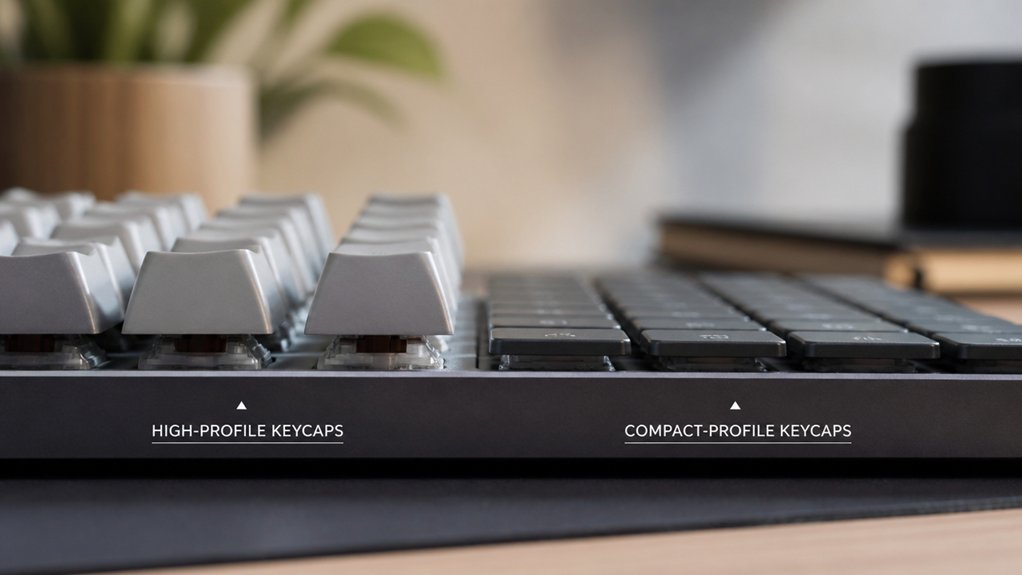
Although many typists stick with traditional keycap sizes, choosing compact keycap profiles can greatly speed up your typing and reduce fatigue. These profiles, like Cherry or low-profile sets, reduce finger extension by lowering the key height and bringing your fingers closer to the keyboard surface. This decreases the travel distance for each keystroke, helping you type faster with less effort.
By minimizing vertical finger movement, compact keycap profiles reduce strain, especially if you have smaller hands. Uniform profiles such as DSA and MOA further support quick finger shifts by keeping finger positioning consistent across rows.
Plus, the reduced height helps lower wrist elevation, enhancing ergonomic comfort and lowering the risk of repetitive strain injuries. Overall, compact keycaps help you maintain speed and comfort during extended typing sessions.
Which Keycap Profiles Are Best For Gamers And Speed Typists?
Which keycap profile suits you best depends on your typing style and gaming needs. If you’re a gamer or speed typist, medium-low Cherry profile keycaps are a solid choice—they reduce finger fatigue while boosting typing speed with their sculpted rows.
Medium-low Cherry profile keycaps reduce finger fatigue and boost typing speed for gamers and speed typists.
Alternatively, low-profile DSA keycaps offer uniform spherical tops that help you glide quickly over keys, perfect for rapid, consistent key presses. OEM profile caps, slightly taller, balance comfort and reachability for gamers with moderate speed demands.
For consistent key feel and fluid typing, XDA keycaps’ uniform height and wide concave tops also enhance performance. You might want to avoid high-profile SA keycaps if speed is your priority since their height can slow you down.
Choosing the right keycap profile can directly impact your typing speed and gaming efficiency.
How Aesthetic Preferences Influence Your Keycap Profile Selection
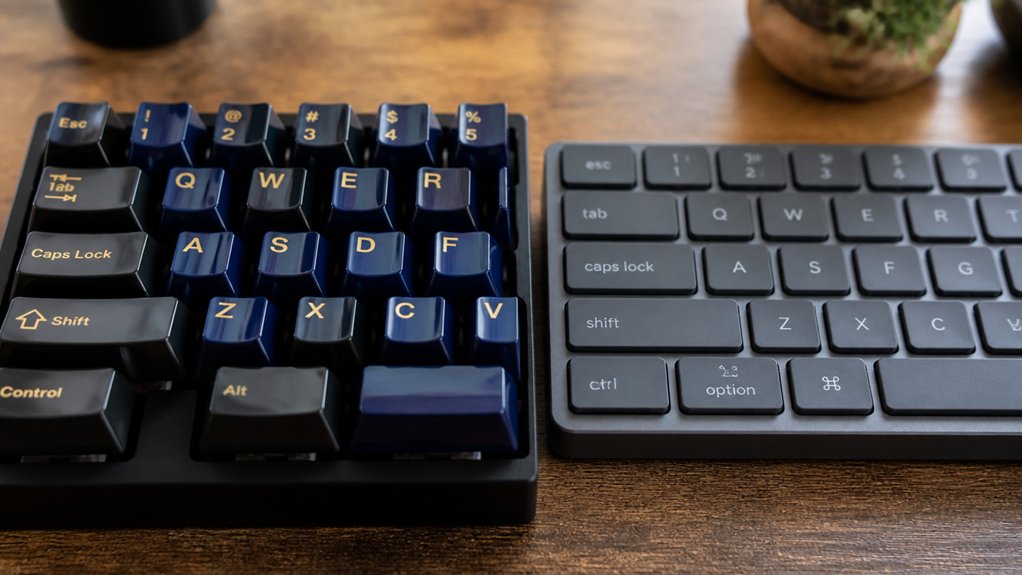
When you choose keycap profiles, your aesthetic preferences play a crucial role in shaping your keyboard’s overall look. High-profile keycaps like SA and KSA offer a bold, retro vibe with sculpted, spherical tops that create deeper shadows and enhance the keyboard’s presence on your desk.
If you want a striking vintage feel, these taller keycaps showcase legends and sculpting beautifully. On the other hand, compact profile keycaps such as DSA and XDA deliver a sleek, modern aesthetic with uniform heights and clean lines, favoring minimalism and layout symmetry.
The choice between high-profile keycaps and compact profile keycaps ultimately depends on whether you lean toward a dramatic or subtle look, as keycap aesthetics are defined by both profile height and surface shape to match your personal style.
Keycap Profile Compatibility: Matching Caps To Your Keyboard Layout
Matching your keycaps to your keyboard layout guarantees both comfort and functionality. When selecting a keycap profile, you need to confirm compatibility with your keyboard’s size, layout, and any special key sizes. High-profile keycaps like SA require enough clearance or wrist rests, while compact profiles like Cherry or OEM fit most layouts, including full-size and tenkeyless. Uniform profiles such as DSA provide versatile compatibility, especially for custom or split layouts.
| Keycap Profile | Compatibility Highlights |
|---|---|
| SA / KSA | Tall, needs clearance, suited for standard |
| Cherry / OEM | Widely compatible, fits most layouts |
| DSA / KAM | Uniform, flexible, great for custom layouts |
| Ergonomic | Row-specific shapes for split keyboards |
| Layout Keys | Needs correct key sizes for ANSI/ISO/etc. |
Choosing wisely guarantees perfect fit and usability.
How Keycap Height Impacts Typing Sound And Acoustic Feel
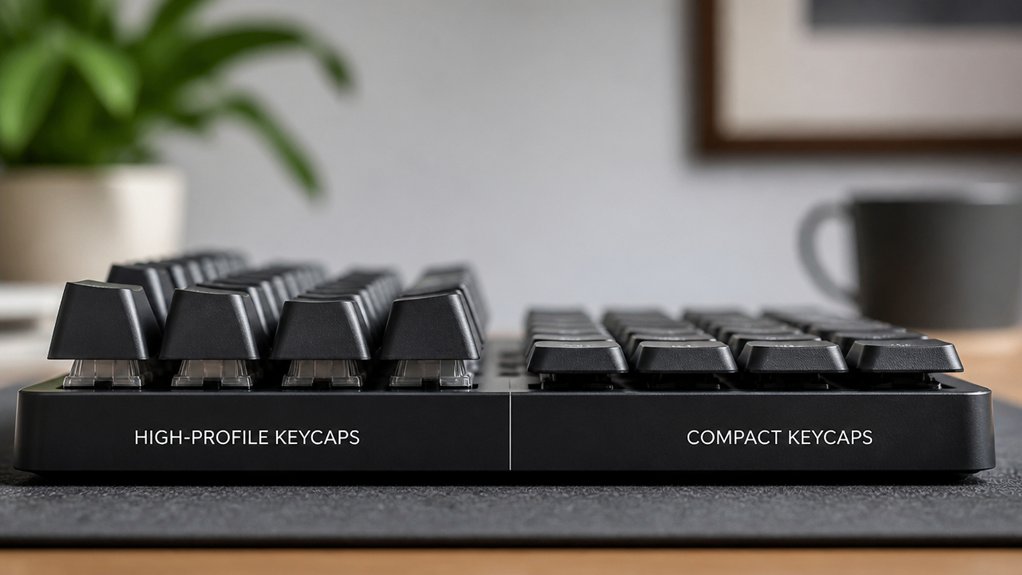
You’ll notice that keycap height plays a big role in the sound your keyboard makes. Taller keycaps create deeper, “thocky” tones, while shorter ones offer softer, crisper sounds.
Understanding these differences helps you pick a sound profile that fits your typing style.
Keycap Height Effects
How does the height of keycaps change your typing experience? Keycap height directly influences the sound and feel when you type.
High-profile keycaps, like SA or KSA, stand taller and have a larger plastic volume, creating a deeper, “thocky” sound with rich resonance. You’ll notice more acoustic feedback but might also experience finger fatigue during long sessions due to the increased travel distance.
Low-profile keycaps, such as Cherry or Chiclet, reduce key travel and produce lighter, quieter keystrokes with less sound impact. They’re favored for fast, soft typing, especially in gaming or professional settings.
The sculpted shape combined with height also shapes the tactile feedback you get with every press, making keycap height a key factor in balancing sound, feel, and comfort during your typing sessions.
Acoustic Characteristics Differences
The height of your keycaps doesn’t just affect feel—it shapes the entire acoustic experience of typing. High-profile keycap profiles, like SA, create a deeper, thocky typing sound with enhanced acoustic resonance, thanks to their taller design and thicker plastic. Compact profiles, such as DSA or Chiclet, deliver a lighter, crisper sound with less echo, ideal for quieter environments. Your choice affects the volume, tone, and consistency of acoustic feedback, influencing how satisfying your typing feels.
| Keycap Profile | Typing Sound | Acoustic Characteristics |
|---|---|---|
| High Profile | Deep, thocky | Rich resonance, louder volume |
| Compact Profile | Light, crisp | Reduced echo, quieter sound |
| Uniform Height | Consistent tone | Even acoustic feel across keys |
Sound Profiles Variation
Although keycap height might seem like a minor detail, it drastically changes the sound profile and acoustic feel of your typing. The keycap profile you choose directly influences the typing height, which impacts the sound your keyboard produces.
High-profile keycaps like SA or KSA, with their taller design, create a deeper, more resonant “thocky sound” that many enthusiasts love. This comes from the larger plastic volume, increasing resonance and sustain.
On the other hand, compact or low-profile keycaps such as Cherry or Chiclet produce quieter, sharper sounds due to their reduced height and plastic material.
Plus, uniform profiles offer consistent typing sounds, while sculpted profiles introduce subtle tonal shifts across rows. Ultimately, your typing sound depends heavily on the keycap profile’s height, shaping your overall acoustic experience.
Common Mistakes To Avoid When Choosing Keycap Profiles
Since keycap profiles directly affect comfort and typing accuracy, you shouldn’t overlook common pitfalls when choosing them.
First, avoid picking high-profile keycaps like SA without considering their height; their taller design can cause finger strain during extended typing. Also, don’t assume uniform profiles suit all layouts—lack of sculpting might reduce typing precision if you rely on row differentiation.
Remember to factor in your hand size, as smaller hands benefit from lower profiles to ease finger extension. Never buy keycaps incompatible with your keyboard’s switch stems or layout, since many custom profiles require Cherry MX-compatible stems.
Finally, consider profile shape carefully: cylindrical tops improve typing accuracy, while flat or spherical tops prioritize comfort and speed, impacting your overall typing feel.
Frequently Asked Questions
What Keycap Profile Is the Best?
The best keycap profile depends on your typing style and comfort. You’ll want to try different profiles like OEM, Cherry, SA, or DSA to see which feels natural, reduces fatigue, and matches your aesthetic preferences perfectly.
Is ABS or PBT More Thocky?
PBT is more thocky than ABS because its thicker, denser material produces a deeper, satisfying sound. You’ll notice ABS sounds higher-pitched and clackier, while PBT gives you that warm, muted thock most enthusiasts love.
Is Moa or Cherry Better?
You’ll prefer Cherry if you want ergonomic comfort and faster typing with sculpted rows, but if you value uniformity and consistent finger positioning, MOA’s taller, uniform profile might feel sleeker and more stylish for you.
Does Keycap Height Matter?
Yes, keycap height matters because it affects your typing comfort, speed, and wrist strain. Choosing the right profile helps you type efficiently and reduces fatigue, so consider your hand size and typing style when picking keycaps.
In Summary
Choosing between high and compact profile keycaps depends on what matters most to you—comfort, speed, or style. High-profile keycaps boost precision and reduce finger fatigue, while compact profiles help you type faster and feel less tired. Consider your typing habits, the sound you like, and your keyboard layout when picking your keycaps. Avoid common mistakes by testing different profiles to find the perfect fit for your workflow and personal taste.



