
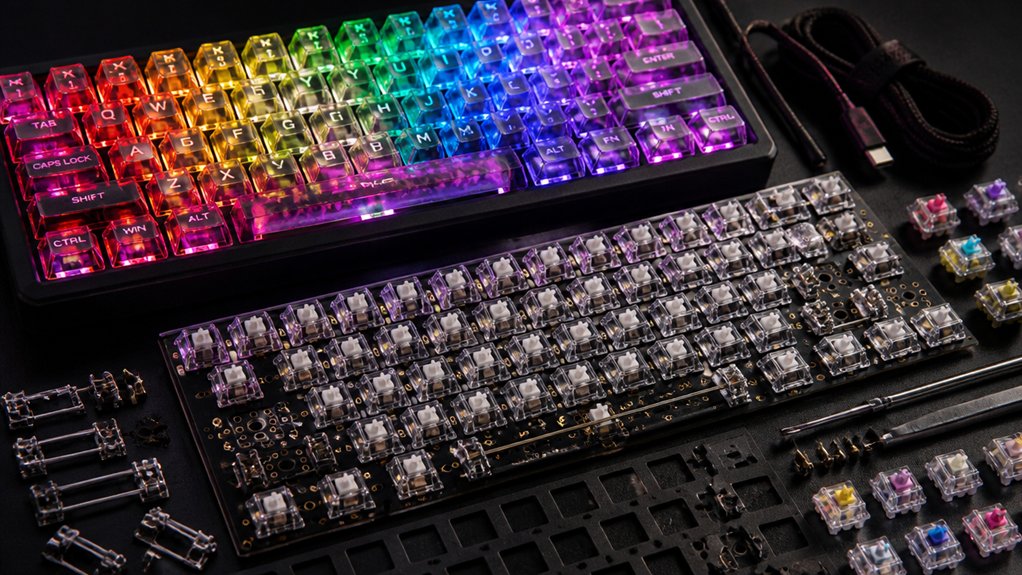
You should choose RGB backlit keyboard assembly kits because they let you customize colors, effects, and lighting zones to match your style and workflow. They improve typing visibility in low light and highlight important keys for faster identification. Hot-swappable PCBs make switch changes easy without soldering, while dynamic lighting adds fun interactivity. Plus, syncing with PC peripherals creates a cohesive setup. Explore this guide to uncover assembly tips, switch choices, and modding tricks for your perfect build.
Why RGB Lighting Transforms Mechanical Keyboard Kits

When you add RGB lighting to a mechanical keyboard kit, you instantly reveal a world of personalization and functionality. RGB lighting lets you tailor your custom keyboard’s colors, effects, and brightness to fit your unique style or workspace vibe.
You can use software like QMK or VIA to program dynamic lighting layers and reactive effects that respond to your keypresses, making the experience more interactive. Many kits also support north-facing LEDs, improving illumination compatibility with various keycap profiles—essential if you’re using custom keycaps.
Additionally, RGB lighting integrates seamlessly with your overall PC setup through syncing technologies like Razer Chroma or Corsair iCUE, allowing you to create cohesive multi-device lighting schemes. This level of control truly transforms your mechanical keyboard into a personalized, functional powerhouse.
How RGB Backlighting Enhances Visibility and Style
You’ll notice that RGB backlighting makes typing in low light much easier by clearly illuminating each key.
Beyond visibility, you can customize your keyboard with millions of colors and dynamic effects to match your personal style. This blend of function and flair lets you create a setup that’s both practical and uniquely yours.
Improved Typing Visibility
Although typing in dim environments can strain your eyes, RGB backlighting on keyboard assembly kits brightens each key with customizable colors and brightness, making the legends easier to see. North-facing LED keycaps enhance this effect, ensuring clear visibility. You can adjust RGB zones to highlight essential keys, boosting efficiency during work or play. Plus, soft ambient lighting reduces eye strain during long sessions, blending style and function.
| Feature | Benefit | User Impact |
|---|---|---|
| RGB Backlighting | Customizable colors | Easy key identification |
| Adjustable Zones | Highlight important keys | Improved workflow |
| North-facing LEDs | Clearer, brighter legends | Reduced eye strain |
Dynamic Lighting Effects
Because dynamic lighting effects offer customizable colors and animations, they make it easier for you to spot keys quickly in low-light settings while adding a stylish, personalized touch to your keyboard.
RGB backlighting on mechanical keyboards includes modes like wave, ripple, and reactive lighting, making your setup visually engaging and interactive. North-facing LEDs improve illumination of translucent keycap legends, enhancing readability and contrast. This doesn’t just look good; it helps you find specific keys faster, especially when color coding or highlighting important functions.
Plus, programmable RGB lighting lets you synchronize animations across your peripherals, creating a cohesive experience. These dynamic effects blend practicality with style, transforming your mechanical keyboard into both a functional tool and a standout centerpiece on your desk.
Personalization Through Colors
Beyond dynamic lighting effects, RGB backlighting lets you personalize your keyboard’s appearance through colors, enhancing both visibility and style.
With a Custom Mechanical keyboard, you get more than just aesthetics; you improve functionality. RGB backlighting guarantees keys are easily visible in low light, reducing mistakes and boosting efficiency.
Here’s how you can personalize your typing experience:
- Customize individual key colors to match your style or mood.
- Program RGB profiles for specific tasks or games.
- Enjoy dynamic effects like wave or ripple for lively visuals.
- Use open-source firmware like QMK or VIA for deep lighting control and macros.
With these options, your Custom Mechanical keyboard isn’t just a tool—it’s an expression of who you are.
Preassembled vs DIY RGB Keyboard Kits: Which Fits You?
Wondering whether a preassembled or DIY RGB keyboard kit suits you best? If you want convenience with minimal setup, preassembled RGB keyboard kits are ready to use right out of the box, featuring factory-tested lighting and switches. They usually come with manufacturer software, making RGB customization easy and accessible—great if you prefer a hassle-free experience or lack soldering skills.
On the other hand, DIY RGB keyboard kits put full control in your hands. You can customize switches, keycaps, stabilizers, and RGB effects to match your preferences. Hot-swappable options let you try different switches without soldering. Plus, these kits often support open-source firmware like QMK or VIA for deeper programming flexibility.
If you enjoy personalization and hands-on building, DIY kits fit you perfectly.
How to Assemble Your RGB Backlit Mechanical Keyboard
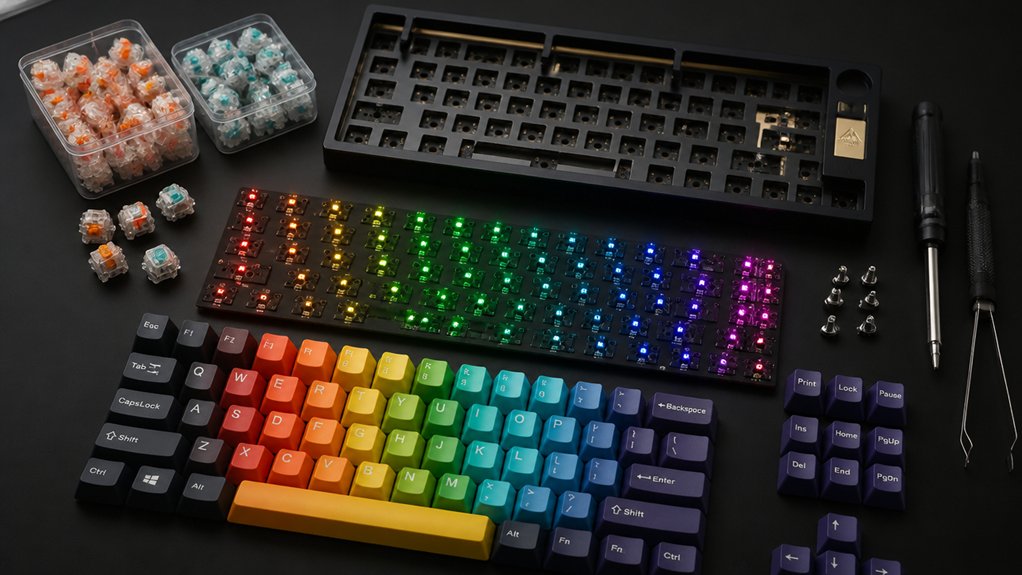
Before you start, make sure you have all the necessary tools on hand, from screwdrivers to soldering equipment if needed.
Follow each assembly step carefully to guarantee your RGB keyboard works perfectly.
If something doesn’t light up or fit right, troubleshooting common issues will save you time and frustration.
Required Tools Overview
To assemble your RGB backlit mechanical keyboard effectively, you’ll need a few essential tools that guarantee precision and protect delicate components.
Whether you choose a hot-swappable PCB for easy switch installation or plan to use a soldering iron for permanent mounting, having the right gear makes all the difference.
Here are the key tools you’ll want on hand:
- Soldering iron and soldering kit for secure switch attachment on non-hot-swap PCBs
- Keycap puller to safely remove and install keycaps without damaging parts
- Precision screwdrivers and tweezers for mounting stabilizers and handling small components
- Anti-static wrist strap or mat to safeguard sensitive electronics during assembly
These tools help you build your keyboard reliably while keeping its RGB backlighting intact.
Step-By-Step Assembly
Having gathered the right tools, you’ll want to start your assembly by testing the PCB using tweezers and software like VIA. This confirms all keys register properly before you proceed with your keyboard build.
Next, carefully lubricate and install screw-in stabilizers to reduce rattling and guarantee consistent keypresses.
Then, mount the switches onto the hot-swappable or soldered PCB through the plate, verifying each switch’s correct orientation for peak RGB lighting on your mechanical keyboards.
After that, install the PCB and plate assembly into the keyboard case, adding gaskets or foam for sound dampening and securing everything with screws.
Finally, attach keycaps compatible with your backlit design, paying special attention to LED alignment—especially for north-facing LEDs—to maximize vibrant RGB light diffusion and complete your build effortlessly.
Troubleshooting Common Issues
Why isn’t your RGB backlit keyboard lighting up or registering keypresses correctly? Often, issues trace back to the switches and keycaps or the printed circuit board (PCB).
To troubleshoot effectively, check these critical points:
- Confirm switches are fully seated and correctly oriented in the hot-swappable PCB sockets to maintain solid connections.
- Test the PCB with software like VIA before installing keycaps and case to verify RGB lighting and switch inputs.
- Align north-facing LEDs with compatible keycaps, since some profiles, like Cherry, may block RGB effects.
- When soldering, avoid lifted copper traces and cold joints that disrupt key registration and lighting.
Following these steps will help you diagnose and fix common issues quickly, making your assembly smoother and your keyboard fully functional.
Choosing Hot-Swappable Switches for Easy Customization

Wondering how to customize your keyboard without the hassle of soldering? Hot-swappable PCBs let you install or swap mechanical switches quickly and tool-free. This means you can experiment with different switch types, adjusting your typing feel and sound without any technical skills.
Hot-swap kits often come with pre-installed sockets and clear guides, making assembly easy even if you’re new to keyboard building. Just remember to check that your chosen mechanical switches are compatible with the PCB sockets to avoid issues.
This setup also lowers the risk of damaging components during switch replacement, so maintenance and troubleshooting become simpler. If you want a flexible, beginner-friendly way to personalize your RGB backlit keyboard, hot-swappable switches provide an excellent starting point.
Selecting Tactile Switches That Balance Feel and Noise
When you want a keyboard that strikes a perfect balance between tactile feedback and noise level, tactile switches are an ideal choice. They offer a noticeable bump without an audible click, giving you precise typing feel without distracting sounds.
To optimize your experience, consider these tips when selecting tactile switches:
- Choose popular options like brown switches for quieter operation in shared spaces.
- Lubricate switches to smooth the bump and reduce key noise.
- Tune and lube stabilizers to minimize rattling and overall noise.
- Use hot-swappable PCBs to easily replace switches and experiment with different feel and sound profiles.
With the right tactile switches, you get enhanced typing accuracy and a refined noise balance that suits both work and play.
Keycap Options That Boost RGB Lighting Effects

Although the choice of switches greatly affects your keyboard’s feel, the keycaps you select play a crucial role in showcasing your RGB lighting.
When choosing a keycap set, you’ll want to prioritize those with translucent legends and thin walls to maximize light transmission. ABS keycaps, especially north-facing LED-compatible ones, excel here by letting RGB light shine through clearly without blocking it.
While PBT keycaps offer durability, their thicker walls and lower translucency generally dampen RGB brightness, making them less ideal for vivid lighting effects.
Additionally, keycap profiles like OEM and Cherry influence how evenly the RGB light diffuses across your keyboard, so choose accordingly.
Opting for double-shot or dye-sublimated ABS keycaps with translucent legends guarantees long-lasting, vibrant RGB illumination that truly makes your build stand out.
Case Materials That Make Your RGB Shine Brighter
You’ll notice aluminum cases reflect RGB light, making your keyboard’s glow more vibrant, while plastic cases tend to soften the effect.
Transparent designs let the colors shine through completely, unlike opaque ones that can dim the brightness. Choosing the right case material and design directly impacts how your RGB setup stands out.
Aluminum vs Plastic Cases
Choosing between aluminum and plastic cases considerably impacts how your RGB lighting appears and feels. Keyboard cases crafted from aluminum enhance RGB lighting by reflecting light better and dissipating heat, making colors pop vividly.
Plastic cases, while lighter and more affordable, absorb more light, softening the backlighting effect.
Here’s what to take into account:
- Aluminum cases offer durability and a premium metallic finish that complements RGB aesthetics.
- Plastic cases provide flexibility in colors and styles, letting you match your RGB schemes.
- Aluminum creates a stiffer, louder typing experience that may influence sensory feedback.
- Plastic cases result in diffused RGB lighting with a gentler glow.
Your choice shapes not just the look but also the feel and vibrancy of your RGB backlit keyboard.
Transparent vs Opaque Designs
The material and design of your keyboard case don’t just affect durability and typing feel—they also shape how your RGB lighting shines through.
With a keyboard kit, choosing transparent cases made from clear acrylic or polycarbonate lets your RGB shine fully, showcasing vibrant key backlighting and underglow effects. These materials amplify brightness and color accuracy, making your custom keyboards stand out.
On the other hand, opaque cases, usually aluminum or plastic, diffuse light more softly, producing a subtler ambient glow but less direct illumination.
If you want a balance, translucent or frosted designs diffuse RGB lighting evenly, delivering a gentle glow without glare.
Ultimately, your choice between transparent vs opaque designs directly impacts how bright and dynamic your RGB setup looks in your custom keyboard build.
Using Firmware to Personalize RGB Mechanical Keyboard Kits

When you explore firmware like QMK or VIA, you gain powerful tools to personalize the RGB lighting on your mechanical keyboard kit. Firmware lets you go beyond default settings to create unique lighting experiences tailored to your preferences.
You can control everything from colors to effects, making your keyboard truly yours.
With firmware customization, you can:
- Set individual key or zone lighting profiles
- Sync RGB with macros or specific keypresses
- Experiment with dynamic effects like waves, ripples, and breathing
- Adjust brightness and layering for better visual feedback
This level of control enhances both aesthetics and usability, improving how you type and game. Firmware makes your mechanical keyboard not just functional but distinctly personal.
Making Your RGB Keyboard Both Stylish and Functional
Firmware customization enables endless possibilities for your RGB keyboard, but making it both stylish and functional takes thoughtful design choices. With RGB keyboard assembly kits, you can combine custom keycaps with programmable lighting to highlight important keys and enhance usability. Choosing keycaps with transparent legends or north-facing LEDs maximizes vibrant, even illumination. This not only boosts style but also improves visual feedback during work or gaming.
| Feature | Benefit | Example |
|---|---|---|
| Custom keycaps | Personalized aesthetics | Transparent legends for lighting |
| Programmable RGB lighting | Functional cues | Highlighting shortcuts or macros |
| Hot-swappable switches | Flexible layouts | Swap switches without soldering |
Customize smartly to enjoy a stylish, highly functional keyboard tailored just for you.
Maintaining and Troubleshooting Your RGB Backlit Keyboard
You’ll want to clean your RGB keyboard regularly by removing keycaps and wiping down the switches and PCB to keep lighting and performance sharp.
If you notice flickering lights or unresponsive keys, check for loose cables, soldering issues, or outdated drivers.
Taking these steps helps you fix common problems and extends your keyboard’s lifespan.
Cleaning And Care
Although RGB backlit keyboards add a striking visual element to your setup, they require regular cleaning and care to keep them functioning smoothly and looking vibrant.
Proper maintenance of mechanical keyboards not only preserves their aesthetic but also guarantees peak performance.
Focus on these key cleaning and care tips:
- Use a keycap puller regularly for deep cleaning to prevent grime buildup that can affect switch function and RGB lighting.
- Avoid liquid spills and prolonged sunlight exposure to protect the keyboard’s PCB and LEDs from damage or discoloration.
- Lubricate switches and stabilizers periodically to reduce noise and improve typing feel.
- Clean the keyboard surface and switch housings with mechanical keyboard cleaning kits and compressed air to remove dust that could block RGB illumination.
Following these steps will keep your keyboard in top shape.
Common Issues Fixes
When your RGB backlit keyboard shows unresponsive keys or lighting glitches, troubleshooting typically starts with testing the PCB using software like VIA and reseating or replacing any faulty switches.
You should regularly check the circuit board and connectors to guarantee there are no loose cables, which can cause power or signal issues affecting lighting.
Cleaning your keyboard with mechanical keyboard kits and keycap pullers helps prevent dirt buildup that hinders switch functionality and RGB performance. Lubricating switches and stabilizers reduces noise and smooths key presses, improving your overall experience.
Don’t forget to update your keyboard’s firmware and use customization tools to fix lighting synchronization and remap keys or macros. Following these steps keeps your RGB backlit keyboard performing at its best.
Adding Sound Dampening and Stabilizer Mods to RGB Builds
Because sound quality plays a vital role in your typing experience, adding sound dampening materials and stabilizer mods can dramatically improve how your RGB keyboard feels and sounds.
Incorporating sound dampening materials like poron foam or PolyFil inside your keyboard case reduces hollow noise without affecting lighting. Lubricating and clipping stabilizers especially for larger keys eliminates rattling, improving keypress smoothness. Pairing these mods with softer plate materials offers an even quieter acoustic profile, perfect for RGB keyboards with tactile switches.
- Install poron foam or PolyFil for effective sound dampening
- Clip, lube, and band-aid stabilizers to reduce key rattle
- Choose softer plate materials like polycarbonate or POM
- Maintain acoustic clarity while enhancing RGB lighting effects
These upgrades create balanced sound and visuals for a refined typing experience.
Where to Find Quality RGB Backlit Keyboard Kits and Parts
Enhancing your RGB keyboard’s sound and feel is rewarding, but finding the right kit and parts is just as important to achieve your ideal setup. You can rely on specialized sellers like MechanicalKeyboards.com, NovelKeys, and Drop for a wide range of customizable RGB backlit keyboard kits and in-stock parts. Boutique makers, such as RAMA WORKS, offer premium kits, while brands like GMMK and Keychron Q-series provide hot-swappable PCBs favored by many.
| Source Type | Examples |
|---|---|
| Specialized | MechanicalKeyboards.com, NovelKeys |
| General Retailers | Amazon, Newegg |
| Boutique Makers | RAMA WORKS, Keycult |
| Hot-Swappable PCBs | GMMK, Keychron Q-series |
| Community Tips | Reddit r/mechanicalkeyboards |
These sources guarantee you’re well-equipped with quality, in-stock parts.
Best Online Communities for RGB Keyboard Builders
Where can you find the best support and inspiration for building your RGB backlit keyboard? The vibrant keyboard community online offers plenty of resources and advice for every builder level.
You’ll find everything from tips on group buys to detailed build tutorials.
Check out these top online spots:
- Reddit’s r/mechanicalkeyboards: Share builds, troubleshoot, and get customization tips.
- Geekhack & Deskthority forums: Engage in advanced discussions on firmware and switches.
- Keebtalk: Engage with projects, lighting mods, and DIY kit reviews.
- Discord servers: Get real-time help and collaborate on RGB lighting setups.
These communities keep you connected, informed, and ready to tackle your next RGB backlit keyboard assembly kit with confidence.
Future Trends in RGB Mechanical Keyboard Kits
As you explore the future of RGB mechanical keyboard kits, you’ll notice a strong push toward sustainability and smarter technology. Manufacturers are adopting eco-friendly materials and production methods to minimize environmental impact.
You’ll also see advanced RGB lighting with customizable per-key effects and better color accuracy, often controlled through open-source firmware like QMK and VIA. Wireless RGB mechanical keyboard kits are improving too, offering low latency and longer battery life despite metal case challenges.
Exclusive collaborations bring limited-edition kits featuring unique lighting designs. Plus, enhanced software ecosystems make RGB customization easier, letting you sync lighting across devices and share profiles within vibrant keyboard communities. These trends guarantee your mechanical keyboard stays cutting-edge, eco-conscious, and highly personalized.
Frequently Asked Questions
What Is the Point of an RGB Keyboard?
The point of an RGB keyboard is to let you customize lighting, improve key visibility in low light, and enhance your gaming or typing experience with dynamic effects that reflect your style and boost functionality.
What Is the Advantage of a Backlit Keyboard?
A backlit keyboard helps you type accurately in low light by illuminating keys clearly, reducing mistakes and eye strain. It also boosts your productivity and gaming reaction time since you don’t need extra lighting to find keys quickly.
Is It Worth Getting a Backlit Keyboard?
Yes, it’s worth getting a backlit keyboard if you work or game in low-light settings. You’ll appreciate better visibility, easier typing, and cool customizable lighting that adds personality and improves your overall experience.
What Is the Difference Between RGB Keyboard and Backlit Keyboard?
You’ll notice RGB keyboards let you customize each key’s color and lighting effects, while backlit keyboards usually have one fixed color just for visibility. RGB offers more flair but costs more and uses extra power.
In Summary
Choosing an RGB backlit keyboard assembly kit lets you personalize both style and functionality. Whether you prefer preassembled or DIY, these kits offer vivid lighting, easy customization with hot-swappable switches, and sound-enhancing mods that elevate your typing experience. Jump into online communities to share your builds and stay updated on trends. With endless options, you’ll find the perfect kit that fits your needs and brightens your desk like never before.



