
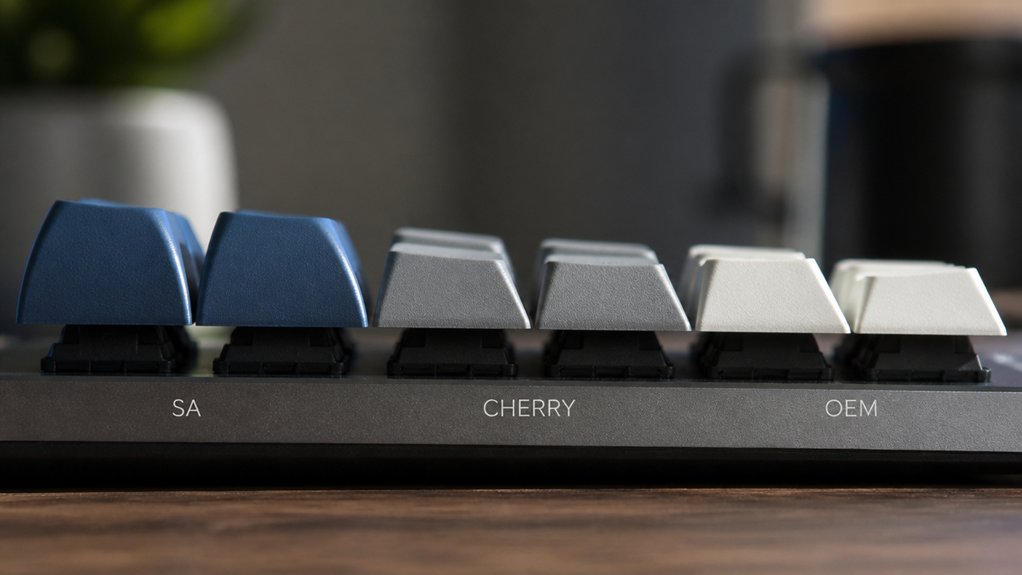
You shape your keyboard’s sound mainly through keycap profile height, shape, thickness, and material. Taller, thicker profiles like SA produce deep, “thocky” sounds with longer resonance, while low-profile keycaps soften and quiet your keystrokes by limiting cavity volume. Sculpted shapes add bass-rich layers, and uniform profiles offer brighter, crisper feedback. Material tweaks, like PBT or ABS, fine-tune the tone. Combining these factors lets you balance rich sound with typing comfort. There’s plenty more to explore about matching profiles to your style and sound preference.
How Keycap Profile Height Changes Keyboard Sound
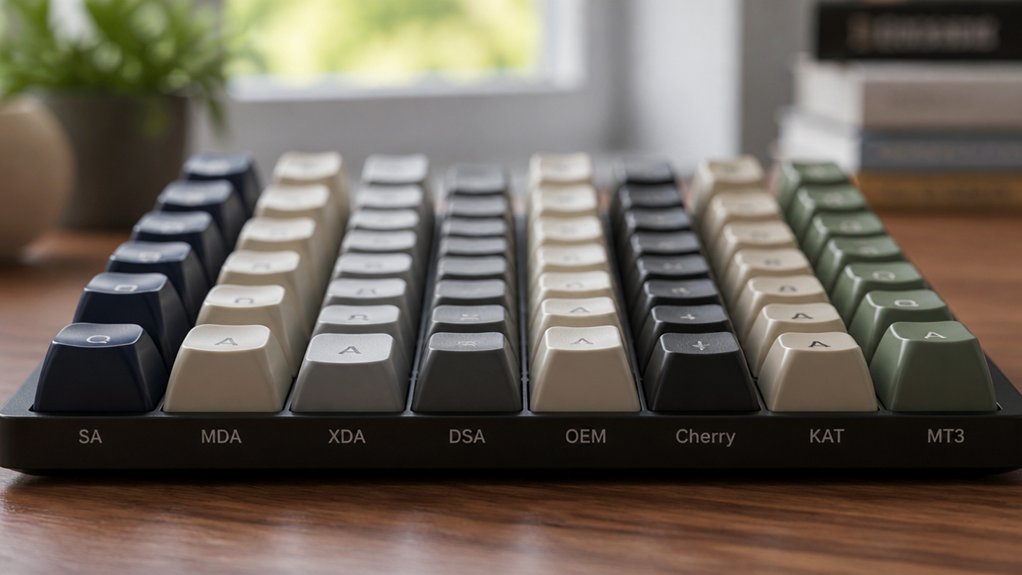
Although many factors influence keyboard acoustics, keycap profile height plays a crucial role in shaping your keyboard’s sound. Taller keycaps, like SA profile keycaps reaching up to 16.5mm, create larger internal cavities that produce a deeper, bassier “thock” with longer resonance.
In contrast, OEM profile keycaps, around 11.9mm tall, strike a balance with a cleaner, slightly crisper sound and shorter decay. The thickness and overall keycap height increase the mass and internal volume, amplifying lower-frequency resonance that enriches your mechanical keyboard’s sound depth.
When you choose between profiles, you fundamentally adjust the sound character and feel, directly influencing your typing experience by changing how each keystroke resonates through your board.
How Keycap Profile Shape Affects Typing Noise
You’ll notice that the shape of your keycaps influences the sound more than you might expect. Sculpted profiles create subtle variations in pitch and resonance across different rows.
The curvature of the keycap tops changes how sound waves bounce inside. Understanding these details helps you fine-tune your keyboard’s acoustic character.
Profile Impact On Acoustics
When you type on keyboards with taller, sculpted keycaps like SA or ASA, you’ll notice a deeper, resonant “thock” sound thanks to their larger internal cavities. This increased keycap height enhances sound resonance, producing rich acoustic tones. Medium profiles like OEM balance clarity and depth, while low profile keycaps deliver sharper, brighter clacks due to reduced reverberation. Your choice of keycap profile drastically shapes your mechanical keyboard’s typing sound, affecting how each keystroke echoes.
| Keycap Profile | Typing Sound Characteristics |
|---|---|
| SA keycaps | Deep, resonant thock, longer decay |
| OEM keycaps | Balanced, clean, slightly crisp |
| Low profile | Sharp, bright, immediate clack |
| Uniform (DSA) | High-pitched, sharper, less resonance |
Sculpting And Sound Variation
Beyond overall keycap height, the sculpted shapes of profiles like SA and ASA impact typing sound by varying cavity sizes row to row. This variation in cavity volume alters resonance and pitch, giving each row distinct acoustic signatures.
Taller sculpted profiles create larger internal cavities that produce a deeper, bassier thocky sound with longer decay, enhancing your typing experience. In contrast, uniform keycap profiles such as DSA or XDA have consistent cavity volumes and row heights, resulting in sharper, higher-pitched noises.
The angled shaping of a sculpted profile also changes how keycaps vibrate on impact, further influencing the typing sound’s timbre. By choosing your keycap profiles carefully, you control subtle yet meaningful variations in typing sound that elevate both feel and auditory feedback.
Sound Differences Between Sculpted and Uniform Keycap Profiles
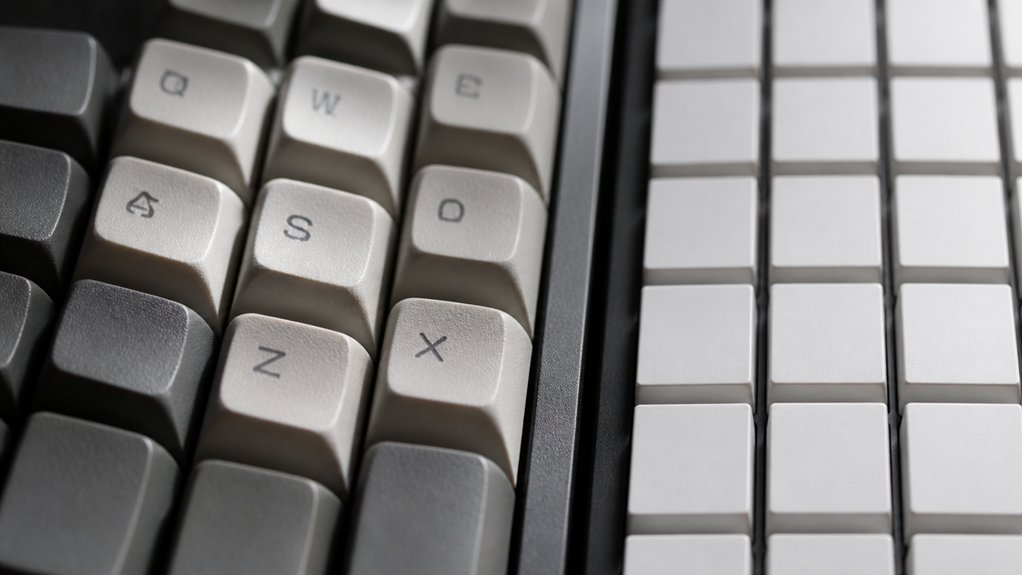
How does the shape of your keycaps change the sound of your keyboard? Sculpted keycap profiles like SA keycaps offer varied row heights and angled tops, creating a more resonant sound with deeper, thocky tones due to larger internal cavities. In contrast, uniform keycap profiles such as DSA keycaps feature consistent keycap height and shape, producing a sharper, high-pitched sound with quicker decay and uniform acoustics across rows.
| Feature | Sculpted Keycap Profiles | Uniform Keycap Profiles |
|---|---|---|
| Keycap Height | Varies by row (taller keys) | Consistent height |
| Sound | Resonant, bass-rich, thocky | Bright, high-pitched, clacky |
| Keycap Acoustics | Layered, subtle pitch variations | Uniform, immediate feedback |
| Example Profiles | SA keycaps, KSA | DSA keycaps, XDA |
| Typing Experience | Deeper sound, longer decay | Faster, sharper acoustic click |
How Keycap Profile Thickness Influences Acoustic Feedback
You’ll notice that thicker keycap profiles add mass and lower the sound’s pitch, giving you a deeper, “thocky” feedback.
Different profiles—from tall SA caps to slim DSA styles—create distinct acoustic signatures based on their thickness and cavity size. Understanding these differences helps you pick the right profile to match the sound you want from your keyboard.
Thickness Impact On Sound
When you press a key, the thickness of the keycap walls plays an essential role in shaping the sound you hear. Keycap thickness directly affects the typing sound on your mechanical keyboard, with thicker walls producing deeper, more resonant tones.
For example, PBT keycaps with wall thickness around 1.8 mm create a fuller, “thockier” acoustic feedback by increasing stiffness and mass. In contrast, thinner ABS keycaps, typically between 1.0 to 1.2 mm, yield sharper, brighter clicks due to less damping.
Small differences in wall thickness across keycap profiles influence how vibrations resonate inside the caps, altering sound quality. By choosing keycaps with varied thickness, you can fine-tune your keyboard’s acoustic feedback to match your preferred sound signature.
Acoustic Differences By Profile
Thickness plays a big role in shaping your keyboard’s sound, but the overall keycap profile adds another layer of acoustic personality. Taller keycap profiles like the SA profile with its ~16.5mm height create a deeper, bassier typing sound thanks to larger internal cavities and thicker walls. This produces longer resonance and a satisfying “thock.”
Medium-height profiles such as OEM (~11.9mm) deliver a balanced acoustic tone, blending clarity with moderate decay for clean feedback. Meanwhile, uniform, low-profile keycaps like the DSA profile (~7.6mm) generate sharper, higher-pitched clicks due to smaller cavities and lighter mass.
The keycap height and sculpting in mechanical keyboards impact vibration and resonance, so choosing your profile influences not only feel but also the acoustic feedback you get from every keystroke.
How Keycap Materials Affect Keyboard Sound Quality
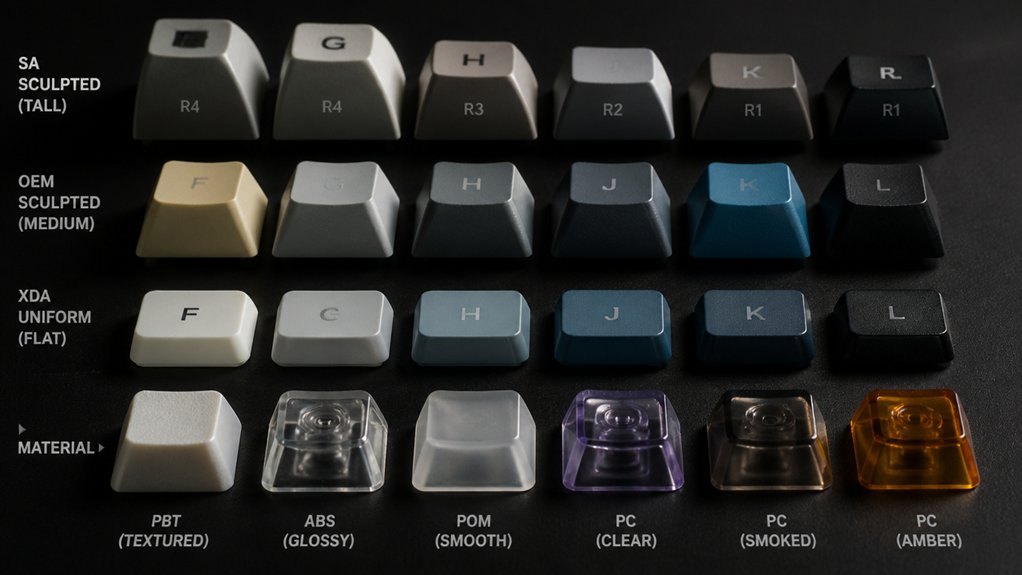
Although keycap profile shapes influence typing feel, the material you choose plays a crucial role in shaping your keyboard’s sound. Different keycap materials affect your keyboard sounds and typing sound uniquely, altering the acoustic tone you experience.
Here’s how keycap materials impact sound quality:
- ABS (Acrylonitrile Butadiene Styrene) produces lighter, higher-pitched, and clacky keyboard sounds that brighten as they wear.
- PBT (Polybutylene Terephthalate) offers a deeper, thocky sound, thanks to its porous structure and better internal damping.
- POM keycaps deliver a muted yet crisp and buttery acoustic tone, while ceramic keycaps bring sharp, bell-like resonance. Rubber-coated keycaps absorb high frequencies, creating a softer, quieter typing sound.
Choose your keycap materials carefully to tailor your keyboard’s acoustic experience.
Which Keycap Profiles Produce the “Thocky” Sound Enthusiasts Love?
Keycap materials set the tone, but the shape and profile of your keycaps really shape the sound signature your keyboard produces.
If you want that coveted “thocky” sound, look to tall, sculpted rows like SA and KAT profiles. These high-profile keycaps, especially in thick PBT, create larger internal cavities that amplify deep, resonant tones. SA’s spherical, concave tops and rounded edges enhance finger landing and boost that bass-heavy sound enthusiasts cherish. KAT offers a medium-high profile with smooth curvature, striking a balance between typing comfort and rich sound depth.
Avoid flat or low-profile designs; they lack the volume for thockiness, delivering sharper, clackier tones. Choosing the right keycap profiles transforms not just sound but your overall typing experience.
How Low-Profile Keycaps Soften and Quiet Your Keystrokes
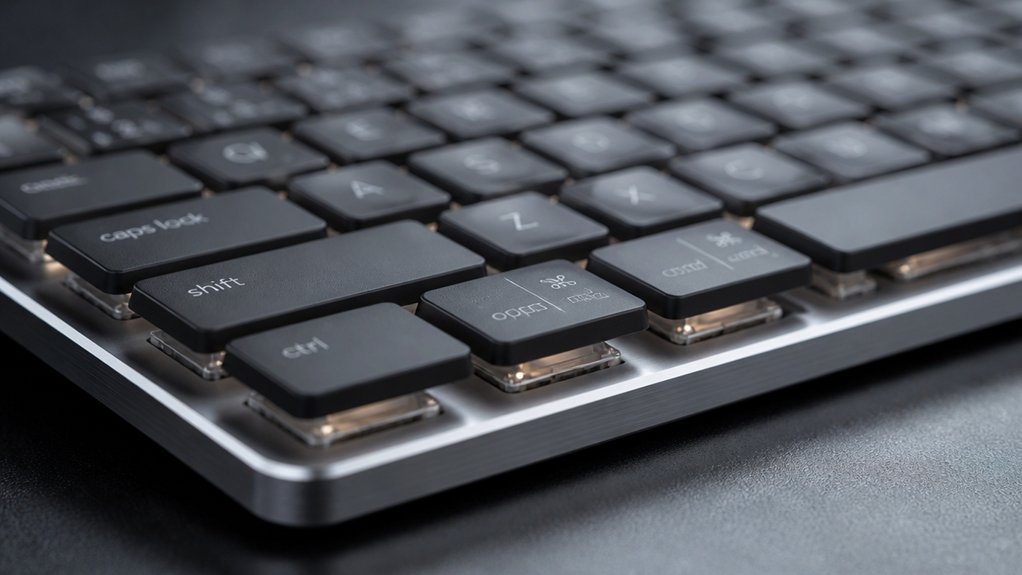
You’ll notice that low-profile keycaps cut down on noise, offering a softer, quieter typing experience perfect for shared spaces. Their reduced height also means your fingers don’t have to travel as far, which can make typing feel faster and less tiring.
Let’s explore how these benefits come together to create a more muted and comfortable keystroke.
Quiet Sound Benefits
When you switch to low-profile keycaps like Chiclet or MBK, you immediately notice how much quieter your typing becomes. Their reduced height and smaller cavity volume dampen sound by limiting resonance, softening your keyboard’s acoustic signature considerably.
Whether made of PBT or ABS, these caps produce quieter keystrokes compared to taller sets.
Here’s why low-profile keycaps benefit your sound environment:
- Reduced Cavity Volume: Smaller internal space absorbs and dampens noise effectively.
- Material Choice: PBT caps enhance sound dampening more than ABS, creating softer output.
- Height and Profile: Lower height means less sharp, clacky sounds and smoother acoustic signatures.
Reduced Finger Extension
Because low-profile keycaps typically measure between 2mm and 7.6mm in height, you’ll experience less finger extension and shorter finger lift distances while typing. This reduction in finger extension means your keystrokes are softer, as your fingers hit the keys with less force, minimizing contact noise.
Low-profile keycap profiles, such as Chiclet or DSA, have smaller internal cavities that reduce resonance, resulting in a quieter, higher-pitched sound compared to taller keycaps. The uniform row shapes common in low-profile sets promote consistent finger movement, cutting down abrupt finger flexion noises during typing.
Choosing Keycap Sound for Your Typing Style
How does your typing style influence the keycap sound you choose? Your typing speed and preference shape your ideal mechanical keyboard sound. Different keycap profiles offer unique sound signatures, so picking the right one is essential.
Your typing speed and style directly shape the sound and feel of your perfect mechanical keyboard keys.
Here’s how to match keycap profiles with your typing style:
- If you like rich, deep feedback, taller profiles like SA with thick PBT keycaps create a “thocky” sound with longer resonance.
- For balanced sound and speed, OEM or Cherry profile keycaps provide crisp yet moderate acoustics, perfect for varied typing.
- If you prefer fast, sharp typing cues, uniform low-profile DSA keycaps produce bright, “clacky” sounds.
Choosing OEMPBT or other profiles aligns your tactile feel with the sound signature that fits you best.
Using Profile and Material Combinations to Tune Keyboard Sound
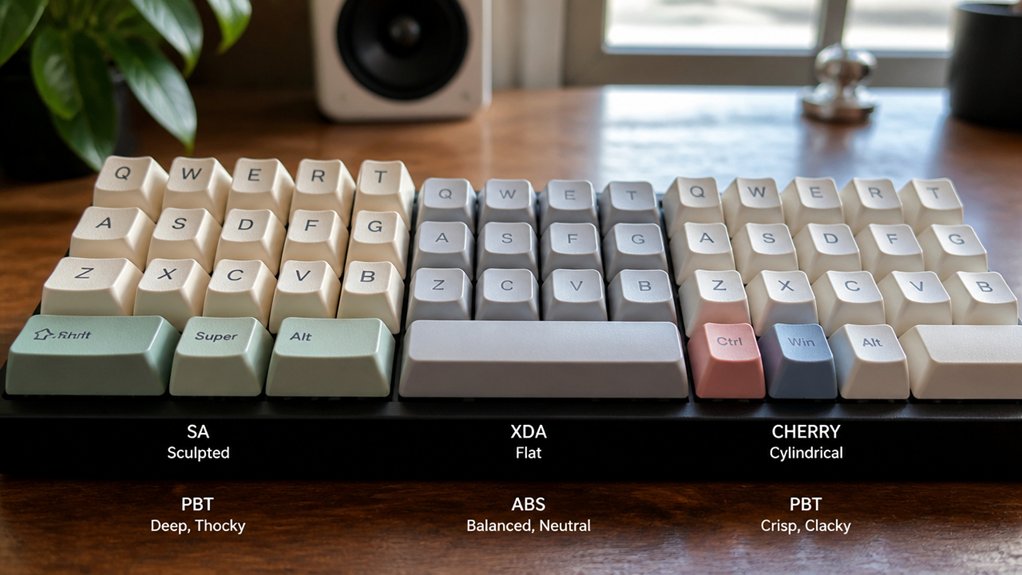
Although keycap profile alone shapes your keyboard’s sound, combining it thoughtfully with material choices lets you fine-tune your typing acoustics. Taller profiles like SA produce a deep, bassy thock sound thanks to larger internal cavities, which PBT keycap material further enriches with its density.
If you prefer a crisper D typing sound, pairing a medium profile height like OEM with ABS caps creates a cleaner, moderately sharp tone with shorter decay. Low-profile keycaps, often thinner ABS, increase pitch and brightness but reduce resonance.
Balancing Sound and Comfort With Keycap Profiles
When choosing keycap profiles, you’ll find that sound and comfort often pull in different directions. Taller profiles like SA heighten bass tones, creating a rich “thock,” but their keycap height may reduce typing comfort.
Sound and comfort often conflict; taller keycaps like SA boost bass but can lessen typing ease.
Medium options such as OEM and Cherry profiles strike a balance with cleaner sound and better ergonomics. Uniform profiles like DSA offer maximum comfort but produce higher-pitched, clackier sound due to smaller cavity resonance.
Consider these to balance sound and typing comfort:
- SA profile delivers deep acoustic qualities but can hinder speed.
- OEM and Cherry profiles provide a balanced sound with ergonomic support.
- DSA profile favors comfort at the cost of sharper sound.
Your choice hinges on whether you prioritize rich sound or typing comfort in keycap profiles.
Frequently Asked Questions
Can Keycap Sound Be Altered Without Changing the Profile?
Yes, you can alter keycap sound without changing the profile by using different materials like PBT or ABS, adding dampening mods, or adjusting switch lubricants. These tweaks impact the sound without affecting key shape or feel.
Do Keycap Profiles Affect Keyboard Sound Recording Quality?
Yes, keycap profiles do affect sound recording quality because different shapes change how sound waves bounce and resonate. You’ll notice some profiles produce clearer, crisper recordings, while others might create muffled or echoey tones.
How Do Ambient Room Acoustics Interact With Keycap Sounds?
You’ll notice ambient room acoustics amplify or dampen keycap sounds, affecting clarity and tone. Hard surfaces reflect noise, causing echoes, while soft materials absorb sound, making typing quieter and more controlled in your recordings.
Are There Specific Profiles That Reduce Keyboard Sound for Offices?
Yes, you can choose keycap profiles like SA or DSA that dampen sound better. Their thicker, denser materials absorb impact noise, making your keyboard quieter, which is great for maintaining a peaceful office environment without distractions.
Can Lubrication Influence the Perceived Sound With Different Profiles?
Yes, lubrication can influence the sound you perceive with different keycap profiles by reducing friction and stem noise. It smooths keystrokes, often making your keyboard feel and sound quieter and more satisfying, regardless of profile shape.
In Summary
By understanding how keycap profiles shape your mechanical keyboard’s sound, you can tailor your typing experience to fit your style. Whether you prefer the crisp feedback of sculpted, thick keycaps or the softer touch of low-profile designs, choosing the right profile and material helps balance sound and comfort. With the right combo, you’ll not only type comfortably but also enjoy the unique acoustic feedback that makes your keyboard truly yours.



