
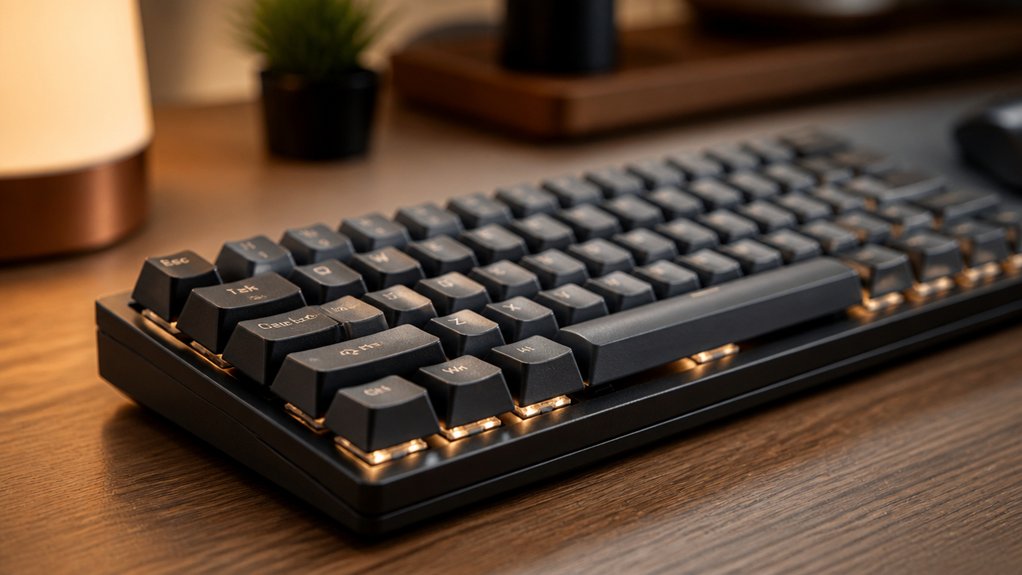
You can reduce typing fatigue by switching to mechanical keyboard switches since they require less actuation force (35–55g) than membranes, easing finger and forearm strain. Mechanical switches give tactile feedback that prevents forceful key presses and muscle overload. Choosing tactile switches helps accuracy and delays fatigue longer than linear ones. Pairing switches with proper ergonomics further lowers stress. If your hands still hurt, learning about switch types and setup can help you type more comfortably and efficiently.
What Causes Typing Fatigue and How Switches Help

Although typing might seem effortless, repeated keystrokes cause cumulative neuromuscular stress that leads to soreness and stiffness in your fingers and forearms. This typing fatigue results from microtrauma to your flexor tendons and sustained muscle activation.
Standard keyboards with high actuation force—around 60 to 80 grams—and inconsistent travel make you bottom out keys or double-tap, increasing finger strain and slowing you down. Mechanical keyboards help by providing precise actuation points between 1.2 and 2.0 millimeters and consistent tactile feedback, which lowers the load on your finger joints. With less need to fully press each key, you reduce strain and enjoy a more comfortable typing experience. In fact, this optimized actuation and feedback system delays fatigue, making typing less of a pain over time.
Mechanical vs Membrane Keyboards: Fatigue Compared
When you switch from a membrane to a mechanical keyboard, you immediately notice how much less effort it takes to press each key. Mechanical keyboards require a lower actuation force (35–55g) than membrane keyboards (60–80g), reducing finger and joint strain and delaying typing fatigue.
Tactile switches on mechanical keyboards also cut down unnecessary key bottoming out, saving milliseconds per keystroke.
Here’s why mechanical keyboards reduce fatigue compared to membrane keyboards:
- They lower forearm muscle activity by 29%, easing prolonged typing.
- Users report 41% fewer morning finger stiffness cases with tactile switches.
- Typing fatigue onset is pushed from 2 hours on membrane keyboards to around 5 hours.
This shows how mechanical keyboards with tactile switches create a more comfortable typing experience.
How Mechanical Switches Reduce Finger and Wrist Fatigue

When you type on mechanical switches, you’ll feel the benefit of precise actuation points that register keystrokes with less effort. These switches require lower force, usually between 35 and 55 grams, which reduces strain on your fingers and wrists over time.
Precise Actuation Benefits
Because mechanical switches feature precise actuation points between 1.2 and 2.0 mm, you don’t have to fully press each key, which considerably reduces finger extension and strain. This precise actuation minimizes the force needed to register keystrokes, lowering typing fatigue.
The consistent tactile feedback from mechanical switches helps you type accurately, avoiding unnecessary key presses that waste energy and increase muscle load.
Three key benefits include:
- Reduced finger strain through shorter key travel and exact actuation.
- Lower muscle fatigue by cutting down on redundant keystrokes.
- Enhanced endurance by delaying fatigue onset during long typing sessions.
Lower Force Requirements
Although typing can put considerable strain on your fingers and wrists, mechanical keyboard switches reduce this stress by requiring markedly less force to actuate. Compared to standard membrane keyboards needing 60–80g, mechanical keyboards typically demand only 35–55g actuation force, lowering your finger exertion with each keystroke. This reduction directly cuts into typing fatigue, letting you work longer without discomfort.
Tactile switches, in particular, help delay the onset of fatigue up to 5.3 hours versus 2.1 hours for membranes by providing precise feedback and minimizing unnecessary presses. Additionally, mechanical keyboards reduce dwell time per key, preventing double taps and bottoming out, which further decreases cumulative finger effort. By choosing mechanical switches with lower actuation force and tactile feedback, you markedly ease finger and wrist strain during prolonged typing sessions.
Actuation Force: Why Light Switches Lower Typing Fatigue
If you want to reduce typing fatigue, choosing mechanical switches with lighter actuation force can make a big difference. Mechanical switches requiring only 35–55g of force reduce muscle strain and delay fatigue, unlike the heavier 65–85g force membrane keyboards.
With less effort, your fingers avoid excessive compression and repetitive strain injuries. Here’s why light actuation force matters:
- It lowers cumulative neuromuscular stress, minimizing microtrauma in finger tendons.
- It enables earlier keypress registration, so you don’t have to bottom out keys.
- It greatly decreases morning finger stiffness by improving tactile feedback without added force.
Using light-force mechanical switches can nearly double your typing endurance, letting you type longer comfortably and reducing overall typing fatigue.
Tactile vs Linear Switches: Finding Comfort and Accuracy
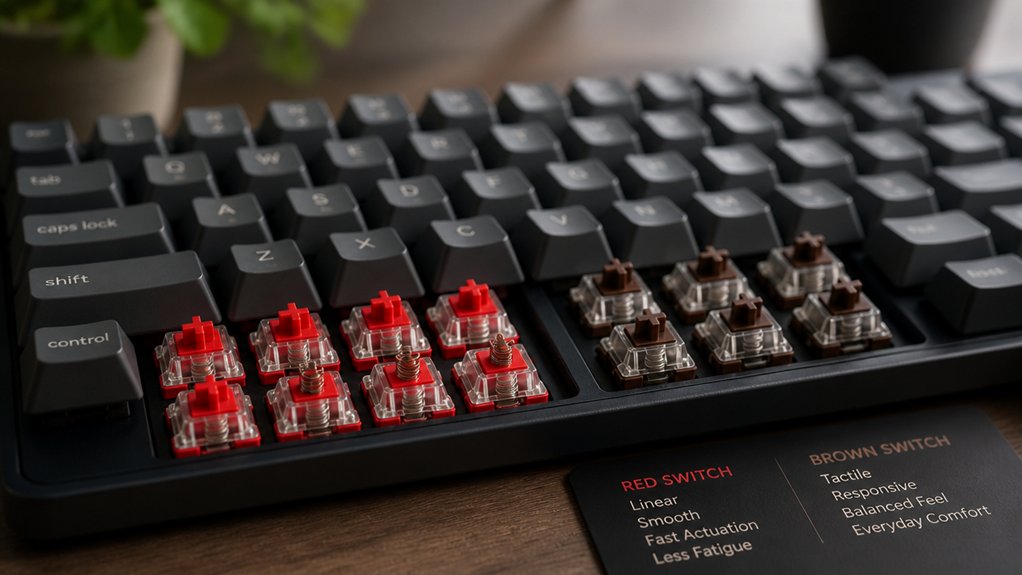
Choosing a lighter actuation force sets the stage for deciding between tactile and linear mechanical switches, each offering unique benefits for comfort and accuracy. Tactile switches give you a physical bump that signals actuation, improving typing accuracy and reducing finger fatigue by preventing unnecessary bottoming out. Linear switches provide smooth keystrokes without feedback, ideal for quiet, prolonged typing with minimal finger resistance.
| Switch Type | Actuation Force (g) | Benefits |
|---|---|---|
| Tactile | 45–55 | Enhanced typing accuracy, less finger fatigue |
| Linear | 35–45 | Smooth, quiet keystrokes, low resistance |
| Membrane | 65–85 | Higher force, more finger fatigue |
Choose tactile if you want precision, or linear switches for extended comfort.
Early Actuation Points and Their Role in Reducing Fatigue
When you use switches with early actuation points, you reduce the distance your fingers need to press to register a key, which eases finger extension and muscle fatigue. These switches typically activate between 1.2 to 2.0 mm of key travel, cutting down unnecessary finger movement and reducing strain. Early actuation force paired with tactile feedback encourages lighter keystrokes, preventing you from bottoming out and lessening joint compression.
Here’s why early actuation points help:
- They lower neuromuscular stress by reducing key travel distance.
- They decrease muscle activity in forearms by about 29%, supporting longer typing.
- They reduce the common 15–20 ms dwell time per keystroke, making typing more efficient.
Early actuation switches balance comfort and performance, making fatigue less likely.
How Switch Feedback Improves Typing Rhythm and Accuracy

Because tactile mechanical switches provide a clear physical bump at the point of actuation, you get immediate feedback that helps maintain a steady typing rhythm. This tactile feedback signals key registration, so you avoid unnecessary bottoming out and double-tapping, speeding up your keystrokes by 15–20 milliseconds each time.
With consistent feedback, you rely less on looking at the screen, allowing smoother, more confident typing. That precision boosts your typing accuracy by reducing missed or extra key presses, which in turn cuts down compensatory finger movements that cause fatigue. A 2023 study even found users of tactile mechanical switches had 41% fewer cases of morning finger stiffness.
In short, the feedback from mechanical switches directly supports a more efficient rhythm and higher accuracy, helping you type longer without strain.
Key Travel Distance and Its Impact on Finger Strain
Feeling the satisfying bump of a tactile switch helps you type with rhythm and accuracy, but the physical distance your fingers travel with each keystroke plays a big role in how fatigued they feel.
On a mechanical keyboard, key travel distance typically ranges from 3.5 to 4.0 mm, which helps reduce finger strain by distributing effort and allowing more natural finger motion. Longer travel distance also means you can type with less actuation force, lowering the risk of repetitive strain.
Here’s why it matters:
- Adequate key travel smooths typing motion, decreasing tendon stress.
- Sufficient travel distance prevents harsh impacts that add fatigue over time.
- Lighter actuation force paired with proper key travel boosts typing endurance.
Choosing a mechanical keyboard with ideal key travel helps you type comfortably longer.
Avoiding Bottoming Out: Protecting Joints From Fatigue

If you want to protect your joints and reduce fatigue during long typing sessions, avoiding bottoming out on your mechanical keyboard is essential. Bottoming out increases joint compression and finger extension load, leading to greater fatigue and potential injury.
Mechanical keyboards with precise actuation points—typically between 1.2 and 2.0 mm—allow your keystrokes to register before the key travels fully, preventing unnecessary force. Tactile switches provide early feedback so you can stop pressing once the key actuates, cutting down on strain.
Forearm Muscle Activity Differences Among Switch Types
When you type on different switch types, your forearm muscles work at varying levels of intensity.
Studies show tactile mechanical switches reduce muscle load considerably compared to membrane keyboards, delaying fatigue. Understanding these differences helps you choose switches that keep your forearms feeling fresh longer.
Forearm EMG Variations
Although typing may seem effortless, the type of keyboard switch you use greatly affects forearm muscle activity. Studies show forearm EMG activity decreases by about 29% with tactile mechanical keyboards compared to membrane ones, thanks to their clear actuation feedback. This reduces unnecessary finger force and lessens muscle fatigue.
Mechanical switches also delay fatigue onset and ease muscle strain.
Here’s how different switches influence forearm EMG variations:
- Tactile mechanical keyboards reduce neuromuscular stress and forearm EMG activity.
- Linear mechanical switches extend the time before muscle fatigue sets in.
- Consistent switch actuation lowers extensor carpi radialis muscle strain during long typing periods.
Choosing the right mechanical switch can greatly reduce forearm muscle fatigue and improve comfort.
Switch Type Muscle Load
Because different mechanical keyboard switches vary in actuation force and feedback, they impact your forearm muscle activity in unique ways.
Mechanical keyboard switch types with lighter actuation forces (35–55g) like tactile switches reduce muscle strain considerably compared to standard membrane keyboards requiring 60–80g force. Using tactile switches lowers your forearm flexor muscle activity by 29%, delaying fatigue onset to around 5.3 hours. Linear switches also cut down muscle load by demanding less force, but may cause fatigue slightly earlier at 4.9 hours.
The precise actuation points and consistent force curves of mechanical switches prevent forceful bottoming out, reducing cumulative muscle activation. Choosing the right mechanical keyboard switch type can greatly ease muscle strain and extend your typing comfort over long sessions.
Best Switch Brands for Smooth, Comfortable Typing
What makes a mechanical keyboard switch truly comfortable for long typing sessions? It boils down to smooth keystrokes, balanced actuation force, and reliable switch type.
As a keyboard enthusiast, choosing the right brand impacts your typing comfort and reduces fatigue. Here are three top picks:
- Gateron: Known for smoothness and affordability, these switches lower finger fatigue with lighter actuation force.
- Cherry MX: Especially Brown and Red variants, they offer durability and well-balanced actuation ideal for long hours’ comfortable typing.
- Durock & KTT: Favored for smooth travel and consistent actuation force, these high-quality switches minimize joint compression.
These brands provide mechanical keyboards with actuation forces between 35–55g, helping delay fatigue onset compared to typical membrane keyboards.
How Switch Lubrication and Mods Reduce Typing Fatigue
How can a simple tweak like lubrication transform your typing experience? Switch lubrication reduces internal friction in mechanical keyboards, making each keystroke smoother and requiring less finger effort. This means you spend less energy pressing keys, substantially reducing typing fatigue.
By applying high-quality lubricants to switch stems, you’ll notice less scratchy texture and quieter operation, improving comfort during long typing sessions. Additionally, mods such as adding foam or O-rings absorb impact noise and soften key bottoming, which eases strain on your fingers and joints.
Together, these adjustments lower the neuromuscular stress from finger extension and key dwell time, allowing you to type longer without discomfort. With switch lubrication and thoughtful mods, you actively reduce strain and increase endurance during your typing tasks.
Integrating Switch Choice With Keyboard Setup and Posture
You’ll notice that the right mechanical switch can ease finger fatigue, but pairing it with proper keyboard height and wrist alignment really boosts comfort.
Position your keyboard so your elbows sit at a 90-degree angle and your wrists stay straight to get the full benefit. Combining these adjustments helps reduce strain and keeps you typing longer with less fatigue.
Switch Selection Impact
Although choosing the right mechanical switch alone won’t eliminate fatigue, integrating switch selection with your keyboard setup and posture can make a significant difference. Mechanical keyboards with tactile feedback and an actuation force between 45–55g reduce finger strain by avoiding forceful bottoming out, boosting typing efficiency.
To optimize your experience, consider these points:
- Select switches with actuation points around 1.2–2.0 mm to complement neutral wrist posture.
- Pair linear, low-force switches (35–45g) with proper keyboard tilt and wrist support to minimize strain.
- Choose high-quality switches from trusted brands to delay fatigue during long sessions.
Posture And Setup
Selecting the right mechanical switches sets a strong foundation, but pairing them with proper posture and keyboard setup maximizes their ergonomic benefits. Position your keyboard at elbow height with forearms parallel to the floor and wrists neutral to reduce tendon stress.
Choose tactile mechanical keyboard switches with lighter actuation forces (45–55g) to decrease finger strain and avoid sacrificing comfort for higher actuation force. Use a soft, non-slip wrist rest that supports the heel of your hand without pressing the carpal tunnel, promoting better wrist posture.
Adjust keyboard tilt with its feet so your forearms stay level or slightly angled downward, preventing wrist extension or flexion. Consistent, light keystrokes on well-chosen switches reduce compensatory wrist movements, enabling you to type longer without fatigue.
When to Seek Medical Advice for Persistent Typing Fatigue
How do you know when your typing fatigue calls for medical advice? If discomfort persists beyond three weeks despite using mechanical keyboards and maintaining good ergonomics, it’s time to consult a certified hand therapist. Watch for these signs:
If typing discomfort lasts over three weeks despite good ergonomics, seek advice from a certified hand therapist.
- Chronic dorsal hand pain, worsening numbness, or slowed median nerve conduction.
- Wrist collapse, pinky hyperextension, or other harmful compensatory movements.
- Symptoms consistent with mild carpal tunnel syndrome that don’t improve with basic treatments.
Mechanical keyboards help reduce typing fatigue but can’t fix injuries caused by poor posture or other factors.
Persistent pain or dysfunction suggests a deeper issue needing professional evaluation to prevent long-term damage. Don’t wait—early intervention by a hand therapist can keep you typing comfortably and safely.
Frequently Asked Questions
What Are the Best Keyboard Switches for Fatigue?
You’ll want tactile or linear mechanical switches with actuation forces between 35–55g. They give clear feedback, reduce finger strain, and delay fatigue effectively. Avoid heavy switches above 60g to keep typing comfortable for longer sessions.
What Does a 96% Keyboard Not Have?
A 96% keyboard doesn’t have a separate numeric keypad, extra navigation keys, or dedicated macro and multimedia controls. You won’t find split ergonomic designs either, since it prioritizes compactness with nearly all standard keys included.
Why Do Gamers Hate Membrane Keyboards?
You hate membrane keyboards because they feel mushy, need more force, and lack precise feedback. This slows your reactions, causes finger fatigue, and leads to accidental key presses, making gaming less responsive and enjoyable overall.
Does a Mechanical Keyboard Improve Productivity?
Yes, a mechanical keyboard boosts your productivity by improving typing accuracy and rhythm, reducing finger strain, and lowering muscle fatigue. You’ll type longer with less discomfort, helping you stay efficient throughout your work or gaming sessions.
In Summary
If you want to reduce typing fatigue, choosing the right mechanical keyboard switch makes a big difference. Lighter actuation forces and tactile feedback can ease finger and wrist strain, letting you type longer with comfort. Don’t forget that mods like lubrication also help smooth your keystrokes. Pair your switch choice with a good setup and posture to maximize relief. And if fatigue sticks around, it’s smart to consult a medical professional for advice.



