
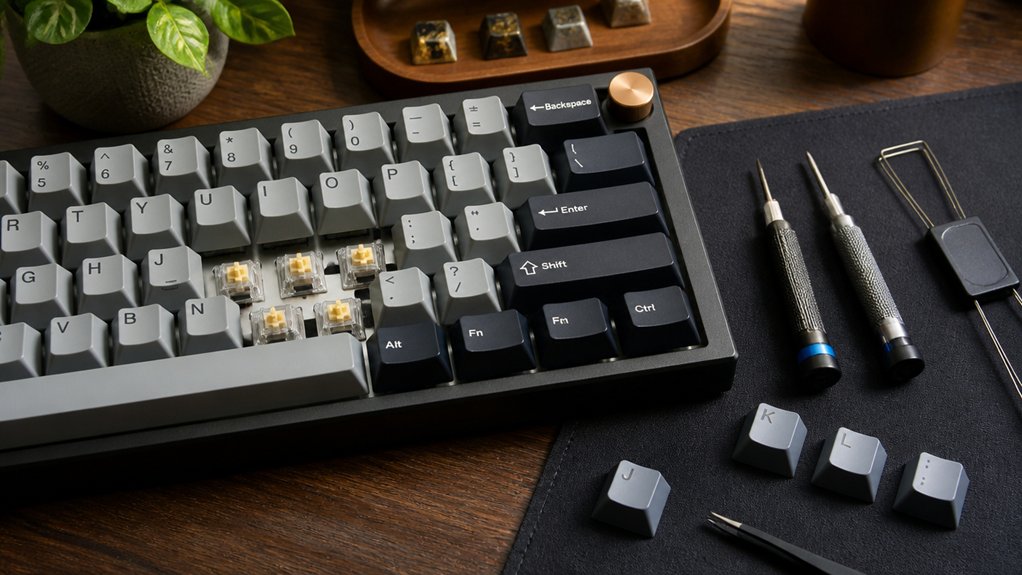
To get smooth keystrokes, choose mechanical switches with tight stems and dustproof covers to reduce wobble and debris. Lubricate switches and springs lightly for quieter, smoother presses, and adjust spring weights to match your typing style. Pick low-friction keycaps like PBT or POM for easy finger travel, and clean switches regularly to maintain consistency. Combine lubrication with O-rings or foam for noise reduction. Keep customizing your setup, and you’ll soon discover how to perfect your typing experience even more.
Why Smooth Keystrokes Matter and How to Achieve Them

Although you mightn’t notice it at first, smooth keystrokes make a big difference in typing comfort and efficiency by reducing finger fatigue through lowered friction and resistance.
To achieve smooth keystrokes, you want to focus on mechanical switches designed for consistent, frictionless key travel. Linear switches, like Cherry MX Reds or Gateron Reds, are great options because they provide smooth, bump-free presses.
Lubrication plays a key role too—it lowers switch friction, resulting in quieter, smoother typing. Applying specialized oils to the switch stems can dramatically enhance smoothness.
If you prefer convenience, pre-lubed switches such as Gazzew Boba U4T or Akko V3 Cream Blue Pro offer out-of-the-box smoothness with reduced wobble. Prioritizing these elements will greatly improve your overall typing comfort.
Choose Mechanical Switches With Tight Stem Tolerances and Dustproof Covers
To build on achieving smooth keystrokes, selecting mechanical switches with tight stem tolerances and dustproof covers can make a noticeable difference. Tight stem tolerances minimize wobble, boosting key stability and typing precision while reducing friction. Dustproof stem covers prevent debris from disrupting smooth switch operation, enhancing switch longevity and maintaining consistent keystroke feel. Switches like the Gazzew Boba U4T provide a balanced combination of durability and premium tactile response.
| Feature | Benefit | Example Switch |
|---|---|---|
| Tight stem tolerances | Reduce key wobble | Gazzew Boba U4T |
| Dustproof stem covers | Block debris ingress | Akko V3 Cream Blue Pro |
| Reduced friction | Enhance keystroke feel | Cherry MX Silent |
| Key stability | Improve typing precision | Kailh Box Switches |
Choosing these switches sets a solid foundation for smooth, reliable typing.
Lubricate Switches for Smoother, Quieter Typing
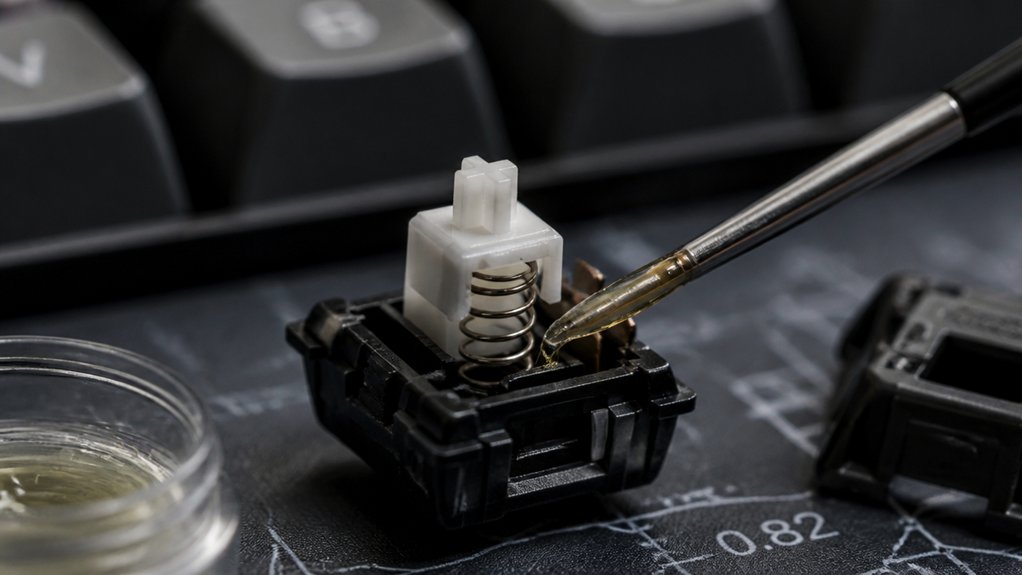
You can dramatically improve your typing experience by lubricating your switches with the right oils and techniques. Choosing the proper lubricant and applying it carefully reduces friction and noise, making every keystroke smoother.
Let’s explore the types of lubricants, how to apply them, and the key benefits you’ll notice.
Types Of Lubricants
Choosing the right lubricant can make a noticeable difference in how your keyboard switches feel and sound. Lubricants like Krytox GPL 205g0 and Tribosys 3204 are popular choices because they reduce friction on plastic switch components, enabling smooth operation and enhanced keypress feel. Thicker greases offer better noise dampening but can slow switch return if overapplied. Here’s a quick overview:
| Lubricant Type | Characteristics |
|---|---|
| Krytox GPL 205g0 | Thick grease, excellent noise dampening |
| Tribosys 3204 | Smooth, long-lasting, gentle on plastics |
| Lightweight Oils | Minimal drag, best for stabilizers or springs |
Applying lubricants evenly on the switch slider and key contact points guarantees quieter, smoother typing without sacrificing responsiveness.
Application Techniques
Applying lubricant precisely to the switch components can transform your typing experience by reducing friction and noise. To get smooth, quiet mechanical keyboards, apply a thin layer of specialized lubricant on both the stem and spring.
Use higher-viscosity lubricant on the stem for smooth keystrokes and lighter oil on the spring to maintain responsiveness without losing tactility. While pre-lubed switches like the Gazzew Boba U4T come ready for smooth, quiet typing, manually lubing your switches guarantees peak performance and longevity.
Benefits Of Lubrication
Although mechanical switches perform well out of the box, lubricating them enhances your typing experience by reducing friction between the stem, housing, and spring.
This simple step transforms your mechanical keyboards by making every keystroke smooth and comfortable. Here are key benefits of lubrication you’ll notice:
- Reduced friction leads to smoother keystroke travel and improved typing comfort.
- Lubrication helps eliminate scratchy or gritty feelings common in unlubricated switches.
- It greatly reduces noise by softening impacts and dampening spring sounds.
- Proper lubrication extends your switch’s lifespan by minimizing mechanical wear.
- It prevents dust buildup inside the switch housing, keeping your switches performing well longer.
Adjust Spring Weights to Suit Your Typing Style
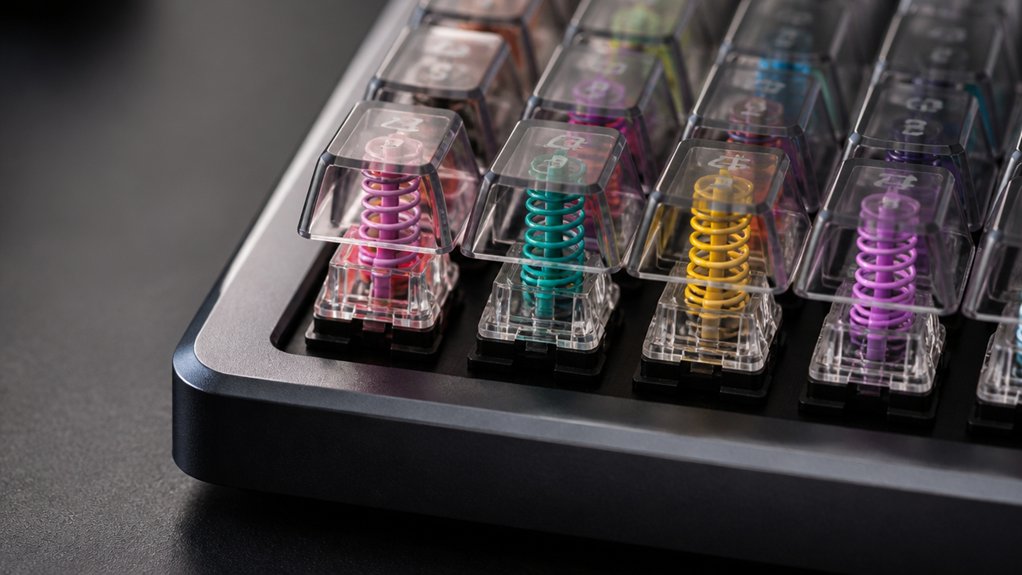
When you adjust the spring weights in your keyboard switches, you can customize the resistance to better match your typing style. Mechanical keyboard switches with lighter springs—around 35-45g—offer less key resistance, making keystrokes faster and smoother. This reduces finger fatigue during long sessions but may increase the chance of bottoming out.
Heavier springs above 60g provide more resistance, boosting typing accuracy by preventing accidental key presses and creating a deliberate tactile feel. You can customize spring tension by swapping to springs that fit your individual typing force and rhythm, balancing smoothness and feedback.
Some switches, like the Gazzew Boba U4T, even offer multiple spring weights, so you can find the perfect match between comfort and control for your unique typing style.
Select Keycaps With Low-Friction Materials for Smoother Travel
Since your fingertips constantly interact with the keycaps, choosing those made from low-friction materials like POM or PBT can greatly improve smoothness during typing. These materials reduce friction, making each keystroke feel effortless and fluid.
When selecting keycaps, consider how the material and design impact your typing experience.
- POM plastic offers a smooth surface with low friction and high wear resistance.
- PBT keycaps balance durability with sustained smooth travel distance.
- Sculpted keycap shapes enhance finger positioning, reducing lateral friction.
- Smooth surface finishes help your fingers glide easily.
- Avoid rough or textured keycaps to minimize resistance during each keystroke.
Choosing the right keycaps lets you type with less effort and more precision, improving overall comfort and efficiency.
Use Quality Mechanical Keyboard O-Rings and Foam to Reduce Noise
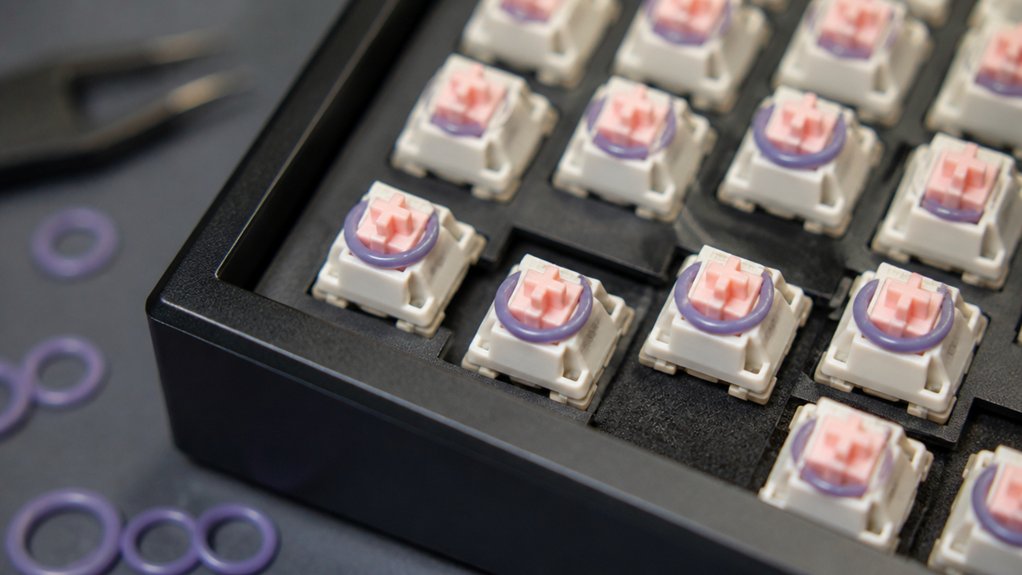
To reduce noisy keystrokes, you can add mechanical keyboard O-rings and foam, which absorb impact and soften vibrations. O-rings fit around switch stems, cushioning the keystroke and reducing typing noise by lessening the harsh bottom out feel.
Foam placed inside the keyboard case or beneath keycaps enhances sound dampening by minimizing hollow resonance and softening vibration. Together, O-rings and foam effectively reduce noise, transforming loud switch sounds into quieter, muted “thocks” many typists prefer.
You can customize the keystroke depth and sound dampening by selecting O-rings with different hardness levels. Installing these sound-dampening materials not only quiets your keyboard but also improves typing comfort by preventing harsh bottoming out, ensuring smoother, more enjoyable keystrokes every time you type.
Clean and Maintain Switches Regularly for Consistent Performance
To keep your switches feeling smooth, regularly clear out dust and debris using compressed air or a small brush.
Make sure to schedule routine lubrication with the right oils to reduce friction and maintain consistent performance. Taking these simple steps helps prevent scratchy keystrokes and extends your keyboard’s lifespan.
Prevent Dust Build-Up
A clean keyboard is key to maintaining smooth switch performance. Prevent dust build-up on your mechanical keyboard by following these simple steps:
- Remove keycaps regularly and use compressed air or a soft brush to clear dust and debris from switch housings and stems.
- Clean non-electronic parts gently with isopropyl alcohol to dissolve residue without harming switches.
- Avoid eating or drinking near your keyboard to minimize dust and particle ingress that cause stiffness.
- Apply switch lubricants sparingly after cleaning to reduce friction from trapped dust particles.
- Use keyboard dust covers when not in use to block dust and prolong consistent switch operation.
Use Proper Cleaning Tools
Although cleaning your mechanical keyboard switches may seem tedious, using the right tools guarantees you maintain their smooth performance without causing damage. Start with a soft brush or compressed air to gently remove dust and debris from switch stems and keycaps, avoiding harsh chemicals or excess moisture that could harm your switches.
Regularly clearing buildup between keycaps and switches prevents scratchiness and inconsistent keystrokes caused by friction. While cleaning alone helps, applying switch lubricant (discussed later) further reduces friction for consistent typing feel.
Schedule Routine Switch Lubrication
Since mechanical keyboard switches endure constant friction, scheduling regular lubrication keeps your typing experience smooth and consistent. Regular lubrication reduces friction inside the switch housing, enhancing smooth keypresses and overall typing feel.
To maintain your switches effectively:
- Clean switches thoroughly to remove dust and debris before lubricating
- Apply thin layers of Krytox or compatible lubricant on the switch stem and spring
- Avoid thick lubricants that can hinder switch movement
- Relubricate pre-lubed switches after extended use to sustain performance
- Perform routine cleaning and lubrication to extend switch lifespan and reduce scratchy sounds
Combine Lubrication With Noise-Dampening Accessories for Best Results
When you combine high-quality lubrication with noise-dampening accessories like O-rings and foam padding, your keyboard delivers a noticeably smoother and quieter typing experience.
Lubrication reduces friction inside each mechanical switch, producing a smooth keystroke and lowering harsh sounds. Adding O-rings around switch stems absorbs impact noise from bottoming out, greatly softening the typing sound. Foam padding beneath keycaps further muffles mechanical noise by cushioning keypresses and cutting down on resonance.
Even pre-lubed switches like the Gazzew Boba U4T can benefit from noise-dampening accessories to enhance both keypress feel and overall sound quality. This layered approach of lubrication and noise-dampening works together flawlessly, delivering a superior typing experience that single modifications just can’t match.
Customize and Optimize Your Keyboard Setup Over Time

To keep your keyboard feeling perfect, try swapping out switches to find the exact feel and response you want.
Adding accessories like O-rings or foam mats can soften keystrokes and reduce noise for a more comfortable experience.
Over time, these small adjustments help you craft a setup that matches your typing style and preferences.
Switch Replacement Benefits
Although replacing keyboard switches might seem like a small change, it lets you customize the feel and sound of your keyboard to match your typing style perfectly.
Switch replacement offers you great control over your mechanical keyboard’s performance, boosting both typing comfort and efficiency. When you swap out key switches, you can:
- Adjust actuation force and tactile feedback to suit your typing habits
- Choose quieter linear switches or clicky switches depending on your environment
- Extend your keyboard’s life by upgrading worn switches without buying a new board
- Restore smooth keystroke action by replacing or lubricating aged switches
- Experiment to find the ideal balance between speed, noise, and feedback for your workflow
Accessory Enhancements
Upgrading your keyboard switches opens the door to even more fine-tuning by adding various accessories that enhance your typing experience. Applying high-quality lubrication oils to switch stems reduces friction, delivering smoother, quieter keystrokes.
Installing keyboard O-rings around the stems absorbs impact noise during bottoming out, softening each press and improving your overall typing acoustics. You can take it further by adding foam dampening beneath keycaps, which cushions keystrokes and refines the sound profile.
Don’t forget a desk mat under your keyboard to minimize vibrations and noise. By customizing switch accessories regularly, you can optimize the smooth keystroke feel and tailor the sound profile precisely to your preference and typing style, making your setup uniquely comfortable and efficient over time.
Test and Refine Your Configuration for Lasting Smoothness
When you test different spring weights like 62g, 65g, or 69g, you quickly discover which actuation force strikes the right balance between smoothness and tactile feedback for your typing style.
To achieve lasting smoothness, consider these steps:
- Choose factory pre-lubricated switches or apply high-quality lubrication oils for consistent smooth keystrokes.
- Add O-rings and foam to reduce impact noise and enhance typing comfort.
- Regularly inspect stem stability, favoring dustproof stem covers to minimize wobble.
- Fine-tune keycap fitment and keyboard mounting to reduce vibrations and irregular feedback.
- Experiment with combinations to tailor feel and responsiveness precisely.
Consistent testing and refinement guarantee your keyboard delivers smooth keystrokes and durability, making typing a comfortable, enjoyable experience.
Frequently Asked Questions
How to Make Keyboard Switches Smoother?
You can make your keyboard switches smoother by applying quality lubricant to stems and springs, adding O-rings, choosing pre-lubed switches, using foam dampening inside, and regularly cleaning to remove dust and debris from switch housings.
What Keyboard Is Best for Cerebral Palsy?
You’ll want a keyboard with low-force linear switches like Cherry MX Reds, sculpted keycaps for accuracy, and quiet operation. Customizable options let you adjust switches and key layout to match your strength and dexterity perfectly.
How to Make Your Keyboard Keys Smooth?
You can make your keyboard keys smooth by applying quality lubricant on stems and springs, installing O-rings, choosing pre-lubed switches, and regularly cleaning them. Adding foam inside the case also helps reduce vibrations for a softer feel.
Do Gamers Prefer Membrane or Mechanical?
You’ll find most gamers prefer mechanical keyboards because they offer faster response times, durability, and tactile feedback. Mechanical switches like Cherry MX Reds let you press keys smoothly and quickly, boosting your gaming precision.
In Summary
You’ve got the tips to make your keystrokes smooth and enjoyable. By choosing quality switches, keeping them clean, lubricated, and customizing your setup, you’ll feel the difference with every press. Remember, it’s all about finding what suits your style and refining it over time. Stick with these steps, and your keyboard will stay responsive, quiet, and satisfying—making every typing session a smooth experience you’ll look forward to.



