
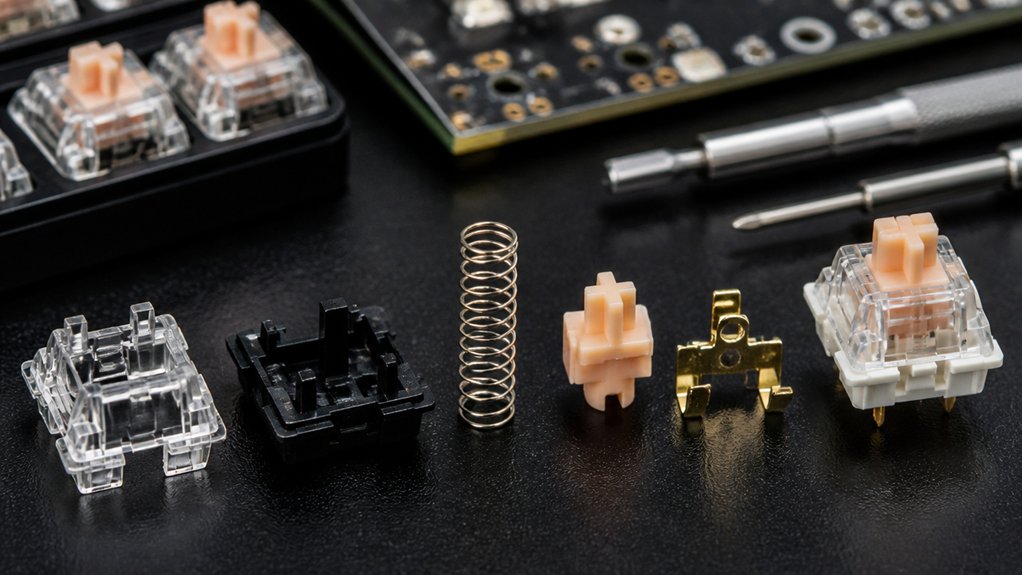
You’ll notice some switches last far longer because they use higher‑grade metals, gold‑plated contacts, and reinforced housings that resist oxidation and wear. Linear designs have simpler contacts, so they endure more keystrokes than tactile or clicky types, which involve extra bumps or snaps that stress plastic and springs. Brands like Cherry MX, Gazzew, and premium Kailh models prioritize these materials and coatings, giving you 50‑100 million presses or more. Keep reading to discover how architecture, lubrication, and maintenance further extend lifespan.
Why Switch Durability Matters for Keyboard Users?

Why does switch durability matter to you? You type, game, and code, and each action adds up to millions of key presses. If the mechanical switches in your board can’t handle that load, they’ll wear out fast, causing inconsistent performance and missed keystrokes.
Durable switches keep the tactile feel and actuation timing steady, so you stay accurate and comfortable over long sessions. They also cut down on replacements and maintenance, saving you money and downtime.
In demanding environments—gaming tournaments, busy offices, or industrial settings—reliable switches mean you won’t lose productivity to flaky inputs. Choosing high‑quality, long‑lasting switches guarantees your keyboard stays dependable, responsive, and enjoyable day after day.
How Material Quality Directly Impacts Switch Lifespan
Because the metal and plastic used in a switch determine how it handles millions of keystrokes, high‑quality materials dramatically extend its lifespan. When you choose mechanical keyboard switches with gold‑plated metal contacts, you’re getting a component that can endure 50‑100 million keystrokes without failure.
Robust plastics and reinforced housings further guard against wear, keeping tactile feedback consistent. Lower‑grade metal and plastic erode faster, causing premature contact loss and uneven actuation.
Premium materials also lower internal friction, preserving smooth responsiveness and stable actuation force over time. Additionally, they resist dust, moisture, and corrosion, shielding the switch from environmental damage. In short, material quality directly fuels durability, ensuring each keystroke feels as reliable as the first.
Which Brands Deliver the Best Switch Durability?

High‑quality materials give a switch its longevity, and the brands that consistently pair those materials with solid engineering set the benchmark for durability.
Cherry MX switches lead the pack, offering 50‑100 million keystrokes and unmatched reliability. Kailh follows closely, delivering affordable mechanical switches that rival Cherry’s durability while keeping costs low. Gateron balances smooth feel and robust construction, providing similar million‑keystroke lifespans without sacrificing performance.
Razer tailors its switches for gamers, ensuring consistent durability under intense, prolonged use. Outemu, though budget‑focused, still meets competitive durability standards and works well in entry‑level keyboards.
How MX‑Compatible vs. Low‑Profile Architecture Affects Lifespan
If you compare the two designs, you’ll see that MX‑compatible switches, with their larger housings and metal contacts, generally outlast low‑profile ones. The MX‑compatible architecture packs a sturdier spring, a bigger stem, and metal contacts that dissipate heat and resist wear, pushing the lifespan toward 50‑100 million keystrokes.
Low‑profile switches, built for slimness, use shorter travel distances and lighter materials; those trade‑offs can shorten durability when you type aggressively or game for hours. Because MX‑compatible models tolerate higher impact forces and sustain less deformation over time, their lifespan stays higher under heavy use. In contrast, low‑profile designs may need replacement sooner if you demand peak durability from your keyboard.
How Linear, Tactile, and Clicky Switch Types Differ in Durability
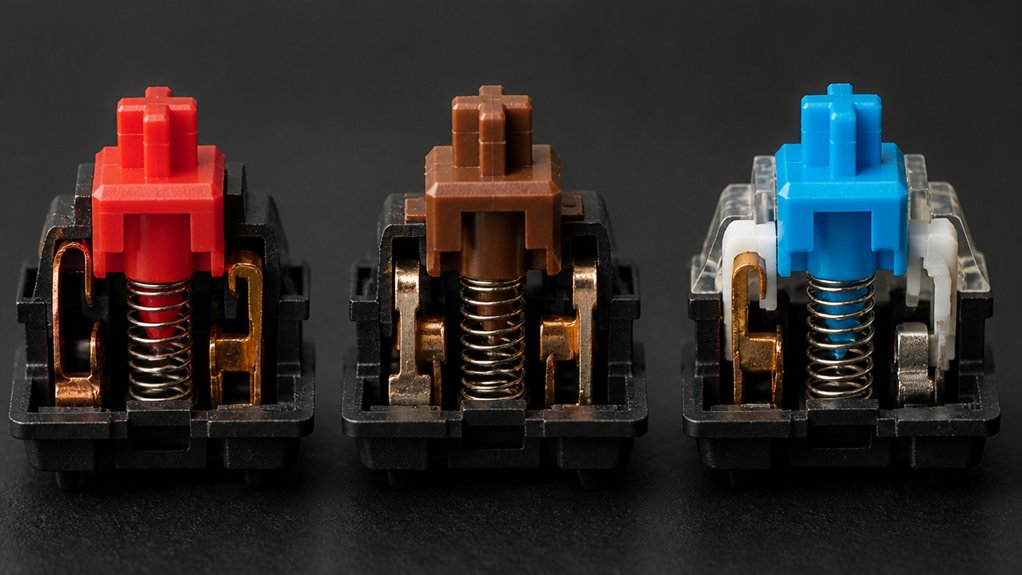
You’ll notice that actuation contact life varies across switch families, with linear designs often lasting a bit longer because they lack a tactile bump.
The bump on tactile switches introduces extra friction, which can wear the contact points faster, though quality materials keep the lifespan high.
Clicky switches add a snap mechanism on top of the bump, so they face the most mechanical stress and potential wear over time.
Actuation Contact Life
When you compare actuation contact life across switch types, you’ll notice that linear switches generally outlast their tactile and clicky cousins because they’ve fewer moving parts and simpler contact points.
Linear switches rely on a single, gold‑plated contact that slides cleanly, so the last of wear is minimal and the durability stays high even after millions of keystrokes.
Tactile switches add a bump mechanism, which introduces extra tension and variable pressure on the contact, leading to a slightly faster wear rate. Clicky switches carry an extra clicking barrel and spring, creating additional friction points that can degrade the contact earlier. High‑quality gold plating helps all three, but the simpler the actuation, the longer the long‑term life you’ll see.
Tactile Bump Wear
Because tactile and clicky switches contain extra moving parts—bump mechanisms, click bars, and additional springs—they endure more mechanical stress than linear switches.
When you press a tactile switch, the tactile bump creates a small force peak that repeatedly deforms plastic and compresses the spring. Over thousands of keystrokes, this deformation accumulates, causing the bump to lose its crispness and the switch to feel mushy. Clicky switches add a click bar, introducing another contact point that can wear or loosen.
Linear switches lack these features, so they experience smoother, lower‑stress cycles and generally last longer. However, high‑quality materials, dust‑proof stems, and proper lubrication can mitigate wear, letting tactile switches stay reliable for many millions of presses.
How Actuation Force & Travel Distance Affect Wear
Even a modest increase in actuation force can raise the pressure each keystroke puts on a switch’s contacts, accelerating mechanical stress and wear. When you push harder, the contacts compress more intensely, and the extra force amplifies friction at each actuation point.
Longer travel distance adds to the problem: each key moves farther, so the internal components rub together more often, generating heat and micro‑abrasions. Together, higher actuation and extended travel accelerate wear, shortening the switch’s durability.
You’ll notice a loss of tactile crispness as the metal springs fatigue and the plastic stems develop play. Choosing a switch with a lighter actuation and a shorter travel distance reduces stress, keeping the keystroke feel consistent and extending the overall lifespan.
How Spring Design Keeps Switches Wearing Well
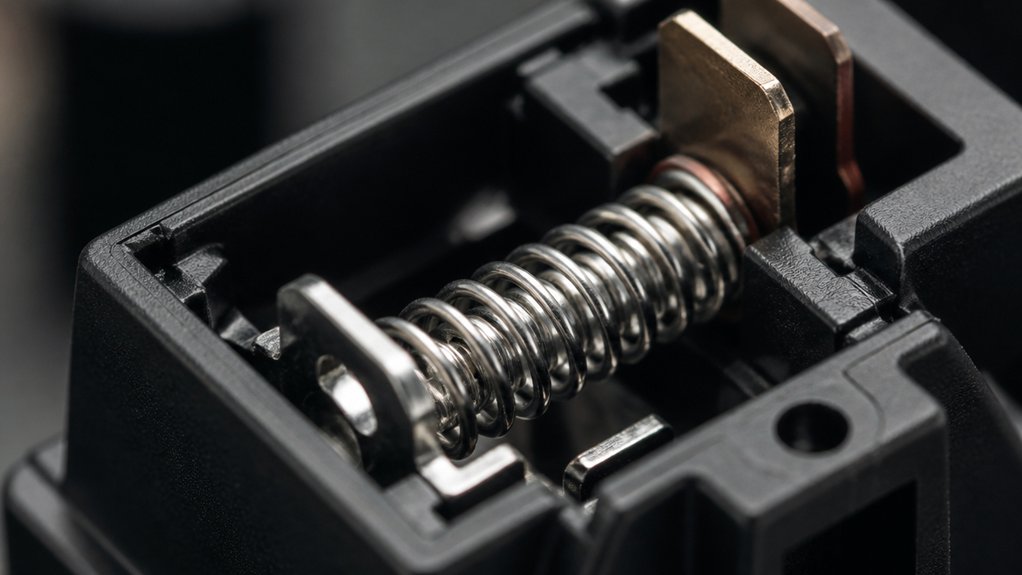
Higher actuation forces and longer travel increase the stress on a switch’s contacts, but the spring’s design can counteract that wear. You’ll notice that high‑quality metal springs keep their elasticity over millions of keystrokes, so the actuation force stays consistent. Optimized tension and a steady spring rate prevent uneven compression, while precise coiling reduces metal fatigue. Heat‑treated or gold‑plated springs further resist corrosion, preserving durability during heavy use. Proper placement minimizes friction, protecting both the spring and the contacts.
| Feature | Benefit | Example |
|---|---|---|
| Consistent spring rate | Steady actuation force | Uniform typing feel |
| Precise coiling | Lower metal fatigue | Longer lifespan |
| Heat‑treated metal | Corrosion resistance | Gaming sessions |
Why Gold‑Plated Contacts Extend Durability
Ever wonder how a thin layer of gold can keep your keyboard clicking smoothly for years? Gold‑plated contacts act as a shield for the electrical parts inside each switch.
Their oxidation‑resistant coating preserves conductivity, so you won’t notice signal loss even after millions of keystrokes. The metal’s low resistance keeps each actuation crisp, while the protective film reduces arcing and pitting that would otherwise degrade the switch.
In practice, this means your Cherry MX‑style switches can survive 50–100 million presses without the sluggishness or failures typical of plain metal contacts.
- Prevents oxidation and corrosion
- Lowers electrical resistance for consistent signals
- Minimizes arcing, extending functional lifespan
How Coatings Reduce Friction and Prolong Switch Life

You’ll notice that silicone‑based and low‑viscosity coatings create a smoother sliding surface for the stem and housing. By applying these lubricants with a precision spray or dip method, you cut friction and keep dust from sticking.
The result is a steadier actuation force and a switch that lasts millions more keystrokes.
Surface Coating Types
When you apply the right surface coating, you dramatically cut friction and protect the switch’s moving parts, which in turn extends its lifespan. Different surface coatings target specific failure modes, so you can match the treatment to the switch’s design.
Gold plating shields metal contacts from oxidation, preserving conductivity for long‑term durability. Diamond‑like carbon (DLC) hard coats stems and housings, slashing abrasion and keeping debris out of the actuation path. Anti‑corrosion layers guard against moisture and contaminants, ensuring consistent performance in harsh environments.
These coatings work together to keep the switch smooth, reliable, and ready for millions of keystrokes.
- Gold plating for oxidation resistance
- DLC for hard, low‑wear surfaces
- Anti‑corrosion for moisture protection
Lubricant Application Methods
If you spread a thin, even layer of silicone‑based lubricant onto a switch stem, you instantly lower internal friction, making each keystroke smoother and cutting wear on moving parts. You’ll notice the switch mechanism glides with less metal‑on‑plastic abrasion, so the key noise drops and vibration fades—signs that durability is improving.
Apply the lubricant with a fine brush or a precision syringe, targeting only the contact points to avoid excess buildup that can trap dust. A controlled amount keeps the coating uniform, preserving the original feel of your mechanical keyboards while extending lifespan.
Combining factory pre‑lubrication with careful home lubing yields consistent performance and higher resistance to wear, pushing durability beyond standard ratings.
How Dust, Moisture, and Temperature Accelerate Failure
Dust, moisture, and temperature each chip away at a mechanical switch’s reliability, and their effects compound quickly. In your mechanical keyboards, dust settles on stems and springs, creating friction that makes actuation feel uneven and can jam the switch.
Moisture seeps into contacts, especially on non‑gold‑plated parts, and triggers corrosion that erodes conductivity.
Temperature spikes melt lubricants and weaken plastics, while rapid thermal cycles foster rust and warp components. The combined stress shortens lifespan and degrades keystroke feel.
- Dust particles block moving parts, raising friction and inconsistent force.
- Moisture causes corrosion, reducing contact reliability and increasing resistance.
- High temperature and humidity accelerate lubricant breakdown and plastic deformation.
How Regular Maintenance Extends Switch Lifespan
You’ll keep your switches humming by setting up a regular cleaning routine with compressed air and brushes.
Applying a silicone‑based lubricant in the right amount smooths out friction and guards against wear.
And when you notice tactile changes, replace the affected switches promptly to avoid further damage.
Regular Cleaning Routine
Regularly clearing out dust and debris with compressed air and a tiny brush keeps the contacts clean, preventing the sluggish feel that builds up over time.
When you practice regular cleaning, you protect the metal contacts inside mechanical switches from corrosion and wear. A quick maintenance routine also stops inconsistent actuation forces from creeping in, so your typing stays crisp.
You’ll notice smoother keystrokes and quieter operation without having to replace the switches prematurely.
- Use short bursts of compressed air at a 45‑degree angle to dislodge particles.
- Follow with a soft brush to sweep away stubborn debris from the switch housing.
- Schedule this cleaning every 2–3 months, especially after heavy use or dusty environments.
Proper Lubrication Techniques
When you apply a thin layer of silicone‑based oil to the slider and spring, you cut internal friction and keep the metal contacts gliding smoothly, which dramatically slows wear and prolongs the switch’s usable life. In mechanical keyboards, regular lubrication preserves tactile feedback and keeps actuation force consistent across millions of keystrokes. Use only a drop per switch, avoid excess that draws dust, and choose a low‑viscosity oil for smooth gliding.
| Step | Action |
|---|---|
| 1 | Disassemble the switch |
| 2 | Apply a micro‑drop of silicone oil |
| 3 | Rotate the spring to coat evenly |
| 4 | Reassemble and test feel |
| 5 | Repeat every 6‑12 months |
This routine boosts switch lifespan while maintaining crisp tactile feedback.
Timely Switch Replacement
If you notice a mushy feel or inconsistent actuation, swapping out the worn switch promptly will keep your keyboard’s tactile feedback and force consistency intact, preventing further wear on neighboring components.
Timely replacement of mechanical switches stops degraded response before it spreads, preserving actuation forces and overall performance. By monitoring keystroke counts and feeling for irregularities, you can schedule swaps before permanent damage occurs.
Combine this with cleaning and lubrication to reduce friction, and you’ll extend each switch’s life well beyond its rated 50‑100 million strokes.
- Inspect for mushy feel or uneven actuation forces.
- Clean and lubricate before you replace the switch.
- Swap out the failing mechanical switch as soon as you notice signs.
Key Takeaways for Selecting and Caring for Long‑Lasting Switches
Because durability hinges on both choice and upkeep, you should pick switches with gold‑plated contacts and robust metal housings—like Cherry MX or Gazzew—to guarantee 50‑100 million keystrokes, then keep them clean with compressed air and a light silicone‑oil lubrication to minimize friction, prevent debris buildup, and preserve consistent actuation force over time.
You’ll notice that mechanical switches from reputable makers already embed durability, but regular maintenance still matters. Schedule a quick dust‑off every few weeks, and apply a thin silicone‑oil film when you hear a sticky feel.
Avoid pounding keys and keep liquids away; this protects actuation force and tactile feedback. Finally, match your usage pattern to the switch type—light typing extends life more than aggressive gaming, ensuring your keyboard stays reliable for years.
Frequently Asked Questions
What Is the Most Durable Mechanical Switch?
You’ll find Hall‑Effect switches the most durable; they’re contactless, handle well past 100 million keystrokes, and avoid wear entirely, so they outlast any traditional mechanical option.
Is 60% or 75% Keyboard Better?
You’ll find a 75% keyboard better if you need constant arrow and navigation keys, but a 60% wins for portability and desk space; choose based on what you value most.
What Is the Lifespan of a Mechanical Switch?
You’ll typically get 50‑100 million keystrokes from a mechanical switch, depending on its material quality and design. Gold‑plated contacts, robust plastics, and regular cleaning can push that figure even higher.
Which Switches Are More Durable?
You’ll find Hall‑Effect switches, Cherry MX Gold‑plated models, and Akko V3 Cream Blue Pro among the toughest. Their metal contacts, robust housings, dust‑proof stems, and pre‑lubrication let them survive tens of millions of keystrokes.
In Summary
By choosing high‑quality materials, reputable brands, and the right switch architecture, you’ll get keyboards that outlast years of typing. Linear, tactile, and clicky types each have their own durability traits, while proper coatings and environmental protection keep friction low and wear minimal. Regular cleaning and maintenance further extend lifespan. Keep these factors in mind, and you’ll enjoy a reliable, long‑lasting typing experience.



