
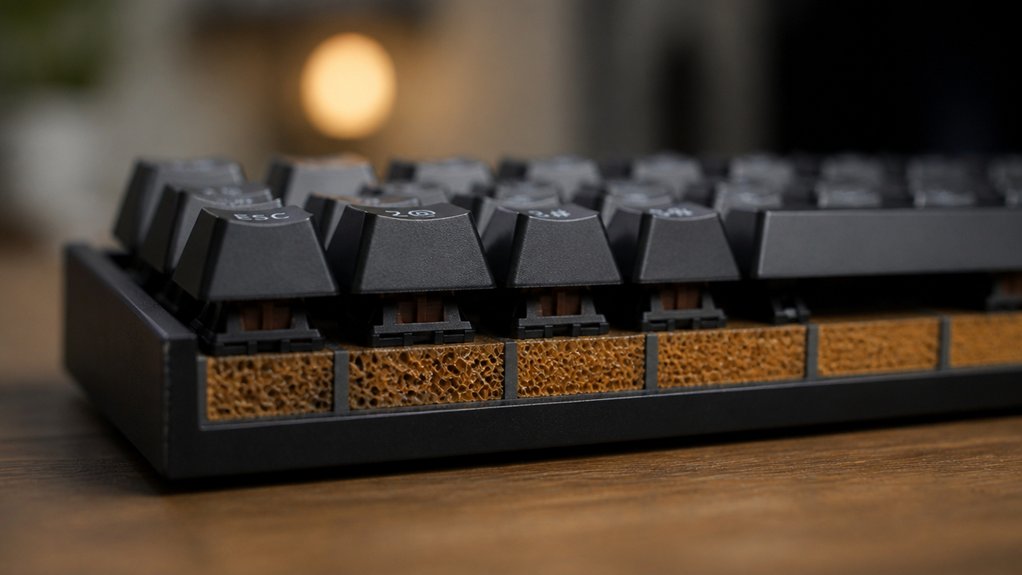
You’ve probably noticed that your mechanical keyboard sounds hollow, especially on larger layouts, and the right PCB foam can change that instantly. By targeting thickness, density, and layout compatibility, the top seven products for 2026 let you mute vibrations without sacrificing RGB or feel. Some stick firmly, others peel off cleanly, and a few even layer different densities for maximum isolation. Which combination will give you the quietest, most tactile typing experience?
| HONKID Mechanical Keyboard Dampening Foam (Black) |  | Best Overall | Material: LE‑20 Poron foam | Thickness: 3 mm | Layout Compatibility: 60‑108 keys (multiple sizes) | CHECK ON AMAZON | Read Our Analysis |
| Poron PCB Foam Switch Pads & Sound Dampeners (108 Layout) | 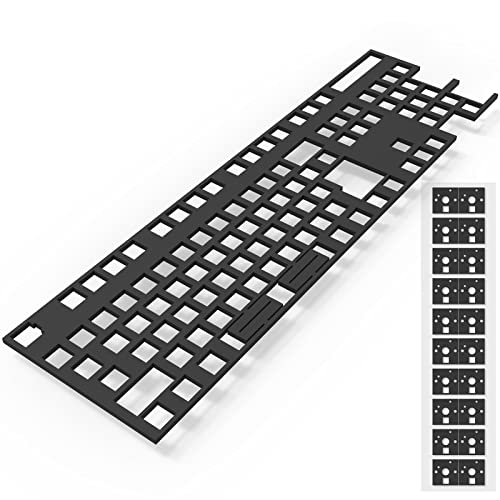 | Value Pack | Material: Poron foam (high‑density) | Thickness: 3 mm (foam) + 0.5 mm switch pads | Layout Compatibility: 108 (104) keys | CHECK ON AMAZON | Read Our Analysis |
| DUROCK Keyboard Switch Pads 0.5mm Poron Foam (120pcs) |  | Premium Thin | Material: Poron foam | Thickness: 0.5 mm (switch pads) | Layout Compatibility: Standard QWERTY (full‑size) | CHECK ON AMAZON | Read Our Analysis |
| Keyboard Foam Damping for Mechanical Keyboards (3mm) |  | Soft Silence | Material: LE‑32 Poron foam | Thickness: 3 mm | Layout Compatibility: 61‑108 keys (various sizes) | CHECK ON AMAZON | Read Our Analysis |
| RUNJRX Poron Switch Pads 0.5mm 120pcs Black | 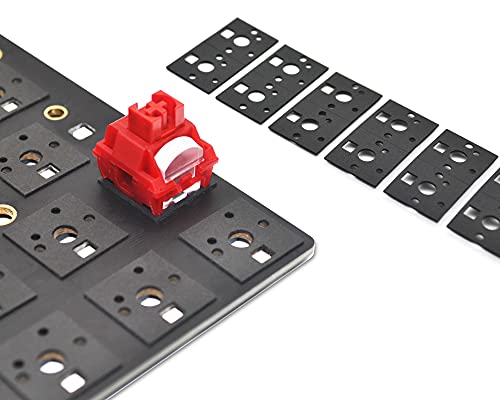 | DIY Favorite | Material: Poron high‑density memory foam | Thickness: 0.5 mm (switch pads) | Layout Compatibility: 61‑108 keys (hot‑swap) | CHECK ON AMAZON | Read Our Analysis |
| Switch Keyboard Dampening Foam Pads (84 Layout) |  | Compact Fit | Material: Poron‑type foam (unspecified) | Thickness: 3 mm | Layout Compatibility: 84 keys | CHECK ON AMAZON | Read Our Analysis |
| YMDK Keyboard Dampening Foam 3-Piece Set (61/64 Layout) | 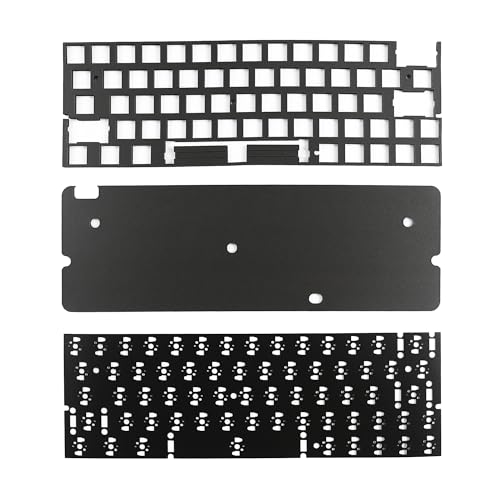 | Multi‑Layer Pro | Material: Poron foam | Thickness: 0.5 mm, 2 mm, 3.5 mm (three layers) | Layout Compatibility: 61‑64 keys | CHECK ON AMAZON | Read Our Analysis |
More Details on Our Top Picks
HONKID Mechanical Keyboard Dampening Foam (Black)
If you want a quiet, crack‑free typing experience, HONKID’s black 3 mm Poron foam delivers the most consistent dampening across 60‑ to 104‑key layouts. You’ll slip the 50 cm × 15 cm sheet into the cavity between PCB and case, where its LE‑20 Poron material absorbs echo and eliminates rattling. The 3 mm thickness fits 60, 61, 64, 68, 87, and 104‑key boards, and the pre‑scored indentation lets you trim it to any shape. We at just 36.9 g, black, and ambidextrous, it’s a plug‑and‑play accessory—no power, no wiring, just pure sound reduction.
- Material:LE‑20 Poron foam
- Thickness:3 mm
- Layout Compatibility:60‑108 keys (multiple sizes)
- Inclusion of Tools:None (foam only)
- Adhesive Backing:None (cut‑to‑size foam)
- Warranty Length:Manufacturer warranty (unspecified)
- Additional Feature:Indentation for easy cutting
- Additional Feature:36.9 g lightweight sheet
- Additional Feature:QWERTY ambidextrous design
Poron PCB Foam Switch Pads & Sound Dampeners (108 Layout)
Mechanical‑keyboard enthusiasts who crave quieter typing will love this value‑pack of Poron PCB foam and switch pads for 108‑key layouts. The high‑density, micro‑fine foam fills the cavity between PCB and mounting board, stopping vibrations before they become clatter. Each of the 120 switch pads sits under a key, using a non‑stick adhesive film that stays put yet peels off for repositioning. Installation needs only the included prying bar and tweezers—no cutting or drilling. You’ll notice a steadier feel, less echo, and consistent feedback across all 104 keys. The kit works with any full‑size ergonomic board, and the 365‑day warranty backs its durability.
- Material:Poron foam (high‑density)
- Thickness:3 mm (foam) + 0.5 mm switch pads
- Layout Compatibility:108 (104) keys
- Inclusion of Tools:Pry bar, tweezers
- Adhesive Backing:Switch pads with non‑stick adhesive film
- Warranty Length:365 days
- Additional Feature:Includes plastic prying bar
- Additional Feature:120 adhesive switch pads
- Additional Feature:1‑year manufacturer warranty
DUROCK Keyboard Switch Pads 0.5mm Poron Foam (120pcs)
DUROCK’s 0.5 mm Poron foam pads are a premium thin solution for anyone seeking quieter, smoother keystrokes. They sit directly between each switch and the PCB, absorbing vibration and cutting the hollow clack that many mechanical boards emit. The black foam comes with a mild adhesive backing, so you can press it onto hot‑swap or soldered PCBs without fuss. Each pad includes a cutout for per‑key RGB shine‑through, preserving lighting while dampening sound. The 120‑piece pack covers a full QWERTY layout with extras, making it ideal for gaming or office keyboards that demand low‑noise performance.
- Material:Poron foam
- Thickness:0.5 mm (switch pads)
- Layout Compatibility:Standard QWERTY (full‑size)
- Inclusion of Tools:None (pads only)
- Adhesive Backing:Mild adhesive backing on pads
- Warranty Length:Not specified
- Additional Feature:RGB LED shine‑through cutouts
- Additional Feature:Supports hot‑swap & soldered PCBs
- Additional Feature:Mild pre‑applied adhesive
Keyboard Foam Damping for Mechanical Keyboards (3mm)
The 3 mm LE‑32 Poron foam delivers soft silence for anyone seeking quieter, clearer keystrokes, because its micro‑fine cells absorb vibration while preserving tactile feel. You’ll cut the 42.8 × 12.4 × 0.3 cm sheet to match your 61‑, 64‑, 87‑, 100‑, 104‑, or 108‑key layout, then pry the case open with the supplied bar. Its high elasticity resists compression, so it stays snug under the PCB and dampens resonant noise better than EVA. You’ll notice a softer bottom‑out and crisper sound, while the foam’s durability keeps performance consistent through countless keystrokes.
- Material:LE‑32 Poron foam
- Thickness:3 mm
- Layout Compatibility:61‑108 keys (various sizes)
- Inclusion of Tools:Plastic pry bar
- Adhesive Backing:None (foam only)
- Warranty Length:365 days
- Additional Feature:Comes with plastic pry bar
- Additional Feature:Softer feel than EVA foam
- Additional Feature:Supports split‑keyset designs
RUNJRX Poron Switch Pads 0.5mm 120pcs Black
If you crave a quieter, smoother keystroke, the 0.5 mm RUNJRX Poron Switch Pads are a DIY favorite for any hot‑swap board. You’ll get 120 black pads and a pair of tweezers, letting you slip each foam directly onto the PCB without disassembling the keyboard. The high‑density Poron memory foam fills the gap between switch and board, dampening vibrations and cutting hollow noise. A non‑stick adhesive film keeps pads in place for repeated swaps, and the 0.5 mm thickness works across 61‑ to 108‑key layouts, including standard 104‑key QWERTY setups. You benefit from a year‑long warranty and easy installation for gaming or professional typing.
- Material:Poron high‑density memory foam
- Thickness:0.5 mm (switch pads)
- Layout Compatibility:61‑108 keys (hot‑swap)
- Inclusion of Tools:Tweezers
- Adhesive Backing:Non‑stick adhesive film on pads
- Warranty Length:365 days
- Additional Feature:Includes tweezers for placement
- Additional Feature:Non‑stick adhesive film backing
- Additional Feature:Compatible with tablet models
Switch Keyboard Dampening Foam Pads (84 Layout)
For DIY keyboard builders seeking a compact fit that silences cavity echo, this 84‑key foam pad sits snugly between PCB and steel plate, eliminating resonance while boosting deeper, richer typing tones. Its 3 mm thickness matches the typical gap between PCB and positioning plate, so it clamps securely without glue. You’ll notice a fuller sound as the foam fills the entire keyboard area, dampening plastic chatter and cavity noise. It works with both welded and hot‑plugged switches and fits the standard 1.5 mm positioning plate. Although cut from generic measurements, slight hole misalignments can occur, so verify fit before buying. The Gliging pack weighs 0.634 oz and ships in a 11.93 × 4.53 × 0.39 in. box.
- Material:Poron‑type foam (unspecified)
- Thickness:3 mm
- Layout Compatibility:84 keys
- Inclusion of Tools:None (foam only)
- Adhesive Backing:None (foam only)
- Warranty Length:Not specified
- Additional Feature:No adhesive, clamped fit
- Additional Feature:Designed for 1.5 mm positioning plate
- Additional Feature:Lightweight at 0.634 oz
YMDK Keyboard Dampening Foam 3-Piece Set (61/64 Layout)
Mechanical enthusiasts seeking quieter 61‑ or 64‑key boards love YMDK’s multi‑layer pro foam set, which sandwiches Poron layers between PCB, board, and switches. The three‑piece kit gives you a 0.5 mm layer between PCB and plate, a 2 mm layer under the PCB, and a 3.5 mm layer under each switch, all without adhesives. Poron’s dense cells absorb residual clicks, curb vibration, and keep sound from radiating to your desk. It fits hot‑swap or soldered 61/64‑key layouts, preserves RGB lighting, and works with USB‑C QWERTY boards. Installation’s straightforward, and the one‑year warranty backs any defects or missing pieces.
- Material:Poron foam
- Thickness:0.5 mm, 2 mm, 3.5 mm (three layers)
- Layout Compatibility:61‑64 keys
- Inclusion of Tools:None (foam only)
- Adhesive Backing:None (foam only)
- Warranty Length:1 year (365 days)
- Additional Feature:Three‑layer thickness gradient
- Additional Feature:No adhesives required
- Additional Feature:Includes 1‑year warranty registration
Factors to Consider When Choosing PCB Foam for Eliminating Hollow Keyboard Sounds
When you pick PCB foam, start by checking the material and its thickness, because they directly affect how much hollow resonance you’ll hear. Next, consider foam density and how easy it is to cut and customize for your layout, as well as whether you need an adhesive backing. Finally, make sure the foam’s compatibility with your keyboard’s specific layout and design won’t cause fit or stability issues.
Material Material Thickness
If you pick the right foam thickness, you’ll dramatically cut hollow keystroke echoes. A 0.3 mm to 3.5 mm range covers most designs, but thicker layers—around 3 mm—absorb more vibration and give a softer feel, filling the gap between PCB and case. Thinner sheets, like 0.5 mm, work well as switch pads, targeting noise right at the switch without limiting key travel or blocking RGB light. Match thickness to your board’s tolerances; too thick can bind switches, too thin may leave gaps that let sound escape. Check the clearance around mounting screws and stabilizers, and make sure the foam sits flush. When you balance these dimensions, you get consistent dampening without sacrificing typing performance.
Foam Density Importance
A well‑chosen foam thickness sets the stage, but the next factor that determines how quiet your board gets is the foam’s density. Density dictates how much the material resists compression, which directly influences its ability to soak up vibration. Higher‑density foams with micro‑fine, uniform cells trap sound waves better, eliminating the echo that makes mechanical keyboards feel hollow. They also hold shape under repeated keystrokes, so the damping stays consistent over months of use. Lower‑density foams compress easily, giving a softer feel but letting more vibration escape and wearing out faster. Aim for a density that feels firm enough to isolate sound while still providing a comfortable tactile response, striking the sweet spot between quietness and comfort.
Cutting Ease & Customization
Why does cutting ease matter? Because you’ll be trimming the foam to match every key, and a material that resists clean, precise cuts saves time and prevents damage. Look for foam with indentations or perforations—they act as guide lines that let you slice straight without guessing. Thinner sheets usually trim more accurately, but they must still retain enough rigidity to hold shape. Density and elasticity matter, too; a balanced foam cuts cleanly and springs back into place, keeping the layout intact. Choose a product that includes a plastic prying bar or scissors guidance, so you can adjust from a compact 60 % board to a full‑size 108‑key layout without sacrificing dampening performance.
Adhesive vs. Non‑Adhesive
Trimming the foam to fit each key is only half the battle; securing it in place determines whether the dampening stays effective over time. If you pick adhesive foam, you’ll enjoy a mild, non‑stick backing that lets you slap the material onto the PCB and reposition it without residue. That backing guarantees consistent contact, so vibrations are absorbed reliably night after night. Non‑adhesive foam, on the other hand, relies on precise cuts and the pressure of the keyboard’s assembly to stay put, which means you avoid any glue‑related damage and keep RGB lighting clear. Choose adhesive when you value quick, hassle‑free installation and long‑term stability; opt for non‑adhesive if you plan frequent disassembly, want to preserve lighting, and don’t mind the extra fitting effort.
Compatibility With Layouts
When you pick foam that matches your keyboard’s exact layout—whether it’s a 60‑key compact or a full‑size 108‑key board—you guarantee a snug fit that eliminates gaps and maximizes sound dampening. Look for foam cut for specific key counts (60/61/64/68/84/87/100/104/108) because those kits often include pre‑marked sections that make trimming painless. Make certain the set provides switch pads for each location, not just a generic PCB bottom layer, so every switch sits on a cushion. Verify compatibility with both hot‑swap and soldered PCBs; the foam shouldn’t block solder joints or interfere with RGB lighting. A layout‑matched kit prevents overlaps, reduces installation friction, and delivers consistent acoustic performance across the entire board.
Frequently Asked Questions
How Does Foam Thickness Affect Key Travel Distance?
You’ll notice thicker foam compresses more, shortening your key travel; thinner foam offers less resistance, keeping the original distance. Basically, the more material you add, the less far the switch can move before actuating.
Can Foam Be Reused After Cleaning?
Yes, you can reuse foam after cleaning; just soak it in mild soapy water, rinse thoroughly, squeeze out excess moisture, let it dry completely, then reinstall it without losing its dampening properties.
Does Foam Affect Switch Actuation Force?
You’ll notice a slight increase in actuation force because foam adds resistance, but it’s minimal—usually just a few grams. The effect varies by foam density, so choose thinner, softer material if you want the force unchanged.
What Temperature Range Is Safe for Foam Use?
You should keep the foam between ‑20 °C and +80 °C; most silicone and polyurethane types tolerate that range without degrading, so avoid temperatures above 90 °C to prevent off‑gassing or melting.
Will Foam Interfere With RGB Lighting?
You’ll find that most thin, translucent foams let RGB LEDs shine through, so they won’t dim your colors. Just avoid thick, opaque pads; they can block light and reduce brightness noticeably.



