
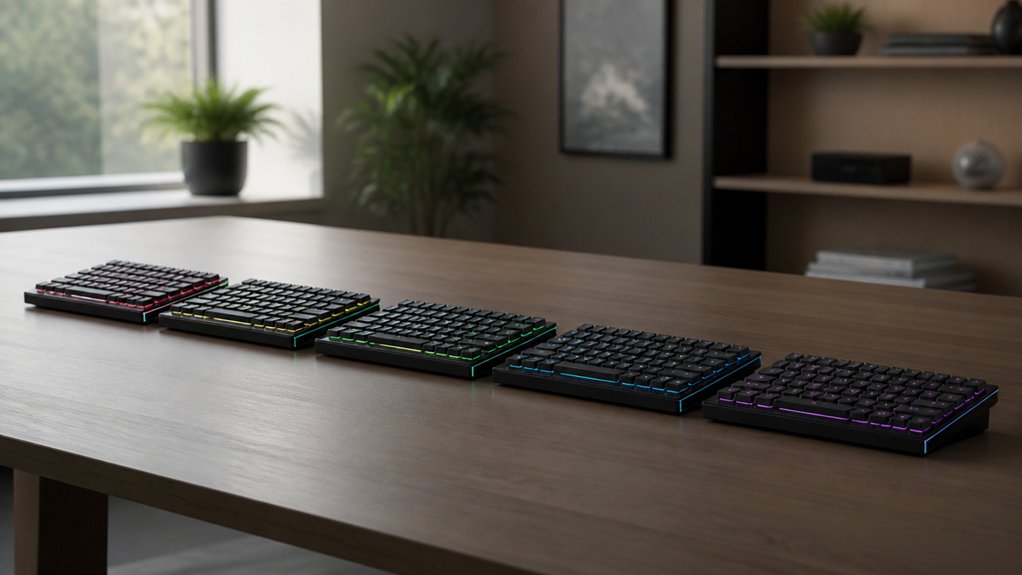
You’re looking for a keyboard that fits a tiny desk without compromising on feel or flexibility, and the 2026 lineup delivers exactly that. From the sleek, RGB‑tuned Koolertron 42‑Key to the split, ergonomic YMDK Corne V4.1, each model balances compactness with customizable firmware like QMK or VIAL. You’ll discover how these 40% keyboards can stay out of sight, save power, and still let you type comfortably—if you want to see which one matches your setup best.
| Koolertron 42-Key RGB Mechanical Mini Keyboard |  | Versatile Pro | Layout Type: 40% compact QWERTY | Switch Compatibility: Hot‑swappable (standard MX) | Programmability: Built‑in macro layers (4) | CHECK ON AMAZON | Read Our Analysis |
| EPOMAKER Luma40 40% Wireless Mechanical Keyboard | Wireless Flex | Layout Type: 40% ortholinear | Switch Compatibility: Hot‑swappable (5‑pin Kailh low‑profile) | Programmability: QMK/VIA with layers | CHECK ON AMAZON | Read Our Analysis | |
| YMDK Split Keyboard Corne V4.1 46-Key Ergonomic Kit |  | DIY Ergonomic | Layout Type: 40% split ergonomic | Switch Compatibility: Hot‑swappable (3‑/5‑pin MX compatible) | Programmability: QMK/Vial firmware | CHECK ON AMAZON | Read Our Analysis |
| YIVU CORNE V4 40% Ortholinear Mechanical Keyboard | 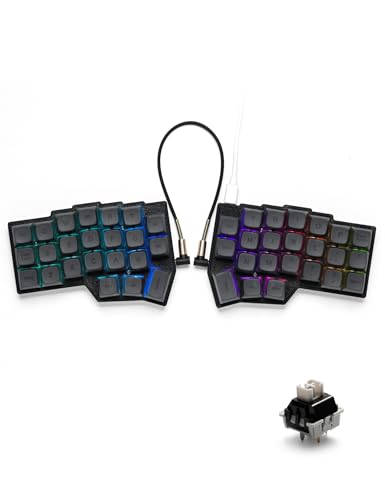 | Customizable Split | Layout Type: 40% ortholinear split | Switch Compatibility: Hot‑swappable (3‑/5‑pin MX compatible) | Programmability: QMK/Vial firmware | CHECK ON AMAZON | Read Our Analysis |
| SZRKBD Ergonomic Split Keyboard 46-Key Corne VIAL Programmable (35g White) |  | Silent Specialist | Layout Type: 40% split ergonomic | Switch Compatibility: MX‑adapter capacitive (MX compatible) | Programmability: VIAL firmware | CHECK ON AMAZON | Read Our Analysis |
More Details on Our Top Picks
Koolertron 42-Key RGB Mechanical Mini Keyboard
If you need a compact, versatile pro keyboard for tight desks, the Koolertron 42‑Key RGB Mechanical Mini delivers. Its 40 % layout trims the footprint while preserving a full QWERTY grid, so you keep essential keys without sacrificing space. You’ll love the hot‑swappable USB‑C port, letting you swap switches on the fly. Eight RGB effects, 30 brightness levels, and 32‑color palettes let you tailor lighting to any mood. Sixteen macro keys support up to 349 commands with delay, and four programmable layers stay saved in the MCU. Mouse‑control keys, shift‑alt‑ctrl‑win combos, and multi‑keyboard stacking make it perfect for gamers, coders, and designers alike.
- Layout Type:40% compact QWERTY
- Switch Compatibility:Hot‑swappable (standard MX)
- Programmability:Built‑in macro layers (4)
- RGB Lighting:Per‑key RGB with effects
- Connectivity:USB‑C wired
- Build Material:Plastic enclosure
- Additional Feature:Mouse control via keys
- Additional Feature:16 advanced macro keys
- Additional Feature:Hot‑swappable USB‑C
EPOMAKER Luma40 40% Wireless Mechanical Keyboard
The EPOMAKER Luma40’s ultra‑compact 40% layout makes it ideal for anyone craving a minimalist desk without sacrificing functionality. You’ll notice its CNC‑cut aluminum case, frosted white keycaps, and silk‑screen legends that give a clean, modern look. Ortholinear keys and low‑profile Kailh linear switches cut finger travel, while foam‑cushioned tray‑mount absorbs shock for a quiet, tactile feel. QMK/VIA firmware lets you program layers, macros, and hot‑swap 47 sockets for switch changes. Wireless 2.4 GHz, Bluetooth, and wired modes support up to five devices, and per‑key RGB adds visual flair without clutter.
- Layout Type:40% ortholinear
- Switch Compatibility:Hot‑swappable (5‑pin Kailh low‑profile)
- Programmability:QMK/VIA with layers
- RGB Lighting:Per‑key RGB, per‑layer
- Connectivity:USB‑C wired / 2.4 GHz wireless / Bluetooth
- Build Material:CNC‑cut aluminum
- Additional Feature:CNC‑cut aluminum chassis
- Additional Feature:2.4 GHz gaming wireless
- Additional Feature:47 hot‑swap sockets
YMDK Split Keyboard Corne V4.1 46-Key Ergonomic Kit
Compact yet powerful, the YMDK Corne V4.1 lets you build a DIY ergonomic 40% keyboard perfect for minimal desk setups. Its split design gives you 46 keys in a 40% layout, keeping your hands at a natural angle while saving space. You’ll receive two 3D‑printed PLA cases and top plates, plus hotswap PCBs that let you swap switches without soldering. A USB‑C cable and data cable handle wired connectivity, and Vial or QMK firmware lets you program every key and control south‑facing RGB lighting. Switches and keycaps aren’t included, so you can choose your preferred feel and aesthetics. This kit balances eco‑friendly materials, customizability, and a compact ergonomic form factor.
- Layout Type:40% split ergonomic
- Switch Compatibility:Hot‑swappable (3‑/5‑pin MX compatible)
- Programmability:QMK/Vial firmware
- RGB Lighting:South‑facing RGB
- Connectivity:USB‑C wired
- Build Material:PLA 3‑D printed
- Additional Feature:3D‑printed PLA case
- Additional Feature:Vial direct programming
- Additional Feature:South‑facing RGB lighting
YIVU CORNE V4 40% Ortholinear Mechanical Keyboard
Ergonomic enthusiasts love the YIVU CORNE V4 because its customizable split design lets you tailor spacing, tilt, and rotation for a truly personal, minimal‑desk setup. You’ll value the 3×6 ortholinear layout with 46 keys, including three thumb keys per hand that ease wrist strain. Hot‑swappable sockets accept 3‑ or 5‑pin Cherry MX‑compatible switches, and the pre‑lubricated linear switches give a smooth 40 g actuation for typing or gaming. QMK and VIAL firmware let you remap every key and create layers, while RGB backlighting offers 16.8 million colors and 45 modes. A 1.5 m USB‑C cable and TRS link keep the halves together, and the kit includes spare switches and a dual‑purpose puller. The 180‑day warranty covers your ultra‑minimal setup.
- Layout Type:40% ortholinear split
- Switch Compatibility:Hot‑swappable (3‑/5‑pin MX compatible)
- Programmability:QMK/Vial firmware
- RGB Lighting:RGB with 45 presets
- Connectivity:USB‑C wired + TRS split cable
- Build Material:Black plastic
- Additional Feature:Adjustable spacing & tilt
- Additional Feature:Pre‑lubricated linear switches
- Additional Feature:Dual‑purpose puller tool
SZRKBD Ergonomic Split Keyboard 46-Key Corne VIAL Programmable (35g White)
If you’re a coder or writer who spends endless hours at a desk, the SZRKBD’s split, 40% layout makes it a silent specialist for ergonomic comfort. Its 46‑key Corne design spreads your hands naturally, cutting shoulder strain while keeping essential keys within reach. Topre‑style electrostatic capacitive switches give a soft, tactile, and whisper‑quiet feel, perfect for shared spaces. VIAL firmware lets you remap layers, craft macros, and program both macOS and Windows without extra software. Double‑shot PBT keycaps stay pristine, and MX‑compatible sliders let you swap caps at will. This keyboard shines for advanced users who embrace programmable, ergonomic minimalism.
- Layout Type:40% split ergonomic
- Switch Compatibility:MX‑adapter capacitive (MX compatible)
- Programmability:VIAL firmware
- RGB Lighting:RGB (16.8 M colors)
- Connectivity:USB‑C wired
- Build Material:PBT keycaps, plastic case
- Additional Feature:Topre‑style capacitive switches
- Additional Feature:Double‑shot PBT keycaps
- Additional Feature:MX‑adapter for keycaps
Factors to Consider When Choosing 40% Keyboards for Ultra-Minimal Desk Setups
You’ll want a compact form factor that fits your tiny workspace, while programmable layers let you access all the functions you need without extra keys. Check the switch compatibility to match your feel, and choose connectivity—wired or Bluetooth—that suits your setup. If you care about aesthetics, look for RGB lighting customization that won’t distract but still adds a personal touch.
Compact Form Factor
Because space is at a premium in ultra‑minimal setups, a 40% keyboard’s compact form factor—typically 40‑46 keys—eliminates the number pad, function row, and many navigation keys, giving you a tiny footprint without sacrificing essential functionality. You’ll notice the desk clears instantly, letting you place a monitor, lamp, or coffee mug wherever you like. Ortholinear and columnar layouts line keys up in neat grids, shortening finger travel and keeping your hands comfortable during long sessions. The reduced size also means you can slip the board into a bag and switch workstations in seconds, perfect for freelancers or remote workers. Even without a full key set, you still retain core typing, and many models let you layer functions later, preserving full capability while staying ultra‑compact.
Programmable Layers
The compact layout of a 40% keyboard frees up desk space, but the limited key count means you’ll need a way to access the functions you normally spread across rows and columns. Programmable layers let you assign multiple actions to a single key, so you can switch between coding, gaming, or multimedia profiles without adding hardware. Look for keyboards that store layers in built‑in memory; that way your custom mappings survive power cycles and you won’t have to re‑flash after each reboot. Open‑source firmware support gives you granular control, while a user‑friendly GUI speeds up layer creation and macro editing. Prioritize models that handle complex command sequences with adjustable delays, ensuring smooth automation and reliable performance.
Switch Compatibility
When you pick a 40% keyboard, checking switch compatibility is essential because it directly shapes the feel, customization, and future upgrades of your ultra‑minimal setup. First, verify whether the board is hot‑swappable; that lets you swap 3‑pin or 5‑pin switches without soldering, so you can test linear, tactile, or clicky options on the fly. Look for Cherry MX‑style stems, because they keep keycap choices wide open and make replacement caps easy to find. If you’re eyeing niche switches—electrostatic capacitive or low‑profile types—confirm the PCB and mounting design support them, otherwise you’ll be stuck with standard mechanical parts. Prioritizing these factors guarantees your compact keyboard stays adaptable and feels exactly right for your workflow.
Connectivity Options
If you value both speed and flexibility, start by weighing the three main connectivity options—wired USB‑C, Bluetooth, and 2.4 GHz wireless. Wired USB‑C gives zero latency and rock‑solid stability, making it perfect for gaming or any task where responsiveness matters. Bluetooth lets you hop between a laptop, tablet, or phone without cables, but expect a modest input delay that can be noticeable in fast‑paced work. 2.4 GHz wireless strikes a middle ground, delivering low latency and reliable range, which many competitive gamers prefer. Look for keyboards that support multi‑device pairing and quick switching; this boosts workflow efficiency when you juggle several gadgets on a minimal desk. Choose the mode that aligns with your need for speed, mobility, or a blend of both.
RGB Lighting Customization
After weighing wired USB‑C, Bluetooth, and 2.4 GHz options, turn your attention to RGB lighting—an often‑overlooked factor that can either clutter or complement an ultra‑minimal desk. You’ll want adjustable brightness, speed modes, and dynamic effects that suit your aesthetic while easing eye strain. Per‑key backlighting lets you build profiles that highlight frequently used layers, boosting workflow efficiency. Tweak saturation, tone, and static or dynamic colors to match your clean setup, or dim the LEDs to a barely‑noticeable glow. The best keyboards let you turn the lights off entirely for pure minimalism. Open‑source firmware often enables intricate patterns and syncs with other peripherals, giving you full control without sacrificing the desk’s sleek look.
Frequently Asked Questions
Can I Use a 40% Keyboard With a Standard Full‑Size Layout?
Yes, you can use a 40% keyboard with a full‑size layout, but you’ll need to remap keys or use layers for missing keys. It won’t physically match the layout, yet it works with proper configuration.
Do 40% Keyboards Support Macro Recording Without Firmware?
No, you can’t record macros on a 40% keyboard unless its firmware includes that feature; the hardware alone doesn’t support macro storage or execution without dedicated firmware.
Will a 40% Keyboard Work With macOS Shortcut Keys?
Yes, it will work, but you’ll need to remap the command key to the control or option key, and maybe adjust the Fn layer for media shortcuts, since 40% layouts lack dedicated keys.
How Does Key Rollover Affect Gaming on 40% Keyboards?
Key rollover determines how many keys you can press simultaneously; if a 40% board caps at two‑key rollover, you’ll miss combos in fast games, but N‑key rollover lets you execute complex moves without drop‑outs.
Is It Possible to Replace Keycaps on a Split 40% Board?
Yes, you can swap keycaps on a split 40% board; just make certain the stems match, use a keycap puller, and check that any custom legends fit the layout without interfering with the split design.



