
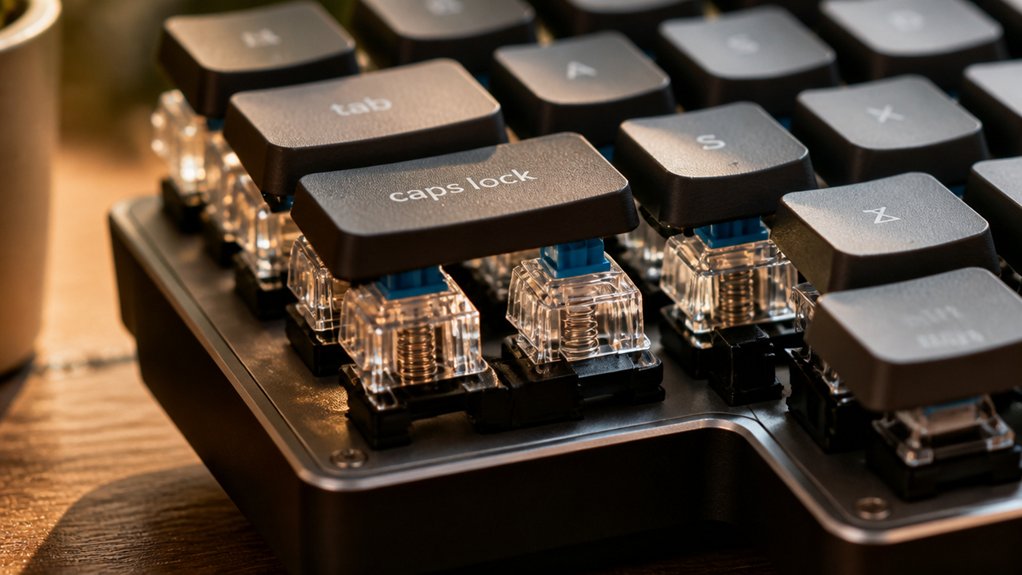
You’ll love clicky switches because each keystroke produces a sharp, audible click that confirms actuation instantly, cutting through background noise and giving you confidence without looking. The plastic clickbar snaps against the housing, creating a crisp sound and a tactile bump that feels satisfying and rhythmic. This feedback helps you stay on beat and type faster, while the loud click can be a handy “built‑in metronome.” Keep reading to discover how to fine‑tune the sound and feel.
How Clicky Keyboard Switches Produce Their Distinct Click
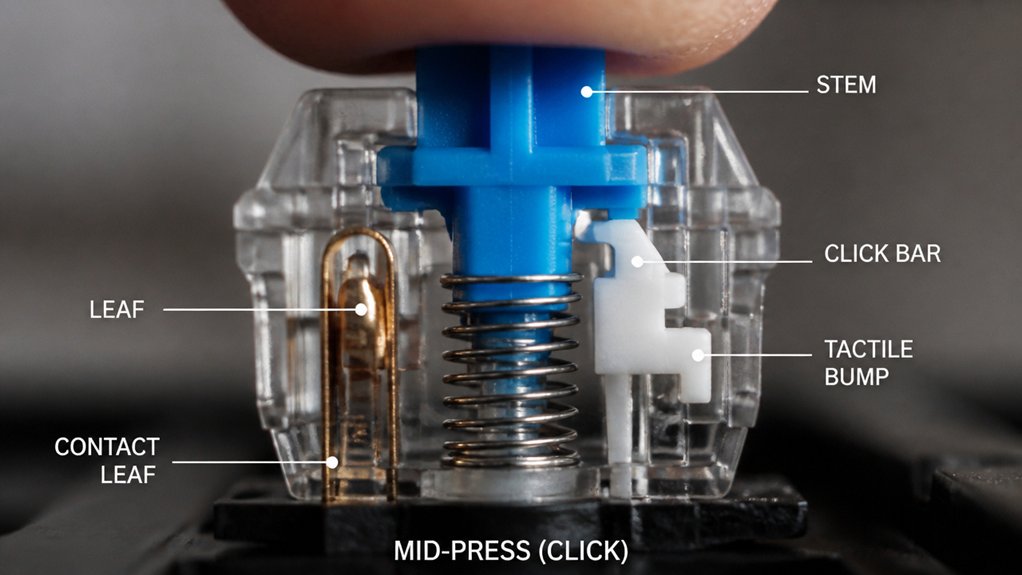
When you press a clicky mechanical switch, a tiny plastic clickbar inside the housing snaps against the case at the actuation point, producing the sharp “click” you hear. That clickbar, often called a click leaf, is engineered to strike the housing as the tactile bump forms, creating an audible click that coincides with the feel of the actuation.
The click mechanism is the defining feature of clicky switches, separating them from purely tactile mechanical keyboard switches that lack the loud click noise. Models such as Cherry MX Blue or Kailh Box Jade use this plastic piece to amplify the sound, delivering a sharp, consistent click noise with every keypress.
Because the click mechanism generates the highest noise levels among mechanical switches, clicky switches excel in environments where audible feedback is desired but can be disruptive in quiet shared spaces.
Why the Click Feels Satisfying While Typing
Because the click combines a crisp sound with a tactile bump, you instantly know a key has actuated, so you don’t have to bottom‑out or guess whether the press registered. The audible click gives you immediate physical feedback, confirming each keystroke without hesitation.
That dual sensation—sound and tactile bump—creates a rhythmic flow that feels deliberate and controlled, turning ordinary typing into a purposeful act. As a clicky key type, the switch’s heavier feel reinforces each press, making the motion feel substantial and satisfying.
You’ll notice your typing experience becomes more engaging; the consistent click trains your brain to anticipate the next key, boosting confidence and speed while keeping every line crisp and clear.
Compare Click Loudness: Clicky vs. Tactile vs. Linear
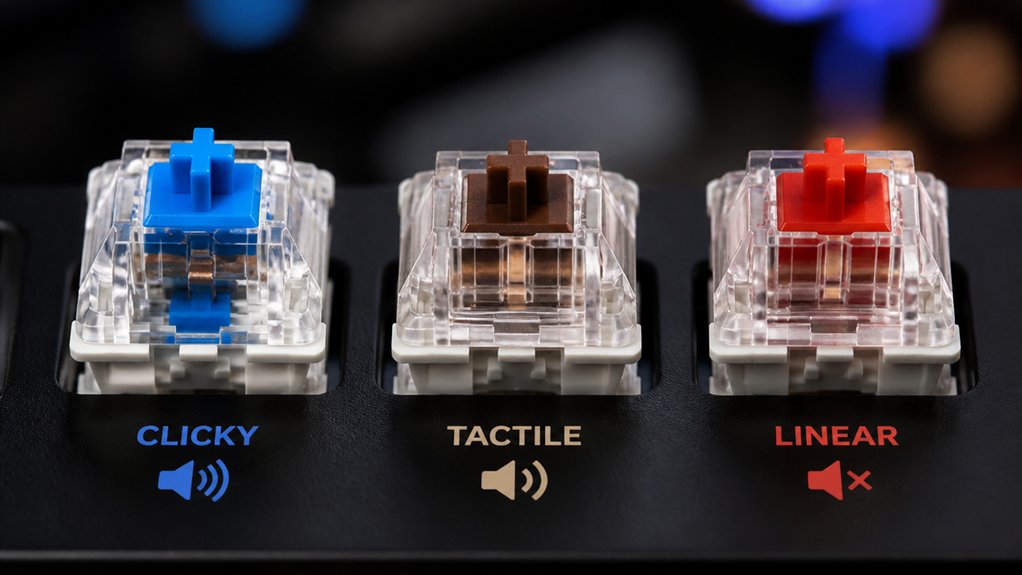
You’ll notice clicky switches slam a sharp, loud click every time you press, which can echo through open offices or shared rooms.
Tactile switches mute that boom, offering a quiet bump that’s far less intrusive.
Linear switches go even quieter, delivering smooth keystrokes that barely register in the soundscape.
Loudness Comparison
If you need a clear picture of how loud each switch type can be, clicky switches dominate the soundscape, emitting a sharp, plastic‑on‑housing click that outpaces the muted bump of tactile switches and the near‑silence of linear ones. You’ll notice the clicky key produces a “bump or click” that’s definitely loud enough to be heard across a room, whereas a tactile switch only makes a subtle bump, and a linear switch barely whispers. This loudness hierarchy matters when you choose a clicky keyboard for typing feedback versus a quieter setup.
| Switch type | Sound character | Typical use |
|---|---|---|
| Clicky | Sharp click, loud enough | Typists who love feedback |
| Tactile | Soft bump, muted click | Office, shared spaces |
| Linear | Near‑silence, smooth travel | Gaming, quiet environments |
Auditory Impact in Spaces
When you type in a shared office, the clicky switch’s sharp, plastic‑on‑housing click can cut through conversation and even register on nearby microphones, while tactile switches emit only a muted bump and linear switches barely whisper, making them far less disruptive.
You’ll notice that a clicky switch creates a loud sound that travels across cubicles, raising the overall noise level. The audible click registers on conference‑room mics, potentially feeding into video calls.
In contrast, tactile switches keep the noise level low, delivering a faint bump without a sharp click, while linear switches stay almost silent. If you value feedback over quiet, clicky switches dominate, but in collaborative spaces their high noise intensity can hinder communication and disturb coworkers.
When Clicky Sounds Boost Focus and Typing Rhythm
You’ll notice that the click’s steady rhythm syncs with your keystrokes, keeping you in the zone. That audible cue tells you each key actuated, reinforcing muscle memory and sharpening accuracy.
Even in a noisy office, the distinct click cuts through the clutter, letting you stay focused on the task at hand.
Click Rhythm Boost
Because the audible click fires exactly at the actuation point, it creates a built‑in metronome that many typists rely on to keep a steady cadence. You’ll feel each clicky Clicky keyboard switches give you a crisp click sound the moment a keystroke registers, turning typing into a rhythmic pulse.
That audible click acts as instant feedback, reinforcing your motion and sharpening accuracy. Over time the rhythm trains muscle memory, so your fingers settle into a consistent typing cadence without conscious effort. The steady auditory pattern also isolates each keystroke, making it easier to stay focused even in noisy surroundings.
In short, the click rhythm boost turns ordinary typing into a focused, synchronized performance.
Audible Cue Alignment
If you let the click of a Cherry MX Blue or Kailh Box Jade guide you, the sound becomes a built‑in metronome that aligns your fingers with each actuation point. The audible click from clicky keyboard switches gives you instant feedback, so you know every keystroke landed without glancing at the keys.
This rhythmic cue steadies your typing pace, turning each press into a predictable beat that keeps focus sharp. In quiet spaces, the crisp pop of Cherry MX Blue or Kailh Box Jade doesn’t disturb others; it reinforces your motor memory, boosting confidence and speed. By syncing your hand motion to the clicky sound, you create a personal cadence that minimizes errors and sustains concentration throughout long sessions.
How Clicky Switches Can Mess With Your Mic?

Ever wondered why your voice chat sounds like a drum solo? You’re probably typing on clicky keyboard switches that slam a plastic stem against the housing, producing sharp, repetitive clicks.
Those clicks flood your microphone with noise, drowning out your voice and making communication fuzzy. The abrupt audio spikes can confuse noise‑gate or suppression filters, so they mute or boost unevenly, leaving gaps or sudden bursts in your stream.
When your mic sits close to the board, the clicks may even trigger feedback loops, creating distracting artifacts. In remote meetings, streaming, or competitive gaming, that extra clatter ruins clarity, so you’ll want to mute or replace clicky switches if clean voice input matters.
How to Pick a Clicky Switch Based on Click Volume and Actuation Force
When you compare clicky switches, focus on two key specs: actuation force (typically 50 g–65 g) and click volume.
Focus on actuation force (≈50‑65 g) and click volume when comparing clicky switches.
First, decide how loud you want the switch to be; models like Kailh Box Jade push the envelope, while many Cherry MX Blue variants stay moderate.
Next, match that volume to actuation force: heavier forces (≈65 g) give firmer tactile bumps and louder clicks but can tire your fingers, whereas lighter forces (≈50 g) produce softer clicks and easier typing.
Test a few key switches on your mechanical keyboard in the actual environment; listen for audibility and feel for feedback. Choose a switch that balances audible satisfaction with comfortable actuation, ensuring you get the click you crave without excess fatigue.
Lubricate Clicky Switches Without Killing the Click
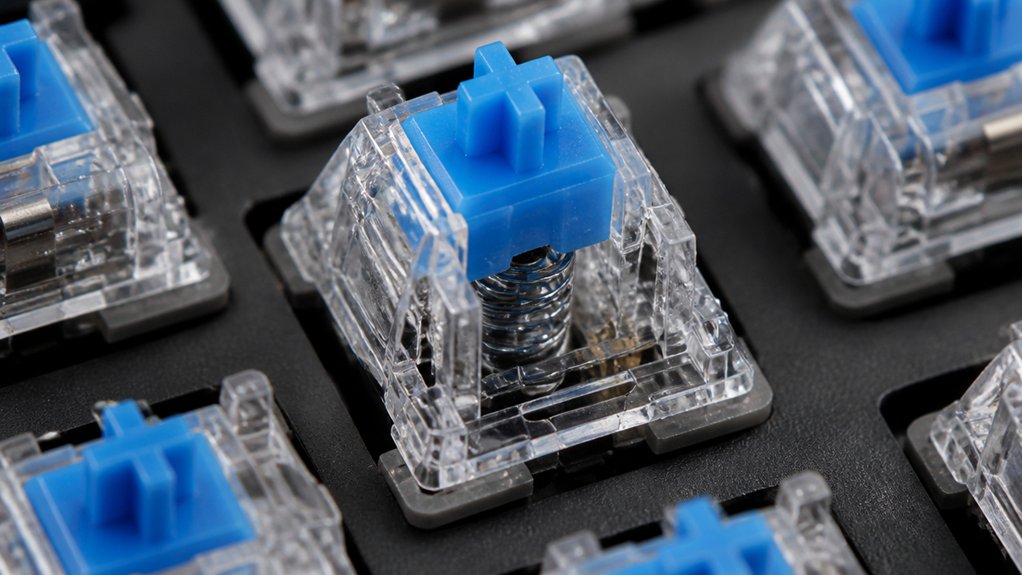
Choosing the right clicky switch is only half the battle; keeping that satisfying snap while smoothing out friction is the next step. To preserve the audible click, you’ll want to lubricate only the spring and sliders. Use a thin, PTFE‑based grease or a light oil, applying a tiny dot to each contact point with a fine brush.
Avoid the plastic click bar entirely—any excess there mutes the click. A quick, partial lubrication of the linear motion parts reduces roughness and slider chatter without sacrificing the tactile punch.
Work one switch at a time, wipe away excess, and test the feel before moving on. This careful approach lets you enjoy a smoother mechanical keyboard while retaining the signature clicky sound that defines Keyboard Switch Types.
Mod Click Clicky Switches to Tune Click Volume and Tactile Weight
If you want to dial in both the click’s volume and its tactile weight, start by tweaking the switch’s internal parts.
First, open a mod clicky switch and examine the slider, spring, and click mechanism. Lightly lubing the slider or spring can mute harsh noise while preserving the crisp click; just avoid over‑lubrication, which dulls the click and blurs tactile feel.
Next, add a thin foam pad or an o‑ring inside the housing to lower click volume without sacrificing actuation force.
Finally, swap the stock spring for a lighter or heavier one to fine‑tune tactile weight and overall feedback.
- Lubricate slider and spring carefully.
- Insert foam or o‑ring for volume control.
- Replace spring to adjust tactile weight.
Keycap Pairings That Enhance Clicky Acoustic Feel

You’ll notice that pairing thick PBT caps with a resonant profile boosts the click’s punch, while adding a thin foam sheet under the caps tames excess echo.
Choosing a sculpted or OEM profile aligns the stem tighter, sharpening the acoustic signature.
If you swap in double‑shot or resin caps, the click stays bright and clear without unwanted damping.
Cap Material Matching
Ever wonder how the right keycap can turn a clicky switch’s “clack” into a crisp, musical snap?
You’ll notice that thicker PBT plastic gives the sound a sharper edge, while profile shapes like SA or MT3 boost acoustic feedback with their deeper sculpting.
Double‑shot or dye‑sublimated caps preserve that clicky tone longer, avoiding the dulling that plain plastic suffers.
Key material choices
- Thick PBT – enhances crispness, keeps the click clear.
- Sculpted profiles (SA/MT3) – larger surface area amplifies sound.
- Double‑shot/dye‑sublimated – maintains consistent acoustic feedback over time.
Transparent caps can soften harshness, and lightweight caps sharpen the snap, while heavier ones mute it.
Pairing the right material with your mechanical keyboard lets you fine‑tune the clicky sound you love.
Acoustic Dampening Foam
Add acoustic dampening foam inside the case or between the PCB and plate, and you’ll instantly soften the overall noise while keeping the clicky switch’s sharp actuation tone. The foam absorbs case‑vibrations, so the sound stays crisp yet less harsh. Pair it with thicker PBT or SA profile keycaps, and you’ll notice richer resonance. silicone foam under the caps cuts bottom‑out thuds without muting the click, while ABS doubleshot caps preserve the bright edge. Together, these choices make the mechanical keyboard feel premium, and the switches provide the best clicky sound you can get without sacrificing comfort.
| Material | Effect on Sound |
|---|---|
| PBT/SA caps + foam | Enhanced resonance, controlled click |
| ABS doubleshot + foam | Bright click, reduced hollow tone |
| Silicone under caps | Mutes bottom‑out, keeps sharp actuation |
Profile‑Specific Keycap Shapes
When you pair sculpted, profile‑specific keycaps—like SA, MT3, or Cherry profile—with clicky switches, the taller, thicker caps create distinct sound chambers that amplify the click’s resonance and clarity. Those chambers boost acoustic feedback and sharpen sound projection, letting each keystroke sing through the mechanical keyboard.
The material matters too; PBT caps keep the ping crisp, while ABS adds a softer edge. Sculpted profiles also vary the tonal character row‑by‑row, giving you a richer typing experience.
- Choose SA or MT3 for deep, resonant clicks.
- Opt for PBT to sharpen acoustic feedback.
- Use undercut stems to enhance sound projection.
When to Choose Clicky Over Quiet Switches in a Mechanical Build
If you crave unmistakable audio feedback that confirms every keystroke, clicky switches are the clear choice. Their sharp click and tactile bump give a satisfying physical sensation that boosts typing accuracy, especially on a mechanical keyboard where you value feedback.
Choose clicky when you work alone, game in a sound‑proofed room, or stream without worrying about mic bleed. The audible click helps you verify each actuation, reducing errors and increasing confidence.
Avoid them in shared offices, libraries, or co‑working spaces where the noise could distract teammates or interfere with voice calls. In those environments, quiet linear or tactile switches keep the sound low while still delivering a smooth keypress.
Use clicky only where the noise is welcomed or harmless.
Frequently Asked Questions
What Are the Benefits of a Clicky Keyboard?
You’ll get precise tactile feedback, audible confirmation, reduced finger fatigue, satisfying actuation force, faster error correction, and a more engaging typing feel that boosts accuracy and confidence.
Is Clicky or Linear Better?
You’ll find clicky switches better if you crave tactile, auditory confirmation while typing, but linear switches win for quieter, faster gaming and noise‑sensitive environments. Choose based on feel, sound, and usage.
Which Keyboard Switches Make the Most Noise?
You’ll find Cherry MX Blue, Kailh Box Jade, and Gateron Green make the most noise—each has a heavy actuation force and a plastic click that slams the housing, producing a loud, sharp sound.
Do Pro Gamers Use Linear or Tactile?
You’ll find pro gamers stick with linear switches; they give you smooth, lightweight keystrokes and near‑silent operation, letting you react faster and keep your communication clear during intense matches.
In Summary
You’ve seen how clicky switches turn each keystroke into a crisp, audible cue that sharpens rhythm, boosts focus, and adds tactile satisfaction. When you want that feedback without drowning out conversation, a modest mod or a proper lub can keep the click in check. Pair them with the right keycaps, and you get a keyboard that feels purposeful and purposeful—perfect for builds where sound and feel matter more than silence.



