
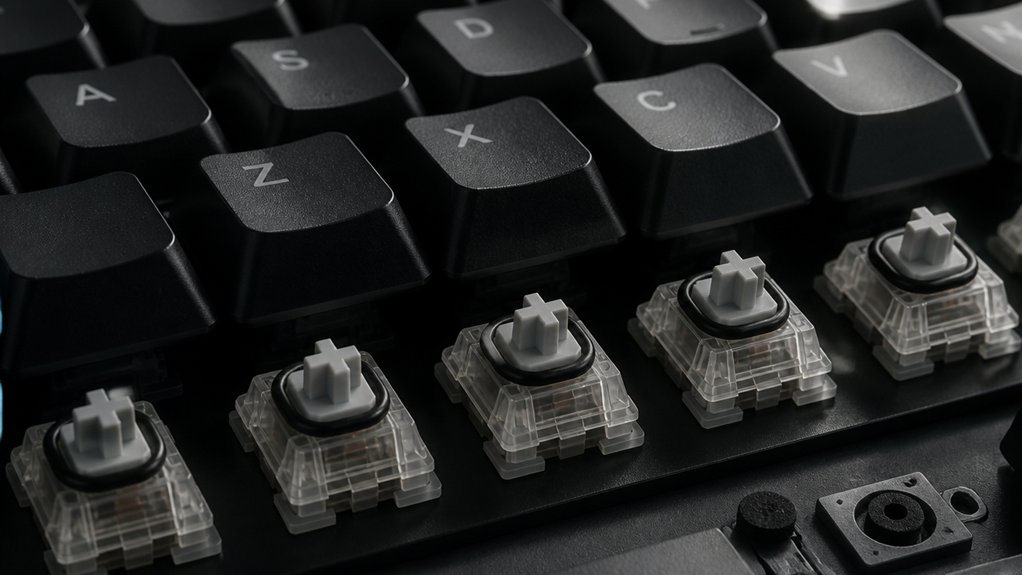
Silent mechanical keyboards use specially designed components to reduce noise and vibrations. You’ll find silent switches with built-in dampening materials like rubber or silicone that absorb impact sounds. Stabilizers are modified or lubricated to prevent rattling, while foam padding inside the case dampens vibrations. O-rings and sound-absorbing pads cushion key impacts. Advanced mods like gasket mounts and filming further minimize noise. Keep exploring to discover how these parts work together for quieter typing.
Where Does the Noise Come From in Mechanical Keyboards?
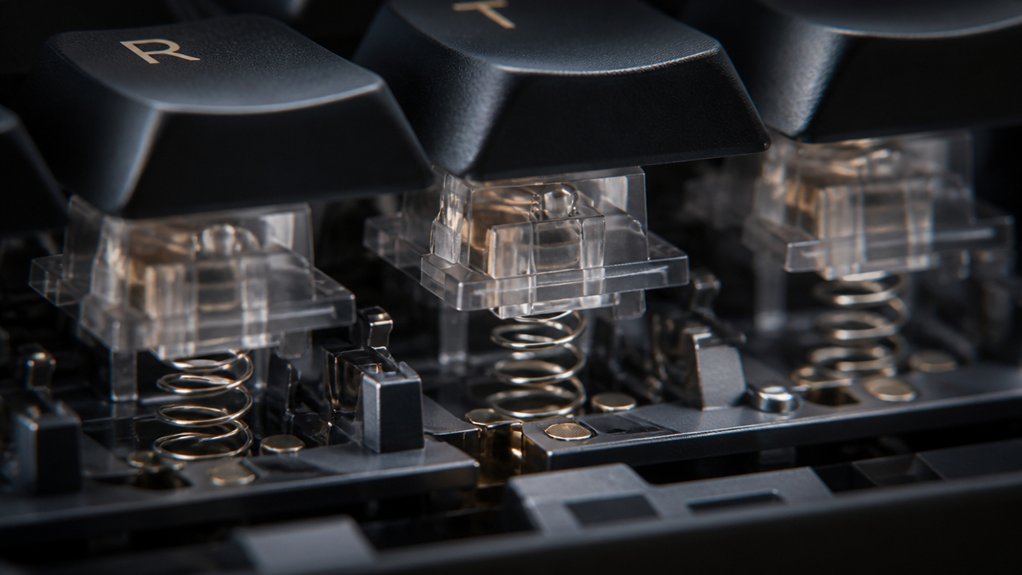
Have you ever wondered why mechanical keyboards can be so loud? The noise mainly comes from the switches, which contain springs and stems that produce tactile and audible feedback with each keypress.
Mechanical switches with springs and stems create the distinctive, tactile, and audible feedback that makes these keyboards so loud.
When you bottom-out, pressing the key fully to the base, it creates a sharp thud, often the loudest sound. Larger keys like the spacebar have stabilizers underneath; if they’re unlubricated, they rattle and add to the noise.
The keycaps also influence sound — materials like ABS or PBT can amplify or dampen it. Plus, the keyboard case plays a role, as its shape and material affect how sound vibrations are transmitted and amplified inside the case.
All these components combine to give mechanical keyboards their characteristic loud, rhythmic noise. Properly lubing stabilizers, such as clip-in stabilizers, can significantly reduce rattling and overall noise during typing.
How Do Silent Switches Reduce Keyboard Noise?
Ever wondered how silent switches manage to quiet down the loud clicking of traditional mechanical keyboards? Silent switches use built-in dampening materials, like rubber or silicone, to absorb impact during bottom-out and top-out of key presses. These materials help with sound reduction by cushioning mechanical vibrations that typically cause noise.
Additionally, silent switches, such as Cherry MX Silent Red, incorporate modified springs or stem designs that reduce the tactile and audible click, all without sacrificing responsiveness. As a result, they greatly lower the overall noise, often by about 10 dB, producing a quieter typing experience than rubber dome keyboards.
How Do Stabilizers Cause Rattling, and How Can You Silence Them?
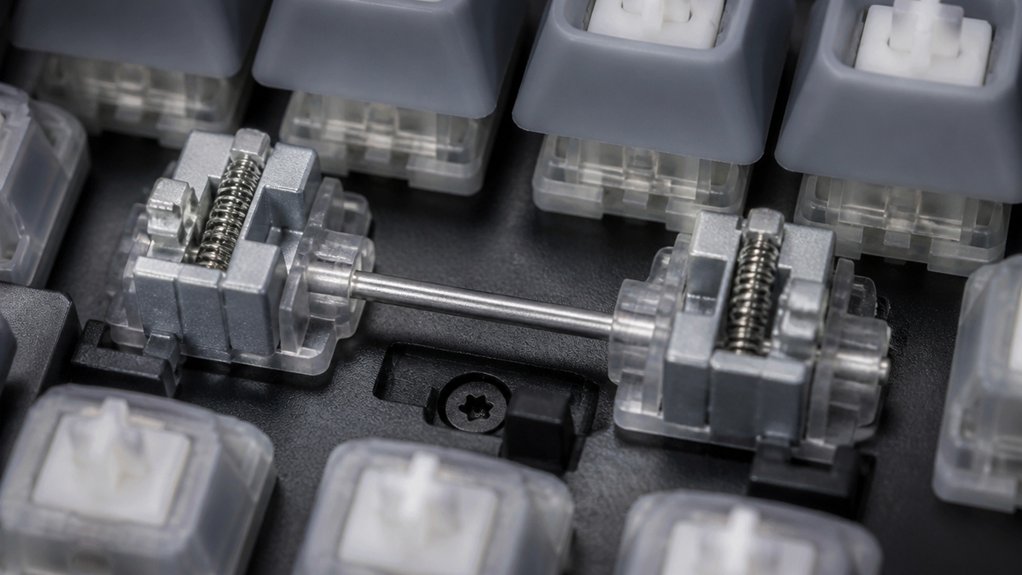
Stabilizers are essential for supporting larger keys like the spacebar and shift, but if they’re not properly maintained or installed, they can produce rattling noises during typing. Rattling happens when stabilizers move excessively or have loose components. Unlubricated stabilizers increase friction, causing the noise.
To silence them, applying lubricant such as Krytox 205g0 grease to the clip stabilizer wire and housing reduces friction and minimizes rattling. Clipping stabilizer wire legs can improve stability, while adding band-aid cushioning inside the stabilizer housing dampens vibrations. These modifications help lock parts in place and absorb shocks.
Properly lubricated and modded stabilizers turn noisy keys into nearly silent contributors, greatly enhancing your keyboard’s noise reduction and overall quietness.
What Role Do Keycaps Play in Sound Dampening?
Your choice of keycaps greatly influences sound dampening; thicker, high-quality materials like PBT absorb more noise than thinner ABS caps. The profile and thickness also matter, with uniform shapes and denser construction reducing impact noise during typing. Additionally, softer or textured surfaces, along with features like rubber O-rings, further minimize sound by dampening vibrations and resonance. Using compatible double-shot ABS keycaps with anti-grease coating can also help maintain their integrity and sound quality over time.
Material Type Impact
The material composition of keycaps greatly influences the sound profile of a mechanical keyboard. Thicker PBT keycaps absorb sound better and reduce high-pitched keypress noise compared to thinner ABS keycaps. PBT’s density minimizes resonance, enhancing sound dampening. Conversely, ABS keycaps tend to amplify sound due to their thin, hollow plastic construction, making your keyboard louder and sharper. Using rubber O-rings on keycap stems can further soften the impact, reducing overall noise. Material type impact is vital for silence, as denser, less hollow materials help minimize internal sound resonance. Additionally, keycap shape and mounting style influence how sound reverberates inside your keyboard. Choosing appropriate keycap materials, like PBT, makes a significant difference in maintaining a quiet, unobtrusive typing experience, especially given the double-shot molding techniques that improve legend durability and overall noise reduction.
Profile and Thickness
Keycap profile and thickness play essential roles in how sound resonates inside a mechanical keyboard. Your choice of keycap profile, like XDA, influences sound by creating consistent acoustics across all keys, while sculpted profiles produce more varied sounds.
Thicker keycaps, especially made from PBT material, absorb and dampen typing noise more effectively than thinner ABS keycaps, resulting in a deeper, less sharp sound. Higher-profile keycaps tend to produce louder, higher-pitched sounds due to increased surface area and resonance.
Maintaining uniform keycap thickness across all keys helps reduce sound variability and encourages a more controlled acoustic environment. Additionally, selecting keycaps with fade-resistant legends can minimize unwanted noise from worn or fading markings over time. Overall, selecting the right combination of keycap profile, thickness, and material—focusing on thicker PBT, uniform thickness, and profiles like XDA—can greatly improve sound dampening in silent mechanical keyboards.
How Can Foam Padding Inside the Keyboard Lower Noise?
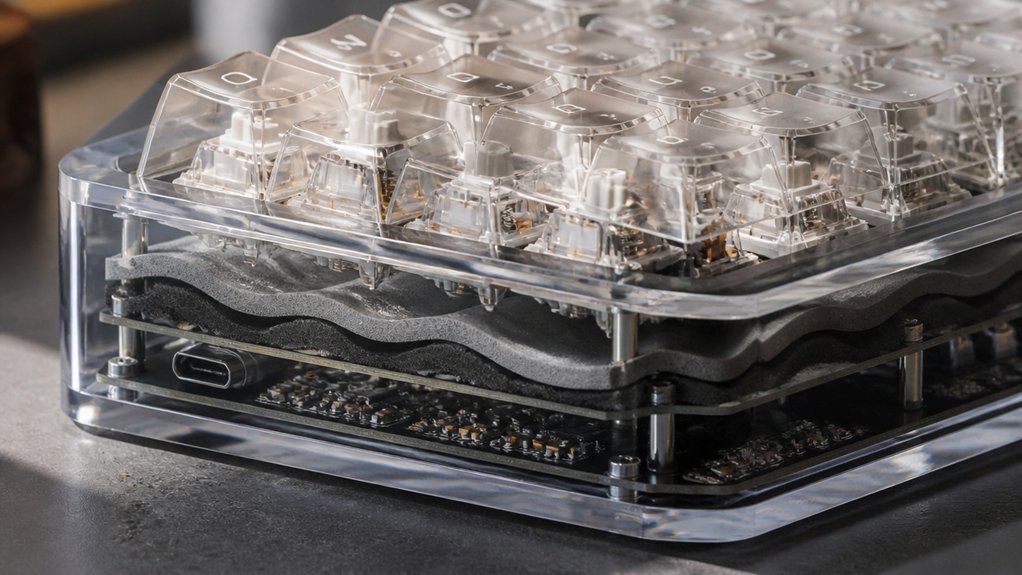
Foam padding inside your keyboard absorbs vibrations from switches and stabilizers, preventing sound from amplifying inside the case.
It also dampens echoes and reduces hollow chamber resonances, making your typing quieter. By adding foam, you can greatly lower noise caused by switch impact and stabilizer rattle. Proper foam density is essential for effective vibration absorption and sound quality improvement.
Absorbs Vibrations and Echoes
Inside a mechanical keyboard, foam padding effectively absorbs vibrations and echoes, leading to a quieter typing experience.
By dampening sound within the keyboard case, foam reduces reverberation between the backplate and PCB, minimizing typing noise. It also absorbs impacts from key bottoming out and stabilizer movement, preventing sharp thuds and high-pitched echoes.
Proper placement of foam inside the casing can greatly lower noise levels, making your typing more discreet.
- Foam acts as a barrier, diminishing reverberation and echo inside the case
- It absorbs vibrations from keypresses, reducing overall noise
- Dampen sound waves that amplify through hollow chambers
- Prevents sharp, disruptive sounds from stabilizers and bottoming out
This results in a more silent, refined keyboard experience.
Damps Sound Transmission
Placing foam padding strategically inside your keyboard helps reduce sound transmission by absorbing vibrations from switches and stabilizers. Foam pads inside the case act as silencers, dampening the sound of keystrokes and preventing rattling between metal parts. Non-conductive foam placed between the backplate and PCB reduces impact noise and minimizes echo within hollow chambers, lowering overall noise levels. Material properties of the foam, such as density and elasticity, significantly influence its effectiveness in sound dampening. Plate foam inserted between the plate and PCB softens spring and stem sounds, further muffling keystrokes. Adding foam inside the case effectively absorbs impact and dampens sharp thuds caused by bottoming out, leading to a quieter typing experience. Using foam as a silencer inside the case is an effective way to reduce noise, making your keyboard sound more muted and less disruptive.
How Do Mounting Styles Like Gasket Mount Reduce Vibrations?
Ever wondered how gasket mount styles help reduce vibrations in mechanical keyboards? Gasket Mount uses soft, compressible materials like Poron gaskets between the case and the plate. This setup absorbs vibrations from key presses, preventing them from resonating throughout the keyboard.
As a result, it reduces the sound of key bottom-out and impact, contributing to a more quiet mechanical keyboard. By isolating the plate from direct contact with the case, this mounting style limits vibration transfer and dampens reverberations.
- Minimizes impact noise during typing
- Softens the overall sound of the keyboard
- Enhances typing comfort with cushioning
- Creates a more stable, vibration-free feel
This design helps you enjoy silent, comfortable typing experiences. Understanding how different mounting styles affect vibration damping can help you choose the best setup for a quieter, more refined keyboard experience.
Why Lubricating Switches and Stabilizers Cuts Down Noise?
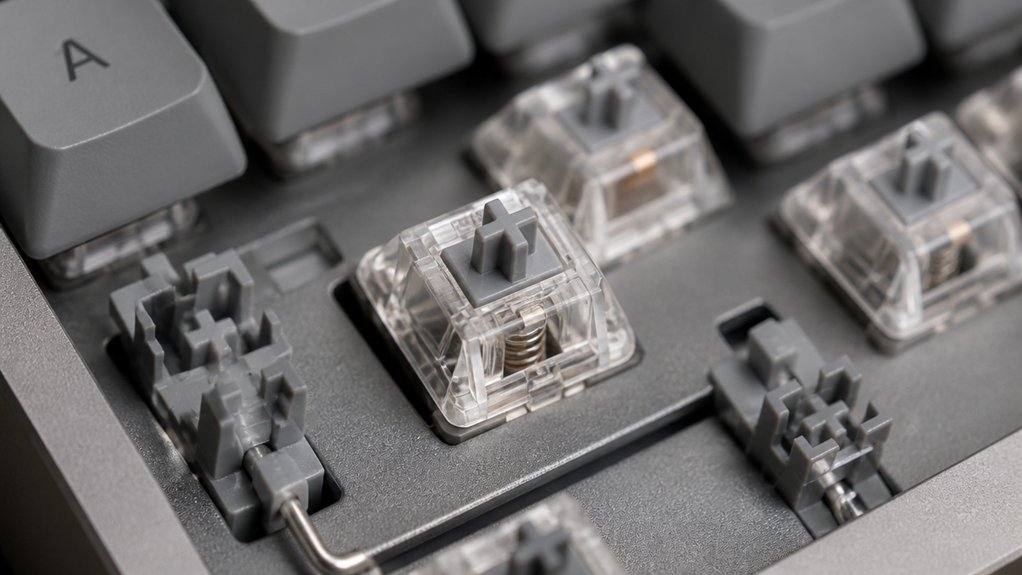
Lubricating switches and stabilizers is essential for reducing noise because it directly addresses the main sources of sound during keystrokes. When you lubricate mechanical switches, you smooth the friction between the stem and housing, dampening harsh ticking and scratchy sounds. Using specialized keyboard switch lubricant ensures that these components operate smoothly and quietly. Applying grease like Krytox 205g0 to stabilizers cushions the metal wire and plastic housing, eliminating rattling on larger keys such as the spacebar and shift. Proper lubrication prevents components from rattling or bottoming out noisily, lowering both click and thud sounds. Lubricated switches produce quieter, more muted keystrokes while maintaining tactile feedback. This reduced noise levels makes silent keyboards more feasible without sacrificing typing feel. Overall, lubricating key components greatly dampens the noise created during key presses, enhancing quiet operation.
What Are the Benefits of Using O-Rings and Sound-Absorbing Pads?
Have you ever wondered how small modifications can greatly reduce keyboard noise? Using O-rings on keycap stems cushions bottoming-out impacts, creating quieter keystrokes without sacrificing tactile feedback.
Sound-absorbing foam pads placed inside the keyboard case dampen vibrations from switches and stabilizers, further lowering noise levels. High-quality rubber O-rings, like Max Keyboard O-rings, soften sounds and help extend keycap lifespan by reducing stem stress.
Foam padding inside the case absorbs hollow or echoing sounds, providing a deeper, muted acoustic experience. Properly selecting the right material hardness and thickness for O-rings ensures optimal noise reduction without negatively affecting typing feel. When combined, O-rings and foam pads can decrease overall noise by about 10 decibels, making your keyboard noticeably quieter.
This setup guarantees a less disruptive, more peaceful typing environment while maintaining the performance benefits of silent mechanical keyboards.
How Can Modifications Like Filming Switches Make Your Keyboard Quieter?
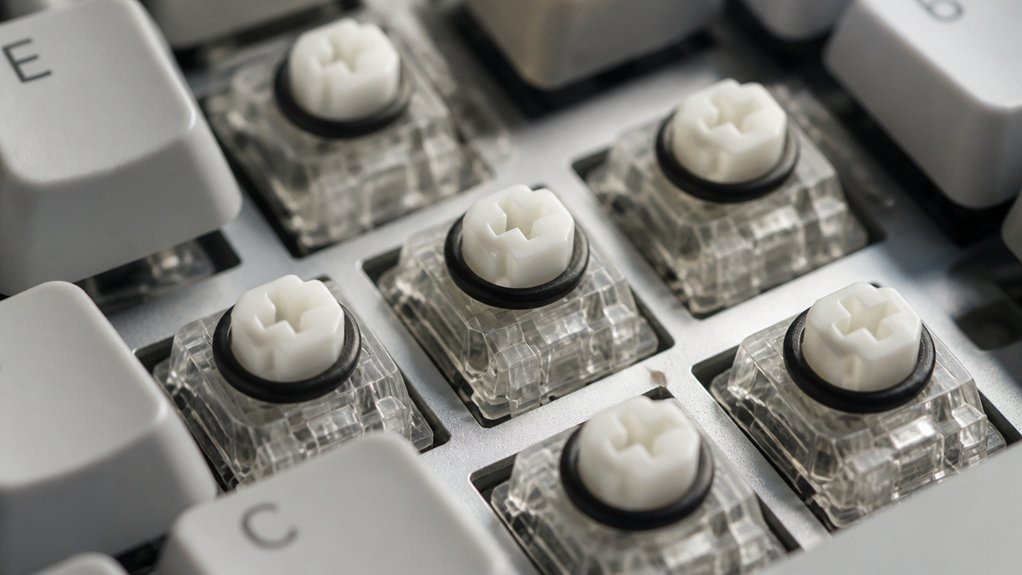
Wondering how you can further quiet your mechanical keyboard? Filming switches is a simple mod that can help you achieve a truly silent keyboard. This process involves wrapping thin plastic films around the switch housing, which stabilizes the stem and reduces internal wobble. A variety of switch film options are available, offering different materials and thicknesses to suit your specific sound and feel preferences. By doing so, it minimizes rattling noises and guarantees switch consistency, resulting in a quieter typing experience. Filming is especially effective for switches with loose housings or stems prone to lateral movement. When combined with lubricating the switch springs and sliders, your mechanical keyboard’s acoustic output drops even further. This quieting method lets you enjoy tactile feedback without sacrificing performance, making it ideal for those seeking a silent keyboard for work or shared spaces.
What Are the Advanced Mods Like Gasket Mounts and Band-Aid Stabilizers That Help Reduce Rattling?
Building on the idea of quieting your switches, advanced mods like gasket mounts and Band-Aid stabilizers focus on reducing overall vibration and stabilizer noise to create a calmer typing environment. Gasket mounts use soft materials like Poron gaskets between the case and plate, absorbing vibrations and minimizing rattling, while also dampening the impact of keystrokes.
The Band-Aid mod involves applying cushioned tape or padding under stabilizer housings, helping to reduce bottom-out noise and stabilize larger keys. Clipping, lubing stabilizers, and filming switches further enhance noise reduction by preventing excess wire and housing chatter.
Together, these mods work synergistically to target key sources of mechanical keyboard noise—vibration, stabilizer rattle, and bottom-out sounds—delivering a noticeably quieter, more refined typing experience.
Final Tips for Building and Maintaining a Silent Mechanical Keyboard
To keep your silent mechanical keyboard performing well, focus on proper maintenance techniques like lubricating switches and cleaning regularly.
Choosing high-quality components, such as dampening materials and O-rings, also guarantees consistent noise reduction and a smooth feel. Always test your keyboard after modifications to make sure your setup remains as quiet and comfortable as possible.
Proper Maintenance Techniques
Maintaining a silent mechanical keyboard requires regular attention to its components to keep everything operating smoothly and quietly. To guarantee peak performance, you should lubricate switches and stabilizers with appropriate grease like Krytox 205g0, minimizing rattling and noise.
Periodically, clean keycaps and internals with compressed air or a soft brush to prevent dust buildup that hampers switch performance. Adjust foam padding inside the case to sustain effective sound dampening and prevent vibrations. Use a switch tester or keyboard software after maintenance to verify silent operation. Additionally, replace worn rubber O-rings and stabilizer parts promptly.
- Keep components clean to prevent dust and debris
- Lubricate diligently for smooth, quiet keypresses
- Periodically inspect foam padding for stability
- Promptly replace worn stabilizer parts
Optimal Component Selection
Selecting the right components can greatly impact your mechanical keyboard’s silence and overall performance. To build a quiet, effective silent mechanical keyboard, choose switches designed for silence, such as Outemu Silent Lemon or Cherry MX Silent series.
Lubricate stabilizers and switches with high-quality grease like Krytox 205g0 to eliminate rattling and guarantee smooth, quiet keypresses. Installing rubber O-rings on keycaps absorbs impact noise and reduces the sharp thud when bottoming out.
Additionally, use foam padding between the keyboard case and PCB or plate to dampen vibrations and lessen hollow resonance.
Regular maintenance, including cleaning switches and re-lubrication, keeps your keyboard quiet over time and prevents noise buildup from dust or wear. Careful component selection enhances both silence and durability in your silent mechanical keyboard.
Frequently Asked Questions
What Makes a Mechanical Keyboard Silent?
A silent mechanical keyboard uses switches with built-in dampeners, lubricated stabilizers, sound-absorbing keycaps, and a solid case design. These features reduce vibrations, rattling, and echoing, creating quieter typing while maintaining tactile feedback.
How to Make a Mechanical Keyboard Completely Silent?
To make your mechanical keyboard completely silent, you should use silent switches, lubricate all moving parts, add rubber O-rings, install dampening foam inside the case, and modify stabilizers to prevent rattling, ensuring minimal noise during typing.
How to Build a Quiet Mechanical Keyboard?
To build a quiet mechanical keyboard, choose silent switches like Cherry MX Silent, add O-rings and lubricate stabilizers, use foam padding inside, opt for thick keycaps, and consider gasket mounting for best noise reduction and vibrations.
Do They Make Silent Mechanical Keyboards?
Yes, they make silent mechanical keyboards. You can find models with silent switches, noise-reducing stabilizers, foam dampening, and rubber O-rings, all working together to provide a quiet, tactile typing experience without sacrificing performance.



