
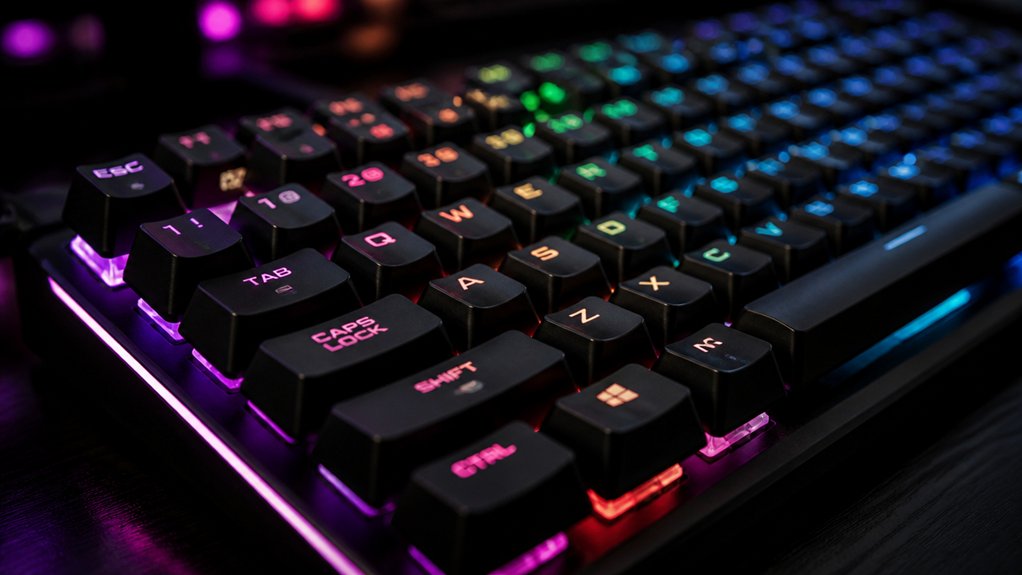
To enhance your mechanical keyboard’s typing feel, choose switch types that match your preference—linear for smoothness, tactile for feedback, or clicky for an audible cue. Experiment with keycap materials like PBT for better grip and sound dampening, and consider gasket mounting for comfort and responsiveness. Adjust actuation force and travel distance, and select case and plate materials that influence sound and feedback. Proper maintenance and firmware tweaks can also refine your experience. Keep exploring to discover even more ways to perfect your keyboard feel.
What Makes Switch Types Affect Your Mechanical Keyboard Feel?
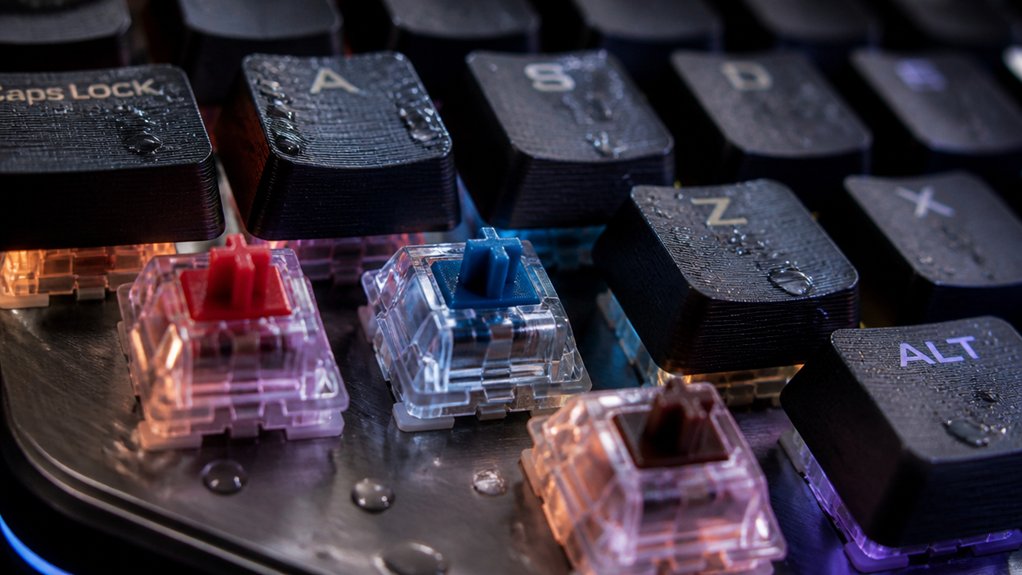
Have you ever wondered how different switch types change the way your mechanical keyboard feels? The answer lies in the unique characteristics of switch types, which include actuation force, tactile feedback, and actuation point.
Linear switches, like Cherry MX Reds, provide smooth, uninterrupted keystrokes, ideal for gaming with less resistance. Tactile switches, such as Cherry MX Browns, feature a small bump that signals your key has registered without loud noise, helping with typing accuracy.
Then there are clicky switches, like Cherry MX Blues, which combine tactile feedback with audible clicks, boosting typing rhythm but possibly disturbing quiet environments. The actuation force and actuation point differ among switch types, directly impacting responsiveness, finger fatigue, and overall feel.
Additionally, silent switches incorporate features like internal dampening or lubricated stems to significantly reduce noise while maintaining a similar feel. These variations help you customize your typing experience based on your preferences.
How Do Keycap Materials and Textures Influence Feel and Sound?
Your choice of keycap material and texture greatly impacts both how your keyboard feels and sounds.
ABS keycaps tend to produce a brighter, more high-pitched sound and feel smoother, but they wear down faster, while PBT caps offer a deeper, muted tone and better grip thanks to their textured surface.
Thicker keycaps can also create a more solid typing feel and help dampen noise, enhancing overall comfort.
Keycap Material Texture Influence
The material and surface texture of keycaps play an essential role in shaping both the feel and sound of a mechanical keyboard. Your choice of keycap profiles and textures directly influences your typing feel and overall experience.
PBT keycaps offer a more textured, matte surface that enhances grip and reduces finger slipping, making long typing sessions more comfortable. Conversely, ABS keycaps tend to be smoother and shinier, producing a brighter sound but sometimes slipping under your fingers.
The surface finish, whether rough or smooth, impacts tactile feedback—rough textures prevent fatigue by boosting grip, while thicker keycaps dampen vibrations, delivering a deeper, less hollow sound. Together, these materials and textures shape how satisfying and responsive your keyboard feels during use.
Sound Characteristics of Materials
Material choices and surface textures directly shape the soundscape of your mechanical keyboard, influencing both how it feels and how it resonates with each keystroke. Keycap materials like ABS produce a brighter, sharper acoustic pitch, while PBT keycaps generate a deeper, “thocky” sound, enhancing the typing feel. The thickness and profile of keycaps also affect sound resonance—thicker keycaps tend to produce richer, fuller tones. Textured keycaps reduce finger slippage, subtly altering sound by changing contact with the key press. Different surfaces, such as matte or smooth finishes, modulate noise, with some dampening or amplifying keypress sounds. Custom keycaps let you personalize this acoustic experience and tactile feel, demonstrating how various materials and textures influence the sound and sensation of keyboards use.
| Material Type | Sound Impact | Tactile Effect |
|---|---|---|
| ABS | Bright, sharp, high pitch | Slightly滑滑滑滑 |
| PBT | Deep, muted, “thocky” sound | Firm, textured grip |
| Thick keycaps | Fuller resonance, richer tone | Improved feedback |
| Matte finish | Dampened noise, softer tone | Reduced滑动, subtle grip |
How Gasket Mounting Systems Enhance Comfort and Responsiveness?
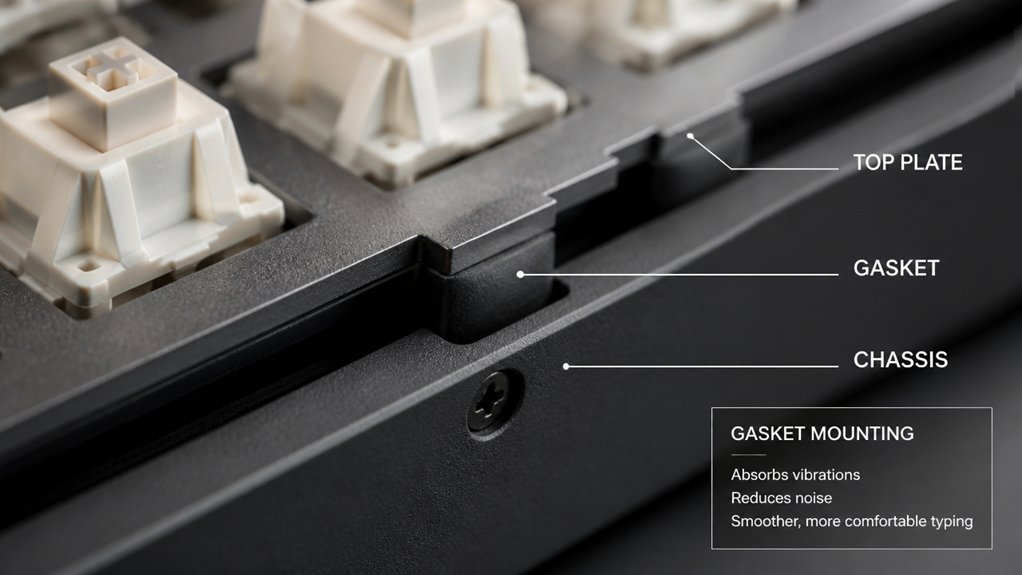
Gasket mounting systems absorb shock and reduce vibrations, making typing more comfortable over long periods.
With customizable options like the Modular Gasket System, you can fine-tune your keyboard’s feel for better responsiveness and tactile feedback. These systems also isolate the plate from the case, boosting both comfort and sound quality during use.
Enhanced Typing Comfort
Gasket mounting systems greatly improve typing comfort by absorbing vibrations and reducing noise, creating a smoother and quieter experience. This setup cushions your fingers during long typing sessions, minimizing fatigue and enhancing overall typing feel. A well-designed gasket system can also help tailor the vibration damping properties to match personal preferences. The modular gasket system (MGS) lets you customize gasket firmness, balancing comfort and responsiveness. Consider these benefits: 1. Feel the soft, cushioned response that makes extended typing comfortable. 2. Experience less finger strain, even after hours of work. 3. Enjoy quieter keyboard operation, reducing noise distractions. 4. Benefit from increased keyboard durability, as impact forces are absorbed effectively.
Improved Responsiveness and Feel
By cushioning the switch plate and absorbing impact forces, gasket mounting systems substantially improve both the responsiveness and feel of a mechanical keyboard. They isolate the switch from vibrations and noise, leading to a cleaner, more precise keystroke. The Modular Gasket System (MGS) in models like the GMMK 3 lets you adjust gasket firmness, tailoring the tactile feedback and sound dampening to match your preferences. Firm gaskets give you a solid, accurate feel preferred by competitive gamers. Flex gaskets deliver a bouncier, comfortable experience ideal for long typing sessions. The result is a keyboard experience that feels more responsive, reduces fatigue, and boosts overall build quality. These improvements make mechanical keyboards better suited for both gaming and extended typing. Additionally, material durability plays a crucial role in maintaining consistent performance over time, ensuring long-term satisfaction with your customized setup.
Customizable Mounting Options
Customizable mounting options empower you to tailor your mechanical keyboard’s feel and responsiveness to your preferences. Mechanical keyboards offer switch types and mounting systems that can drastically influence your comfort during long sessions.
Gasket mounting systems place soft gaskets between the keyboard plate and case, cushioning each press and reducing harsh vibrations. The Modular Gasket System (MGS), like in the GMMK 3, lets you adjust gasket firmness, giving you control over responsiveness and tactile feel.
Whether you prefer a firmer setup for precision or a softer feel for comfortable typing, these options help you find the perfect balance. Additionally, hot-swap PCBs facilitate quick switch changes, enabling customization of switch type and actuation force to further enhance your typing experience.
- Feel every press with confidence.
- Reduce finger fatigue during extended typing.
- Achieve quieter, smoother keystrokes.
- Customize your keyboard for maximum comfort.
How Does Case Material Shape Sound and Tactile Feedback?
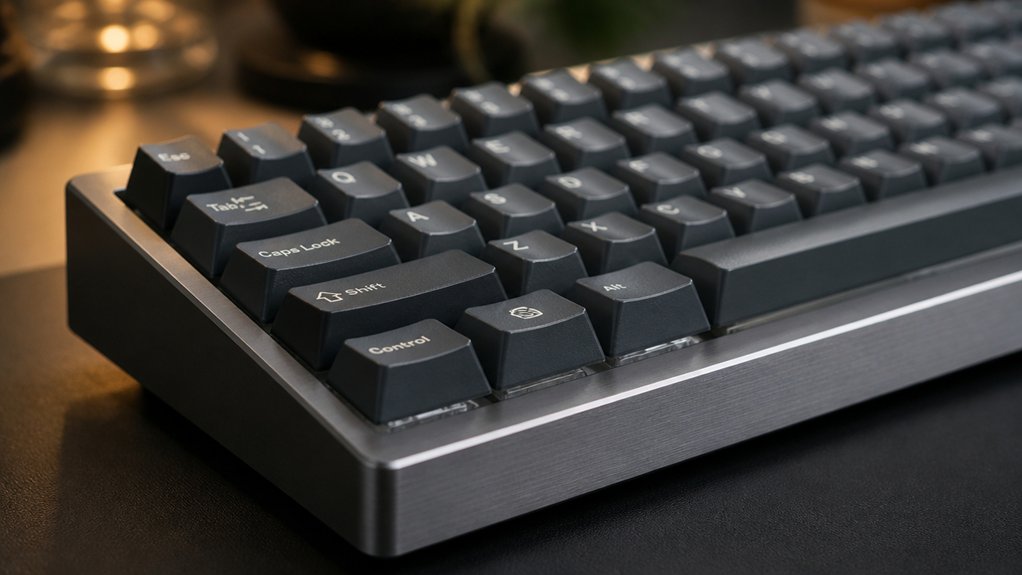
Have you ever noticed how the case material of a keyboard can dramatically alter its sound and feel? Mechanical keyboards with polymer cases tend to absorb sound, creating deeper, muted tones, while metal cases amplify resonance, making typing louder and more expressive.
Metal cases also produce bright, ringing acoustics that highlight tactile feedback, whereas polymer cases dampen vibrations for a softer, cushioned feel. Inside metal cases, sound-dampening foam reduces resonance, balancing loudness without losing sharp keystroke responses.
The material’s rigidity and density, like aluminum or brass plates, further influence how tactile feedback is transmitted, affecting keypress firmness and perceived quality. Changing or customizing the case material allows you to personalize your keyboard’s sound signature and tactile experience to match your preferences. Additionally, the surface finish options like anodizing or powder coating can impact both durability and acoustic properties, further shaping your typing experience.
How to Adjust Actuation Force and Travel Distance for Better Typing Comfort?
Ever wonder how you can make your typing feel more comfortable and tailored to your style? Adjusting actuation force and travel distance can greatly improve your experience.
Here’s how:
- Choose switches with appropriate actuation force—lighter springs (around 35g) reduce fatigue, while heavier ones (about 65g) offer more control.
- Select switches with shorter actuation points—these register presses earlier, accelerating your typing and minimizing bottoming out.
- Opt for switches designed for tactile or linear profiles—they provide feedback at actuation, so you can press with less force and travel less.
- Modify travel distance—switch to low-profile keyboards or use low-travel switches like Logitech G915 for less finger movement and more comfort.
- Consider pre-lubricated switches, which reduce friction and improve typing smoothness, making adjustments feel even more seamless.
Tweaking these elements allows switches to provide a tailored, responsive feel.
How Do Plate Materials Affect Sound Dampening and Key Feel?
Plate materials play a crucial role in shaping both the sound and feel of your mechanical keyboard. Your choice affects sound resonance and the key press impact, influencing the overall acoustic profile. Using foam dampening between the plate and PCB can further reduce resonance and soften the typing sound, enhancing overall comfort. Brass plates produce a bright, firm typing sound with crisp, solid keystrokes, making keyboards worth considering if you prefer clarity and responsiveness. Aluminum offers a balanced sound with tactile feedback, combining durability with moderate keypress firmness for a versatile feel. Polycarbonate plates deliver a softer, cushioned experience, reducing sound resonance and creating a deeper, muted sound. FR4 plates minimize flex, dampening the acoustic profile and providing a quieter, softer key feel.
What Are the Best Layouts and Angles for Ergonomic Typing?
Choosing the right layout and angle for your mechanical keyboard can greatly influence your comfort and typing efficiency. Opt for ergonomic typing layouts that feature compact, split, or ortholinear designs, reducing finger movement and strain. A negative tilt or low keyboard angle helps maintain a natural hand position, minimizing wrist discomfort.
Make sure your mechanical keyboard includes wrist rests or use external ones to support your wrists and prevent pronation. Consider sculpted keycaps with distinct shapes and textures to improve fingertip fitting, boosting typing accuracy.
Additionally, low-profile switches or slim cases can decrease keyboard height, lessening wrist elevation. These adjustments create an ideal ergonomic setup, helping you type longer and more comfortably without fatigue. Prioritize these elements for an improved, natural hand posture during extended sessions. Incorporating ortholinear PCBs can further optimize your setup by aligning keys in straight rows, reducing finger travel and strain over prolonged typing periods.
How Do Lubrication and Proper Maintenance Improve Your Mechanical Keyboard?
Have you noticed how some mechanical keyboards feel smoother and quieter than others? The secret lies in proper lubrication and maintenance. Lubricating mechanical switches and stabilizers reduces friction and scratchiness, resulting in smoother keypresses and quieter operation. Using the right keyboard switch lubricant ensures optimal performance and sound profile. Regular maintenance, like cleaning with compressed air and wiping, prevents debris buildup that can cause inconsistent switch performance. Removing keycaps for deep cleaning helps preserve tactile feedback and prevents key sticking over time.
Proper lubrication and maintenance make your mechanical keyboard quieter, smoother, and more satisfying to type on.
Well-lubricated switches enhance durability by minimizing wear on mechanical components, extending the keyboard’s lifespan beyond typical keystroke counts. Consistent upkeep also boosts typing comfort, reducing finger fatigue and making every keystroke more responsive and satisfying.
Proper maintenance guarantees your keyboard performs at its best, combining longevity with a more pleasurable typing experience.
How Can Firmware Settings Fine-Tune Your Keyboard’s Response?
Ever wondered how firmware settings can transform your keyboard’s performance? Firmware allows you to fine-tune responses that directly impact your typing experience, making each keystroke more precise.
Here are four ways it can improve your setup:
- Adjust debounce time to prevent unintentional multiple key presses, boosting typing accuracy.
- Change the actuation point so keys register at your preferred travel distance, speeding up or slowing down responses.
- Use key remapping to assign commands or redesign your layout, reducing finger movement and strain.
- Customize key repeat rates and delay times to balance speed and control, adapting responsiveness to your style.
- Leveraging QMK firmware support enables advanced customization such as macros and multi-layer configurations, further enhancing your typing experience.
Frequently Asked Questions
How to Improve Typing on a Mechanical Keyboard?
You can improve typing on a mechanical keyboard by choosing switches that match your style, customizing keycaps, using ergonomic accessories, lubricating switches, and regularly cleaning the keyboard to guarantee smooth, comfortable, and accurate keystrokes every time.
Why Can’t Gen Z Touch Type?
You probably can’t touch type because, growing up, you relied more on texting and smartphones than formal keyboard lessons, which limits your familiarity with proper techniques. Casual habits and poor posture also make developing accurate, touch-typing skills harder for you.
Why Do Mechanical Keyboards Feel so Good to Type On?
Mechanical keyboards feel so good to type on because their tactile switches provide satisfying feedback, their sound profiles add auditory enjoyment, and customizable keycaps guarantee comfortable, precise, long-lasting keystrokes, making your typing experience more rewarding and enjoyable.
Is Typing 27 WPM Good?
Typing 27 WPM is a solid starting point, especially if you’re new or casual. You can improve with practice, focusing on accuracy and finger positioning, and using online tools to steadily increase your speed over time.
In Summary
To enhance your mechanical keyboard typing feel, consider customizing switch types, keycap materials, and mounting styles to suit your preferences. Experiment with case and plate materials for ideal sound and tactile feedback, and fine-tune actuation force and travel distance for comfort. Regular maintenance and adjusting firmware settings also play important roles in delivering a personalized, satisfying typing experience. By exploring these elements, you can create a keyboard that feels just right for you.



