

To avoid over-lubricating your switches, apply lubricant sparingly and only to critical friction points like stem rails and leaf bumps using a fine brush. Use a tiny amount, about 1–2mm, and wipe off excess before applying. Focus on consistent, thin layers and stop when the switch feels smooth without mushiness. If you want to learn how to fix over-lubed switches and prevent it in future builds, there’s more you should know.
Prevent Over-Lubrication in Keyboard Switches: Why It Matters
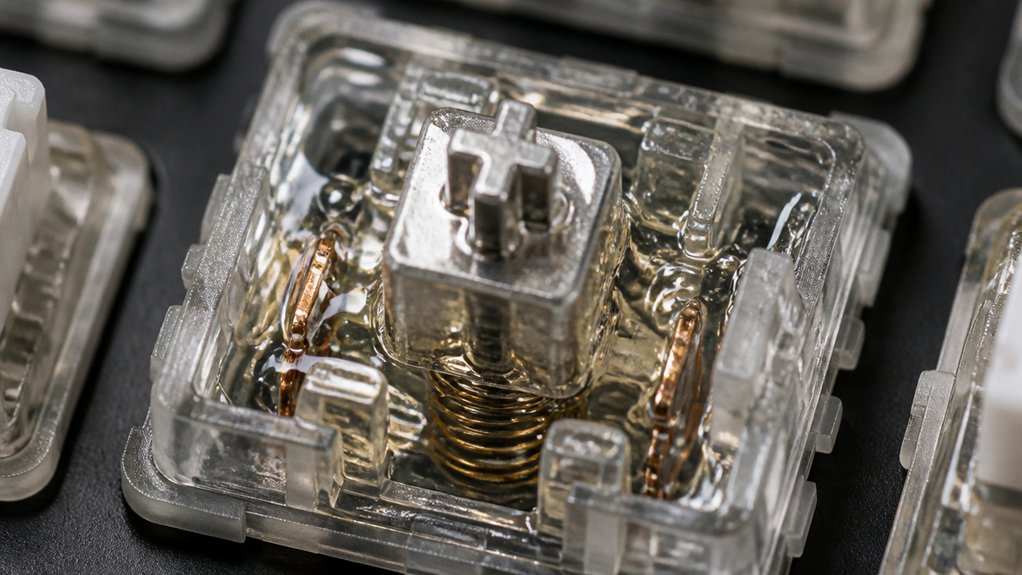
Over-lubricating keyboard switches can greatly impact their performance, so it’s important to apply lubricant carefully.
When applying lubricant, using too much can cause over-lubrication, leading to sluggish or mushy keypresses that reduce responsiveness and accuracy. For tactile switches, the amount of lube matters; a thin, even layer—about 1–2mm on a fine paintbrush—is all you need to prevent gunk buildup.
Apply a thin, even layer of lubricant to avoid sluggish or mushy keys and maintain optimal responsiveness.
Excessive lubricant tends to accumulate on stem rails and leaf bumps, dulling the switch’s tactile feedback. Thick or over-application can also attract dust and debris, making keys sticky and increasing maintenance needs.
Monitoring how your switches feel after lubing helps you avoid degrading their original sound and feel, preserving their thocky sound and responsiveness over time.
Signs Your Switch Is Over-Lubed and Needs Fixing
If your keyboard feels mushy or responds sluggishly, you might’ve over-lubed the switches.
Notice if keys stick, return slowly, or produce unusual noises—these are clear signs of excessive lubrication.
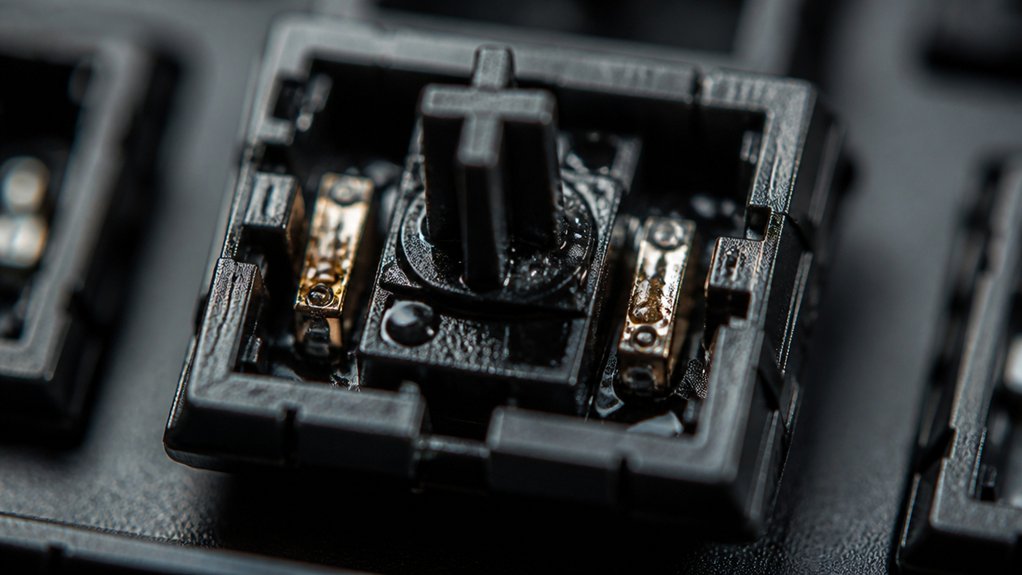
Also, visible grease residue around the components indicates you’ve applied too much lube.
A further sign is if the sound profile shifts from crisp or “thocky” to a duller, muffled tone, indicating over-lubrication affecting the switch’s acoustic properties and sound quality.
Sticky or Mushy Keys
Sticky or mushy keys are clear signs that your switch has been over-lubed, causing friction to increase and hindering smooth key presses. When too much lube is applied inside the switch, it can cause the switch components to stick together, making the key feel heavier and less springy during actuation. For tactile switches, over-lubing can dull the bump and reduce tactility, resulting in a numb and unresponsive feel. Visible white residue or globs inside the switch housing are indicators of excessive lubrication that can trap dirt and further degrade performance. If you notice sticky or mushy keys, it’s a sign to disassemble your switch, clean out the excess lube, and apply a sparing amount of lubricant to restore proper function.
Unusual Key Noises
Have you noticed unusual noises when typing, like squelching or dampened sounds? This is often a sign of over-lubricated switches. Over-lubricated switches can produce strange keypress sounds that seem wet or mushy, caused by excess lubricant dampening the switch’s natural click and feedback.
You might also hear audible squelching, especially around stem rails and spring areas, indicating too much lubricant trapped inside the switch housing. These noises can be accompanied by sluggish key return or muted spring sounds, altering your typing rhythm.
If keypresses feel heavier or less tactile and produce abnormal acoustic feedback, it’s a clear indication that your switches are over-lubed. Identifying these signs helps you know when your switches need fixing before performance drops further. Proper lubrication techniques and understanding the right amount of lubricant are essential for maintaining optimal switch performance (lubrication best practices).
Excess Lubricant Residue
Excess lubricant often leaves a visible residue inside your switch housing, appearing as a white or greasy film that clings to the components. If you notice this residue, it’s a sign you’ve applied lube too liberally or over-lubed your tactile switches. A poorly managed lubing process can also lead to organized compartments, which are designed to keep switch parts orderly during lubrication. This buildup can cause sluggish or mushy keypresses, reducing typing accuracy. Over-lubing dampens the tactile bump, making switches feel less responsive and decreasing overall performance.
Additionally, excess lubricant attracts dust and debris, leading to faster wear or switch failure. Signs that your switches are over-lubed include sticky keys, uneven actuation, and muted sound.
To fix this, you’ll need to disassemble the switch, thoroughly clean off the excess lubricant with isopropyl alcohol, and apply a thin, even coat if needed.
Using the Right Amount of Lubricant to Avoid Issues
Applying just the right amount of lubricant guarantees your keyboard switches feel smooth without sacrificing responsiveness. Too much lube, however, can slow down keypresses and mute tactile feedback, especially on tactile switches. Use a fine brush to coat friction points lightly, and wipe away any excess before reassembling. For optimal results, consider using switch films to reduce wobble and enhance switch stability, preventing issues caused by over-lubrication.
Benefits of Proper Lubing
Using the right amount of lubricant during keyboard switch tuning guarantees you enjoy smooth, responsive keypresses without sacrificing tactile feedback. Proper lubing reduces friction and wear, extending switch lifespan and maintaining your ideal typing experience. Using a thin lubricant like Krytox GPL205-GD0 allows for smooth travel while preventing excessive buildup that dulls tactility and sound. Applying lubricant sparingly to stem rails and leaf bumps avoids sluggishness and inconsistent registration. Over-lubrication traps dust and debris, leading to switch degradation and uneven resistance. Regular inspection with minimal reapplication keeps your switches performing at their best. Additionally, understanding switch compatibility and proper application techniques helps prevent common issues caused by over-lubricating.
Risks of Excessive Lube
While proper lubing enhances your keyboard’s feel and longevity, adding too much lubricant can backfire, causing sluggish key responses and a mushy sensation.
Over-lubricating your mechanical keyboard switches introduces excess lubricant that can hinder performance. Here are some risks:
- Sluggish keypresses — excess lubricant increases friction, slowing down switch actuation.
- Sticky or uneven response — dust and debris stick to the excess lube, making keys feel choppy.
- Dampened tactility — thick or heavy greases in switch housing mute the switch’s natural feedback.
- Increased maintenance — over-lubrication leads to switch gunk, requiring frequent disassembly and cleaning.
Applying just a thin, controlled layer guarantees smooth, responsive keypresses and prevents these issues caused by excess lubricant.
How to Apply Lube Evenly Without Overdoing It
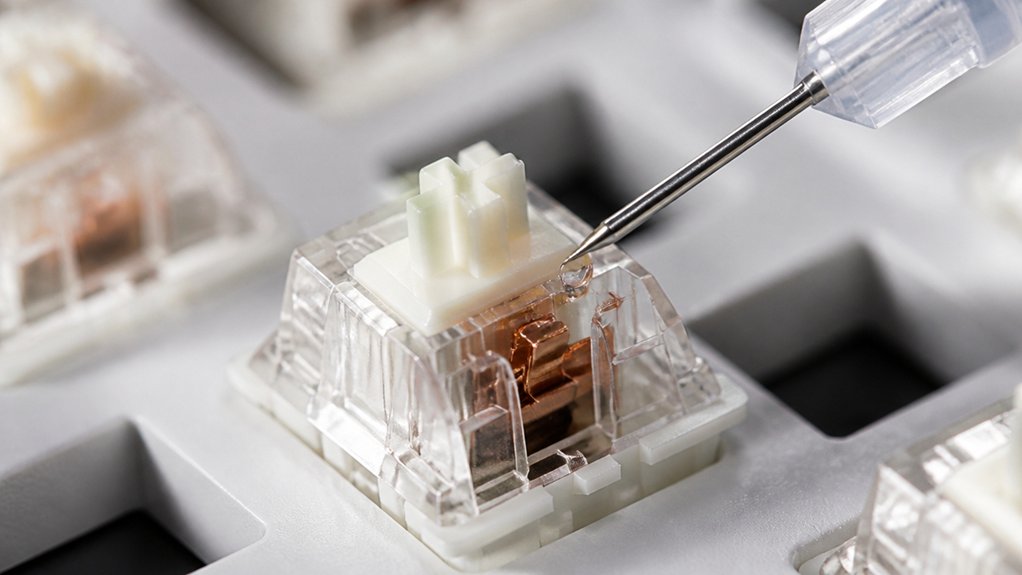
Ever wonder how to get just the right amount of lubrication on your switches? The key is to lube keyboard components with a small amount of lubricant.
Use a tiny paintbrush dipped lightly in lubricant and then remove any excess on the brush. Apply a thin, even coat about 1-2mm thick on switch rails and stem surfaces. Focus lubrication on critical friction points like the east and west rails of the bottom housing and all four sides of the stem, applying sparingly to prevent white residue buildup.
Lubricate springs and switch tops minimally, avoiding excess on tactile switch leaf bumps to preserve tactile feedback. Instead of one heavy coat, layer lube evenly in multiple thin applications.
For optimal durability, selecting a high-quality flux core solder can enhance your work’s reliability and joint strength, ensuring consistent performance over time.
Afterward, test the switch by pressing 10-20 times to distribute the lube and wipe off surplus.
Techniques to Prevent Excess Lubricant Buildup
To prevent excess lubricant buildup, focus on targeted application rather than coating entire switch components. Use your lube station effectively by applying only to key friction points, like the stem and rails. Avoid over-lubricating tactile leaf bumps, which can impair tactility. Aiming for precise application helps maintain switch responsiveness and longevity. Follow these techniques to keep the switch smooth:
- Use a fine-tipped paintbrush and dip only 1-2mm of grease to control application.
- Apply lubricant in thin, even layers, brushing until grease is absorbed without white residue.
- Concentrate on the stem and rails, steering clear of large surfaces or non-critical parts.
- Test switches after applying minimal lube and add more only if necessary to prevent sticky, sluggish switches.
This approach guarantees a balanced, clean finish, reducing the risk of over-lubrication.
Common Mistakes That Lead to Over-Lubricating Switches
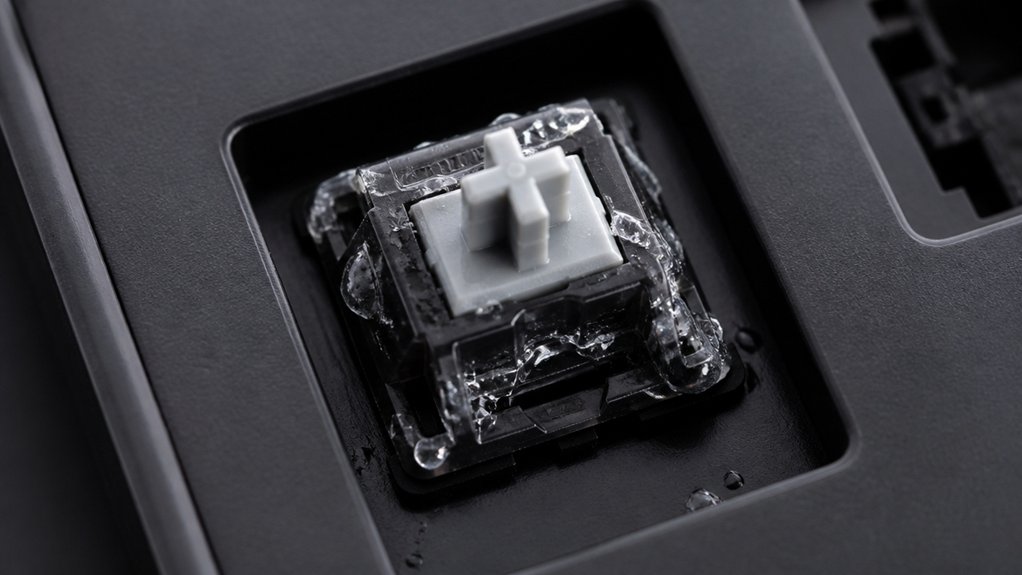
You might over-lubricate your switches by applying too much lubricant at once or using thick coats. Ignoring how the switch feels afterward can also lead to excess grease, making keys sluggish or mushy. Additionally, neglecting to consider the lubrication quality can result in inconsistent application and impact switch performance. To avoid these common mistakes, focus on applying small amounts and paying attention to how each switch responds.
Excessive Lubricant Application
Applying too much lubricant is one of the most common mistakes that leads to over-lubricating switches. When using a switch opener, it’s easy to accidentally add excess lube, especially on the legs of the stem or inside the bottom housing.
Excess leftover lube can spread unevenly, creating a mushy feel rather than smooth operation. To avoid this, consider these tips:
- Use minimal lubricant, focusing only on the contact points.
- Avoid thick, visible white residue or clumps.
- Refrain from applying heavy grease to tactile switch leaf bumps.
- Always clean old leftover lube before reapplying to prevent buildup.
Being precise with your application helps maintain switch response and prevents degradation caused by over-lubrication.
Ignoring Switch Feel
Neglecting to test switch feel after lubrication is a common mistake that leads to over-lubrication. You need to regularly evaluate how the switch feels—whether it’s smooth or sluggish—before adding more lube.
Use a switch puller to remove and test each switch, then decide whether it needs lubrication based on its feel. Tactile switches, for example, require minimal lube on leaf bumps to maintain tactility, so avoid over-priming them.
Press the switch multiple times after lubricating to distribute the lube evenly and gauge the actual feel. Failing to do this leads to unknowingly masking the switch’s natural response, prompting unnecessary lube application.
Steps to Correct Over-Lubricated Switches and Restore Feel
When over-lubrication occurs, the key is to carefully remove the excess lubricant without damaging the switch components. Follow these steps:
- Use a switch opener tool to disassemble the switch gently, exposing the stem and housing. Be cautious to avoid damaging the delicate leaf or housing.
- Soak lint-free swabs or soft brushes in high-purity isopropyl alcohol (90%+) and carefully clean the rails, stem, and spring surfaces to remove excess lubricant.
- Allow all parts to fully dry at room temperature (68–72°F). This prevents mushy or sluggish feels during reassembly.
- Lightly reapply lubricant using a fine paintbrush on only the critical friction points. Reassemble the switch and test it thoroughly to restore smooth keypresses.
Best Practices for Fine-Tuning Your Switch Lubrication
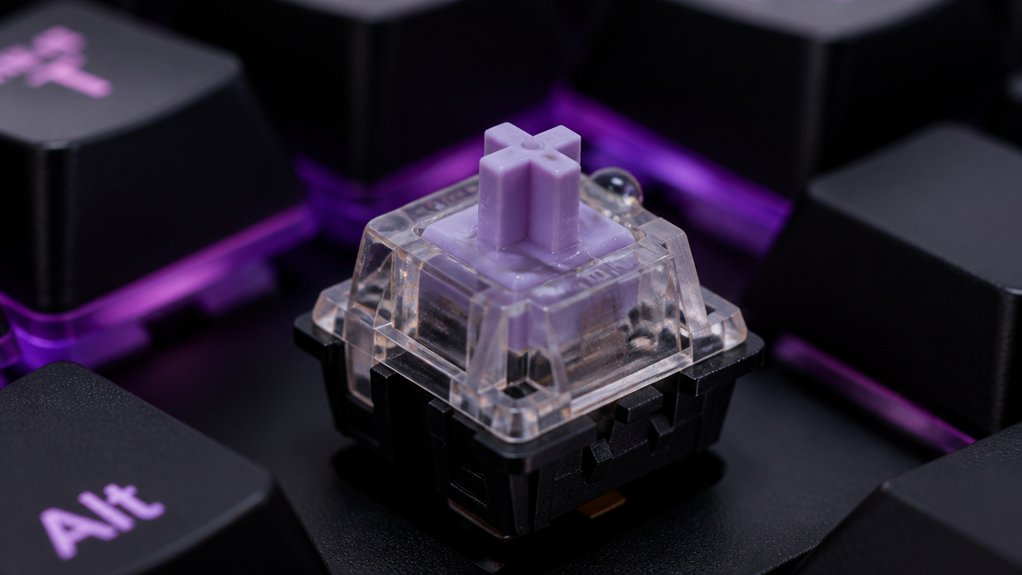
To fine-tune your switch lubrication effectively, focus on applying thin, precise coats of lubricant to the most critical friction points. Use a small paintbrush and only apply a light layer of Krytox GPL205-GD0 or Tribosys 3203, targeting switch rails and stem sides. Avoid saturating entire components or thickening tactile switch leaf bumps, which can diminish tactility. When lubing springs, use sparingly mainly to reduce pinging noise—excessive lube can cause sluggishness. Test switch feel often by actuating the keys multiple times, ensuring even lubricant distribution. If your switches feel sticky or scratchy, disassemble and re-lube, then refine your application. For best results, reassemble carefully, then type normally to let the lubricant settle and switch back to ideal feel.
| Focus Area | Lubrication Approach |
|---|---|
| Critical friction points | Thin, precise coats with a small brush |
| Tactile switch bumps | Avoid coating to preserve tactility |
| Springs | Light application focused on noise reduction |
| Testing frequency | Actuate switches often during lubing |
| Final reassembly | Gentle and careful to optimize feel |
Tools and Tips for Precise and Safe Lubricant Application
Achieving precise and safe lubricant application hinges on choosing the right tools and techniques. Using an opener tool helps you access the switch safely, and a fine-tipped paintbrush or dedicated lube brush allows you to apply lubricant accurately.
Here are tips to enhance control:
- Dip the brush lightly into lubricant, then wipe off excess on a clean surface to avoid over-application.
- Focus lubrication on high-friction areas like stem rails and the bottom of the switch, guaranteeing a thorough coating without excess.
- Use small containers or trays to hold switch components, so you can work meticulously.
- Frequently test the switch by pressing it multiple times to distribute lubricant evenly and confirm it’s thoroughly cleaned of excess lube.
These tips help prevent over-lubrication and keep your switches smooth and responsive.
Avoiding Over-Lubrication in Future Keyboard Builds
Ever wonder how to keep your keyboard switches smooth without accidentally over-lubbing? Make sure you put the switch on your workspace and organize your tools before starting.
Apply lubricant sparingly, using a small, fine paintbrush with just 1-2mm of grease on the tip. Focus on critical friction points like the stem rails and housing rails, avoiding excessive lubricant on tactile leaf bumps. This helps keep the switch less scratchy and maintains its feel.
Use thin, switch-friendly lubricants like Krytox GPL205-GD0 or Tribosys 3203 to prevent sluggishness. Regularly test the keypress feel as you lubricate; stop once you achieve a smooth glide without mushiness or lost tactility. Lubricate in small batches to maintain control and prevent over-application.
Frequently Asked Questions
Can You Over Lube Keyboard Switches?
Yes, you can over-lube keyboard switches. Applying too much creates a sluggish, mushy feel, attracts debris, and reduces tactility. Always use a thin, even layer to maintain switch responsiveness and avoid buildup issues.
How to Remove Lube From Keyboard Switch?
To remove lube from keyboard switches, disassemble them carefully, then clean metal parts and stems with high-concentration isopropyl alcohol and lint-free swabs. Dry everything thoroughly before reassembling to guarantee peak performance.
How Often Do You Have to Lubricate Keyboard Switches?
You should lubricate your keyboard switches every 1-2 years, depending on usage. Regularly check for gritty or sticky keys, and only re-lube when you notice signs of wear. Avoid over-lubrication to keep performance ideal.
Do Gamers Prefer Membrane or Mechanical?
You prefer mechanical keyboards, especially for gaming, because of their faster response, tactile feedback, and durability. Membrane keyboards are quieter and cheaper, but most gamers find mechanical switches better for precision and competitive play.



