
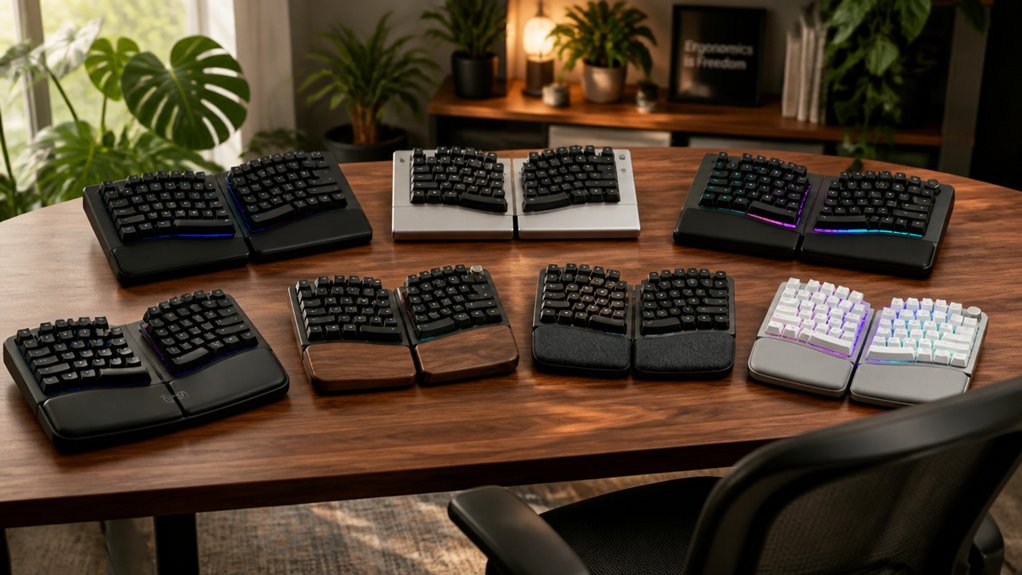
If you spend long hours typing, you know how essential a comfortable keyboard is for your health and productivity. The latest ergonomic split keyboards in 2026 offer much more than just a unique look—they’re designed to keep your wrists and shoulders relaxed, all while boosting workflow. With so many new models introducing advanced features, it’s worth exploring how these options stack up before you upgrade your setup.
| Cleave Split Ergonomic Mechanical Keyboard with Backlit Keys |  | Premium Ergonomic Choice | Split/Ergonomic Layout: Split columnar ergonomic mechanical design | Wrist/Palm Rest: Cushioned palm rest | Wireless Connectivity: Wired USB (does not mention wireless) | CHECK ON AMAZON | Read Our Analysis |
| Logitech Ergo K860 Wireless Ergonomic Split Keyboard |  | Trusted Mainstream Pick | Split/Ergonomic Layout: Curved, split keyframe ergonomic layout | Wrist/Palm Rest: Curved wrist rest with memory foam | Wireless Connectivity: Wireless (USB receiver or Bluetooth) | CHECK ON AMAZON | Read Our Analysis |
| Razer Pro Type Ergo Wireless Split RGB Keyboard | Feature-Packed Innovation | Split/Ergonomic Layout: Split ergonomic keyboard layout | Wrist/Palm Rest: Integrated plush leatherette wrist rest | Wireless Connectivity: Wireless (HyperSpeed 2.4 GHz, Bluetooth, or wired USB-C) | CHECK ON AMAZON | Read Our Analysis | |
| Arteck Split Ergonomic Wireless Keyboard with Wrist Rest |  | Simplicity Meets Comfort | Split/Ergonomic Layout: Split ergonomic design | Wrist/Palm Rest: Soft cushioned wrist and palm rest | Wireless Connectivity: Wireless (2.4G USB nano receiver) | CHECK ON AMAZON | Read Our Analysis |
| Kensington Pro Fit Ergo Wireless Split Keyboard | 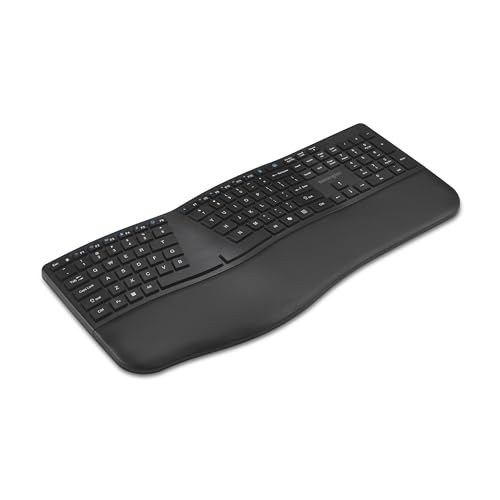 | Customization Powerhouse | Split/Ergonomic Layout: Full-size split ergonomic design | Wrist/Palm Rest: Integrated wrist pad | Wireless Connectivity: Wireless (Bluetooth and USB-A nano receiver) | CHECK ON AMAZON | Read Our Analysis |
| MOFII Wireless Ergonomic Keyboard & Mouse Combo | 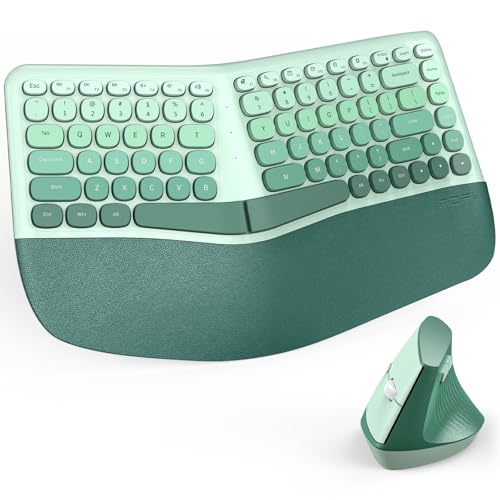 | Best Combo Set | Split/Ergonomic Layout: Split curved ergonomic keyboard | Wrist/Palm Rest: Curved padded palm rest | Wireless Connectivity: Wireless (USB nano receiver) | CHECK ON AMAZON | Read Our Analysis |
| ProtoArc EK01 Plus Backlit Wireless Split Keyboard |  | Wireless Versatility | Split/Ergonomic Layout: Curved, split keyframe ergonomic layout | Wrist/Palm Rest: Cushioned wrist rest | Wireless Connectivity: Wireless (Bluetooth and 2.4G USB) | CHECK ON AMAZON | Read Our Analysis |
More Details on Our Top Picks
Cleave Split Ergonomic Mechanical Keyboard with Backlit Keys
For professionals and creators seeking a premium ergonomic choice, the Cleave Split Ergonomic Mechanical Keyboard stands out. You’ll value its split columnar layout, designed by ergonomists to reduce wrist twisting, finger reach, and shoulder tension during long typing sessions. The cushioned palm rest keeps your wrists neutral, while centrally placed high-use keys let your strongest fingers do most of the work—minimizing strain on your pinkies and boosting comfort. Mechanical optical switches deliver fast, stable keystrokes and hot-swappable convenience. Built from aerospace-grade aluminum, it’s highly durable, fully backlit, and compatible across all major operating systems, ensuring workflow efficiency and health benefits.
- Split/Ergonomic Layout:Split columnar ergonomic mechanical design
- Wrist/Palm Rest:Cushioned palm rest
- Wireless Connectivity:Wired USB (does not mention wireless)
- OS Compatibility:Windows, macOS, Linux, ChromeOS
- Rechargeable or Replaceable Battery:Wired (no battery/charging info listed)
- Included/Adjustable Tilt or Angle:Not specified
- Additional Feature:Hot-swappable optical switches
- Additional Feature:Centralized Enter/Backspace keys
- Additional Feature:Aerospace-grade aluminum body
Logitech Ergo K860 Wireless Ergonomic Split Keyboard
Curved, split keyframes make the Logitech Ergo K860 a trusted mainstream pick if you want all-day typing comfort without sacrificing productivity. Its sloping design and memory foam wrist rest offer 54% more support and reduce wrist bending by 25%, easing strain on your forearms and keeping your posture healthy. You’ll enjoy scooped keys shaped for accurate, fluid typing and three adjustable tilt angles for seated or standing use. Connect via Bluetooth or USB, and customize shortcuts with Logitech Options software. The K860 works seamlessly with Windows or Mac. Plus, it’s more sustainable, using recycled plastics and FSC-certified packaging.
- Split/Ergonomic Layout:Curved, split keyframe ergonomic layout
- Wrist/Palm Rest:Curved wrist rest with memory foam
- Wireless Connectivity:Wireless (USB receiver or Bluetooth)
- OS Compatibility:Windows, Mac
- Rechargeable or Replaceable Battery:Replaceable batteries (type not specified)
- Included/Adjustable Tilt or Angle:Adjustable tilt legs (0, -4, -7 degrees)
- Additional Feature:Memory foam wrist rest
- Additional Feature:Certified ergonomic design
- Additional Feature:Scooped fingertip-matched keys
Razer Pro Type Ergo Wireless Split RGB Keyboard
Whether you’re a professional who values comfort and productivity, this feature-packed innovation brings true ergonomic relief to your workspace. The Razer Pro Type Ergo Wireless Split RGB Keyboard features a split design, plush leatherette wrist rest, and dual “B” keys that support natural hand movement. Its adjustable slope lets you fine-tune the angle for personalized comfort. You’ll enjoy ultra low-profile keycaps, five dedicated macro keys, and customizable RGB backlighting. With wireless multi-device support for up to five devices via HyperSpeed, Bluetooth, or USB-C, it’s compatible across platforms. The AI Prompt Master and command dial further streamline your workflow and productivity.
- Split/Ergonomic Layout:Split ergonomic keyboard layout
- Wrist/Palm Rest:Integrated plush leatherette wrist rest
- Wireless Connectivity:Wireless (HyperSpeed 2.4 GHz, Bluetooth, or wired USB-C)
- OS Compatibility:Windows 10 and later; Macs, PCs, tablets
- Rechargeable or Replaceable Battery:Rechargeable (battery type not specified)
- Included/Adjustable Tilt or Angle:Built-in 10° slope; adjustable tilt at 4° or 7°
- Additional Feature:Command Dial customization
- Additional Feature:Macro and AI keys
- Additional Feature:Full RGB backlighting
Arteck Split Ergonomic Wireless Keyboard with Wrist Rest
Those seeking a straightforward, relaxing typing experience will appreciate how the Arteck Split Ergonomic Wireless Keyboard blends simplicity with impressive comfort. Its split layout positions your wrists and forearms in a natural, relaxed state, while the soft cushioned wrist and palm rest keeps you comfortable through long hours. Setup is effortless—just plug in the nano USB receiver and start typing. The keyboard’s rechargeable lithium battery delivers up to six months on a single charge, and USB-C charging makes recharging a breeze. You’ll receive a complete package, including a 24-month warranty and friendly customer support for added peace of mind.
- Split/Ergonomic Layout:Split ergonomic design
- Wrist/Palm Rest:Soft cushioned wrist and palm rest
- Wireless Connectivity:Wireless (2.4G USB nano receiver)
- OS Compatibility:Windows computers/desktops/laptops
- Rechargeable or Replaceable Battery:Rechargeable lithium battery (up to 6 months)
- Included/Adjustable Tilt or Angle:Not specified
- Additional Feature:Ultra-long battery life
- Additional Feature:Plug-and-play setup
- Additional Feature:USB-C recharging included
Kensington Pro Fit Ergo Wireless Split Keyboard
Professionals seeking ergonomic comfort and robust customization will find the Kensington Pro Fit Ergo Wireless Split Keyboard a standout choice. You’ll value its split layout, integrated wrist pad, and front tilt legs that encourage natural wrist alignment. Soft membrane switches and non-stick keys deliver smooth, all-day typing with minimal strain. Wireless connectivity includes Bluetooth or a 2.4GHz receiver, plus AES 128-bit encryption for security. Quickly pair with up to three devices—Windows, macOS, and Amazon Fire tablets alike. A rechargeable 500mAh battery keeps you powered for up to four months. Fourteen programmable keys and Copilot AI enhance workflow efficiency.
- Split/Ergonomic Layout:Full-size split ergonomic design
- Wrist/Palm Rest:Integrated wrist pad
- Wireless Connectivity:Wireless (Bluetooth and USB-A nano receiver)
- OS Compatibility:Windows 10+, macOS, laptops, PCs, tablets, Fire tablets
- Rechargeable or Replaceable Battery:Rechargeable 500mAh battery (up to 4 months)
- Included/Adjustable Tilt or Angle:Front-positioned tilt legs
- Additional Feature:Programmable Copilot AI key
- Additional Feature:Government-grade data encryption
- Additional Feature:Recycled material construction
MOFII Wireless Ergonomic Keyboard & Mouse Combo
If you often juggle long hours at your desk, the MOFII Wireless Ergonomic Keyboard & Mouse Combo delivers comfort that sets it apart as the ideal combo set for reducing wrist and forearm strain. The split, curved keyboard and leather-like palm rest support your hands naturally, making each keystroke easier. You’ll love the stain-resistant surface and the ease of wiping it clean. The vertical ergonomic mouse fits your palm’s curve and offers three DPI settings for precise control. Just plug in the nano receiver—no drivers or setup needed. Enjoy reliable wireless performance with minimal lag and a generous 12-month warranty.
- Split/Ergonomic Layout:Split curved ergonomic keyboard
- Wrist/Palm Rest:Curved padded palm rest
- Wireless Connectivity:Wireless (USB nano receiver)
- OS Compatibility:Windows (XP–11), PCs, laptops, desktops, TVs
- Rechargeable or Replaceable Battery:Not specified (assumed replaceable batteries)
- Included/Adjustable Tilt or Angle:Not specified
- Additional Feature:Vertical ergonomic mouse included
- Additional Feature:Leather-like stain-resistant palm rest
- Additional Feature:Vibrant color options
ProtoArc EK01 Plus Backlit Wireless Split Keyboard
Users who crave both comfort and wireless versatility will appreciate the ProtoArc EK01 Plus Backlit Wireless Split Keyboard’s ergonomic design. Its sculpted, split keyframe layout minimizes wrist and forearm strain, while scooped keys and a cushioned wrist rest enhance typing comfort. You can quickly switch between up to three devices using Bluetooth or the 2.4G USB receiver, with compatibility for Windows, Mac, Android, and certain Amazon tablets. Adjustable white LED backlighting, three tilt angles, and a robust 2000mAh rechargeable battery guarantee flexibility and endurance. Just note, the full-size keyboard’s footprint is larger than average, so check your desk space.
- Split/Ergonomic Layout:Curved, split keyframe ergonomic layout
- Wrist/Palm Rest:Cushioned wrist rest
- Wireless Connectivity:Wireless (Bluetooth and 2.4G USB)
- OS Compatibility:Windows, Mac OS X, Android, Fire/Kindle tablets
- Rechargeable or Replaceable Battery:Rechargeable 2000mAh battery
- Included/Adjustable Tilt or Angle:Four adjustable tilt feet (multiple angles)
- Additional Feature:Multi-device seamless switching
- Additional Feature:Adjustable white LED backlight
- Additional Feature:Four-angle tilt feet
Factors to Consider When Choosing Ergonomic Split Keyboards for All-Day Comfort
When picking an ergonomic split keyboard, you’ll want to look at layout design, switch options, and palm rest support to keep your hands comfortable all day. Don’t overlook connectivity or compatibility with your setup. Adjustable tilt features can make a big difference in your overall comfort, too.
Ergonomic Layout Design
While comfort is a top priority, choosing the right ergonomic split keyboard layout also means paying close attention to how the keys are positioned and shaped. A true ergonomic layout separates the keys into two halves, aligning naturally with your arms’ widths and your hands’ resting positions. Columnar key arrangements reduce awkward finger stretches and help you maintain a more natural typing posture, protecting your wrists and shoulders from unnecessary strain. Look for keyboards that centralize high-use keys—like Enter and Backspace—since this lets your stronger fingers take over repetitive tasks and relieves your pinkies. Integrated wrist rests promote neutral alignment, preventing discomfort during long sessions. Advanced models offer adjustable tilt and split angles, so you can tailor the setup to your ideal ergonomic position for daily comfort.
Switch Type Options
A well-designed ergonomic layout sets the foundation for comfort, but the switches beneath each key play a pivotal role in your everyday typing experience. You’ll want to choose between mechanical and membrane switches—each has unique benefits. Mechanical switches, like tactile optical varieties, offer precise, stable keystrokes with fast response and outstanding durability, making them ideal for intensive, all-day use. Membrane keys, on the other hand, provide smooth, quiet presses and are preferred if you seek a softer feel with less noise, though they sacrifice some tactile feedback. Consider hot-swappable switches if you want to fine-tune your keyboard later—they make it easy to swap out switches for different feel or actuation force, adjusting comfort as your typing needs change. Keycap profiles also influence your overall experience.
Palm Rest Support
Palm rest support stands as a key factor in choosing the right ergonomic split keyboard for lasting comfort. When you type for hours, a cushioned palm rest helps you maintain a neutral wrist position, which reduces tension and discomfort. Look for palm rests made from soft or plush materials—they minimize wrist strain and provide comfortable support, especially during extended work sessions. Properly positioned rests keep your wrists aligned, so you avoid unnatural twisting or bending that could lead to repetitive strain injuries over time. With steady support under your palms, you’ll notice less muscle fatigue in your wrists and forearms, which boosts typing endurance. Many ergonomic split keyboards include integrated wrist rests, designed to match your hands’ natural placement and protect your long-term health.
Connectivity and Compatibility
If you’re investing in an ergonomic split keyboard for daily comfort, it’s important to think about how the device connects to your system and whether it’s truly compatible with your workflow. Most models now offer Bluetooth, 2.4 GHz wireless via a USB receiver, and wired USB connections. These diverse options guarantee you can work seamlessly with desktops, laptops, or even tablets.
Make sure the keyboard you choose supports your operating system—whether that’s Windows, macOS, Linux, or ChromeOS. Wireless models often allow you to pair with multiple devices and switch between them easily, which streamlines multitasking. Some keyboards require custom software for advanced key mapping or connectivity management, so confirm it’s compatible with your system before committing, guaranteeing hassle-free integration and performance.
Adjustable Tilt Features
When evaluating ergonomic split keyboards, adjustable tilt features stand out as a crucial element for achieving lasting comfort. You’ll want a keyboard that lets you set the angle to match your wrist and forearm position perfectly—this customization is key to reducing strain during long typing sessions. Look for models offering a range of tilt settings, from negative to positive degrees, so you can accommodate both seated and standing postures with ease. Fine-tuning the tilt angle promotes a neutral wrist posture, minimizing extension and flexion, which helps lower your risk of repetitive strain injuries. By adjusting the tilt, you can alleviate muscle fatigue, encourage circulation, and avoid static wrist positions that often cause discomfort. Ultimately, these features let you create a more efficient and comfortable workspace.
Key Customization Abilities
Although adjustable tilt features are essential, key customization abilities truly elevate your typing experience on an ergonomic split keyboard. You can reassign keys and set up macros, streamlining your workflow and enhancing comfort during long sessions. With programmable keys and customizable function layers, you create shortcuts tailored to your needs, reducing finger movement and the risk of repetitive strain.
Hot-swappable switch support and compatible keycap styles let you fine-tune tactile feedback and key travel to suit your preferences. Macro keys make executing complex commands or AI-powered shortcuts easy, cutting down on multitasking and boosting productivity. Software-driven options, including function key remapping and backlighting controls, further increase ergonomic convenience and usability. Ultimately, all-encompassing customization puts you in control of your typing experience.
Material Durability Factors
While comfort is paramount, material durability determines how well your ergonomic split keyboard stands up to daily wear. You’ll want to look for models using aerospace-grade aluminum or reinforced plastic, as these materials guarantee a sturdy build that resists flexing and impacts over time. High-quality keycaps and enclosures prevent rapid wear, so your keys maintain their tactile feel and appearance without the need for frequent replacements. Opt for keyboards with durable mechanical switches—those designed to last through far more actuations than standard ones—so you get consistent performance for years. Don’t ignore the wrist rest. Memory foam or leather-like surfaces won’t break down or stain easily, preserving comfort throughout long sessions. Ultimately, robust materials protect both the keyboard’s structure and your ergonomic health.
Frequently Asked Questions
Are Split Keyboards Compatible With All Major Operating Systems?
Yes, you’ll find that most split keyboards work seamlessly with all major operating systems like Windows, MacOS, and Linux. Just make sure you check the manufacturer’s specifications for full compatibility and any potential software requirements.
Can I Use a Split Keyboard for Gaming?
Yes, you can use a split keyboard for gaming. You’ll quickly adapt, and some gamers even find improved comfort and keystroke accuracy. Just make sure your split keyboard has fast response times and supports essential gaming key functions.
How Do You Clean and Maintain a Split Keyboard?
To clean and maintain a split keyboard, gently unplug it, remove the keycaps with a puller, and use compressed air or a small brush to clear debris. Wipe surfaces with a damp cloth and reattach keycaps carefully.
Do Split Keyboards Reduce Typing Speed Initially?
Yes, you’ll likely type slower when you first switch to a split keyboard. Your hands need time to adjust to the new layout and separation, but with practice, your typing speed usually returns or even improves.
Are There Travel-Friendly Split Keyboards Available?
Yes, you’ll find several travel-friendly split keyboards designed for portability. Many models fold or separate into compact pieces, fitting easily in your bag. You don’t have to sacrifice comfort or ergonomics when working on the go.



