
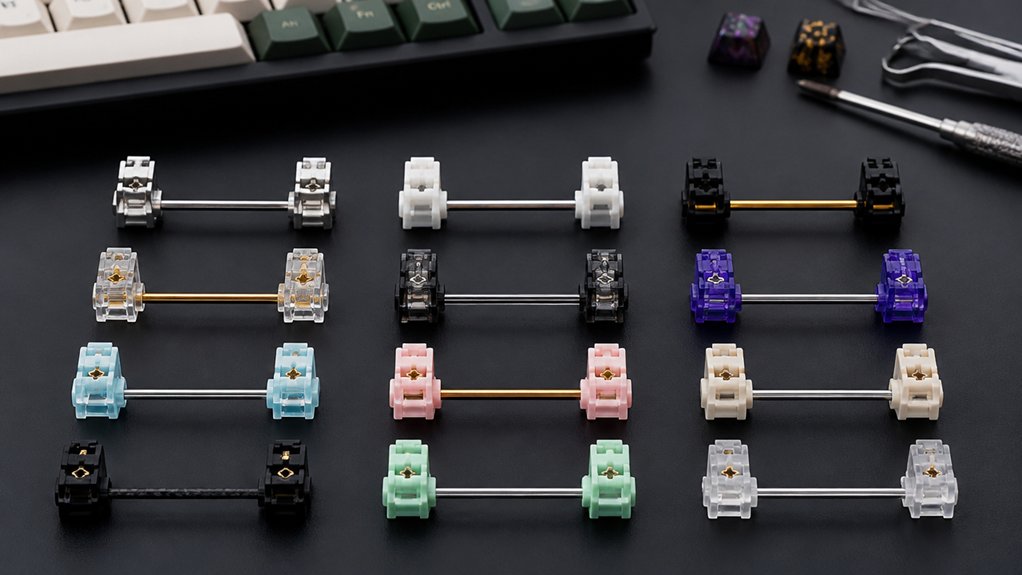
If you want a smoother, quieter keyboard, picking the right stabilizers is key. With so many new options in 2026, it’s easy to get overwhelmed by materials, mounting styles, and the latest noise-dampening tricks. You’ll find that some stabilizers offer more than just silence—they transform your typing comfort and performance. Before you make your next upgrade, it’s important to know which models stand out and why a few specific features really matter.
| DUROCK V3 PCB Mount Keyboard Stabilizers (Smokey) |  | Best Overall | Mount Type: PCB Mount (Screw-in) | Components Included: Stabilizers (housings, stems, wires), screws, washers, tuning kit | Key Sizes Supported: 2U, 6.25U, 7U | CHECK ON AMAZON | Read Our Analysis |
| Costar Plate-Mounted Stabilizers Kit for MX Keyboards |  | Classic Plate-Mount | Mount Type: Plate Mount | Components Included: Stabilizers (housings, wires), keycap puller | Key Sizes Supported: 2U, 6.25U (and additional 2U in larger kit) | CHECK ON AMAZON | Read Our Analysis |
| Zkeebs TX AP TKL Mechanical Keyboard Stabilizers |  | Rattle-Free Performance | Mount Type: Plate Mount | Components Included: Stabilizers (housings, stems, wires) | Key Sizes Supported: 2U, 6.25U, 7U | CHECK ON AMAZON | Read Our Analysis |
| WS Stupid TPU Snap-in Keyboard Stabilizers (1.2mm) |  | Easiest Installation | Mount Type: PCB Mount (Snap-in) | Components Included: Stabilizers (housings, stems, wires) | Key Sizes Supported: 2U, 6.25U, 7U | CHECK ON AMAZON | Read Our Analysis |
| Keyboard Stabilizer Switch Pads and EVA Set |  | Best Accessory Set | Mount Type: PCB Mount (Stabilizer pad/add-on) | Components Included: Buffer pads, EVA pads | Key Sizes Supported: Works on all stabilizer-supported sizes (2U, 6.25U, 7U via pad usage) | CHECK ON AMAZON | Read Our Analysis |
| Typeplus x YIKB Screw-in Keyboard Stabilizers Set |  | Full-Size Coverage | Mount Type: Screw-in (Plate/PCB hybrid) | Components Included: Stabilizers (pre-assembled bars, housings), mounting plates, washers, screws | Key Sizes Supported: 2U, 6.25U, 7U, other standard keys in 104-key layouts | CHECK ON AMAZON | Read Our Analysis |
| YIMAGUJRX Teflon Stabilizer Films for Keyboards (20pcs) |  | Sound Enhancement | Mount Type: PCB Mount (Stabilizer film/add-on) | Components Included: Stabilizer films (Teflon pads) | Key Sizes Supported: Works on all stabilizer sizes (film applied to satellite switches) | CHECK ON AMAZON | Read Our Analysis |
| Glorious GSV2 Stabilizer Kit for Mechanical Keyboards |  | Premium Build | Mount Type: PCB Mount (Screw-in) | Components Included: Stabilizers (housings, wires), screws, washers | Key Sizes Supported: 2U, 6.25U, 7U | CHECK ON AMAZON | Read Our Analysis |
| GATERON Crystal Stabilizer Set for MX Keyboards |  | Crystal Clear Choice | Mount Type: PCB Mount (Screw-in) | Components Included: Stabilizers (housings, wires, screws) | Key Sizes Supported: 2U, 6.25U, 7U | CHECK ON AMAZON | Read Our Analysis |
| HONKID Mechanical Keyboard PCB Stabilizer Satellite Switch Film Pad 20pcs |  | Noise Reduction Helper | Mount Type: PCB Mount (Stabilizer film/add-on) | Components Included: Stabilizer film pads | Key Sizes Supported: Applies to all stabilizer-supported sizes (via pad fitment) | CHECK ON AMAZON | Read Our Analysis |
More Details on Our Top Picks
DUROCK V3 PCB Mount Keyboard Stabilizers (Smokey)
For those seeking smooth keystrokes and reliable stability, DUROCK V3 PCB Mount Keyboard Stabilizers (Smokey) stand out as the go-to choice overall. You’ll value the screw-in, pre-clipped design, which speeds up installation and eliminates the need for manual clipping. The V3 upgrade minimizes wire wobble and noise, while patented wire hooks prevent wire popping for a secure feel. Made from premium polymer nylon with stainless steel, gold-coated wires, the stabilizers promise durability and a refined look. With support for various spacebar sizes and compatibility with major switch brands, you’re guaranteed versatile fit and high-quality performance for your 80% keyboard builds.
- Mount Type:PCB Mount (Screw-in)
- Components Included:Stabilizers (housings, stems, wires), screws, washers, tuning kit
- Key Sizes Supported:2U, 6.25U, 7U
- Material/Finish:Polymer nylon, stainless steel wires, gold coating
- Intended Keyboard Type/Compatibility:80% keyboards (87-key), 1.2–1.6mm PCB, Cherry MX-compatible
- Noise/Vibration Reduction Focus:Reduces wire wobble and noise, stable output
- Additional Feature:Patented wire hooks
- Additional Feature:Pre-clipped stem design
- Additional Feature:Soulmate Tuning Kit included
Costar Plate-Mounted Stabilizers Kit for MX Keyboards
Enthusiasts seeking a classic plate-mount experience with a proven feel should consider the Costar Plate-Mounted Stabilizers Kit for MX Keyboards. You will value their raised wire design, which delivers a more tactile response compared to flat wire alternatives. The kits include options for various layouts, whether you need a GH60, 87 TKL, or full-size 104 keys. Installation suits MX switches and Filco boards, ensuring wide compatibility. The metal build adds durability, while the included keycap puller makes setup a breeze. Don’t forget the one-year warranty support for peace of mind. If you want consistent, rattle-free typing, Costar delivers.
- Mount Type:Plate Mount
- Components Included:Stabilizers (housings, wires), keycap puller
- Key Sizes Supported:2U, 6.25U (and additional 2U in larger kit)
- Material/Finish:Metal
- Intended Keyboard Type/Compatibility:MX mechanical switches (GH60, 87, 96, 104 layouts)
- Noise/Vibration Reduction Focus:Enhanced tactile feedback (not specifically noise, but improved feel)
- Additional Feature:Raised wire design
- Additional Feature:Built-in keycap puller
- Additional Feature:Waterproof feature mentioned
Zkeebs TX AP TKL Mechanical Keyboard Stabilizers
Serious typists seeking rattle-free performance will appreciate the Zkeebs TX AP TKL Mechanical Keyboard Stabilizers. These plate-mounted stabilizers, designed by Kin25, aim to eliminate rattling thanks to their wire pop-out prevention and refined geometry. You’ll find the kit perfect for your 80% TKL setup, with 10 housings, 10 stems, plus appropriately sized 2U, 6.25U, and 7U wires. The long pole version matches long pole switches, ensuring smooth, stable keystrokes. Your spacebar’s sound quality significantly improves, and you’ll enjoy a quieter, more consistent typing experience. TX AP Rev. 4 stabilizers are all about reliable, durable operation.
- Mount Type:Plate Mount
- Components Included:Stabilizers (housings, stems, wires)
- Key Sizes Supported:2U, 6.25U, 7U
- Material/Finish:(Assumed) Polymer housing, metal wires
- Intended Keyboard Type/Compatibility:80% TKL, plate-mounted, Cherry MX-compatible
- Noise/Vibration Reduction Focus:Minimizes rattling, enhances acoustics, smooth/quiet typing
- Additional Feature:Long pole switch support
- Additional Feature:Wire pop-out prevention
- Additional Feature:Optimized geometry version
WS Stupid TPU Snap-in Keyboard Stabilizers (1.2mm)
Looking for stabilizers with the easiest installation? The WS Stupid TPU Snap-in Keyboard Stabilizers (1.2mm) might be just what you need. These come with a Pom housing and PC stem, ensuring robust stability and less key wobble. You’ll find their snap-in design convenient—they fit both 1.2mm and 1.6mm PCB mounts and support 2u, 6.25u, and 7u key sizes, making them ideal for most 87% and 108% layouts. Installation is swift since you won’t need any extra tools. Each stabilizer meets high standards through thorough testing. MELETRIX includes a one-year warranty, ensuring reliability.
- Mount Type:PCB Mount (Snap-in)
- Components Included:Stabilizers (housings, stems, wires)
- Key Sizes Supported:2U, 6.25U, 7U
- Material/Finish:POM housing, PC stem
- Intended Keyboard Type/Compatibility:87% and 108% layouts, 1.2 or 1.6mm PCB, most mechanical keyboards
- Noise/Vibration Reduction Focus:Reduces key wobble and looseness, smoother typing
- Additional Feature:Tool-free installation
- Additional Feature:Machined and tested
- Additional Feature:Sleek modern design
Keyboard Stabilizer Switch Pads and EVA Set
Engineers and daily typists who demand smooth, reliable keystrokes will find this keyboard stabilizer switch pads and EVA set elevates every typing session. You’ll get 20 Teflon PCB satellite switch buffer pads and 12 EVA stabilizer switch steel wire pads, ensuring broad compatibility with mechanical keyboards using PCB stabilizers. The Teflon and silicone options let you adjust for either a crisper or duller sound profile. These pads reduce friction, add essential buffering, and prevent steel wire dropout in transparent satellite switches. With support for RGB keyboards, water resistance, and a 365-day warranty, the YIMAGUJRX RJ-344 set is versatile and dependable.
- Mount Type:PCB Mount (Stabilizer pad/add-on)
- Components Included:Buffer pads, EVA pads
- Key Sizes Supported:Works on all stabilizer-supported sizes (2U, 6.25U, 7U via pad usage)
- Material/Finish:Teflon, transparent silicone (pads), EVA
- Intended Keyboard Type/Compatibility:Mechanical keyboards with PCB satellite switches
- Noise/Vibration Reduction Focus:Reduces friction and vibration, offers sound tuning (crisper/duller)
- Additional Feature:Dual-material pad options
- Additional Feature:Buffers for positioning plate
- Additional Feature:Supports RGB backlighting
Typeplus x YIKB Screw-in Keyboard Stabilizers Set
Builders aiming for full-size coverage will appreciate the Typeplus x YIKB Screw-in Keyboard Stabilizers Set, designed for 104-key layouts. You’ll find everything you need in this set: five pairs of stabilizers, 16 mounting plates, 16 connection pieces, mounting screws, washers, and pre-assembled stabilizer bars. Installation is straightforward thanks to the easy screw-in mounting system, which guarantees secure attachment to your keyboard plate. The combination of durable plastic housings with metal bars delivers consistent, rattle-free key movement. This kit fits most standard mechanical keyboard PCBs supporting screw-in stabilizers, making it ideal for MX-compatible custom builds—wired or wireless.
- Mount Type:Screw-in (Plate/PCB hybrid)
- Components Included:Stabilizers (pre-assembled bars, housings), mounting plates, washers, screws
- Key Sizes Supported:2U, 6.25U, 7U, other standard keys in 104-key layouts
- Material/Finish:Plastic housing, metal stabilizer bars
- Intended Keyboard Type/Compatibility:104-key layouts, custom MX-compatible builds
- Noise/Vibration Reduction Focus:Reduces key rattle, improves stability
- Additional Feature:Pre-assembled stabilizer bars
- Additional Feature:104-key full kit
- Additional Feature:Plate mount optimization
YIMAGUJRX Teflon Stabilizer Films for Keyboards (20pcs)
If you demand cleaner keystroke acoustics, YIMAGUJRX Teflon Stabilizer Films deliver precise sound enhancement for custom mechanical keyboards. These films act as a buffer between satellite switches and the PCB, reducing rattle and sharpening each key’s sound signature. You’ll get 20 Teflon films per pack, each sporting heat and friction resistance, plus a reliable 3M adhesive for secure application. They’re strictly for PCB-mounted satellite switches and compatible with Windows and Linux systems, RGB backlighting, and Bluetooth keyboards. Water resistance boosts durability. RunJRX backs your purchase with a one-year warranty, ensuring both immediate results and peace of mind.
- Mount Type:PCB Mount (Stabilizer film/add-on)
- Components Included:Stabilizer films (Teflon pads)
- Key Sizes Supported:Works on all stabilizer sizes (film applied to satellite switches)
- Material/Finish:Teflon
- Intended Keyboard Type/Compatibility:Mechanical keyboards (PCB satellite switches)
- Noise/Vibration Reduction Focus:Reduces vibration, creates crisper sound
- Additional Feature:3M adhesive backing
- Additional Feature:Split keyset design
- Additional Feature:Bluetooth compatibility
Glorious GSV2 Stabilizer Kit for Mechanical Keyboards
For enthusiasts seeking a premium build, the Glorious GSV2 Stabilizer Kit stands out with its high-quality polymer construction and gold-plated wires. You’ll get everything you need: five 2u, one 6.25u, and one 7u stabilizer, plus screws, washers, and wires—ideal for GMMK boards and most third-party keyboards. Installation’s a breeze; just replace your pre-installed stabs and screw these directly to your PCB—no clipping necessary. The GSV2 comes unlubed, so you can customize with your preferred lubricant, like Glorious G-Lube. Enjoy a smooth, rattle-free typing experience, enhanced sound, and rock-solid stability, whether you’re gaming, coding, or typing daily.
- Mount Type:PCB Mount (Screw-in)
- Components Included:Stabilizers (housings, wires), screws, washers
- Key Sizes Supported:2U, 6.25U, 7U
- Material/Finish:High-quality polymer, gold-plated wires
- Intended Keyboard Type/Compatibility:MX-compatible, PCB-mount, GMMK models and third-party keyboards
- Noise/Vibration Reduction Focus:Improves sound and stability, reduces ping/scratch
- Additional Feature:Install guide online
- Additional Feature:Unlubed for customization
- Additional Feature:7.5 Year Warranty
GATERON Crystal Stabilizer Set for MX Keyboards
Transparent enthusiasts will find the GATERON PC Screw in Crystal Stabilizer RGB Set a crystal clear choice for any MX keyboard build. If you’re after stability and style, these screw-in stabilizers deliver with high-gloss transparent housing and polished silver alloy wires. You’ll get four 2U housings, one 6.25U, a 7U wire, plus a backup—perfect for most 60% MX mechanical builds. The flat, Phillips-driven screws use a Unified National Coarse (UNC) thread, ensuring secure mounting and long-term durability. GATERON’s design elevates both your keyboard’s appearance and sound, reducing rattle while letting RGB shine through your transparent setup.
- Mount Type:PCB Mount (Screw-in)
- Components Included:Stabilizers (housings, wires, screws)
- Key Sizes Supported:2U, 6.25U, 7U
- Material/Finish:Alloy steel, transparent polycarbonate
- Intended Keyboard Type/Compatibility:60% MX mechanical keyboards
- Noise/Vibration Reduction Focus:Designed for stabilizing mechanism and secure mounting
- Additional Feature:High-gloss transparent finish
- Additional Feature:Backup wire included
- Additional Feature:Polished silver hardware
HONKID Mechanical Keyboard PCB Stabilizer Satellite Switch Film Pad 20pcs
Looking for a noise reduction helper for your mechanical keyboard? The HONKID Mechanical Keyboard PCB Stabilizer Satellite Switch Film Pad is a smart choice. You’ll get 20 Teflon foam pads per pack, each just 0.2mm thick, designed to fill the gap between stabilizer stem and housing, reducing both vibration and typing noise. These pads fit QWERTY layouts with PCB satellite switches, and they’re super easy to install—just peel off the 3M or PC anti-sticking layer and apply. Their technically improved design won’t stick to glue, and they’re compatible with ambidextrous keyboards on Windows systems. Choose HONKID for a quieter, smoother keystroke.
- Mount Type:PCB Mount (Stabilizer film/add-on)
- Components Included:Stabilizer film pads
- Key Sizes Supported:Applies to all stabilizer-supported sizes (via pad fitment)
- Material/Finish:Teflon foam
- Intended Keyboard Type/Compatibility:Mechanical keyboards (PCB satellite switches)
- Noise/Vibration Reduction Focus:Reduces vibration and typing noise
- Additional Feature:Anti-sticking technology
- Additional Feature:Teflon foam material
- Additional Feature:Ultra-thin 0.2mm design
Factors to Consider When Choosing Stabilizers for a Rattle-Free Typing Experience
When picking stabilizers for a rattle-free typing experience, you’ll want to pay close attention to mounting types and material quality. Make sure your choice matches your keyboard’s size and layout, and don’t ignore how easy installation will be. It’s also smart to look for options designed to cut down on noise and vibration.
Stabilizer Mounting Types
Because stabilizer mounting type directly impacts both feel and sound, you’ll want to weigh your options carefully for a rattle-free typing experience. You’ll generally choose between PCB-mounted and plate-mounted stabilizers. PCB-mounted stabilizers screw directly into the keyboard’s PCB, giving a firm and secure fit that greatly reduces wobble and wire pop-out. This design typically results in less rattle and requires minimal tuning for quiet performance. On the other hand, plate-mounted stabilizers clip into the keyboard’s metal plate. While they’re easier to install and swap out—ideal if you often customize—they tend to produce more noise and may require extra lubrication or modification to stay quiet. Also, always check compatibility: each mounting type requires matching keyboard parts for proper installation.
Material Quality Matters
While many factors affect the smoothness and sound of your keystrokes, material quality takes center stage in minimizing stabilizer rattle. When you pick stabilizers made from high-quality polymer nylon, you’ll notice reduced key wobble and superior durability. Stainless steel wires—especially those with gold plating or protective coatings—add strength and resist oxidation, so your typing stays consistent over time. Precision-molded housings and stems allow for smooth, quiet movement and often need less manual tuning to achieve a rattle-free experience. Incorporating buffer materials like Teflon or EVA pads further reduces friction and dampens vibrations, leading to quieter, crisper keystrokes. Finally, robust hardware such as gold-plated screws and washers guarantees your stabilizers stay securely mounted, preventing performance issues caused by loosening.
Size and Layout Compatibility
Although premium materials can elevate the feel and longevity of your stabilizers, choosing the right size and layout remains just as critical for a smooth, rattle-free typing experience. You need to match stabilizers to your keyboard’s layout—such as 60%, 80% (TKL), or full-size—since each uses different key sizes like 2u, 6.25u, or 7u for keys including the spacebar, shift, and enter. It is crucial to pick stabilizers that fit your keyboard’s mounting style, whether plate-mounted or PCB-mounted, as these directly impact installation and performance. Always check that stabilizer wires and mounting components suit your keyboard’s key lengths and PCB thickness (typically 1.2mm to 1.6mm). Some kits include multiple wire sizes, giving you the flexibility to customize your build for minimal rattle.
Installation Ease Factors
Finding stabilizers that suit your keyboard’s size and layout is only part of the equation—the installation process itself can make or break your build experience. If you want to save time and avoid extra steps, look for stabilizers with pre-clipped stems—they eliminate manual clipping and speed up setup. Screw-in stabilizers generally require precision; you’ll need to check your PCB’s compatibility and might have to use washers for a secure, rattle-free fit. Kits that come pre-assembled with bars and screws streamline the job, letting you attach everything directly without fiddling with small parts. Always confirm that the stabilizer matches your PCB thickness, typically between 1.2mm and 1.6mm, to avoid installation issues. Clear instructions and complete hardware kits make the entire process much smoother.
Noise and Vibration Reduction
Even the best-looking keyboard can feel lackluster if it rattles or buzzes with every keystroke, so selecting stabilizers that prioritize noise and vibration reduction is essential. When you’re aiming for a quiet, premium typing experience, choose stabilizers with elastic support bases and tight wire gaps to cut down on wire wobble and noise. Installing buffer pads made from Teflon or EVA between stabilizer parts also dampens friction, slashing those pesky rattling sounds and vibrations. Opt for pre-clipped stems to guarantee smoother and quieter key movement. The materials matter, too—go for stabilizers with high-quality polymer nylon housings and stainless steel wires for improved durability and stability. In conclusion, look for secure mounting options, like screw-in stabilizers, to further minimize unwanted noise.
Tuning and Lubrication Needs
Reducing unwanted noise with the right stabilizer design is only half the battle; how you tune and lubricate your stabilizers plays just as important a role in creating a quiet, satisfying typing experience. When you apply lubricant to the metal wires and housing contact points, you cut down on scratchy sounds and stabilizer ping, delivering smoother keypresses. Even if you pick stabilizers with pre-clipped stems or precision molding, it’s wise to fine-tune with grease or lube for ideal noise suppression. Buffer pads or films between switch contacts help eliminate residual vibration and dampen noise further. As you assemble your board, remember: effective tuning and proper lubrication let you achieve the most consistent, rattle-free performance, making each keystroke genuinely satisfying.
Long-Term Durability
While premium acoustics are important, you shouldn’t overlook durability when selecting stabilizers for a rattle-free typing experience. You’ll want stabilizers crafted from premium polymer nylon and stainless steel wires, as these materials resist wear and guarantee consistent performance. Look for gold or anti-oxidation coatings on the wires and hardware to ward off corrosion and preserve smooth operation for years. Stabilizers with patented wire hooks or secure wire retention mechanisms go a long way in preventing wire popping, so you won’t have to deal with uneven keypresses down the line. Precision molding and quality materials further reduce the chance of degrading parts. Finally, go for screw-in mounting mechanisms, which firmly secure the stabilizers and prevent loosening, ensuring every keystroke remains satisfyingly stable.
Brand Reliability Reputation
Alongside picking stabilizers built for long-lasting performance, it’s smart to weigh a brand’s track record before making your choice. Brand reliability and reputation directly reflect how consistently a company produces quality, durable stabilizers. Established brands usually invest in patented designs and premium materials, which help prevent issues like wire popping or persistent rattling. If you see consistent positive user feedback and reliable warranty policies, that’s a strong sign the brand stands behind its products’ longevity and noise reduction.
Trusted brands go the extra mile by offering detailed installation guides or even tuning kits. These resources make setup easier and help guarantee your stabilizers are rattle-free and stable from the start. Top manufacturers also use precision molding, giving you smoother keypresses and fewer post-installation adjustments.
Frequently Asked Questions
How Do I Properly Lube My Keyboard Stabilizers for Optimal Performance?
To properly lube your keyboard stabilizers, remove them, disassemble each part, and use a thin brush to apply dielectric or synthetic grease to the housings and wires. Don’t overlube—just guarantee smooth, even coverage for peak performance.
Are Stabilizers Compatible With Both Wired and Wireless Mechanical Keyboards?
Yes, stabilizers work with both wired and wireless mechanical keyboards. You just need to match the stabilizer type—plate-mounted or PCB-mounted—to your keyboard’s design. Always double-check compatibility before buying so you don’t run into issues.
Can Stabilizers Help Reduce Keyboard Ping or Just Rattle?
Stabilizers mainly reduce rattle by keeping larger keys secure, but they don’t directly address keyboard ping. You’ll need to dampen or lube the case and switch springs if you want to minimize pinging sounds, too.
What Tools Do I Need for Installing Keyboard Stabilizers?
You’ll need a keycap puller, switch puller, small Phillips screwdriver, tweezers, and lubricant brush to install keyboard stabilizers. Make sure you’ve got your stabilizers and lube too. Take your time and work carefully for best results.
How Often Should Stabilizers Be Replaced or Maintained?
You should maintain your stabilizers every few months by cleaning and re-lubing them, especially if you notice rattling or scratchiness. Replace them if they’re damaged or worn out, typically every one to two years with heavy use.



