
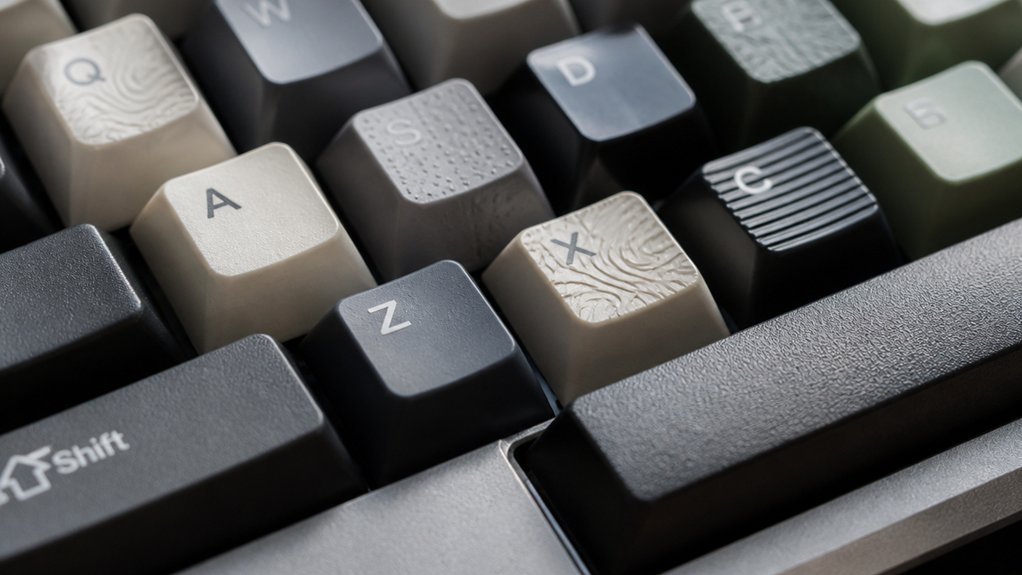
You can improve your keyboard grip by choosing keycaps with textured surfaces like matte or engraved finishes, which prevent finger slips and enhance control. Materials like PBT offer better traction and durability compared to smooth ABS keycaps that get slippery over time. Sculpted profiles fit your fingers naturally, reducing fatigue during long typing or gaming sessions. Adding textured grips on high-use keys like WASD also boosts precision. Keep exploring to discover the best options tailored to your typing style.
Why Keycap Texture Matters for Keyboard Grip
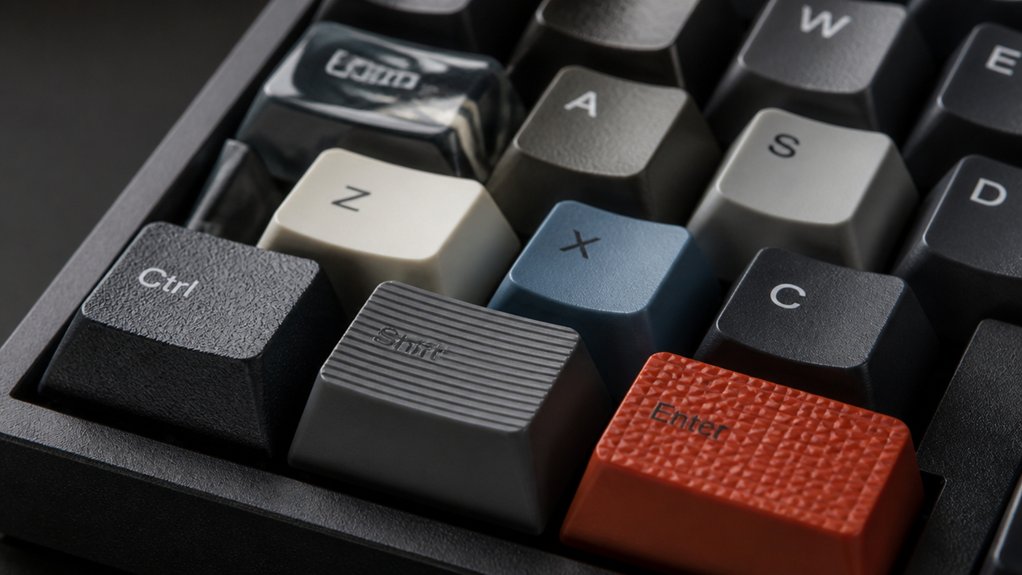
Why does keycap texture play such a crucial role in your keyboard grip? Textured keycaps provide essential grip and tactile feedback that smooth surfaces simply can’t match.
When your fingers move quickly during intense typing or gaming, these textured surfaces prevent slipping, helping you stay accurate and efficient. Matte and engraved finishes enhance control by offering a reliable feel under your fingertips. This grip not only improves precision but also reduces finger fatigue during long sessions.
Without the micro-slips that occur on glossy keycaps, your fingers experience less strain, making it easier to maintain performance over time. Choosing keycaps made from durable materials like PBT can further improve grip, giving you consistent feedback and comfort every time you use your keyboard.
How Keycap Textures Affect Finger Control
You’ll notice that textured keycaps give your fingers a better grip, helping you stay precise with each keystroke. This added control reduces slipping, which means fewer typing errors and less frustration.
Choosing the right texture can make a big difference in your overall accuracy and comfort.
Texture and Grip
Although smooth keycaps may look sleek, they often cause your fingers to slip during fast typing or intense gaming sessions. You’ll find textured keycaps, like matte or engraved finishes, give you a much better tactile grip and prevent fingers from slipping. This enhanced grip reduces micro-slips, so your fingers stay steady and fatigue less over time.
When you use textured keycaps, especially on important clusters like WASD, you gain more confidence and control. The small patterns or engravings act as subtle landmarks, helping your fingers land exactly where you intend without looking.
Choosing the right texture isn’t just about feel—it directly impacts how consistently you can hold your fingers in place under pressure. Ultimately, textured keycaps make your typing or gaming experience smoother and more reliable.
Accuracy and Control
Textured keycaps do more than just prevent slipping—they sharpen your accuracy and control by giving your fingers clear tactile cues. This tactile typing experience helps you quickly locate keys, enhancing typing accuracy and overall finger control. Matte or engraved finishes reduce slippage, while smooth surfaces can cause errors during fast typing. Gamers especially benefit from textured keycaps on vital keys like WASD for faster, more precise actions. Here’s a quick comparison:
| Keycap Texture | Effect on Control |
|---|---|
| Matte | Enhances grip |
| Engraved | Provides tactile cues |
| Raised patterns | Aids precise placement |
| Smooth/Glossy | Risks slipping |
| Contoured | Minimizes mispresses |
Choosing textured keycaps guarantees you maintain consistent finger placement, boosting typing accuracy and control.
Common Keycap Textures and Their Grip Benefits

When choosing keycaps, understanding their textures can greatly boost your typing or gaming grip. Textured keycaps, especially on a mechanical keyboard, improve finger traction, helping you avoid slips during fast-paced actions.
Matte keycaps made from durable PBT plastic provide a slightly rough surface that resists fingerprints and enhances grip. In contrast, smooth or glossy ABS keycaps look sleek but may become slippery over time, reducing control.
Engraved or patterned textures add tactile feedback, letting your fingers find keys more accurately. Metallic finishes, often matte, offer a cool touch and extra weight, contributing to stability and comfort.
Strategically placing textured keycaps on frequently used keys like WASD can markedly boost your grip, reaction time, and reduce finger fatigue for long sessions.
How Keycap Material Influences Grip and Feel
Understanding keycap textures sets the stage for exploring how the materials themselves influence your grip and typing feel.
On your keyboard, ABS keycaps tend to feel smooth and glossy but can get slippery and shiny, reducing grip over time. In contrast, PBT keycaps offer a rougher, matte texture that fights fingerprints and maintains better finger hold, improving control and comfort.
ABS keycaps start smooth but can become slippery, while PBT offers a durable, matte grip that enhances control.
Double-shot keycaps layer plastics for durability while keeping smooth legend surfaces, balancing grip and style. Metal keycaps feel cooler and heavier, giving you a stable and tactile response, though they might impact finger fatigue differently from plastic options.
Each material’s unique texture directly affects how your fingers interact with the keys, making the choice of textured or smooth keycaps essential in enhancing typing accuracy and overall feel.
How to Choose Between Smooth and Textured Keycaps

How do you decide whether smooth or textured keycaps suit your typing style best?
If you prioritize typing speed and accuracy with quick, fluid finger movements, smooth keycaps with a glossy finish might appeal to you. However, keep in mind that these can become slippery and show fingerprints over time.
On the other hand, textured keycaps are designed to improve grip by reducing finger slips, which helps enhance your control and reduce fatigue during long sessions. Textured keycaps, often made from PBT or featuring lightly rough patterns, strike a balance between comfort and grip without feeling abrasive.
Trying different textures on frequently used keys like WASD can help you find the ideal surface that complements your personal typing environment and maximizes your performance.
How Keycap Profiles Help Improve Grip
Choosing the right keycap surface plays a big role in grip, but the shape and profile of your keycaps can greatly boost your control as well. Keycap profiles influence finger placement and comfort, which directly enhance better grip. Here’s how:
Selecting the right keycap shape and profile enhances finger comfort and grip for better typing control.
- Sculpted profiles like SA and MT3 have taller, curved shapes that fit your fingers naturally, increasing tactile surface area and reducing slips.
- Low-profile profiles such as CHERRY or XDA offer a flatter design, helping you maintain consistent finger positioning with less travel.
- Uniform profiles keep key height and shape consistent, aiding muscle memory so your fingers find keys predictably, improving grip during fast typing.
Pairing the right keycap profiles with appropriate keycap texture gives you ergonomic support and tactile friction for superior control.
How Textured Keycaps Enhance Gaming Grip and Performance

You’ll notice textured keycaps like those with engraved surfaces really boost your grip on critical keys, cutting down slips during intense gameplay. This added control helps you react faster and stay accurate, especially in competitive matches.
Grip Benefits for Gamers
Textured keycaps give gamers a crucial edge by enhancing grip on essential keys like WASD, so you won’t have to worry about finger slippage during intense gaming moments. Their textured surface helps reduce finger slippage, keeping your fingers steady when reactions matter most.
Plus, these keycaps enhance comfort, letting you game longer without fatigue.
Here’s how textured keycaps boost your gaming grip:
- Matte and engraved finishes provide superior tactile feedback for precise finger placement.
- Extra grip on movement and number keys helps maintain control in high-pressure situations.
- Anti-slip overlays—like clear rubber grips—combine performance with style without blocking backlighting.
Performance Impact of Texture
While gaming at high speeds, having reliable key feedback can make all the difference between victory and defeat. Textured keycaps improve your typing experience by preventing finger slippage, especially on essential keys like WASD and the number pad.
The tactile texture of engraved or patterned surfaces enhances your finger placement accuracy, speeding up reaction times during intense gameplay. Using matte or rough-textured keycaps reduces finger fatigue and boosts control during extended sessions, helping you maintain consistent performance.
Additionally, these keycaps produce more audible keystrokes, providing auditory cues that fine-tune your timing and precision. Gamers using metal-textured keycaps, like Copper Eagle, report faster FPS reaction times thanks to superior grip and comfort.
Choosing the right texture genuinely elevates your gaming grip and overall performance.
How Keycap Texture Reduces Typing Fatigue
Because your fingers rely on steady contact with keycaps, surfaces that provide better grip can greatly reduce typing fatigue. When you use textured keycaps on a mechanical keyboard, you benefit from:
- Enhanced grip that minimizes finger slips and reduces the need for constant adjustments, especially during long sessions.
- Consistent tactile feedback from durable materials like PBT with rough finishes, keeping your finger placement precise.
- Reduced muscle strain by balancing friction and smoothness, so you don’t overexert your fingers maneuvering the keys.
This improved texture prevents micro-slips that cause extra effort, helping your fingers stay comfortable and efficient.
How to Add Grip Without Replacing Keycaps

If you want to boost your keyboard’s grip without swapping out keycaps, you can easily apply rubber stickers or adhesive tapes designed for this purpose. These additions create a textured, anti-slip surface that enhances control on your mechanical keyboard.
Since the stickers or tapes stick directly onto the keycaps, you don’t need to remove or replace them, preserving your keyboard’s original feel and look. Transparent grip tapes are especially useful because they improve finger traction without blocking RGB lighting that keycaps offer.
You can target high-use areas like WASD or number pads to gain better precision during gaming or fast typing. Plus, repositionable adhesives guarantee easy application and residue-free removal.
Adding grip this way gives you a quick, customizable boost without altering your mechanical keycaps permanently.
What to Look For When Buying Grip-Enhanced Keycaps
What features should you prioritize when choosing grip-enhanced keycaps? Picking the right texture is vital to improve typing performance and prevent finger slippage.
Prioritize the right texture to boost typing accuracy and prevent finger slippage on grip-enhanced keycaps.
While ABS keycaps are common, opting for textured materials like PBT or metal often delivers better durability and grip over time.
Here’s what to take into account:
- Texture Type: Matte or engraved patterns provide superior traction compared to smooth surfaces, enhancing control during fast typing or gaming.
- Material Quality: Prioritize PBT or textured metal keycaps instead of ABS, as they resist wear and maintain the right texture longer.
- Profile and Fit: Choose keycaps with ergonomic profiles (like MOA or sculpted designs) compatible with your keyboard switches to guarantee comfort and precision.
These factors help you select grip-enhanced keycaps that genuinely improve control and comfort.
Real User Experiences With Keycap Textures and Grip
When you switch to textured keycaps, you’ll often notice a tangible improvement in grip and control. Many gamers report that the enhanced grip on textured keycaps, especially on the WASD cluster, prevents finger slippage during fast-paced play, boosting reaction times.
Typists and designers also appreciate how certain textures, like matte metallic finishes, reduce finger fatigue without sacrificing smoothness. This balance contributes to better typing accuracy and sustained comfort during long sessions.
Real user feedback consistently highlights that keycap texture plays a vital role in minimizing errors and improving overall precision. Whether you’re gaming or working, a well-chosen texture offers superior grip that directly supports your performance and comfort, making your keyboard feel more responsive and reliable.
Frequently Asked Questions
How to Make Keycaps More Grippy?
You can make keycaps more grippy by applying rubber stickers or grip tapes, choosing textured PBT keycaps, or using engraved and matte finishes. These add friction and prevent your fingers from slipping during intense typing or gaming.
Is ABS or PBT More Thocky?
PBT keycaps are more thocky than ABS because their thicker, denser material creates deeper, warmer sounds. You’ll notice ABS feels sharper and clackier, while PBT delivers that satisfying, muted thock many enthusiasts love.
Is Moa or Cherry Better?
You’ll find MOA better if you want enhanced grip and finger comfort, thanks to its rounded, ergonomic design. Cherry suits you more if you prefer faster, minimalist typing with lower, flatter keycaps.
Is ABS or PBT Better?
You’ll find PBT better because it offers a rougher, matte texture that improves grip, resists shine, and feels quieter. ABS feels slicker and wears faster, so it’s less ideal if you want durability and traction.
In Summary
Choosing the right keycap texture can make a big difference in your keyboard grip and comfort. By understanding how different textures and materials affect finger control, you’ll type more confidently and reduce fatigue. Whether you prefer smooth or textured keycaps, or want to add grip without replacing them, knowing what to look for helps you create your ideal typing experience. Don’t underestimate the power of texture—it’s a simple upgrade that really improves your flow.



