

To build a mechanical keyboard, start by choosing your parts, like switches, keycaps, and a PCB that fits your style and budget. Next, assemble the components carefully — whether hot-swap or soldered — following clear instructions. Finally, customize your setup through key remapping, lubing switches, or adding stabilizers. Each step shapes your perfect keyboard, and if you’re curious about the details, you’ll find helpful tips in the next sections.
Which Is Easier and More Flexible: Hot-Swap or Soldered Builds?
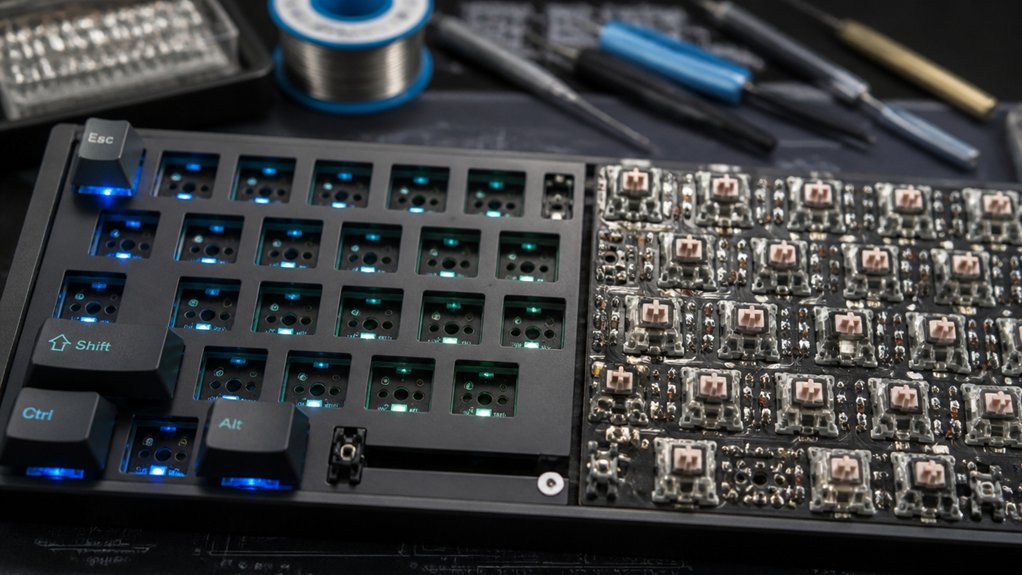
When deciding between hot-swap and soldered keyboard builds, the question often comes down to ease and flexibility. A hot-swap PCB lets you install and replace switches without soldering, making customizing your build simple and accessible, especially if you’re new to soldering.
With a hot-swap socket, changing switch types is quick, allowing you to experiment with different typing feels and sounds. Soldered builds, however, require soldering each switch, which demands more skills and tools but offers a stable, reliable connection.
Assembling a hot-swap keyboard minimizes risk to the PCB and streamlines maintenance. Additionally, compatibility considerations such as switch type and socket design are crucial for ensuring reliable performance and long-term durability. Overall, if you want a flexible, user-friendly process with easy upgrade options, hot-swap keyboards are typically better suited for most users, whereas soldered builds might appeal for permanence and custom layout control.
Are Soldered Keyboards More Durable and Reliable Than Hot-Swap?
Soldered keyboards often provide a more stable and reliable connection between switches and the PCB, making them a preferred choice for users prioritizing durability. The rigid bond offers better stability, which can improve the keyboards sound and typing feel, especially during heavy use.
Soldering skills are required for switch replacement, but once soldered, the connection remains strong, reducing the risk of intermittent key failures. Hot-swap keyboards, while convenient for quick switch changes, may experience less durability over time due to socket wear, especially with frequent switch swaps.
Though hot-swap setups are typically sufficient for most users, soldered keyboards generally have an edge in long-term reliability and durability, particularly under demanding conditions. Furthermore, creating a soldered connection reinforces learning PCB assembly skills, which can be valuable for more advanced projects.
Which Build Fits Your Budget and Skill Level Better?

Choosing the right mechanical keyboard build depends heavily on your budget and your soldering skills. If you’re new or have limited experience, a hot-swap PCB makes life easier—no soldering needed for switch changes.
Selecting your mechanical keyboard depends on budget and soldering skills—hot-swap PCBs simplify switch changes for beginners.
For a budget-friendly custom keyboard, in-stock keyboard kits like the Keychron Q Series or Inland Gaming MK Pro, with affordable switch and keycap sets, are excellent options.
If you’re comfortable soldering, a solderable PCB offers more layout choices and material quality, but demands patience, a soldering iron, and added time.
High-end builds over $300 include premium materials, lubed switches, stabilizers, and custom keycaps.
Frequently Asked Questions
How Do You Build a Mechanical Keyboard?
You build a mechanical keyboard by testing the PCB, installing and lubing stabilizers, mounting switches, assembling the case with gaskets and foam, and finally attaching keycaps, testing functionality, and making adjustments as needed for peak performance.
Is 84 Keys 75%?
Yes, 84 keys typically match a 75% keyboard layout. This size balances functionality and compactness, including the arrow keys and function row, making it popular for both gaming and productivity uses while saving desk space.
What Is a 96% Keyboard Missing?
A 96% keyboard is missing extra spacing, a dedicated navigation cluster, a function row, and a separate number pad. It combines these keys into a compact layout, saving desk space but sacrificing some traditional key groupings.
What Are the 5 Components of the Keyboard?
You need a case, PCB, plate, stabilizers, and switches to build a mechanical keyboard. These components determine the keyboard’s look, feel, sound, and function, working together seamlessly to create your perfect typing experience.
In Summary
Choosing between hot-swap and soldered builds depends on your budget and skill level. Hot-swappable keyboards are great if you want quick customization and ease of assembly, while soldered builds offer more durability if you’re comfortable with soldering. Consider your priorities, experience, and how much you’re willing to invest. Whichever route you pick, with patience and care, you’ll end up with a custom keyboard that fits your style and needs perfectly.



