
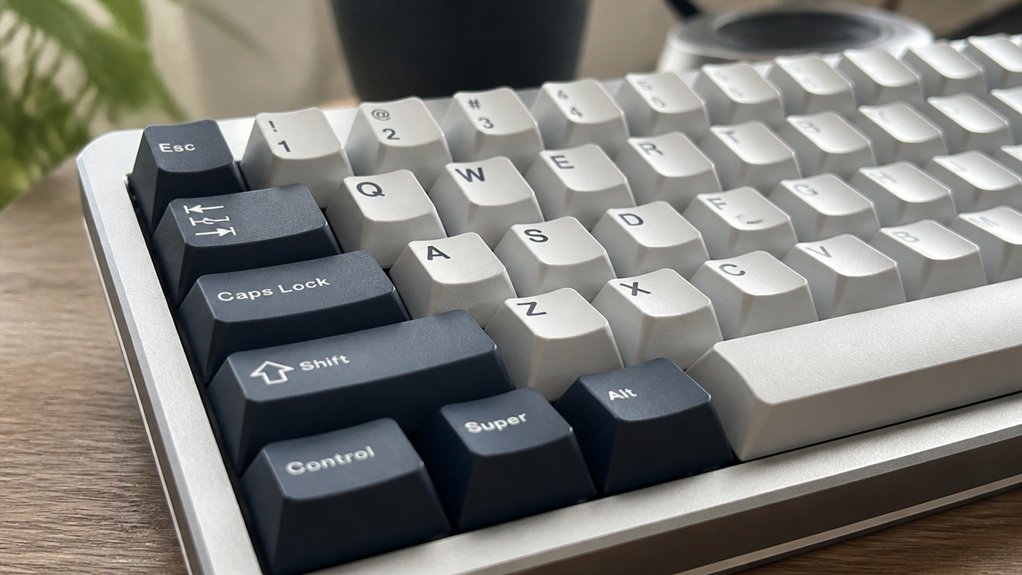
Keycap profiles enhance your typing precision by guiding your fingers naturally and reducing travel distance, which cuts down errors and finger fatigue. Sculpted profiles like Cherry match your finger curvature, making keystrokes smoother and more comfortable, especially during long sessions. Uniform profiles provide consistent finger placement, improving muscle memory and accuracy. The right height and shape optimize speed and control, balancing comfort and performance. Explore how different profiles can sharpen your typing and gaming skills even further.
What Keycap Profiles Are and How They Help Your Typing

Although you mightn’t realize it, keycap profiles play a crucial role in how accurately and comfortably you type. A keycap profile defines the height, shape, and curvature of each keycap, affecting how your fingers naturally rest and travel across the keyboard.
Sculpted profiles like Cherry use varying keycap height and ergonomic design across rows to guide your fingers, reducing errors and enhancing typing precision. By aligning with your natural finger flexion, these profiles minimize finger travel and fatigue.
Alternatively, uniform low-profile options help you build muscle memory with consistent spacing and surface shape, improving accuracy. Choosing the right keycap profile optimizes your typing experience, allowing for smoother, more precise keystrokes that feel intuitive from the start.
Why Keycap Height Matters for Speed and Accuracy
When you choose keycaps, their height directly impacts how swiftly and accurately you type. On a mechanical keyboard, lower profiles like Cherry or DSA reduce finger travel distance, boosting typing speed and maintaining accuracy by promoting consistent finger placement.
Taller keycaps, such as SA profiles, provide deeper tactile feedback, which enhances typing accuracy by confirming each keystroke. Medium-height sculpted profiles, like OEM, offer a balance that supports both speed and precision for everyday use.
Keycap height also affects finger ergonomics, with the right profile lessening fatigue and sustaining typing accuracy over time. By selecting the keycap profile that fits your natural finger movement and preferences, you optimize your typing speed and accuracy, making keycap height a vital factor in your overall mechanical keyboard experience.
How Sculpted and Uniform Profiles Affect Typing Precision
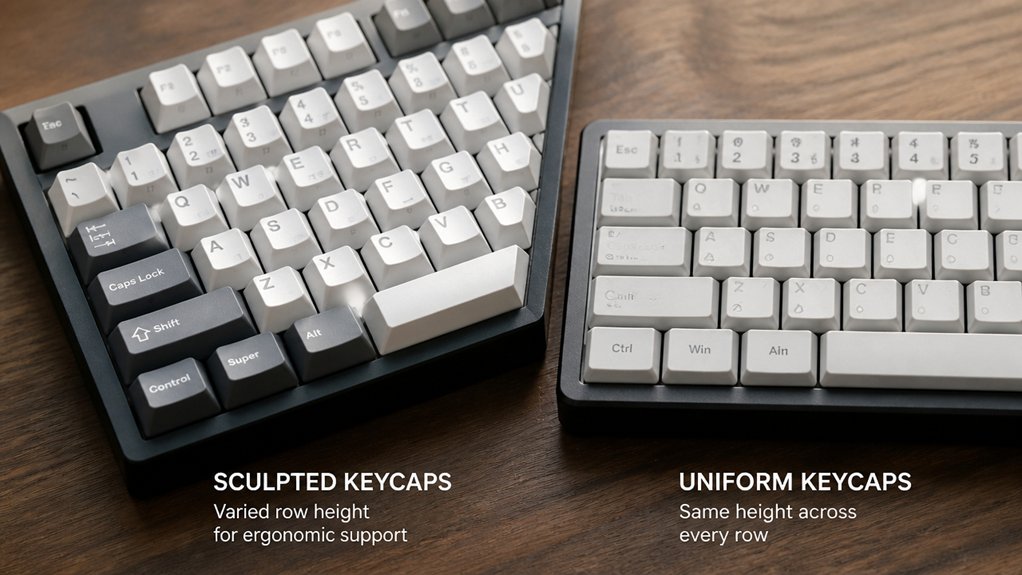
You’ll notice sculpted profiles guide your fingers with varied heights and angles, boosting accuracy by reducing travel mistakes.
On the other hand, uniform profiles keep keycaps the same height, which helps muscle memory and consistent finger placement, especially if you customize layouts. Understanding how each affects precision will help you pick the best fit for your typing style.
Sculpted Profile Advantages
Because sculpted keycap profiles vary in height and angle across rows, they guide your fingers naturally and reduce travel distance, improving typing accuracy. These profiles feature an ergonomic curvature that supports your fingers’ natural arcs, making it easier to find the right keys without errors.
For example, the Cherry profile’s moderate keycap heights (~9.4mm) help reduce finger strain during long typing sessions. High-profile sculpted designs like the SA profile (~16.5mm) provide distinct tactile feedback, further enhancing precision and control.
- Sculpted profiles contour to your fingers naturally
- Varying keycap heights reduce unnecessary travel distance
- Ergonomic curvature lowers finger strain for comfort
- Cherry and SA profiles offer tailored tactile experiences
With sculpted profiles, you get a more intuitive and accurate typing feel.
Uniform Profile Benefits
Although sculpted profiles like Cherry and OEM guide your fingers with varying heights and angles, uniform profiles such as DSA and XDA offer consistent key shape and height across all rows, helping you develop steady muscle memory and precise finger movement.
With uniform keycap profiles, you experience consistent key height that reduces finger travel variability, leading to more reliable keystrokes. The flat surface of DSA and XDA also makes key remapping straightforward, especially for custom layouts, enhancing typing precision tailored to your needs.
Impact On Accuracy
When you choose between sculpted and uniform keycap profiles, you directly influence your typing accuracy.
Sculpted profiles like Cherry and SA vary row heights and angles, guiding your finger placement naturally and reducing mistypes. On the other hand, uniform profiles maintain the same height and shape across all rows, helping your muscle memory deliver consistent precision.
Consider these points to understand their impact on typing accuracy:
- Sculpted profiles use row heights to enhance intuitive finger placement
- Cherry profile balances ergonomic guidance and typing speed
- Uniform profiles support rapid, precise keystrokes on flat surfaces
- SA profile curvature minimizes finger strain for distant keys
Your choice of keycap profile shapes how accurately and comfortably you type.
How Keycap Shape Influences Comfort and Fatigue

Three keycap shapes—sculpted, uniform, and low-profile—significantly influence your typing comfort and fatigue levels. Sculpted design keycap profiles like Cherry or OEM match your natural finger curvature, reducing finger fatigue and enhancing typing comfort during long sessions.
Taller profiles with deep sculpting, such as SA, create a pronounced finger arc that can feel comfortable by preventing slippage but may lead to fatigue because of increased key travel. Uniform profiles, such as DSA, provide a flat surface that supports muscle memory and reduces finger movement, though it might cause discomfort if the finger curvature feels unnatural.
Lower-profile keycaps lessen finger extension effort, helping especially if you have smaller hands by minimizing fatigue. Cylindrical tops guide your fingers securely, lowering joint stress and improving comfort overall.
Top Keycap Profiles for Fast, Accurate Typing
Understanding how different keycap shapes affect your comfort sets the stage for exploring profiles that sharpen your typing speed and accuracy. On your mechanical keyboard, certain keycap profiles stand out for enhancing typing precision through their sculpted profiles and ergonomic designs.
Consider these top choices:
- Cherry profile: Medium height and sculpted rows guide fingers naturally, boosting accuracy.
- MT3 keycaps: Deep sculpting with concave tops improves finger placement, reducing errors.
- SA profile: Tall and spherical, helps locate keys quickly with distinct row shaping.
- DSA profile: Uniform and low-profile, supports consistent finger positioning, perfect for fast typists.
How to Customize Keycap Profiles to Match Your Style

Why settle for a standard typing experience when you can tailor your keycap profile to fit your style and improve comfort?
To customize keycap profiles, you might pick sculpted profiles like the Cherry profile, which enhances typing precision by shaping finger movement naturally. If you prefer consistent finger positioning across all keys, uniform profiles such as the DSA profile offer versatile layouts that support fast, accurate typing.
You can also explore hybrid keycap sets like ASA or KAT, blending retro aesthetics with ergonomic function for both style and comfort. Focus on medium to low-height profiles to reduce finger fatigue during long sessions.
Finally, consider artisan or custom-designed keycaps, which can be tailored for your finger size and typing style, optimizing tactile feedback and personalizing your overall typing experience.
Picking the Best Keycap Profile for Typing and Gaming
When choosing keycap profiles, think about how you type and game.
Sculpted profiles like Cherry boost typing accuracy and comfort, while uniform profiles like DSA help with fast, consistent key presses.
Finding the right balance can improve both your typing precision and gaming performance.
Typing Profile Recommendations
Because your typing and gaming needs differ, choosing the right keycap profile can greatly impact your comfort and performance.
For a superior typing experience, keycap profiles with ergonomic sculpting and medium height usually win. Here’s what you should consider:
- Cherry profile: Offers medium height (~9.4mm) with ergonomic sculpting, reducing finger fatigue.
- OEM profile: Slightly taller (~11.9mm) with mild sculpting, balancing typing comfort and gaming performance.
- DSA profile: Uniform low-profile (~7.6mm), better for rapid key actuation but less sculpted for typing precision.
- SA profile: High-profile (up to 16.5mm) with deep key travel, great for typing feel, less ideal for fast gaming.
Gaming Profile Advantages
Choosing the right keycap profile doesn’t just affect typing comfort—it also shapes your gaming performance. Different keycap profiles impact your keyboard’s feel and responsiveness.
Shorter mechanical keycaps like Cherry (9.4mm) and OEM (~11.9mm) reduce finger travel, allowing faster key actuation and improved typing precision, essential for gaming. Uniform profiles, such as DSA with its 7.6mm height, support consistent finger placement, enhancing accuracy during rapid gameplay.
Sculpted profiles guide your fingers naturally across keys, reducing fatigue and sustaining precision over long sessions. While high-profile keycaps like SA (~16.5mm) look stylish, their greater height can slow your finger travel, lessening gaming speed.
Using a Sculpted profiles guide helps you find the perfect balance of height and ergonomics to boost gaming response and typing accuracy simultaneously.
Tips for Choosing Keycaps That Boost Comfort and Performance
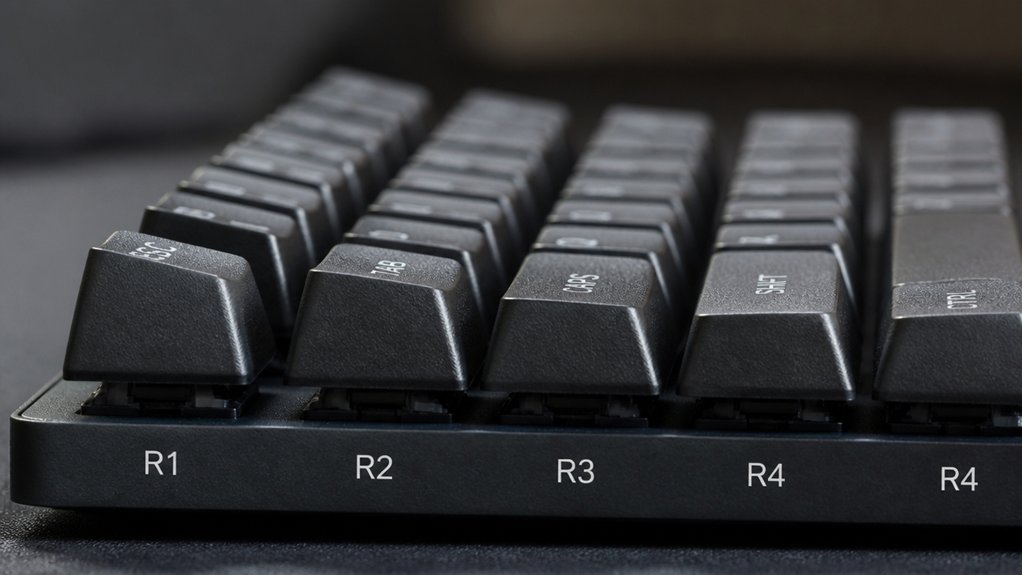
To boost both comfort and performance, you’ll want to select keycaps that align with your typing style and needs. Profiles offer distinct benefits, especially sculpted rows that aid finger positioning and promote comfortable typing. Mechanical keyboard enthusiasts find that choosing the right profile is key to enhancing their typing feel and reducing fatigue.
Medium-height keycaps strike a balance between ergonomic comfort and quick response, perfect for long sessions.
Here are some tips for choosing keycaps that boost comfort and performance:
- Opt for sculpted profiles like Cherry or MT3 for natural finger guidance
- Choose medium-height keycaps to combine ergonomic comfort with fast actuation
- Consider uniform profiles such as DSA for consistent finger movement
- Pick keycaps with smooth tops matching your finger curvature to reduce strain
Frequently Asked Questions
What Keycap Profile Is Best for Typing Speed?
You’ll type fastest with Cherry or low-profile DSA keycaps because they reduce finger travel and allow quick movements. Cherry’s ergonomic sculpting and DSA’s uniform low height both boost your speed and comfort during long sessions.
What’s Better, 60% or 75% Keyboard?
Choosing between 60% and 75% depends on your needs: go for 60% if you want maximum portability and minimal desk space, or pick 75% if you prefer dedicated function and navigation keys for easier productivity.
Is an OEM Profile Good for Typing?
Yes, OEM profile keycaps are good for typing. They offer comfortable height and mild sculpting that helps guide your fingers naturally, reducing strain and improving accuracy, making them a solid choice for balanced, everyday typing sessions.
Is 95% Accuracy in Typing Good?
Yes, 95% accuracy is good for everyday typing. You’re hitting most keys correctly, but small mistakes might slow you down. With practice and better setups, you can push beyond 95% for smoother, faster typing sessions.
In Summary
Choosing the right keycap profile can seriously boost your typing precision and comfort. By understanding how height, shape, and sculpting affect your fingers’ movement, you’ll type faster and with fewer mistakes. Whether you prefer a sculpted or uniform profile, customizing keycaps to fit your style and needs makes a real difference. So, pick keycaps that match your typing and gaming habits—your hands will thank you with better performance and less fatigue.



