

Lubricating your switches reduces friction between moving parts, resulting in smoother, more fluid keystrokes. It minimizes plastic-on-plastic contact, lowering resistance and preventing stickiness or roughness. This not only makes each keypress feel more consistent but also decreases noise from spring ping and rattling. Proper lubrication enhances tactile feedback without dulling the bump, providing a more comfortable typing experience. To discover exactly how to achieve this and optimize your switches, keep exploring the details below.
Why Should You Lubricate Your Switches?

Have you ever noticed how some mechanical keyboards feel smoother and sound better than others? The key is often in lubrication. Applying lubricant to the stem rails and housing contact points reduces friction inside the switch, leading to smoother key movements.
This minimizes scratchy sounds and friction variability, ensuring consistent and comfortable keystrokes. Proper lubrication also reduces spring ping and metallic ringing, resulting in a quieter, deeper “thock” sound, which many enthusiasts prefer.
Plus, well-lubricated switches lower resistance, making long typing sessions more comfortable and reducing hand fatigue. Whether you want to improve tactile feedback or achieve a silky, refined feel, lubricating your switches is a simple step that enhances typing comfort and overall switch performance. Thermal stability is also crucial to maintain consistent sound and feel during extended use.
How Does Lubrication Make Your Switch Feel Smoother?
Wondering how lubrication makes your mechanical switch feel smoother? It works by reducing plastic-on-plastic friction between the switch stem and housing. A high-quality lubricant like Krytox 205g0 creates a long-lasting film that minimizes internal resistance, making keystrokes lighter and more consistent. Imagine:
Lubrication reduces friction, ensuring smoother, quieter, and more reliable mechanical switch performance.
- A silky glide as the stem moves effortlessly within the housing
- Suppressed scratchiness, allowing for smoother key travel
- Prevention of stem sticking or bouncing by smoothing microscopic irregularities
This steady movement enhances the feel without Muffled tactile feedback, especially when you avoid lubing the tactile legs. Additionally, using a synthetic grease with stable viscosity ensures the lubricant remains effective over time, maintaining a smooth keystroke experience. Proper lubrication doesn’t change the actuation force but guarantees the switch operates quietly, reliably, and with a smoother, more satisfying keystroke each time.
Which Parts of a Switch Need Lube for Best Performance?

Lubrication optimizes switch performance by focusing on specific contact points where friction can hinder smooth operation.
You should lubricate the stem, especially the rails and sides, to reduce friction between the stem and housing, ensuring smooth vertical movement. Applying lubricant to the bottom housing rails where the stem contacts also minimizes scratchiness and enhances key travel. Lightly coating the cylindrical shaft of the stem creates a consistent glide without dampening tactile feedback.
The spring needs lubrication—either via bag lubing or light brush oil—to reduce spring ping and metallic noise during keypress return.
Finally, the top housing’s interior contact points can be lubricated sparingly to silence noise, but avoid lubing the contact area that interacts with the electrical leaf to prevent key registration issues.
How to Choose the Right Lubricant for Your Switch Type
Choosing the right lubricant for your switch type guarantees peak performance and feel. For linear switches, Krytox 205g0 is ideal, offering a thick, smooth glide that minimizes friction without dulling feedback.
Tactile switches benefit from Tribosys 3204, which balances smoothness with a crisp tactile bump for satisfying feedback. For clicky switches, Tribosys 3203’s thinner consistency reduces friction while preserving the click sound.
Krytox GPL 105 is perfect for lubricating springs, minimizing ping noise without changing switch feel or sound.
When applying lubricant, think of:
- Smooth, consistent flow for linear switches with Krytox 205g0
- Maintaining tactile feedback with Tribosys 3204
- Reducing noise on springs using Krytox GPL 105
Optimize your switch experience with the right lubricant, especially considering pre-lubed switches that are designed for immediate use and enhanced performance.
Step-by-Step: How to Lube Your Switches Properly
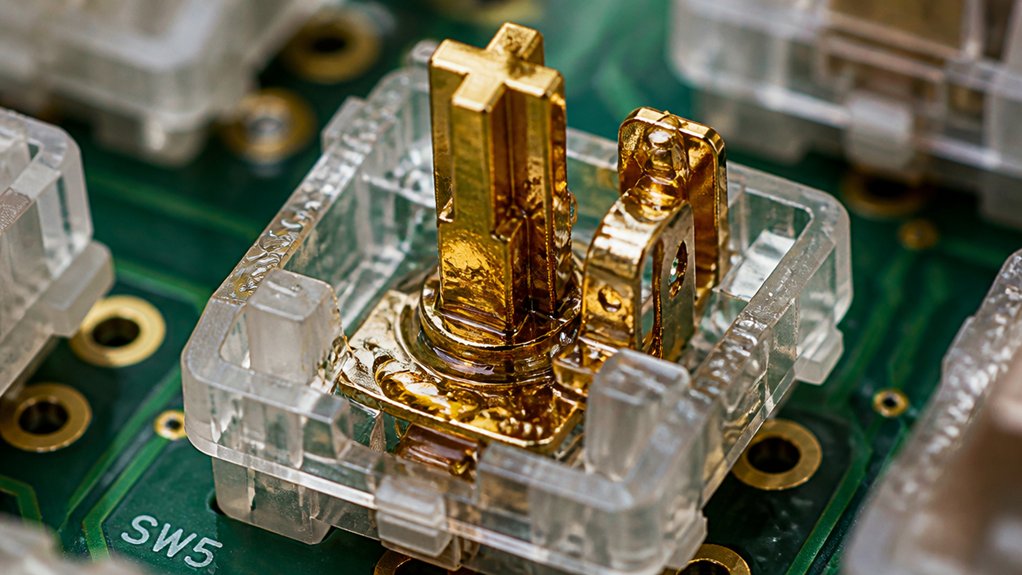
To properly lube your switches, start by carefully disassembling each one using a switch opener, making sure to keep all components intact. Next, apply lubricant precisely to the stem rails, stem sides, and bottom housing without overdoing it, then reassemble the switch components correctly. For added protection and ease of handling, consider using a magnetic switch opener, which can improve efficiency during modding. Finally, test each switch for smoothness and tactility before reinstalling them into your keyboard.
Disassemble Switch Carefully
Before you start lubricating your switches, it’s essential to disassemble them carefully to prevent any damage. Use a switch puller to gently lift out the switches from the PCB, making sure to fully depress the tabs to avoid bending or breaking.
Then, employ a switch opener designed for your switch type to separate the top housing from the bottom housing without stressing internal parts. To keep everything organized, place the top housing, stem, spring, and bottom housing in separate containers.
Be cautious with the delicate spring and stem, avoiding contamination or damage ahead of time. Remember, disassemble switch carefully to preserve all internal components, making your lubrication process smooth and damage-free. Incorporating tools made from high-quality materials like S2 steel can help ensure durability and precision during disassembly.
Apply Lubricant Precisely
Applying lubricant precisely is essential to achieving a smooth and responsive keystroke. When performing switch lubrication, carefully apply lubricant to the stem rails and inside rails of the bottom housing, using a fine brush for even coverage.
For linear switches, Krytox 205g0 works well on these areas. Be sure to avoid the tactile leg on tactile switches to prevent changing switch feel.
When lubricating springs, use minimal oil and consider bag lubing to reduce spring ping without slowing key return. It’s vital to avoid over-lubing, which can cause mushiness or sluggishness.
Never apply lubricant to the metal contact leaf to maintain consistent key registration.
Using dedicated lubrication stations with organized compartments can improve precision and efficiency during the lubing process.
Reassemble the switch firmly and test the feel, adjusting the lubricant amount if necessary for peak smoothness.
Reassemble and Test
Once you’ve applied lubricant to the switch components, carefully reassemble the switch by placing the spring first, followed by the stem with the legs facing the gold contacts, then snapping the top housing securely into place. During reassembly, picture yourself aligning each part for a seamless fit. To ensure longevity, verify that the switches support the rated keystrokes and actuation forces for heavy daily use, as detailed in the Lifespan and Durability section.
- Imagine the spring settling softly against the rails.
- Visualize the stem sliding smoothly into position with ease.
- Envision the top housing clicking into place securely.
After reassembling, test the switch manually by pressing it to confirm a smooth, consistent keystroke, ensuring there’s no mushiness or sticking.
If the feel isn’t right, make minor adjustments before reinstalling into your keyboard. Proper testing guarantees your lubed switches deliver optimized clarity and tactile feedback.
How Much Lubricant Do You Need?
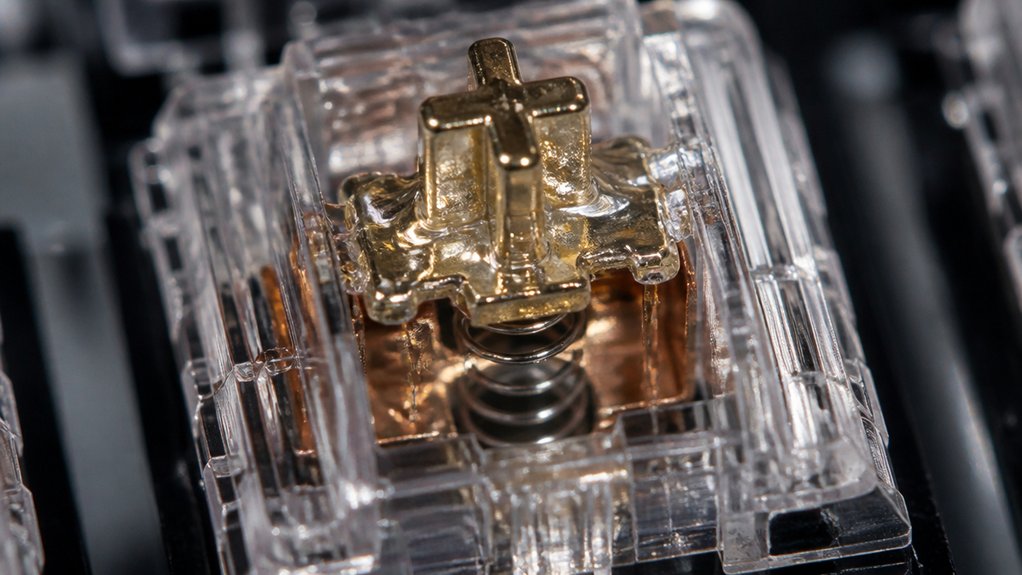
Applying too much lubricant can make your keystrokes sluggish or mushy, so start with a light coat. A thin layer about 1-2mm thick on switch stems and rails usually does the trick without dulling sound or feel. Test your switches as you go to find the right balance before lubricating your entire keyboard. Keep in mind that proper pre-lubrication techniques help maintain the switch’s responsiveness and durability.
Applying Light Coats
To achieve ideal lubrication without compromising performance, you should use only a thin, even layer of about 1-2 mm on the stem rails and bottom housing. This guarantees reduced friction and noise without risking sluggishness or mushy keys.
When lubing your switch, visualize a delicate coating that:
- Glides smoothly with minimal effort
- Keeps dust and grime from trapping inside
- Preserves tactile feedback during keystrokes
Using a fine brush, gently apply the lubricant on the switch’s moving parts, avoiding over-lubing. Test the switch as you go to gauge the right amount—too much can hinder the tactile feel, while too little mightn’t reduce friction enough.
Applying the right amount of lubricant also helps prevent housing shake and ensures a more stable, consistent keystroke experience.
Light coats are key to achieving sleek, smooth keystrokes.
Avoiding Excess Lubricant
Guaranteeing you use just the right amount of lubricant is essential for ideal switch performance. A small amount of lubricant, applied evenly, helps reduce friction without making switches feel sluggish. Using premium lubricants like Glorious G-Lube can further enhance smoothness and longevity. Too much lubricant can cause sticky switches and hinder key registration, especially if it contacts metal contacts or contact points. To avoid this, focus on applying an even coat of lubricant—typically 1-2mm on parts like the stem rails and bottom housing rails. Remember, switches can vary, so testing lubricated switches individually helps find the perfect balance. This way, you prevent over-lubrication and achieve smooth, responsive keystrokes while maintaining tactile feedback.
Common Signs You’ve Laxed Your Switch Correctly
Ever wonder how you can tell if you’ve lubed your switch just right? When done properly, your lubed switches will feel smooth and consistent during every keystroke, with a noticeably reduced scratchy feel.
You might notice a deeper, muted “thock” sound replacing harsh or metallic ringing, indicating the switch is well-lubricated. Key signs also include no mushiness or sluggish key travel, showing the lubricant was applied sparingly to the stem and housing rails.
If you notice minimal spring ping, it means the spring has been properly reduced of excess lubricant. Additionally, balanced tactile feedback is maintained without dampening the bump, confirming you avoided over-lubricating the tactile legs while achieving a satisfying, refined typing feel and sound.
Why Proper Lubrication Reduces Friction and Noise

Proper lubrication forms a thin, non-conductive layer that reduces plastic-on-plastic friction and keeps keystrokes smooth. It also dampens spring vibrations, cutting down on noise and rattling.
Friction Reduction Techniques
Friction reduction in keyboard switches hinges on applying lubricant precisely to contact points where plastic components rub against each other.
To effectively lubricate switches, focus on areas like the stem rails and housing surfaces, which are primary sources of internal friction. Use thin layers of high-quality lubricants such as Krytox 205g0 to smooth out the contact surfaces, reducing scratchiness and resistance.
Visualize these areas as:
- Sliding parts of the stem rails
- Contact points between housing surfaces
- The sidewalls where plastic-on-plastic friction occurs
Lubricating these points minimizes micro-vibrations and micro-resistance during keypresses. This targeted approach prevents roughness, guarantees consistent actuation force, and creates a smooth, satisfying keystroke.
Noise Dampening Methods
Lubrication plays a key role in dampening noise within keyboard switches by reducing the friction between internal plastic parts. When you lubing switches, you minimize scratchy sounds caused by stem and housing rail contact, creating a smoother sound profile. Lightly lubricating springs with a drop of oil dampens spring ping, eliminating metallic ringing. Applying thin coats to the stem and housing rails produces a deeper, quieter “thock,” preferred for quieter typing. Just avoid lubricating metal contacts to prevent inconsistent key registration while keeping electrical feedback sharp. Balanced lubrication reduces micro-vibrations and rattling within the switch. This way, you enjoy a quieter, crisper keystroke without sacrificing tactility.
| Method | Effect |
|---|---|
| Lubing switches | Quieter, smoother typing |
| Spring lubrication | Reduces spring ping |
| Housing rail lubrication | Softens sound profile |
| Avoiding metal contacts | Guarantees reliable registration |
Tips to Avoid Over-Lubing and Achieve Consistent Feel
To prevent over-lubing and guarantee a consistent feel, it’s essential to apply just enough lubricant—only a thin coat on the stem rails and bottom housing. Use a fine brush and focus on even coats to keep your switches smooth without feeling mushy.
Remember, avoid lubricating tactile legs or metal contact leaves to preserve the tactile feedback and consistent key registration.
To lube mechanical keyboard switches properly, test a few switches mid-lubing, adjusting the amount of lube as needed.
Be mindful to:
- Spread lubricant sparingly, just 1–2mm on key parts
- Choose thicker lube for linear switches and thinner for tactile ones
- Clean off excess immediately to reduce friction and maintain responsiveness
This approach guarantees smooth, reliable keystrokes without compromising feel.
Maintaining and Re-Lubing Your Switches for Long-Term Performance
Over time, switch lubricant can break down or gather dust, which diminishes its effectiveness and impacts your keyboard’s feel and sound. Regularly inspecting your switches helps spot increased friction, scratchiness, or spring ping, indicating re-lubing is needed. Carefully disassemble switches and apply fresh Krytox 205g0 to key areas like stem rails and springs, but avoid over-lubing to prevent mushiness. Maintaining switch maintenance routines keeps your keyboard performing smoothly and extends its longevity. Using high-quality lubricants like Krytox 205g0 ensures consistent feel and sound over time. Keep your workspace clean and store your keyboard properly to protect the lubricant’s integrity.
| Feeling | What It Means |
|---|---|
| Smooth, effortless | Proper re-lubing achieved |
| Sticky or gritty | Lubricant has degraded |
| Increased friction | Needs re-lubing |
| Noisy switches | Spring ping or dirt buildup |
| Consistent sound | Well-maintained switch |
Enjoy Quieter, Smoother Typing With Proper Lubbing
Applying the right amount of lubricant to your switches can greatly reduce internal friction, resulting in smoother keystrokes and a more comfortable typing experience. Switch lubing minimizes plastic-on-plastic friction inside mechanical switches, creating a consistent, fluid feel.
It also reduces spring ping and metallic noises, leading to a quieter, more subdued sound profile—perfect for quiet work environments. When applied evenly to stem rails, housing guides, and springs, lubricant prevents key sticking and bouncing, enhancing overall responsiveness.
Imagine:
- A silky, seamless keystroke with minimal resistance
- Deep, muted “thock” sound that enhances sound quality
- Smooth, tactile feedback without muffling response
Using recommended lubricants like Krytox 205g0 or Tribosys helps balance feel and sound, making your typing feel satisfying and refined while reducing friction effectively.
Frequently Asked Questions
What Is the Point of Lubing Keyboard Switches?
Lubing keyboard switches makes your keystrokes smoother and quieter by reducing internal friction, minimizing noise, and preventing wear. It also boosts switch stability, so your typing feels more consistent, comfortable, and durable over time.
Does Lubing Improve Switch Feel?
Yes, lubing improves switch feel by reducing friction, making keystrokes smoother and more consistent. You’ll notice softer, cleaner keypresses, less noise, and a more comfortable, precise typing experience when you properly apply just the right amount of lubricant.
Does Lubing Switches Make It Quieter?
Yes, lubing switches makes them quieter by reducing friction and dampening sharp noises. You’ll notice less rattle and ping, creating a more subdued, enjoyable typing experience while maintaining a crisp, responsive feel with proper, controlled lubrication.



