
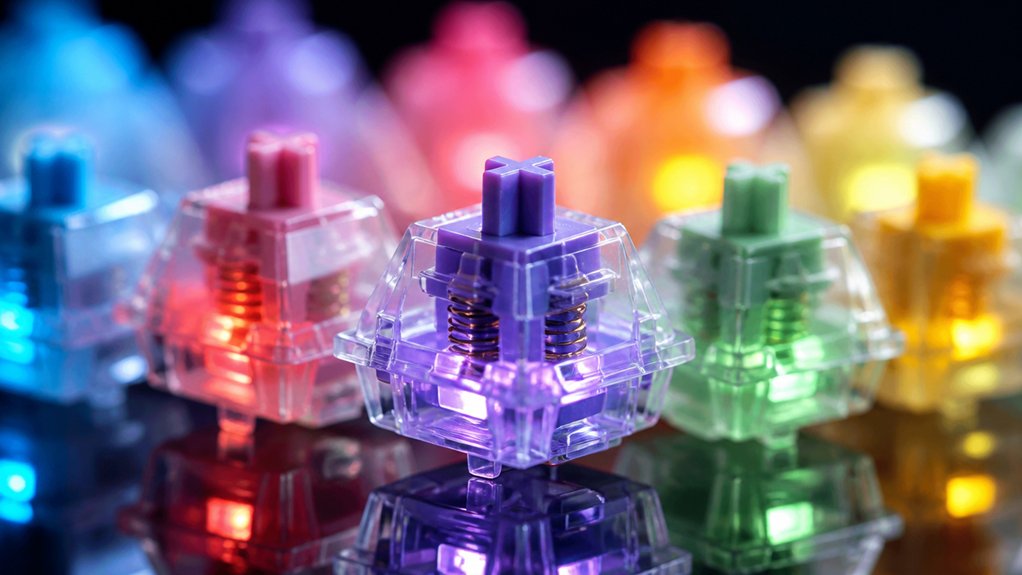
Pick transparent‑housing switches—ideally 3‑pin—for the brightest, most uniform RGB glow, because the clear polycarbonate or POM stems let light pass straight through. Choose linear or tactile models like Gateron North Pole 2.0 or Gazzew Boba U4T for crisp actuation while keeping the LEDs vivid, and favor spring weights around 45‑55 g for fast typing without dimming. If you want clicky feedback, go for Cherry MX or Gateron clicky switches with translucent tops, and you’ll get vivid illumination and audible clicks. Continue for deeper details on materials, lubrication, and installation.
Transparent Switch Housings and Their Effect on RGB Lighting

Because the housing is clear, a transparent switch lets the RGB LEDs shine through without obstruction, boosting both brightness and color uniformity. You’ll notice that transparent switch housings, often made of clear plastic, maximize RGB lighting diffusion, letting the light spread evenly around the stem. This eliminates shadows and preserves vivid illumination on each keycap, so your backlit mechanical switches look sharp and vibrant.
Models like the YMDK Gateron SMD series use white‑base covers that support strong underglow and top‑RGB effects without color distortion. The transparent shells also keep durability, letting you enjoy intense, uniform lighting while maintaining the reliable feel of mechanical switches. This design choice is ideal for keyboards built around vibrant lighting setups.
Choosing 3‑Pin or 5‑Pin Switches for Optimal RGB Light Transfer
Transparent housings let the LEDs shine through, but the switch’s pin configuration also shapes how much light reaches the keycap. When you pick 3‑pin switches, you get fewer metal pins, so more RGB lighting passes directly through the PCB, giving brighter, more uniform glow. 5‑pin switches add extra plastic pins for stability, which can block a sliver of light, but they keep the key stable, especially on larger boards. Make sure your PCB matches the pin count; otherwise the LEDs may not light up correctly.
| Feature | Effect |
|---|---|
| Pin count | 3‑pin = more light; 5‑pin = extra stability |
| Light blockage | Fewer pins = less obstruction |
| Compatibility | Match PCB to switch type |
| Brightness | 3‑pin maximizes RGB lighting |
| Stability | 5‑pin improves alignment and feel |
Selecting Stem Materials That Maximize RGB Brightness
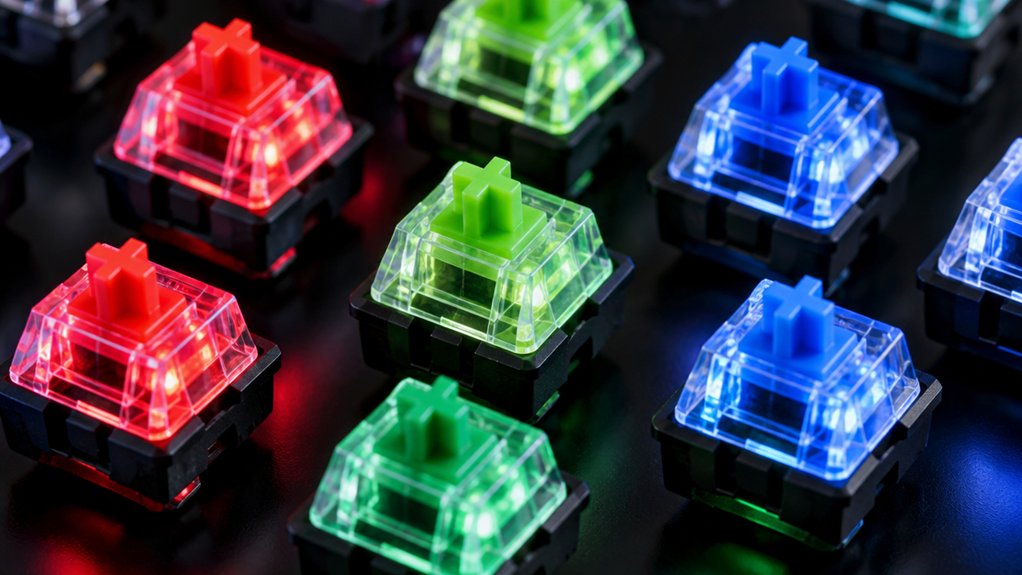
You’ll notice that transparent stems—like clear PC or POM—let RGB light pass straight through, boosting brightness.
Picking a design that optimizes light transmission, such as a clear top housing paired with a light‑colored stem, reduces obstruction and spreads color evenly. A smooth, uniform surface finish on the stem further enhances diffusion, giving you vivid, consistent illumination.
Transparent Transparent Material Choices
If you want the brightest RGB on each key, choose a stem that lets light pass through rather than block it. Transparent switch housings made from clear polycarbonate let the LED shine directly into the stem, minimizing loss. Opt for milky‑white or semi‑clear stems; they scatter light evenly and keep the glow vivid. Brands like Gateron and Kailh already engineer such Switches, delivering crisp, uniform RGB lighting without dulling the colors.
| Material | Transparency | Typical Use |
|---|---|---|
| Clear polycarbonate housing | Fully transparent | Maximizes light entry |
| Milky‑white stem | Translucent | Diffuses RGB evenly |
| Semi‑clear nylon | Semi‑transparent | Balances strength and glow |
Choosing these materials guarantees each key radiates the full spectrum, giving you a striking, luminous keyboard.
Optimized Light Transmission Design
When you pick stems made from clear polycarbonate or high‑clarity POM, the LEDs shine straight through with minimal loss, delivering the brightest, most uniform RGB on every key. Those materials let light travel unimpeded, so each keycap glows with vivid, consistent color.
To fine‑tune that effect, consider how the switch design, housing transparency, and LED alignment interact.
- Choose fully transparent housings paired with clear switch stems for maximum light passage.
- Opt for designs that eliminate internal obstructions, ensuring the LED’s beam reaches the keycap directly.
- Use 5‑pin switches with stable mounting to keep LEDs perfectly aligned with the stem’s clear channel.
Uniform Stem Surface Finish
A uniform, smooth stem surface is key to maximizing RGB brightness because it lets light travel through the switch without unwanted scattering.
When you pick mechanical key switches with a polished, even finish, the light from your LEDs passes straight through the stem, avoiding dim spots.
Transparent POM or polycarbonate stems, or PA66 with treated finishes, keep the light diffusing evenly across the keycap.
Switches for Mechanical designs often include factory lubrication and precise molding to preserve that uniform stem surface finish, reducing irregularities that could scatter light.
How Spring Weight Influences Both Performance and RGB Appearance
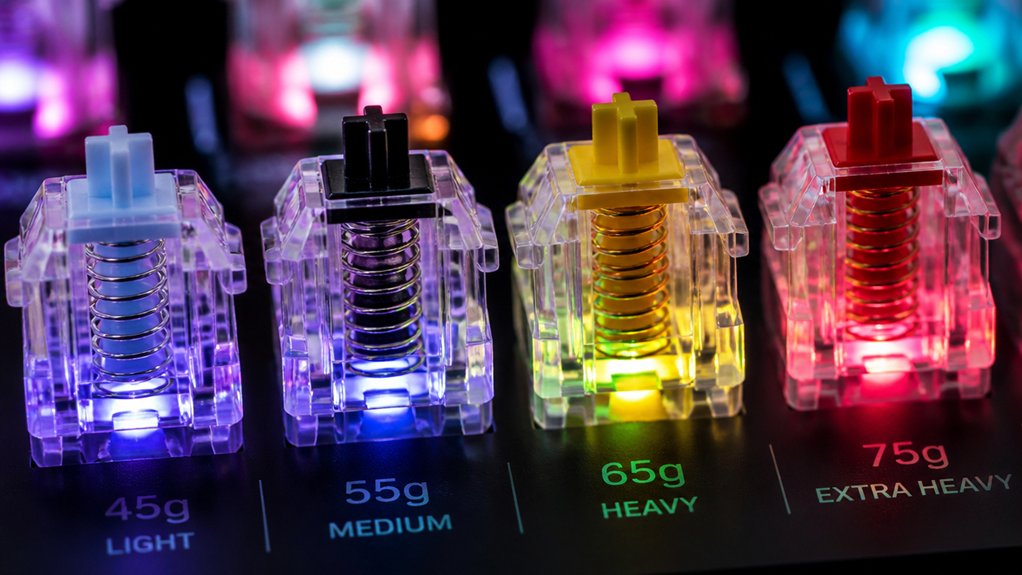
Because spring weight determines both the force needed to actuate a switch and how much light can pass through its internals, it directly shapes typing performance and RGB appearance.
You’ll notice that lighter spring weight (42‑50 g) lets you type faster with smooth, low‑resistance keystrokes while the RGB light shines through the translucent housing unobstructed. Heavier springs (60 g +) add tactile heft but thicken the coil, slightly dimming the LEDs. The Gazzew Boba U4T series (62 g, 65 g, 69 g) proves you can keep vivid colors without sacrificing feedback.
Key takeaways
- Light springs boost speed and light diffusion.
- Heavy springs increase actuation force, modestly reducing brightness.
- Transparent housings paired with the right spring weight preserve RGB vibrancy in mechanical switches.
Top 5 RGB‑Compatible Linear Switches
You’ll notice that transparent housings let RGB shine through, turning every keystroke into a vivid light show.
The switches we’ll cover all boast rapid actuation, so you get both speed and eye‑catching illumination.
Let’s explore the five linear options that marry clear‑case design with lightning‑fast performance.
Transparent Transparent RGB Compatibility
When you want your keyboard’s RGB to truly pop, transparent switch housings are essential because they let light pass through unhindered.
You’ll notice that the combination of transparent switch housings, RGB lighting, and linear switches delivers a clean, uniform glow that accentuates every keystroke.
Below are three top picks that excel in this category:
- Gateron North Pole 2.0 – fully transparent housing, smooth linear feel, and superb light diffusion.
- YMDK Gateron SMD Yellow 3‑pin – transparent cover with a white base, perfect for per‑key RGB and underglow.
- Standard Transparent Linear – generic model with clear housing, reliable actuation, and vibrant color clarity.
Choosing any of these guarantees your board shines brightly while maintaining the fast, buttery performance you expect from linear switches.
Fast Actuation Speed
If you crave split‑second response and a crisp, uniform glow, fast‑actuating RGB‑compatible linear switches are the sweet spot. The YMDK Gateron SMD Yellow 3‑pin linear offers a 50 g peak force and transparent housing that lets RGB underglow shine without distortion.
Gateron KS‑3 Milky Yellow Pro adds a 2.0 mm pre‑travel, hitting the actuation point quickly for snappy gaming moves. Most top models sit in the 45‑55 g range, delivering quiet, rapid keystrokes while preserving vivid color spill.
Transparent or translucent casings maximize lighting diffusion, and many users mod the 3‑pin design for even smoother feel. Together, these switches give you blazing speed, consistent actuation, and a uniform RGB backdrop that enhances every keystroke.
Best RGB‑Compatible Tactile Switches

Because the housings of many tactile switches are transparent or translucent, their RGB backlighting shines through clearly, giving you vivid colors without sacrificing feedback.
You’ll notice the Gateron KS‑3 Milky Yellow Pro’s bright glow, the Akko V3 Cream Blue Pro’s budget‑friendly sparkle, and the Gazzew Boba U4T’s deep “thocky” feel—all engineered for RGB compatibility and crisp tactile feedback.
Gateron KS‑3 Milky Yellow Pro shines, Akko V3 Cream Blue Pro sparkles, Gazzew Boba U4T thocks—RGB‑ready tactile perfection.
- Gateron KS‑3 Milky Yellow Pro – translucent housing, 55 g actuation, smooth pre‑lubed travel.
- Akko V3 Cream Blue Pro – dust‑proof stem cover, factory pre‑lubrication, reliable lighting diffusion.
- Gazzew Boba U4T – 5‑pin design, rounded tactile bump, enhanced backlighting stability.
These tactile switches balance actuation force, travel distance, and illumination, letting you type with confidence while your keycaps blaze in vivid hues.
RGB‑Compatible Clicky Switches: Sound Meets Light
You’ll notice that RGB‑compatible clicky switches blend vivid lighting with a crisp audible click, letting the glow shine through transparent housings. Their acoustic transparency guarantees the light isn’t blocked while the click remains distinct, and the sturdy stems keep the sync reliable for millions of keystrokes.
Brands like Cherry MX and Gateron deliver this combo, giving you both visual flair and tactile satisfaction.
Clicky Meets RGBable
Ever wondered how a clicky switch can also light up your desk? When you pair a tactile, audible click with a transparent housing, the RGB glow bursts through each key, turning every keystroke into a visual cue.
You’ll love the satisfying resistance—55 g for blues, up to 80 g for greens—while the underglow stays vivid. Just remember that some hot‑swap boards still prefer traditional MX stems, so check compatibility before you buy.
- Transparent housings maximize light diffusion.
- Actuation forces give high‑resistance feedback.
- Wired USB guarantees reliable RGB control.
These RGB‑compatible clicky switches let you enjoy loud, high‑pitched feedback without sacrificing the dazzling lighting you expect from modern mechanical keyboards.
Acoustic Transparency for Lighting
When you combine a clicky switch’s crisp audible feedback with a transparent housing, the result is a perfect blend of sound and light; the polycarbonate shell lets RGB LEDs shine evenly through the key while the engineered tolerances keep the click sharp and consistent. Acoustic‑transparent design lets the clicky sounds travel unimpeded, so each downstroke and upstroke remains distinct without dimming the glow.
Manufacturers select polycarbonate housings that diffuse light uniformly while tuning internal tolerances to avoid resonance that could muffle the click. Factory lubrication and refined components reduce unwanted vibration, preserving both the bright RGB‑compatible illumination and the satisfying tactile snap.
The result is a keyboard that looks vibrant and feels lively, delivering a balanced sensory experience.
Durable Stem Design for Sync
Because a stable, five‑pin stem anchors the switch firmly to the PCB, RGB‑compatible clicky switches can keep their lighting perfectly synchronized with every keystroke. The durable stem tolerances lock the mechanical key in place, eliminating wobble and ensuring the clear housing lets light spill evenly.
Factory lubrication smooths travel without muting the crisp click, while the ~60 g actuation force gives a satisfying tactile response that matches the visual burst. You’ll notice less lag between sound and light, making your Keyboard feel like a single, harmonious instrument.
- Five‑pin anchor prevents drift.
- Transparent housing maximizes diffusion.
- Lubricated click retains acoustic punch.
Lubrication Tips That Preserve RGB Clarity and Switch Feel
If you want your RGB‑lit switches to stay bright while feeling buttery smooth, stick to thin, transparent lubricants like Krytox GPL 205 oil. Apply a micro‑drop to the slider rails and spring, avoiding the housing walls so the LED passes unhindered.
Use a fine‑tipped brush; a little goes a long way, and you’ll keep the switch’s clear plastic glowing. Heavy or opaque greases will dim the RGB lighting and can discolor the housing, so skip them.
Pre‑lubricated units, such as Gazzew Boba U4T, already balance feel and light, but if you mod, choose a higher‑viscosity oil for sound dampening, not a thick paste. This method preserves the vividness of your mechanical keyboards while delivering a silky tactile experience.
How to Install and Test RGB‑Ready Switches on Your PCB
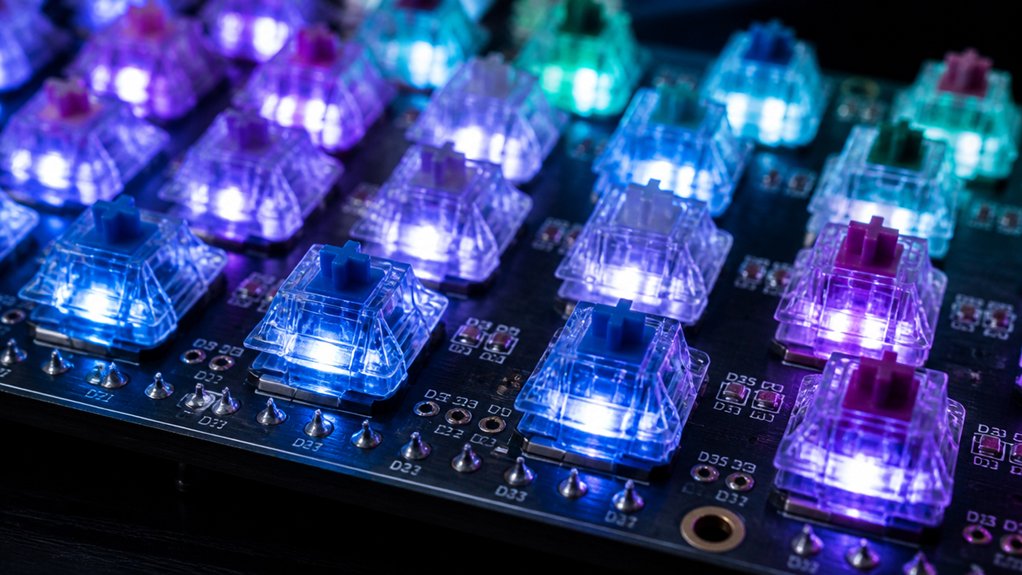
Keeping the RGB brightness intact starts with a proper install, so after you’ve lubricated the switches, line up the transparent housings and pins with the PCB’s 5‑pin or 3‑pin sockets.
Proper install preserves RGB brightness: align transparent housings and pins with the PCB’s 5‑ or 3‑pin sockets.
Use a hot‑swappable PCB if you can; it lets you snap in RGB‑ready switches without soldering, making testing a breeze.
Press each key gently to confirm key actuation while watching the LEDs glow through the tops.
- Align pins, then press switches until they seat firmly.
- Connect the board to your PC and launch the lighting software.
- Cycle through effects, noting any dead LEDs or uneven illumination.
If every key lights up and registers a smooth press, the install succeeded and your RGB lighting will stay vivid.
RGB‑Compatible Switch FAQ
What makes a switch truly RGB‑compatible? You need a transparent or translucent housing so the backlight shines through, and a 3‑pin or 5‑pin design that fits standard PCBs. Most RGB‑compatible mechanical keyboards use Gateron, Kailh, or Cherry MX models engineered for light diffusion without sacrificing feel. Linear switches with clear housings usually deliver the brightest glow, while opaque tactile or clicky switches dim the effect. Specialized options like the Gateron North Pole 2.0 are fully transparent, guaranteeing uniform illumination across the board.
| Brand | Type | Pin Count |
|---|---|---|
| Gateron | Linear Transparent | 3 |
| Kailh | Clicky Opaque | 5 |
| Cherry MX | Tactile Semi‑Clear | 3 |
| Gateron North Pole 2.0 | Fully Transparent | 5 |
Frequently Asked Questions
How to Switch RGB Lights on Keyboard?
Press the Fn key with the designated arrow or number keys to cycle effects, or open your keyboard’s software (Razer Synapse, iCUE, G Hub) and select a new lighting profile, adjusting colors and brightness as you like.
What Are the Best Color Switches for Keyboards?
You’ll love Gateron Yellow or Kailh Transparent linear switches; they’re smooth, cheap, and let RGB shine through. If you prefer tactile feedback, choose Brown switches with transparent housings and factory lubrication.
Do Pro Gamers Use Linear or Tactile?
You’ll find most pros gravitate toward linear switches for their buttery, fast actuation, but many also opt for tactile switches when they need precise feedback; personal comfort and playstyle ultimately decide.
Do Gamers Prefer Membrane or Mechanical?
You’ll choose mechanical over membrane because you value faster actuation, tactile or linear feedback, and the ability to sync RGB lighting, while membrane feels slower, quieter, and less customizable.
In Summary
Now’ve seen how transparent housings, pin count, stem material, and spring weight all shape the way RGB shines through your switches. By picking the right linear or clicky options and keeping them well‑lubricated, you’ll get vivid colors without sacrificing feel. Install, test, and tweak—your board will look as good as it performs, proving that great lighting and solid typing can coexist perfectly.



