

Hot-swap keyboard switch lifespan depends mainly on socket quality and how carefully you handle them. High-quality sockets can last up to 50,000 cycles, but cheap ones may wear out after only a few hundred. Frequent swapping, rough removal, or static damage can quickly shorten their life. To get the most out of your switches, keep everything clean and handle switches gently. Continue exploring to discover tips that help maximize your keyboard’s longevity and performance.
How Long Do Hot-Swap Switches Last?
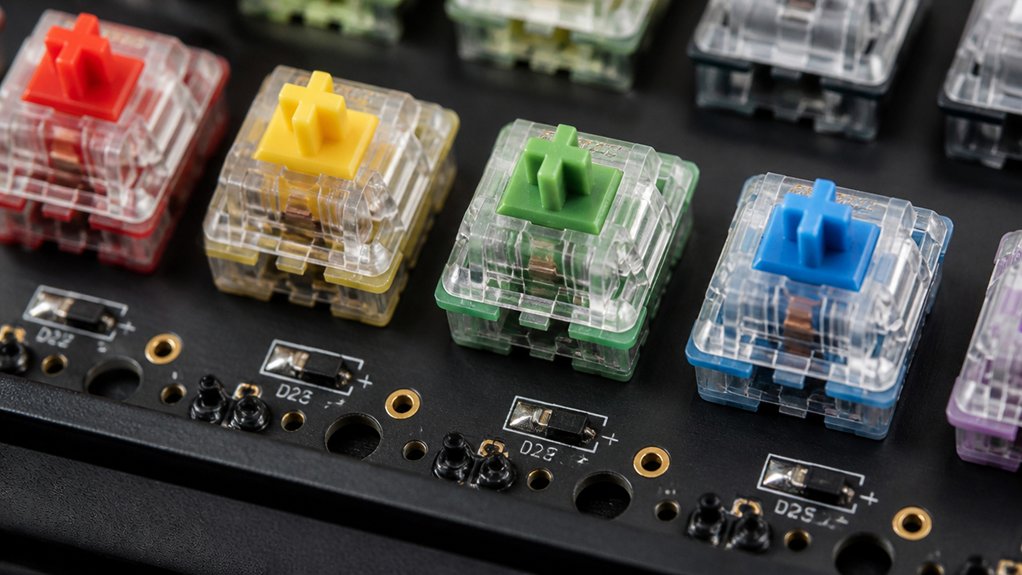
Hot-swap switches are designed to be easily removable and replaceable, but their lifespan varies depending on the socket type and how often you swap them. With hot-swap sockets, keyboard switches are held in place by metal contacts that connect electrical signals.
Frequent switch insertion and removal, known as switch plugging, can wear out these contacts over time. Common hot-swap sockets like Kailh typically support around 100 switch cycles before degradation, while higher-quality Gateron sockets may endure up to 50,000 cycles.
The socket lifespan depends on proper switch insertion and careful handling. Excessive force or dust buildup can accelerate wear, reducing the overall durability of hot-swappable keyboards. Proper installation methods and maintenance are essential to maximize lifespan and performance.
Limiting unnecessary switch swapping helps prolong the life of your hot-swap socket and maintain peak functionality.
What Factors Affect Hot-Swap Switch Durability?
What factors influence the lifespan of your hot-swap keyboard switches? Your hot-swap switch socket lifespan depends on several key elements. Frequent switch insertions and removals, especially with tools like a switch puller, can wear out the hot-swap sockets, causing damage to the metal pins and reducing durability. Rough or forceful switch insertions/removals risk damaging the socket or the PCB, leading to poor electrical connection and failures. Exposure to static electricity can also harm the sockets’ internal components. Dust, debris, or corrosion build-up inside the sockets diminishes contact quality, shortening lifespan. Additionally, poor soldering or weak PCB construction can lead to socket looseness or breakage over time. Ensuring gentle handling and quality components increases your hot-swap switches’ longevity. Properly designed hot-swap PCB sockets, like Kailh and DUROCK, are built for durability and socket stability to withstand repeated use.
How Can You Tell When Your Switches Are Worn Out?

Ever notice your keyboard’s response slowing down or feeling less smooth over time? Worn-out hot-swap keyboard switches often show themselves through inconsistent key response, with delayed or missed keystrokes.
You might also feel a change in key feel, such as increased scratchiness or a loss of tactile feedback, signaling switch degradation. Rattling or wobbling switches during typing indicate mechanical wear or loose internal components.
If some keys need extra force to actuate or don’t register presses properly, your switches are likely near the end of their lifespan. Physical signs like corrosion, dust buildup, or damaged pins are clear indicators of wear.
Additionally, switches with reduced lifespan, such as those rated for 50 million keystrokes, may begin to show these signs sooner especially under heavy use, emphasizing the importance of regular inspection.
Regularly inspecting your switches can help you catch these signs early and know when it’s time for a replacement.
Tips to Extend the Life of Your Hot-Swap Switches
To maximize the lifespan of your hot-swap switches, it’s important to handle them carefully during removal and installation. Always use a proper plastic switch puller and apply gentle, straight vertical force to prevent damage to switch pins and hot-swap sockets. Using switches with high-quality switch support and compatible sockets can further enhance durability. Limiting switch removal cycles to fewer than 100 helps avoid wearing out sockets, which are rated for 50,000 to 100,000 swaps depending on quality. Keep the sockets clean from dust or debris to guarantee good electrical contact.
When working on your keyboard, ground yourself or use an anti-static mat to avoid static electricity that could damage the PCB. Handle switches gently and align pins precisely before insertion, never forcing them. This care can greatly extend your hot-swap switches’ lifespan.
Should You Upgrade or Replace Hot-Swap Switches?

Deciding whether to upgrade or replace your hot-swap switches depends on their condition and your typing experience. Hot-swappable sockets support switch insertions/removals from about 50 to 100,000 times, depending on quality.
Frequent switch swapping can cause switch wear and degrade socket material durability, leading to input issues or inconsistent typing. If switches feel less responsive, register intermittently, or show physical damage, switch replacement is the best choice.
Upgrading switches can improve your keyboard’s lifespan and customize your typing feel or sound. However, excessive hot-swapping without caution risks socket damage.
Consider switching to more durable sockets or replacing worn switches to preserve performance and socket integrity. Balancing switch swapping and care guarantees peak switch responsiveness and long-term keyboard longevity.
Frequently Asked Questions
What Is the Lifespan of a Keyboard Switch?
Your keyboard switch typically lasts between 50 million to over 100 million key presses, depending on the switch type and brand. Regular cleaning and proper handling can help you extend its lifespan beyond the initial rated actuation cycles.
How Long Can a Keyboard Switch Last?
A keyboard switch can last anywhere from 50 to 100 million key presses, depending on its quality and use. With proper care, these switches often endure several years of regular typing, though environmental factors and maintenance impact their lifespan.
What Are the Downsides of Hot-Swap?
The downsides of hot-swap include reduced socket lifespan from frequent use, potential damage from improper handling, poor connection quality over time, static or debris interference, and increased risk of internal electronic damage if not used carefully.
How Often Should I Replace My Keyboard Switches?
You should replace your keyboard switches every few years if you’re a heavy user or notice degraded performance, such as inconsistent registration or noise. Casual users can go longer, as mechanical switches last many years under normal use.
In Summary
Ultimately, understanding the lifespan of your hot-swap switches helps you make informed decisions about repairs and upgrades. Regular maintenance and choosing quality switches can extend their durability, saving you money in the long run. Keep an eye on signs of wear and consider upgrading if needed. By caring for your switches, you’ll enjoy a reliable, satisfying typing experience for years to come. Stay attentive, and your keyboard will serve you well through countless keystrokes.



