
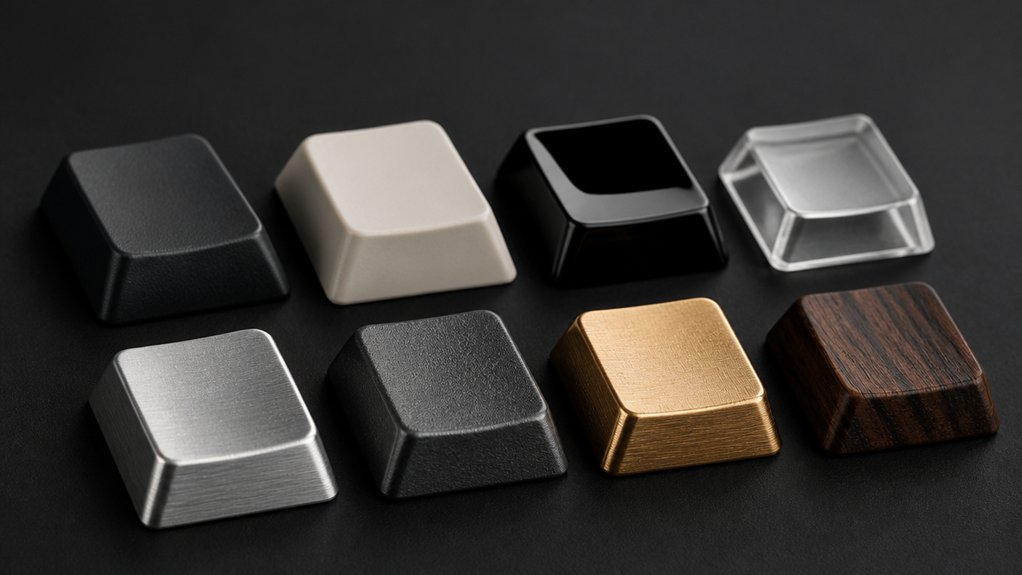
Low profile keycaps offer a slim, sleek design with heights between 2mm and 7mm, boosting comfort and typing speed. You’ll find them in ABS or PBT materials—ABS feels softer but can shine over time, while PBT is thicker, textured, and more durable. Profile options include sculpted, ergonomic shapes for finger support or uniform styles for faster typing. These keycaps also come with various legend techniques like doubleshot or dye sublimation for lasting clarity. Explore further to get the best fit and feel for your keyboard.
What Are Low Profile Keycaps?

What makes low profile keycaps stand out is their sleek, shortened design that greatly reduces keyboard height and key travel distance.
When you switch to low profile keycaps, you’ll notice their reduced height, usually between 2mm and 7mm, which gives your keyboard a slimmer, more streamlined profile. These keycaps are crafted specifically for low profile mechanical switches like Cherry MX Low Profile or Kailh Choc, making keycaps for your mechanical setup that feel faster and more responsive.
You’ll find different keycap profiles within the low-profile keycap profile category—from flat tops to gently sculpted shapes—each enhancing typing comfort and fingertip glide. This variation lets you personalize your keyboard’s feel without sacrificing the compact, modern aesthetics low profile keycaps offer.
Benefits of Low Profile Keycaps: Why Choose Them?
You’ll notice faster typing with low profile keycaps thanks to their reduced key travel distance. They also help improve comfort by promoting better wrist positioning and less finger strain during long sessions.
Plus, their sleek, modern look adds a stylish touch to your keyboard setup.
Enhanced Typing Speed
Because low profile keycaps reduce key travel and actuation distance, you can achieve faster keystrokes and boost your overall typing speed. Low profile keycaps like Cherry MX Low Profile feature uniform keycaps that help minimize finger fatigue by reducing the distance your fingers must move.
This efficiency lets you maintain speed during long sessions without sacrificing accuracy.
- Reduced key travel enhances typing speed and responsiveness.
- Shorter key actuation distance allows for quicker finger movements.
- Uniform profiles improve finger positioning and ergonomic alignment.
- Sturdy low profile keycaps reduce key wobble, promoting precise strokes.
Choosing low profile keycaps optimizes typing speed by combining reduced key travel with thoughtful design, making every keystroke smoother and more efficient.
Improved Ergonomic Comfort
Alongside boosting your typing speed, low profile keycaps greatly enhance ergonomic comfort. Their slim profile reduces overall keyboard height and finger extension, which eases finger strain and decreases wrist fatigue during long typing sessions.
By promoting ergonomic wrist positioning, these keycap profiles help minimize stress on your finger joints and tendons. Low profile keycaps require reduced finger motion thanks to shorter key travel and actuation distance, making each keystroke quicker and less tiring.
This design supports not only faster typing speed but also improved typing comfort by lowering the risk of repetitive strain injuries. Whether you type for hours or need a portable setup, low profile keycaps deliver a comfortable experience that keeps your hands feeling fresh and agile.
Sleek Aesthetic Design
When you choose low profile keycaps, you give your keyboard a sleek, modern look with a slimmer silhouette. Their reduced height and uniform profile create a clean, uncluttered surface that complements modern and sleek setups.
Whether made from durable PBT keycaps or smooth ABS plastic, these keycaps enhance the visual appeal of compact keyboards, making them perfect for minimalist workspaces or portable devices. You’ll love how the sleek aesthetic design not only looks great but also improves keyboard portability and style.
- Reduced height lowers overall keyboard thickness for a slimmer profile
- Uniform profile guarantees visual consistency and elegance
- Materials like PBT keycaps and ABS plastic offer smooth or textured finishes
- Ideal for compact keyboards with minimalist color palettes and matte textures
ABS vs. PBT: Material Effects on Durability and Feel
Though both ABS and PBT keycaps serve the same purpose, choosing between them greatly impacts your keyboard’s durability and typing experience.
ABS keycaps are thinner and smoother, giving a softer typing feel but tend to develop a shiny surface from wear, lowering durability. On the other hand, PBT keycaps feature a thicker, textured matte finish that resists shine and wear, markedly enhancing wear resistance and lifespan. This textured surface also offers a firmer, more solid typing feel.
Additionally, PBT keycap materials maintain their legend printing quality far better over time, especially with doubleshot or dye-sub methods, unlike ABS. While ABS keycaps are cheaper and common on budget sets, opting for PBT boosts both durability and overall typing satisfaction.
How Low Profile Keycaps Are Made: Manufacturing Overview

You’ll find low profile keycaps are crafted with materials like ABS or PBT, shaped through precise injection molding tailored for thinner profiles.
The manufacturing process includes careful stem design for a snug fit with low-profile switches and durable legend creation methods like doubleshot molding or dye sublimation.
Quality control guarantees each keycap maintains the right thickness and finish to balance strength, aesthetics, and usability.
Materials Used
Low profile keycaps rely on precise injection molding techniques using plastics like ABS and PBT, each chosen for specific qualities that affect durability and feel.
ABS plastic offers a smooth, lightweight finish but tends to wear and shine faster. PBT plastic, on the other hand, provides better durability and a textured, matte surface resistant to shine, making it ideal for longevity.
Manufacturers often use dye sublimation or doubleshot molding for legend production to preserve clarity on the thinner keycap profiles. Some low profile keycaps also integrate multi-material designs or metal elements to boost sturdiness without sacrificing slimness.
- ABS plastic: smooth finish, lightweight, less durable
- PBT plastic: durable, matte texture, resists shine
- Legend production: dye sublimation and doubleshot molding
- Multi-material designs add strength and unique aesthetics
Manufacturing Techniques
Because keycaps must balance slimness with durability, manufacturers use precise injection molding to create low profile keycaps. They inject molten ABS plastic or PBT plastic into molds shaped for shorter height and slimmer profiles, controlling keycap thickness typically between 1.0mm and 1.5mm to maintain strength without adding bulk.
Doubleshot molding stands out among manufacturing techniques by layering two plastics, producing legends that won’t fade over time. For PBT options, dye sublimation infuses dyes directly into the surface, ensuring vibrant, wear-resistant legends.
Many manufacturers also add surface texturing or coatings during or after molding to improve grip and aesthetic appeal without compromising the low profile design. These combined methods deliver sleek, durable low profile keycaps optimized for both feel and longevity.
Quality Control
Quality control plays a crucial role in making sure every low profile keycap fits and performs flawlessly. When producing these slim keycaps, manufacturers focus on dimensional accuracy and keycap heights to guarantee a consistent fit with low-profile switch stems.
You’ll notice stability and uniformity are essential for a smooth typing experience, so stabilizer mount and keycap tolerance checks prevent wobble and misalignment. Durability testing confirms keycap legends and surfaces resist wear, shine, and fading—especially important for PBT or doubleshot construction.
Visual and automated inspections maintain the expected texture, color, and finish throughout production. Key elements of quality control include:
- Verifying stem dimensions and keycap heights
- Conducting durability testing on surfaces and legends
- Measuring stabilizer mount precision and tolerance
- Inspecting uniformity in texture, color, and finish
Low Profile Keycap Profiles and Ergonomic Benefits

When you choose keycaps with a reduced height, around 2 to 4 mm, you substantially cut down finger extension and key travel distance. Low profile keycap profiles like Cherry MX Low Profile and Kailh Choc are designed to work with low travel switches that enable faster actuation and quicker key response.
This slim design reduces strain by encouraging a more natural wrist position, which enhances typing comfort during long sessions. By minimizing travel distance and finger extension, these profiles help decrease fatigue and boost efficiency.
Whether you’re gaming or typing, opting for low profile keycaps offers tangible ergonomic benefits. Their blend of sleek aesthetics and functional design makes them a smart choice if you value both comfort and performance in your keyboard setup.
Sculpted vs. Uniform Profiles for Low Profile Keycaps
Although low profile keycaps all share a slim design, they come in two main profile types: sculpted and uniform.
Sculpted keycaps feature varying keycap height and angled rows that enhance typing comfort and accuracy by supporting ergonomic finger positioning. In contrast, uniform keycaps keep consistent height and shape, promoting faster typing speed with smooth, predictable finger movements.
Choosing between these keycap profiles depends on whether you prioritize ergonomic benefits or speed.
- Sculpted keycaps slightly curve front to back, reducing finger strain during long use
- Uniform keycaps offer flat or gently concave tops with a minimalist look
- Ergonomic keycaps improve tactile differentiation between rows
- Uniform keycaps favor consistent fingertip glide for rapid key shifts
Keycap Thickness: Impact on Typing Sound and Stability

Beyond profile shape, the thickness of low profile keycaps plays a significant role in how your keyboard feels and sounds. Low profile keycap thickness usually ranges from 1mm to 1.5mm.
Thinner keycaps produce a lighter, sharper typing sound but can feel less stable due to increased wobble. Thicker keycaps, especially PBT keycaps, enhance stability by reducing key wobble and deliver a deeper, more satisfying “thock” sound. This added thickness also boosts durability, resisting wear and shine better than thinner ABS caps.
The choice of keycap material and keycap profiles affects how thickness influences typing sound and stability. Striking the right balance in keycap thickness helps you enjoy ergonomic benefits without sacrificing sound quality or key feel on your low profile keyboard.
Why Low Profile Stem Length Matters for Compatibility
Because low profile switches vary in stem height, choosing keycaps with the correct stem length is essential for a secure fit and smooth typing experience. The low profile stem length directly affects keycap fit and keycap compatibility, ensuring the keycap mounts stably on your switch stem.
Selecting keycaps with the right stem length ensures secure fitting and optimal typing on low profile switches.
Using keycaps with incorrect keycap stem length often leads to key wobble and uneven typing feel. To avoid issues, consider these factors:
- Different low profile switches, like Cherry MX Low Profile and Kailh Choc, require matching stem lengths for proper fit
- Incorrect keycap stem length can misalign stabilizers and cause unstable mounting
- Standard keycaps rarely fit low profile switches properly due to stem height differences
- Manufacturer-recommended keycaps guarantee stable mounting and peak typing feel
Matching stem length lets you enjoy reliable keycap compatibility and a comfortable, wobble-free typing experience.
Visual Styles and Legend Types on Low Profile Keycaps
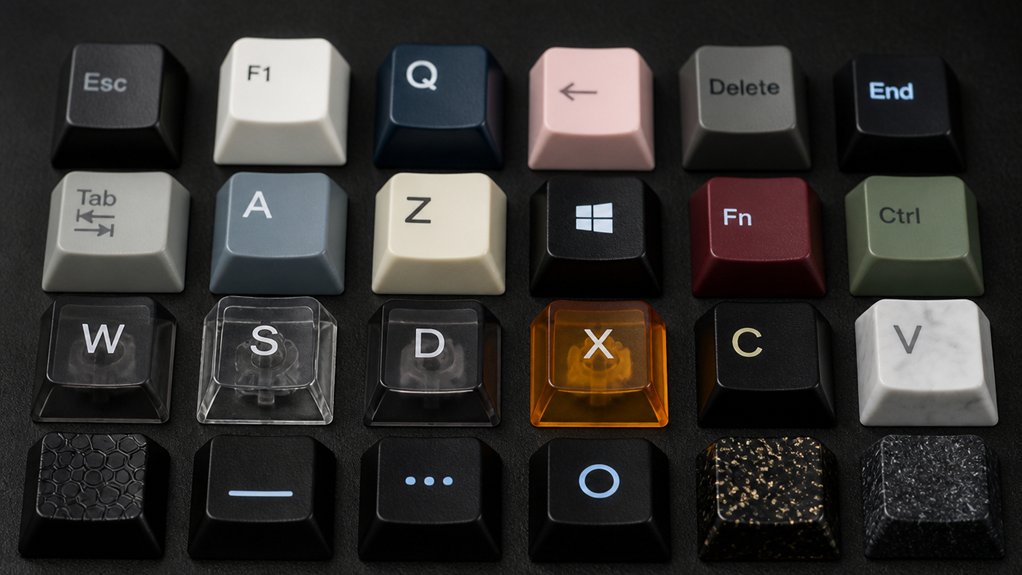
You’ll find low profile keycaps use legend production methods like doubleshot molding and dye sublimation to keep characters sharp and durable.
Translucent legends and pudding-style designs enhance RGB lighting effects, giving your keyboard a vibrant look. Let’s explore how these styles balance aesthetics with clear visibility.
Legend Production Methods
Legend production methods define how the characters and symbols appear on your low profile keycaps, impacting both aesthetics and durability. When choosing keycaps, the legend technique shapes your typing experience and keycap longevity.
Dye-sublimation infuses dye into PBT plastic, creating durable legends that resist fading, perfect for low profile keycaps used long-term. Doubleshot molding, though less common, molds legends as separate plastic layers, offering wear-proof clarity and vibrant backlighting.
Pad printing and UV printing provide more design options but sacrifice durability. Pudding keycaps combine translucent sides with doubleshot or dye-sub legends to maximize RGB lighting effects.
- Dye-sublimation guarantees fade-resistant, durable legends
- Doubleshot molding provides permanent, crisp translucent legends
- Pad printing offers flexible designs but less longevity
- UV printing delivers vibrant, precise legends but fades faster
Aesthetic Effects Of Legends
When selecting low profile keycaps, how the legends look can greatly shape your keyboard’s style and usability. You’ll find doubleshot molding and dye sublimation as the most durable methods to keep legends sharp, even through thin keycap layers.
If you want vivid RGB effects, translucent legends on pudding keycaps let light shine clearly from both the tops and sides, creating an eye-catching glow. Laser-engraved legends and UV printed legends, though less common on low profile keycaps due to surface curvature, offer precise, long-lasting visuals when done well.
Whether you prefer minimalist monochrome fonts for a sleek, modern feel or bold, colorful legends to boost aesthetic appeal, legend contrast and printing quality remain critical for legibility and an overall polished look.
Matching Low Profile Keycaps to Keyboard Layouts and Sizes
How do you guarantee your low profile keycaps fit perfectly on your keyboard? Start by matching the low profile keycaps precisely to your keyboard’s mechanical switches and layout. Selecting keycap sets designed for your specific keyboard layout guarantees proper compatibility and function.
Pay attention to these key factors:
- Confirm your keyboard uses compatible mechanical switches like Cherry MX Low Profile or Kailh Choc.
- Identify your keyboard layout type—60%, 75%, TKL, or full-size—to match keycap sizes and quantity.
- Choose between ANSI layout or ISO layout keycap sets, especially for bottom row and Enter key differences.
- Match keycap profiles to maintain consistent height and shape for smooth key travel and aesthetics.
Choosing Low Profile Keycaps for Gaming or Typing
After ensuring your low profile keycaps match your keyboard’s layout and switches, the next step is choosing the right keycaps based on your primary use—gaming or typing.
Selecting keycaps starts with matching your keyboard’s layout and switches before considering your main use—gaming or typing.
For gaming, you want low profile keycaps with shorter travel distances like Cherry MX Low Profile, which minimize finger fatigue and speed up responsiveness. Sculpted profiles often help by providing better finger key differentiation.
If typing is your focus, consider slightly taller low profile keycaps made from durable PBT, which offer comfort and ergonomic wrist positioning. Uniform profiles such as XDA or DSA enhance typing speed with their consistent height.
While ABS plastic keycaps are budget-friendly, PBT stands out for its matte texture and resistance to shine and wear, suitable for both gaming and typing setups. Choose accordingly to optimize your experience.
Tips for Selecting the Best Low Profile Keycaps for Your Setup
What should you prioritize to get the best low profile keycaps for your setup? Start by choosing PBT material to guarantee durability and a textured matte finish instead of shiny ABS plastic.
Check that your keycaps match your keyboard’s low profile switch to avoid wobble. Decide between sculpted profiles like Cherry or OEM profile keycaps for ergonomic comfort, or uniform profiles if you want consistent key height for faster typing.
Also, pick low profile keycaps with dye-sublimated legends to keep legends clear and fade-resistant. Finally, consider keycap thickness between 1.5mm and 2mm for a solid feel without losing the slim design.
- Use PBT material for durability
- Match profile to your switch type
- Choose sculpted profiles or uniform profiles for typing style
- Opt for dye-sublimated legends for longevity
Frequently Asked Questions
Can Low Profile Keycaps Affect Keyboard Backlighting Quality?
Yes, low profile keycaps can affect keyboard backlighting quality. Since they’re thinner and closer to the switches, they often let more light shine through, making the backlighting appear brighter and more vivid on your keyboard.
Are Low Profile Keycaps Compatible With Hot-Swappable Switches?
Yes, low profile keycaps are compatible with hot-swappable switches as long as they fit the switch stem. You’ll want to double-check the keycap profile and stem compatibility, but most low profile keycaps work fine on hot-swappable boards.
How Do Low Profile Keycaps Impact Keyboard Cleaning and Maintenance?
Low profile keycaps make cleaning easier since they trap less dust and debris. You’ll find it simpler to wipe surfaces and reach between keys, speeding up maintenance without needing extra effort or tools compared to taller keycaps.
Do Low Profile Keycaps Wear Out Legends Faster Than Standard Keycaps?
You usually won’t find legends on low profile keycaps wearing out faster than standard ones, especially if they’re made with high-quality printing or doubleshot molding. Proper care also helps keep legends intact longer.
Can Low Profile Keycaps Be Customized With Artisan Keycaps?
You can customize low profile keycaps with artisan keycaps, but it’s tricky. Most artisans fit standard profiles, so you’ll need to find or commission ones specifically designed for low profiles to guarantee a proper fit and look.
In Summary
Choosing low profile keycaps can greatly enhance your typing comfort and efficiency. Whether you prefer the smooth feel of ABS or the durability of PBT, understanding material differences helps you pick the best option. Consider the profile shape and visual style to match your keyboard and personal style. With the right low profile keycaps, you’ll enjoy better ergonomics and improved performance, whether typing or gaming. Take these tips to find the perfect fit for your setup.



