
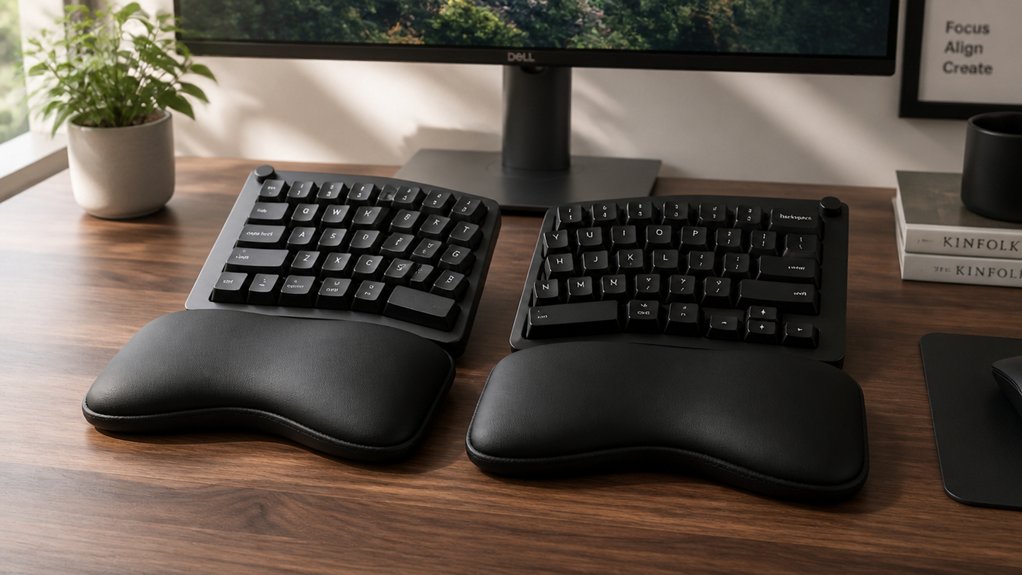
Using wrist rests with split keyboards helps you maintain proper wrist alignment, reducing strain and preventing injuries like carpal tunnel syndrome. They support your palms and keep your wrists straight, promoting a natural, comfortable typing posture. Soft or hard, these rests absorb impact and cushion your wrists during long sessions. For ideal comfort, their size and position matter. If you want to learn how to maximize your ergonomic setup, keep exploring the details.
Why Wrist Rests Make Typing More Comfortable With Split Keyboards

Wrist rests make typing more comfortable with split keyboards because they provide tailored support that keeps your wrists in a neutral position. Split keyboards naturally promote an ergonomic posture, but without proper wrist support, you can still experience discomfort.
Wrist rests designed for split keyboards encourage you to keep your wrists straight and your palms gently cushioned, reducing awkward bends and pressure. The soft, flexible materials like TPE absorb impact from keystrokes, decreasing fatigue during long sessions. They help position your wrists at the right height and angle relative to the keyboard’s tented and separated layout, enhancing overall typing comfort.
How Wrist Rests Help Prevent Wrist Strain and Injuries
Wrist rests help keep your wrists in a neutral, straight position, reducing strain and the risk of repetitive injuries. They also absorb impact from keystrokes, easing fatigue during long typing sessions.
When used correctly, wrist rests support good posture and promote long-term wrist health.
Maintains Neutral Wrist Position
Using a wrist rest during typing helps keep your wrists in a neutral position, which is essential for preventing strain and injury. When you use wrist rests with a split keyboard, they support your palms, keeping your wrists straight and aligned with the keyboard. This positioning prevents awkward wrist bends and reduces pressure on the carpal tunnel nerves. Memory foam supports contour to your wrists, enhancing comfort and maintaining proper alignment. Split keyboards with wrist rests promote a natural, shoulder-width posture, reducing ulnar deviation and encouraging a comfortable, neutral wrist angle. Properly resting your palms on wrist rests absorbs impact from keystrokes and lessens muscle fatigue in tendons and joints. Maintaining a neutral wrist position with wrist rests is a key step in lowering the risk of repetitive strain injuries and supporting long-term wrist health while typing.
Reduces Repetitive Strain
Supporting your palms with wrist rests helps prevent repetitive strain by maintaining a neutral wrist posture during extended typing sessions. Split keyboard wrist rests encourage this natural alignment, reducing wrist bending and ulnar deviation that cause injuries. They cushion your palms during pauses, absorbing impact from key presses and lowering muscle fatigue. A high-quality wrist rest can further enhance comfort and support during prolonged use. Properly sized wrist rests, aligned with your split keyboard, minimize stress caused by steep keyboard angles and extended wrist positions common with high-profile mechanical keyboards. Using wrist rests also prevents your wrists from hovering over hard desk edges, promoting comfort and reducing strain. Soft, flexible materials like TPE provide gentle support, helping to prevent soreness, tingling, and fatigue during long typing sessions. Overall, split keyboard wrist rests are essential for reducing repetitive strain injuries.
Enhances Ergonomic Support
When you rest your palms on a properly designed wrist rest, it promotes a neutral wrist posture by keeping your wrists straight and aligned with your forearms. With a palm rest tailored for split mechanical keyboards, your wrists stay at an optimal height, reducing awkward bending and ulnar deviation.
This support helps distribute pressure evenly across your palms, which encourages intermittent resting and minimizes continuous strain. Ergonomic wrist rests made of soft, durable materials absorb impact from keypresses, decreasing fatigue and the risk of repetitive strain injuries.
Using a well-sized wrist rest guarantees your wrists remain supported and properly aligned, making long typing sessions more comfortable. Additionally, non-slip bases provide stability, preventing slipping during use and maintaining proper ergonomics. Ultimately, a good palm rest enhances ergonomic support, keeping your wrists healthy and preventing discomfort or injury.
What Features Matter Most in a Wrist Rest for Split Keyboards
What features should you prioritize in a wrist rest for a split keyboard?
First, make certain the split wrist rests align in height with or slightly below your Mechanical Keyboard to keep your wrists in a neutral position and reduce strain.
Ensure split wrist rests are level with or slightly lower than your keyboard for optimal wrist alignment and comfort.
Comfort is key, so choose a soft, flexible material like TPE that offers gentle cushioning while remaining durable for long typing sessions.
Support your palms—not wrists—to prevent awkward bends and promote a straight posture, especially with split designs.
Size matters too; aim for around 145 mm x 80 mm x 20 mm to match your keyboard’s layout seamlessly.
Finally, opt for a wrist rest that’s easy to clean and resistant to wear, maintaining a professional, tidy appearance over time.
Additionally, selecting a wrist rest made from high-quality, durable materials can enhance longevity and resistance to scratches and wear Material Quality, ensuring it remains functional and attractive over many uses.
Which Materials Are Best for Wrist Rests and How to Maintain Them

Choosing the right material for your wrist rest can make a big difference in comfort and durability. Soft options like silicone or TPE provide cushioning, while hardwoods offer a sturdy, professional look. Additionally, selecting materials with anti-static properties can help protect your electronic devices from static buildup during use. To keep them in top shape, simple cleaning and maintenance routines will extend their lifespan and support.
Durable Material Choices
Selecting the right material for your wrist rest is essential for combining durability and comfort. Mechanical and walnut wood options stand out for their strength and aesthetic appeal. Walnut wood offers a firm, stable support while adding a natural touch to your workspace. When finished with protective oils or coatings, it becomes highly resistant to wear, ensuring long-lasting use.
High-quality TPE wrist rests also provide a soft, flexible surface that balances comfort with durability and are easy to keep clean. Resin wrist rests, with customizable finishes, combine durability and smoothness, making them another solid choice.
Soft gel or foam options deliver cushion but tend to wear faster and need more frequent cleaning. Proper maintenance, like regular gentle cleaning, extends the lifespan of any material you choose, keeping your wrist rest in peak condition.
Easy Maintenance Tips
Maintaining your wrist rest is straightforward when you understand the best methods for its material. Different materials require specific care to keep your keyboard rests in top shape.
| Material | Maintenance Tips |
|---|---|
| TPE | Wipe with a damp cloth; easy to clean and resilient. |
| Wood | Occasionally oil to preserve finish and prevent scratches. |
| Cork | Gently wipe clean; handmade and lightweight. |
| Resin | Surface clean with a damp cloth; anti-slip surface stays intact. |
For most rests, regular wiping with a damp cloth is enough. Avoid harsh chemicals to prevent damage. Removable covers and fillers like buckwheat hulls can be washed for extra hygiene, keeping your keyboard rests safe and durable.
Comfort and Support Factors
The material of your wrist rest directly impacts its comfort and support during long typing sessions. Soft materials like high-quality TPE or silicone offer gentle cushioning that molds to your wrist, reducing pressure and fatigue over extended periods. These are ideal for keyboards where you need padding but should be cleaned regularly to remove oils and dirt.
Conversely, durable materials like walnut wood or resin provide firm, stable support, making them a good choice if you prefer a firmer feel. They’re also easier to maintain, requiring only occasional polishing or oiling to preserve their appearance.
For split keyboards, selecting a wrist rest with a size depth of 2–3 inches slightly below the keyboard enhances palm support, ensuring comfortable typing for hours. Incorporating closed-cell EVA foam in wrist rest design can improve vibration absorption and water resistance, adding durability and comfort over time.
How to Properly Position and Use Your Wrist Rest for Maximum Comfort

Have you ever wondered if your wrist rest is positioned for maximum comfort? Proper placement can greatly reduce strain during typing.
Rest your palms gently on the rest during pauses, avoiding direct pressure on your wrists to maintain a neutral wrist posture. The height of your wrist rest should align with or be slightly lower than your split keyboard to keep your wrists straight and reduce strain. Use a rest with a depth of 2-3 inches to support your palms fully without restricting finger movement or causing awkward bends.
Keep your wrists straight and elbows bent at about 90 degrees, with palms lightly resting to reduce muscle fatigue. Remember to take regular breaks and avoid continuous contact to promote circulation and prevent repetitive strain injuries.
Soft vs. Hard Wrist Rests: Which One Is Right for You?
Choosing between soft and hard wrist rests depends on your personal comfort and typing habits.
Soft wrist rests, made from gel or foam, mold to your wrist shape, providing gentle support and pressure relief during long sessions. They’re cushioned and cozy but may require more frequent cleaning.
Hard wrist rests, crafted from wood, plastic, or resin, offer firm, stable support that helps keep your wrists aligned, promoting a consistent typing posture. They’re durable, easy to clean, and resist stains over time.
Your decision should reflect what feels best for you—whether plush comfort or firm stability. Remember, regardless of your choice, proper ergonomic use involves keeping your palms, not wrists, on the rest to maintain neutral wrist positioning and support healthy typing habits. Material durability is also a key consideration when selecting your wrist rest to ensure longevity and consistent support.
Custom and Handmade Wrist Rests for Personalized Support
When it comes to optimizing your ergonomic setup, custom and handmade wrist rests offer a level of personalization that mass-produced options can’t match. They’re designed to fit your split keyboard perfectly, supporting your right hand and wrist during long typing sessions.
By choosing materials like high-quality walnut, resin, cork, or buckwheat hulls, you create a wrist rest that’s durable, comfortable, and visually appealing. Handmade options often allow you to customize length, finish, or even add logos, enhancing both comfort and workspace aesthetics.
These wrist rests encourage a neutral wrist posture, reducing strain during extended use. Because they’re crafted to your specific needs, custom and handmade wrist rests provide long-lasting, effective support, making them a smart choice for anyone serious about ergonomic typing.
Pairing Wrist Rests With Other Ergonomic Tips to Work Better and Safer
To maximize the benefits of wrist rests, it’s important to pair them with other ergonomic strategies, like adjustable tenting and keyboard splitting. Mechanical keyboards with split designs help reduce forearm pronation and ulnar deviation, which, when combined with wrist rests, can considerably lower carpal tunnel risk.
Moreover, selecting ortholinear PCBs with adjustable tilt and split options can further enhance ergonomic comfort by aligning the keyboard with your natural hand posture. Keep your wrist rests at or slightly below keyboard height, about 2-3 inches deep, to promote straight wrists and proper alignment. Remember to support your palms, not wrists, during long typing sessions, and take regular ergonomic breaks to relax muscles. Maintaining a 90-degree elbow angle with relaxed shoulders complements the wrist rest benefits, fostering a healthier, more comfortable workspace. Combining these tips creates an ergonomic setup that minimizes strain and promotes long-term comfort.
Frequently Asked Questions
Do Keyboard Wrist Rests Actually Help?
Yes, wrist rests help by keeping your wrists aligned and reducing strain during typing. They provide cushioning, prevent awkward bends, and improve comfort, especially during long typing sessions, but should be used with proper posture and regular breaks.
Are Split Keyboards Better for Your Wrists?
Yes, split keyboards are better for your wrists because they promote a more natural, neutral wrist position by reducing ulnar deviation, allowing ergonomic angles and personalized adjustments that decrease muscle strain, fatigue, and the risk of repetitive strain injuries.
Are Wrist Rests Bad for Carpal Tunnel?
Wrist rests aren’t bad for carpal tunnel if used properly; they keep your wrists aligned and prevent strain. Just make sure you rest your palms, not wrists, and take breaks to avoid over-reliance and discomfort.
When Should a Wrist Rest Be Used?
You should use a wrist rest when your wrists bend awkwardly during typing, experience soreness, tingling, fatigue, or if they hover above or rest on hard desk edges. It helps maintain proper posture and reduces strain.
In Summary
Using a wrist rest with your split keyboard can make a big difference in comfort and injury prevention. It helps keep your wrists in a natural position and reduces strain during long typing sessions. Just choose the right material and proper positioning to get the most benefit. When used correctly, wrist rests support your ergonomic setup, allowing you to work more efficiently and safely—so don’t overlook this simple but essential accessory for a healthier typing experience.



