

To achieve quieter typing, focus on properly lubricating switch components like the stem walls, center pole, and housing rails with the right lubricant, such as Krytox 205g0 for linear switches or Tribosys 3204 for tactiles. Use precise tools and apply lubricants sparingly to avoid sluggishness or loss of feedback. Disassemble carefully, test often, and re-lubricate as needed for long-term quietness. Keep practicing these techniques to optimize your switch sound and feel.
Learn Your Switch Parts to Lubricate Better
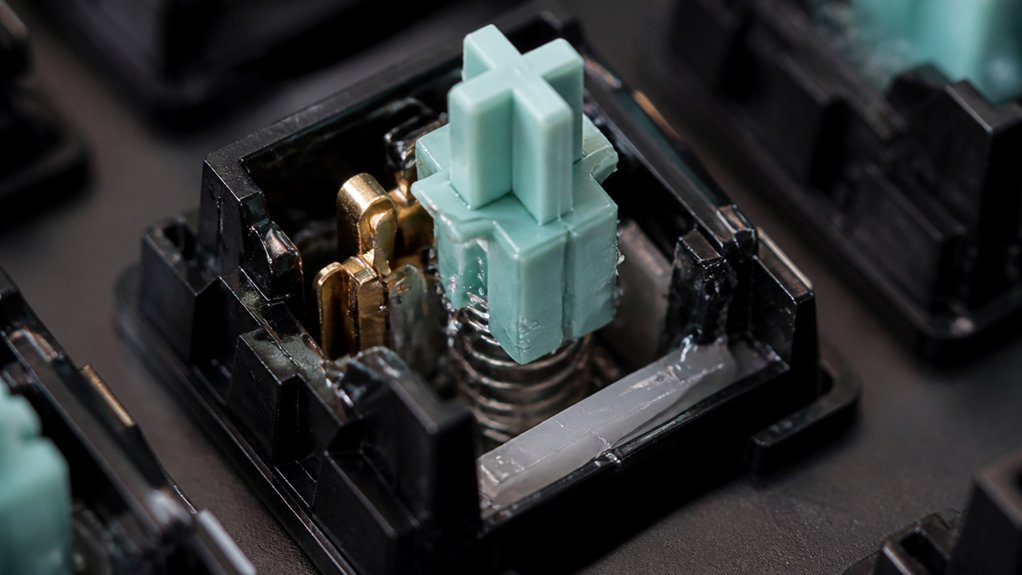
Understanding the different parts of your switch is essential for effective lubrication. The stem, top housing, and bottom housing each play a role in smooth key travel.
Knowing your switch parts ensures optimal lubrication for smoother, quieter keystrokes.
Focus on lubing the stem walls and center pole, as these areas reduce friction most efficiently. When applying switch lube, lightly coat the housing contact points to prevent stickiness without affecting tactility. Avoid touching the contact leaf to guarantee keystrokes remain reliable.
For the spring, a minimal amount of lube applied with a brush or bag-lubing method helps reduce spring ping noise and maintains actuation. Be cautious not to over-lubricate, especially on tactile switch legs or click bars, to preserve tactile feedback and sound.
Using the right lubricant application tools and techniques ensures more precise coverage and better control during lubrication. Properly understanding and lubricating these parts results in a smoother, quieter typing experience.
Choose the Best Lubricant for Quieter, Smoother Switches
Choosing the right lubricant depends on its viscosity and consistency, which directly impact how quiet and smooth your switches feel.
A proper lubricant also considers material compatibility, ensuring it doesn’t damage or degrade delicate switch components over time. You’ll also want to match the lubricant to your switch type, since different materials and designs require specific products. Using incompatible lubricants can hinder performance or cause unwanted issues, so selecting wisely makes all the difference.
Lubricant Viscosity and Consistency
The viscosity and consistency of your switch lubricant play a crucial role in achieving a quieter, smoother keystroke. Using the right lubricant, like Krytox 205g0 for linear switches or Tribosys for tactile switches, guarantees an even coat of lubricant that reduces friction without muffling feedback.
Consistent lubricant viscosity is essential for avoiding over-lubing, which can cause sluggishness or mushy keystrokes. Thicker lubricants help linear and box switches glide smoothly and prevent lubricant oozing, while thinner options like Tribosys 3203 maintain tactility.
Properly selecting and applying the right viscosity based on switch type guarantees a balanced sound dampening and enhanced smoothness—key for quieter, more comfortable typing.
Compatibility With Switch Types
Selecting the right lubricant depends heavily on your switch type, as different switches respond best to specific products. For lubricated switches, choosing the proper lubricant enhances quietness and smoothness.
- Use Krytox 205g0 on linear and box switches for the smoothest, quietest key travel without sluggishness.
- For tactile switches, opt for lighter lubricants like Krytox 204 or Tribosys 3204, which reduce scratchiness while preserving tactile feedback.
- Lightly lubricate springs with Krytox GPL 105 or Super Lube to prevent spring ping and reverberations, but avoid lubing switch legs or the switch housing to maintain crisp tactile responses, especially for silent tactile switches.
Proper compatibility guarantees your switch lubrication maximizes performance and reduces noise.
Gather Tools and Disassemble Switches Before Lubrication

Make sure you have a reliable switch opener, like the aluminum one from KBDfans, to disassemble your switches efficiently. Carefully remove keycaps and switches to avoid damaging pins or sockets, and organize the parts by grouping stems, springs, and housings separately. Handle delicate components with precision tools like tweezers to prevent loss or damage before lubing. Considering the material and build quality of your tools can help ensure durability and precision during the disassembly process.
Gather Necessary Tools
Before you start lubricating your switches, gather all the necessary tools to guarantee a smooth and efficient process. First, use a reliable aluminum switch opener designed for mechanical keyboards to disassemble switches safely. Second, prepare fine brushes (sizes 0 or 00 for tactile switches and 3 or 4 for linear switches) for precise lubrication. Finally, gather angled tweezers or prong holders to handle delicate parts like springs and stems without damage. Make sure to have a switch puller ready to remove switches from the keyboard, along with a lube station to organize parts—top housing, bottom housing, stem, and spring. Utilizing tools with precise temperature control can prevent damage during disassembly and lubrication, ensuring proper application and optimal switch performance. These tools streamline disassembly and secure proper lubrication, leading to quieter, smoother switches.
Disassemble Switches Carefully
To start disassembling your switches safely and efficiently, first remove the keycaps to access the switches. Carefully pull out the switches if your board is hot-swappable, then use a reliable switch opener tool like the aluminum KFA or KVD Fans version to disassemble mechanical keyboard switches.
Gently separate the top housing, stem, spring, and bottom housing, making sure to organize removed switch parts into groups. Hold stems securely with angled tweezers or a stem holder to prevent damage when separating from the switch housing.
Avoid applying lubricant during disassembly; instead, inspect each part carefully and remove any pieces like contact leaves or tactile legs before lubing. Proper organization and gentle handling help guarantee a smooth lubrication process without damaging delicate components. Additionally, utilizing organized compartments in a lubing station can streamline the process and prevent misplacement of small parts.
Carefully Apply Lubricant to Switch Rails, Stems, and Springs
Applying lubricant carefully to switch components is essential for achieving smooth, responsive keystrokes. Proper switch lubing reduces friction and enhances overall smoothness without sacrificing tactile feedback.
To get started:
- Lightly coat stem walls and the center pole with a fine brush, avoiding tactile legs to maintain feedback.
- Gently lube the housing rails, focusing on the rails and stems, but steer clear of contact leaf areas to keep responsiveness intact.
- Evenly coat springs using bag lubing or a light brush, emphasizing the ends and length to minimize ping noise and preserve spring force.
Remember to press the switch a few times after lubing to distribute the lubricant evenly along rails, stems, and springs—this step guarantees consistent, quiet keystrokes for a smoother typing experience.
Learn How to Lube Without Overdoing It
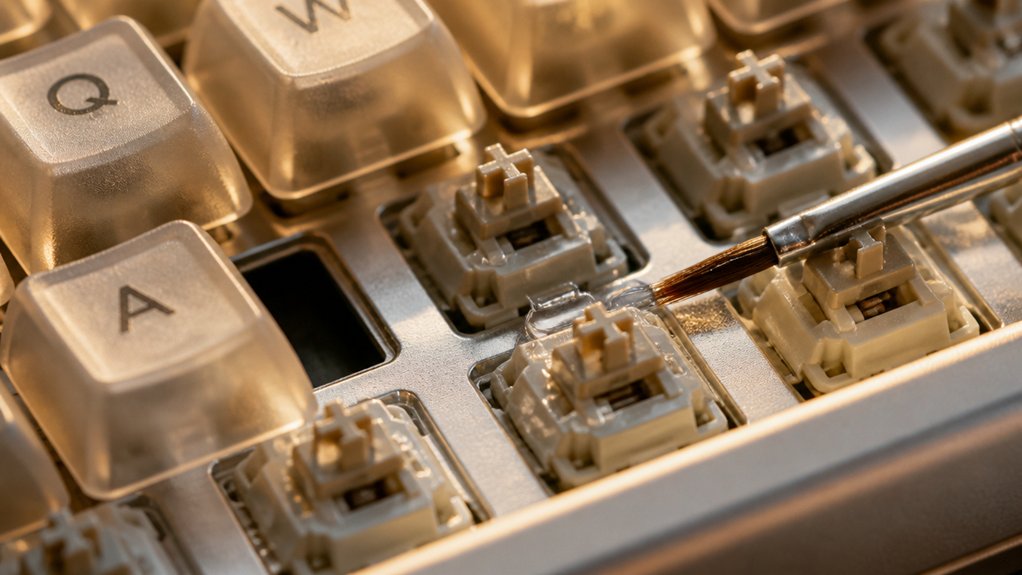
Learning how to lube your switches without overdoing it is key to achieving a smooth, responsive feel. Use a small amount of lubricant carefully applied with a thin brush to the stem and housing. This helps reduce friction without making keys feel sluggish. Avoid over-lubing the tactile legs and contact leaf, which can dampen tactile bumps and cause sluggishness. Test a few switches after lubing to gauge if the feel is smooth or heavy. Distribute lubricant evenly by pressing switches multiple times, ensuring no excess lube oozes onto sensitive parts like spring seats. Remember, a little goes a long way—over-lubing can ruin your keystrokes. Keep it light and precise to preserve responsiveness and tactile feedback. Pre-lubricated switches provide an excellent starting point for beginners seeking a perfect balance.
Test Your Switches and Make Adjustments for Optimal Sound and Feel
Before finalizing your lubing process, it’s vital to test your switches thoroughly to guarantee they feel smooth and sound right. You should test switches by pressing them multiple times to distribute lubricant evenly and assess the sound profile. During sound testing, use different keycaps to accurately gauge the acoustic signature and identify scratchy sounds or ping noise. Adjust lubricant amount if keys feel sluggish or unresponsive—removing excess lube with swabs or cloth prevents mushiness. Check for consistent tactile feedback and actuation across all tested switches to confirm a uniform typing experience. Compare stock switches, lubed switches, and lubed plus filmed switches to fine-tune the lubricant application, balancing smoothness and sound signature for your ideal typing feel. Additionally, consider the sound profile of each switch type to match your environment and preferences.
Maintain and Re-Lubricate Your Switches for Long-Term Quiet Performance

Maintaining the quiet performance of your switches over time primarily involves re-lubrication when necessary, ensuring their smooth and silent operation. When lubing your switches, focus on an even coating that reduces friction and diminishes metallic ringing. A thorough understanding of foam dampener material properties can also help you select the appropriate lubrication amount to maintain optimal sound and feel. Re-lubricate the spring onto the stem, which reduces spring ping and helps preserve the switch feel and sound. Avoid over-lubing to prevent sluggish key response or leftover lube that could dampen the tactile feedback. If you notice increased noise or altered switch feel and sound, re-lubricate carefully to restore quiet typing. Proper re-lubrication supports long-term performance and keeps the switch feel consistent. Regular testing for sound and feel helps you determine when to re-lubricate, ensuring smoother, quieter typing over the lifetime of your switches.
Frequently Asked Questions
What Is the Best Lubricant for Keyboard Switches?
You should use Krytox 205 Grade 0 for linear and box switches for long-lasting smoothness, Krytox 204 or Tribosys 3203 for tactile switches to balance feel and noise reduction, and Krytox GPL 105 for springs to minimize ping.
What Are the Best Switches for a Quiet Keyboard?
You should choose silent switches like tactile silent variants, custom silent linear switches such as Silent Peach, or box silent switches, which feature dampening or lubrication, ensuring quiet, smooth, and comfortable typing with minimal noise.
How to Lube Silent Tactile Switches?
To lube silent tactile switches, use a tiny amount of Krytox 204 on sliders and center poles with a fine brush, avoiding rubber pads and stem legs. Lightly coat springs, reassemble carefully, and test for smooth, quiet keystrokes.
Does Lubing Switches Make It Quieter?
Yes, lubing switches makes them quieter by reducing friction and plastic-on-plastic noise, especially when using light oils or thicker lubricants like Krytox 205g0 on stems and housings, which creates a smoother, more muted typing sound.



