

Split keyboards need ergonomic layouts because they promote natural hand and finger movements, reducing strain and risk of injury during long typing sessions. Features like adjustable separation, tenting, and thumb clusters help support neutral wrist positions and minimize reach. By customizing key placement and layout, you can improve comfort and efficiency. If you want to discover how these design choices boost your typing experience, keep exploring the key principles behind ergonomic split keyboards.
Why Ergonomic Split Keyboard Layouts Are a Must for Comfort

Have you ever wondered why many people favor ergonomic split keyboard layouts? The answer lies in their natural design, which aligns with how your fingers and hands move. Split keyboards reduce joint strain and minimize finger travel by staggering keys in a way that follows your natural finger motions. Incorporating programmable firmware features allows for customized key setups that further enhance comfort and efficiency. Thoughtfully designed thumb clusters make it easier to use keys like Backspace and Enter, reducing pinky overuse and wrist tension. Adjustable tenting options help prevent forearm pronation, promoting a neutral handshake position. Fully split layouts allow you to customize hand separation and angles, keeping wrists straighter and shoulders relaxed. Layered key functions boost productivity without added finger movement. Overall, ergonomic split keyboards make typing more comfortable and reduce the risk of strain injuries.
What Key Design Features Make Split Keyboards Ergonomic
What key design features give split keyboards their ergonomic edge? Split keyboards often use columnar or staggered layouts, aligning keys vertically with natural finger motion. This minimizes joint strain compared to traditional staggered designs. A hot-swappable switch system allows users to personalize the key feel for maximum comfort and responsiveness. Adjustable separation and tenting features allow you to customize the angle between halves, promoting neutral wrist and forearm positions and reducing ulnar deviation and pronation. Ergonomic keyboards incorporate thumb clusters, placing essential keys like Backspace and Enter on your thumbs, which optimizes thumb strength and avoids pinky overuse. Proper support for the split halves helps you maintain shoulder-width spacing and correct angles, easing tension in your neck, shoulders, and upper back. These key design features work together to support natural typing and improve overall comfort.
How Layout Variations Affect Comfort and Typing Efficiency
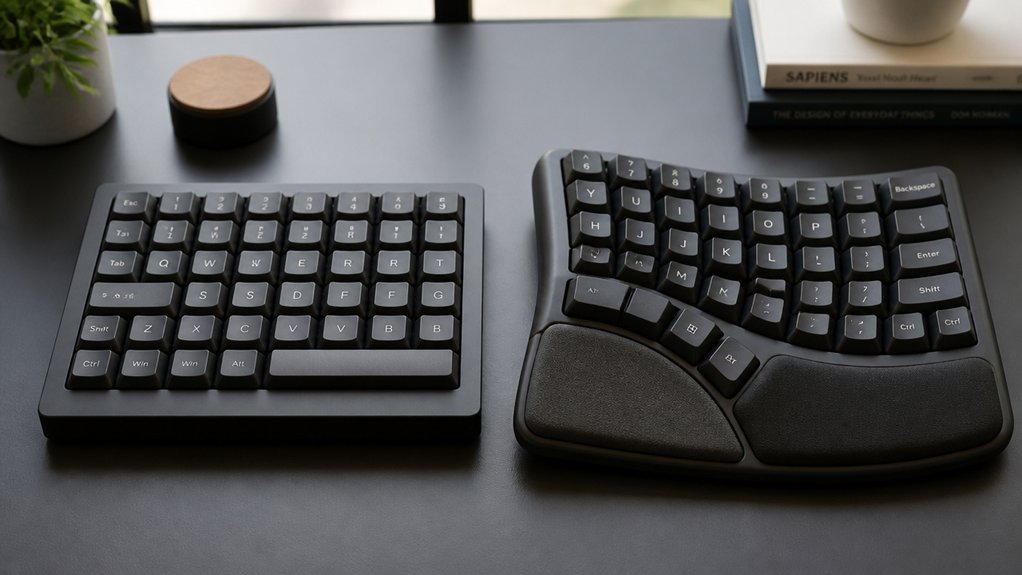
Layout variations on split keyboards directly impact both comfort and typing efficiency. A columnar layout aligns keys vertically with your fingers’ natural movements, reducing joint strain compared to traditional staggered designs.
Staggered layouts require more finger travel and can cause awkward wrist angles, increasing wrist pain. Ergonomic layouts with columnar keys improve comfort by better matching finger placement, easing muscle tension.
Programmable layers and symbol keys further enhance efficiency by minimizing finger travel and allowing quick access to functions and shortcuts. Well-designed thumb clusters leverage your stronger thumbs, decreasing pinky strain and boosting typing efficiency.
Additionally, ortholinear PCB designs support these ergonomic benefits by aligning keys in straight rows, further reducing unnecessary finger movement. Keep in mind, adapting might initially feel slower as you rebuild muscle memory, but long-term comfort and productivity improve with optimized key positioning.
Why Thumb Clusters and Key Placement Matter for Reducing Strain
Thumb clusters play a crucial role in reducing strain on your hands by assigning multiple keys to your stronger thumbs, rather than relying solely on the space bar. In split ergonomic keyboards, thoughtful key placement within thumb clusters helps decrease hand strain and repetitive strain injuries. A well-designed thumb cluster can also incorporate programmable keys or media controls for added functionality, further enhancing ergonomic efficiency. Programmable keys and media controls allow users to customize their layout for optimal comfort and productivity. Typically, three to four keys per side balance key-press effort with minimal thumb movement, making typing more efficient. Properly designed thumb clusters leverage your thumbs’ natural dexterity, allowing you to quickly access essential keys like Backspace and Enter without overextending weaker fingers. This strategic layout improves typing ergonomics by distributing workload evenly, reducing pinky and finger fatigue. Ultimately, optimized thumb clusters help you type comfortably longer, lowering the risk of hand strain during extended use.
How to Customize Your Split Keyboard for Maximum Comfort

| Adjustment | Benefit |
|---|---|
| Tenting angles | Neutral wrist, reduces pronation |
| Thumb clusters | Decreases pinky strain, balanced workload |
| Custom layers | Minimize finger travel, boost efficiency |
| Separation distance | Promotes natural alignment, reduces ulnar deviation |
| Practice daily | Builds muscle memory, maximizes comfort |
| Use programmable firmware support | Enables tailored key functions and layered configurations |
Common Challenges When Adapting to Ergonomic Split Layouts
Adapting to ergonomic split layouts often presents a steep learning curve, especially for those used to traditional keyboards. You’ll initially see a drop in typing speed and accuracy as you get used to new key spacing and layouts.
To succeed, focus on:
- Relearning hand positioning and adjusting to tenting angles for comfort.
- Retraining muscle memory, which takes at least 30 minutes daily, especially with layouts like Colemak-DH or Miryoku.
- Mastering thumb clusters and custom layers, avoiding reliance on traditional thumb usage and spacebar role.
Being aware of the programmable layers and firmware features can help customize the layout to better suit your ergonomic needs. Sustained patience and gradual adaptation to the unique ergonomic split keyboards’ features are essential. Expect frustration at first, but with consistent practice, your familiarity with the split layout and keyboard halves will improve, boosting overall ergonomics and typing efficiency.
How to Choose the Best Ergonomic Layout for Your Needs
To find the best ergonomic layout for your needs, start by analyzing your typing habits and choosing a design that feels comfortable, like staggered or columnar layouts. Consider customization options such as programmable layers and thumb clusters to enhance efficiency and reduce strain. Additionally, exploring features like hot-swappable switches can allow you to personalize your keyboard feel and perform quick modifications without soldering. Also, look for features like tenting and community support to guarantee the layout adapts to your body and workflow.
Assessing Personal Ergonomic Needs
How do you determine whether a split keyboard with a customized ergonomic layout is right for you?
First, assess your wrist and shoulder pain levels, along with how many hours you spend typing daily, to see if ergonomic benefits outweigh the cost.
Second, choose a layout that supports neutral arm and wrist positions, like columnar or staggered columns, to prevent strain.
Third, consider adjustable features such as tenting angles and split distance, aligning them with your shoulder width and posture.
Additionally, evaluate your preference for key clusters, especially thumb clusters, to minimize finger travel.
Finally, look for programmability to easily customize layouts over time, enabling a smoother shift and sustained comfort without sacrificing efficiency.
Furthermore, selecting a keyboard that offers hot-swappable switches allows for personalized modifications to enhance comfort and typing feel as your preferences evolve.
Exploring Layout Customization Options
Are you unsure which ergonomic keyboard layout best suits your specific needs? Many split keyboards offer customizable layouts, allowing you to tailor your setup for comfort and efficiency.
Fully split designs help reduce strain by adjusting separation and tenting, promoting a neutral wrist position. Columnar key alignment in ergonomic layouts better matches natural finger movement, minimizing joint stress.
Customizable layouts let you assign frequently used keys to thumb clusters or accessible spots, reducing finger travel. Programmability enables layer switching and remapping for tasks like programming or editing, boosting productivity.
Taking time to practice with these layouts—around 30 minutes daily—builds muscle memory. Whether you’re switching to colemak-dh or Miryoku style, choosing the right keyboard layout helps create a comfortable, personalized typing experience. Adding layout customization options can further enhance comfort and functionality to suit your workflow.
Frequently Asked Questions
Are Split Keyboards Actually More Ergonomic?
Yes, split keyboards are more ergonomic because they promote natural wrist positioning, reduce strain through adjustable angles, align keys with finger movements, and distribute workload effectively, helping you prevent pain and injuries during extended typing sessions.
What Are the Benefits of a Customizable Ergonomic Split Computer Keyboard?
You gain tailored comfort and better health with a customizable ergonomic split keyboard. It reduces strain, improves wrist and arm positioning, boosts productivity through remappable keys, and offers long-term benefits like decreased injury risks and enhanced overall typing comfort.
Do I Really Need an Ergonomic Keyboard?
You might need an ergonomic keyboard if you experience wrist pain, discomfort, or numbness while typing. It can help prevent injuries and improve your posture, especially if you type for long hours regularly.
Why Would You Want a Split Keyboard?
You’d want a split keyboard because it promotes better posture, reduces strain on your wrists, shoulders, and neck, and allows customizable positioning. This lowers the risk of discomfort, repetitive strain injuries, and helps keep you comfortable during long typing sessions.
In Summary
Choosing the right ergonomic split keyboard layout can greatly boost your comfort and reduce strain during long typing sessions. By understanding key features, layout variations, and customization options, you can tailor your keyboard to suit your needs perfectly. While adapting may come with some challenges, the long-term benefits of improved posture and decreased discomfort make it worthwhile. Invest time in finding the ideal layout, and you’ll enjoy a healthier, more comfortable typing experience every day.



